
How to Keep a Laptop Awake With the Lid Closed (Windows and Mac)
On Windows, set closing the lid to Do nothing in Power Options. On a Mac, use clamshell mode: power adapter, external display, keyboard and mouse. Commands for both, the admin and heat caveats, and why Slack still shows you away with the lid closed.
To keep a Windows laptop awake with the lid closed, open Control Panel, Power Options, Choose what closing the lid does, and set When I close the lid to Do nothing for Plugged in. On a Mac, use clamshell mode: connect the power adapter, an external display, and a keyboard and mouse, then close the lid; the Mac keeps running on the external display. Without a display, a Mac needs an admin command (sudo pmset -a disablesleep 1) or an app like Amphetamine.
A laptop that stays awake with the lid closed still shows you as away in Slack after 10 minutes, because nobody is giving Slack input. To stay green with the lid closed, the session has to come from somewhere else: Slack Green keeps your Slack presence active from its own servers during the working hours you set, and the laptop can sleep.
Ways to keep a laptop running with the lid closed
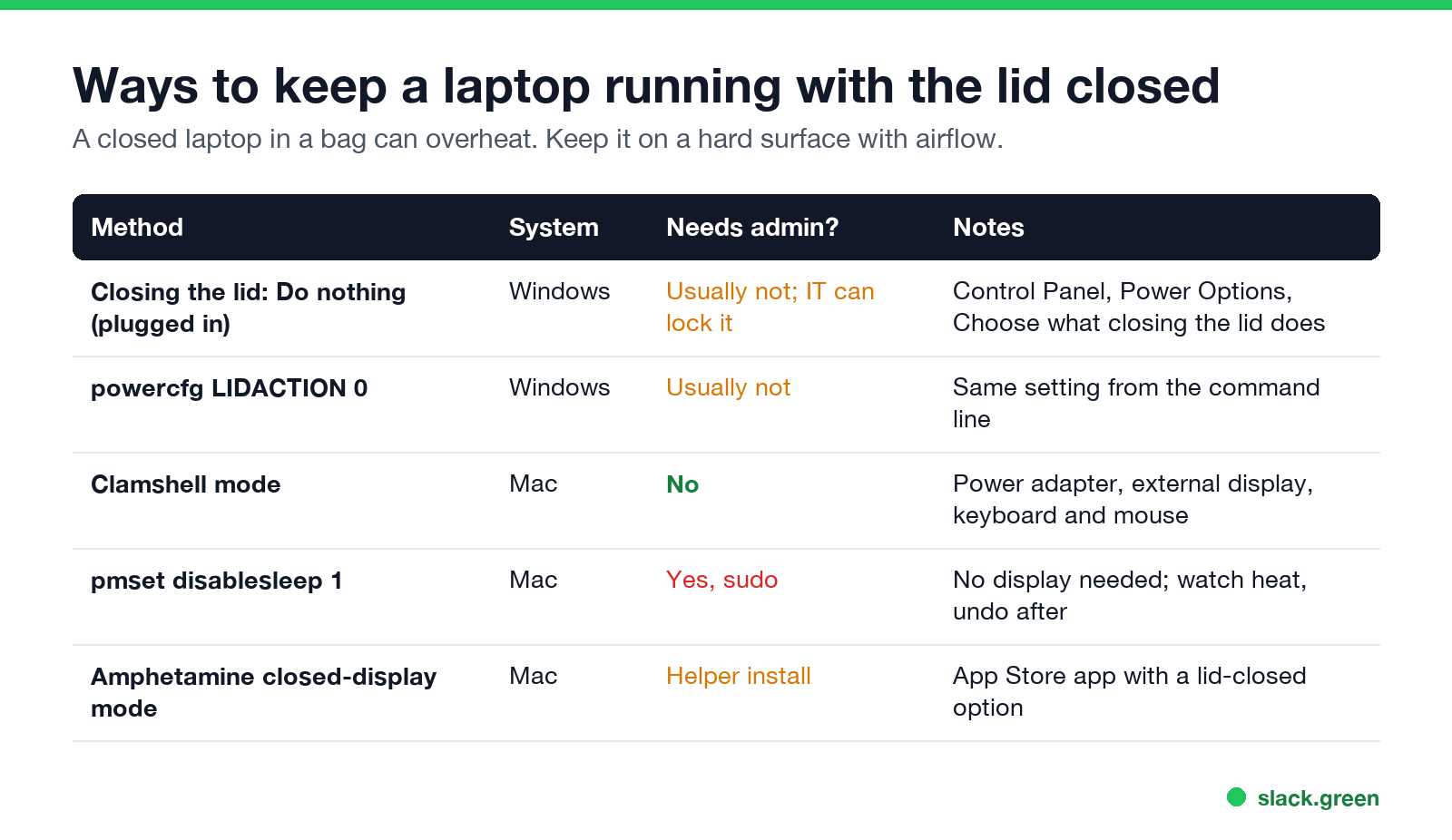
| Method | System | Admin | Notes |
|---|---|---|---|
| Closing the lid: Do nothing | Windows | Usually not | IT can lock it |
powercfg LIDACTION 0 | Windows | Usually not | Same setting, command line |
| Clamshell mode | Mac | No | Power, display, keyboard and mouse |
pmset disablesleep 1 | Mac | Yes | No display needed |
| Amphetamine closed-display mode | Mac | Helper install | App Store app |
Windows 11 and 10: keep the laptop awake with the lid closed
- Open Control Panel and go to Hardware and Sound, Power Options.
- Click Choose what closing the lid does.
- Next to When I close the lid, set Plugged in to Do nothing. Leave On battery on Sleep unless you need it.
- Click Save changes.
Newer Windows 11 builds also show lid settings under Settings, System, Power & battery. The same change from a terminal, for the current power plan while plugged in:
powercfg /setacvalueindex SCHEME_CURRENT SUB_BUTTONS LIDACTION 0
powercfg /setactive SCHEME_CURRENT
0 means do nothing; 1 is sleep. On a company laptop the option may be greyed out by policy.
Mac: keep a MacBook awake with the lid closed
Ne jamais plus apparaître "absent" sur Slack
Basé sur le cloud. Sans téléchargement. Fonctionne 24/7 même avec votre PC éteint.
Clamshell mode (no admin). Plug in the power adapter, connect an external display and a keyboard and mouse (or trackpad), then close the lid. The Mac keeps running on the external display. Unplug power or the display and it sleeps.
Without an external display. macOS sleeps when you close the lid. This command stops all sleep, needs an admin password, and should be undone afterwards:
sudo pmset -a disablesleep 1   # keep awake, lid closed too
sudo pmset -a disablesleep 0   # back to normal
A closed MacBook running this way in a bag can overheat. Amphetamine from the App Store offers a closed-display mode with its own helper. caffeinate alone does not stop lid-close sleep; see our caffeinate guide.
Does Slack stay active with the laptop closed?
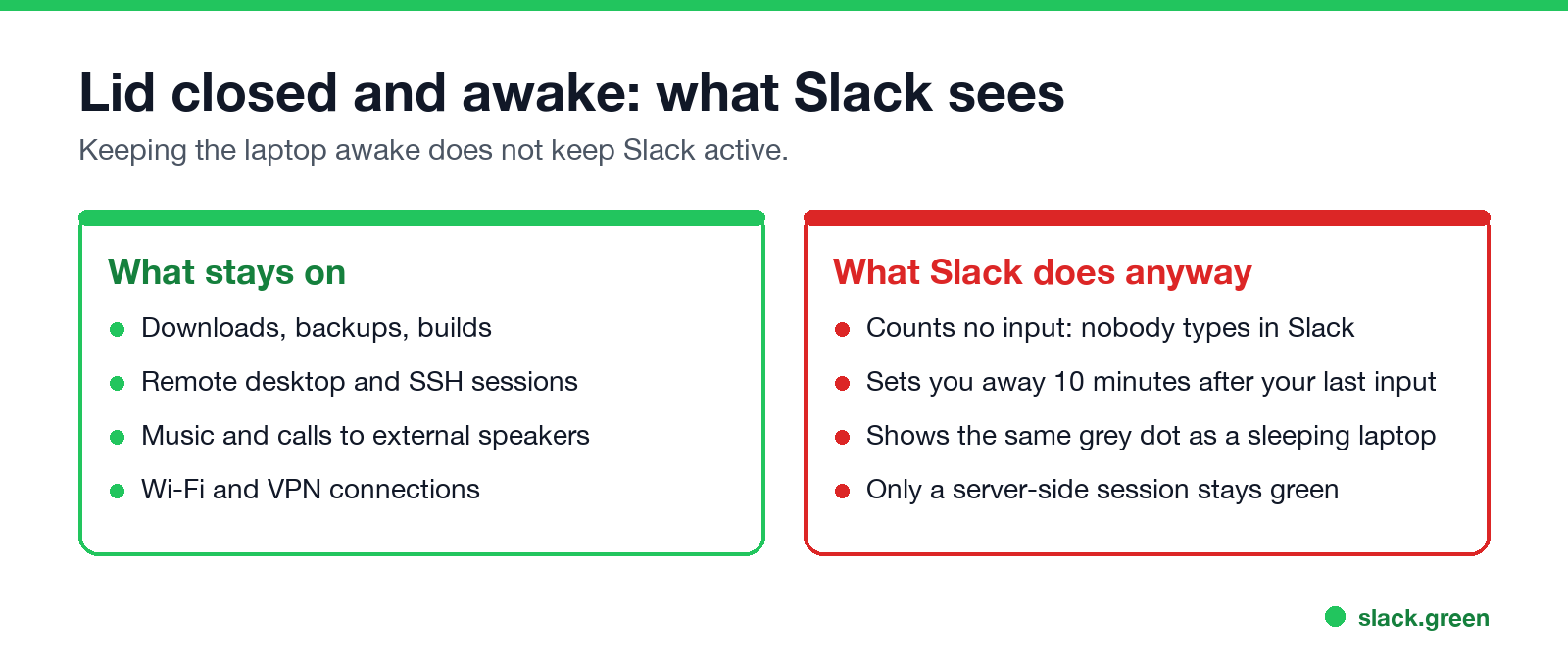
No. If the laptop sleeps, Slack sets you away within seconds. If you keep it awake with the lid closed, Slack still counts no input in its window and sets you away 10 minutes after your last one. Either way your coworkers see the grey dot. The rules are in how long does Slack stay active, and the desktop options in how to keep Slack always active on desktop.
What does work with the lid closed:
Before you leave a laptop running closed
FAQ
Ne jamais plus apparaître "absent" sur Slack
Basé sur le cloud. Sans téléchargement. Fonctionne 24/7 même avec votre PC éteint.
How do I keep my laptop running with the lid closed?
Windows: set closing the lid to Do nothing in Power Options. Mac: clamshell mode with power and an external display.
How do I keep a MacBook awake with the lid closed without a monitor?
sudo pmset -a disablesleep 1, which needs admin rights, or Amphetamine's closed-display mode. Undo it afterwards.
Is it bad to run a laptop with the lid closed?
It is fine on a hard surface with airflow and power. It can overheat in a bag.
Does Slack stay active when my laptop is closed?
No. A sleeping laptop sets you away at once, and an awake one after 10 minutes without input in Slack.
Does Teams stay green with the laptop closed?
No. Teams shows Offline when the computer sleeps, and Away after a few minutes without input if it stays awake.
Arrêtez de Bouger la Souris.
Des centaines de télétravailleurs ne se soucient plus de leur statut Slack. Configurez une fois, restez vert pour toujours.
Related Articles
Can Slack Admins See What You Search? And What Else They See
No. Slack gives admins no record of your search terms. On Enterprise they can see how many searches you ran each day. What admins see about edits, private channels, scheduled messages, analytics and read receipts.
Does Slack Notify When You Leave a Channel? Leave, Edit, Delete and More
Slack does not ping anyone when you leave a channel, but it posts a line saying you left, unless an admin turned join and leave messages off. Edits show (edited), deletes leave no alert, forwards do not tell the author, and removing someone does notify them. What each action shows, and how to leave quietly.
How to Connect Slack and Microsoft Teams: Calls, Messages and Status
Slack and Teams do not connect natively for chat. You can start Teams calls from Slack with the free Microsoft Teams Calls app, relay messages with a paid bridge such as Mio, and sync your Teams status to Slack with a short script. Every option, what it costs, and the setup steps.