
Slack Jira Integration: Setup, /jira Commands and Notifications
Install the Jira Cloud for Slack app, type /jira connect in a channel to send a Jira space's updates there, /jira notify for personal notifications as DMs, and create work items from any message with More actions. Every /jira command, Jira automation to Slack, and fixes when previews or notifications stop.
To connect Jira and Slack, install the Jira Cloud for Slack app from the Slack Marketplace and sign in with your Atlassian account when it asks. Then, in the channel that should get updates, type /jira connect, pick your Jira site and space, and set filters for work type, priority and events. Type /jira notify to get your own Jira notifications as direct messages from @Jira instead of email. To turn a Slack message into a ticket, hover over it, click More actions, and choose Create work item from Jira Cloud. Links and uppercase work item keys such as DEV-36 then unfold into preview cards you can edit in place.
Jira tickets in Slack keep a team in one app all day, and that app also shows who is around: your dot turns grey 10 minutes after your last input in the Slack window, even while you work in Jira. Slack Green keeps it green during the working hours you set, from the cloud.
Set up Jira Cloud for Slack
Atlassian's Jira Cloud for Slack guide describes the setup:
- Install Jira Cloud for Slack in your workspace. If your workspace requires app approval, an admin approves it first.
- Log in to your Atlassian account when prompted to link Slack and Jira.
- You get a DM from the Jira Cloud app. From there, connect your first Jira space to a channel.
After that you have channel updates, personal notifications, link previews, work item creation and actions such as transition, assign, comment and watch, all from Slack. The Jira app's Home tab in Slack lists work assigned to you and work you watch.
This is for Jira Cloud. Jira Server and Data Center use a different app, and Atlassian has a guide for moving from the Jira Server integration.
Slack Jira commands
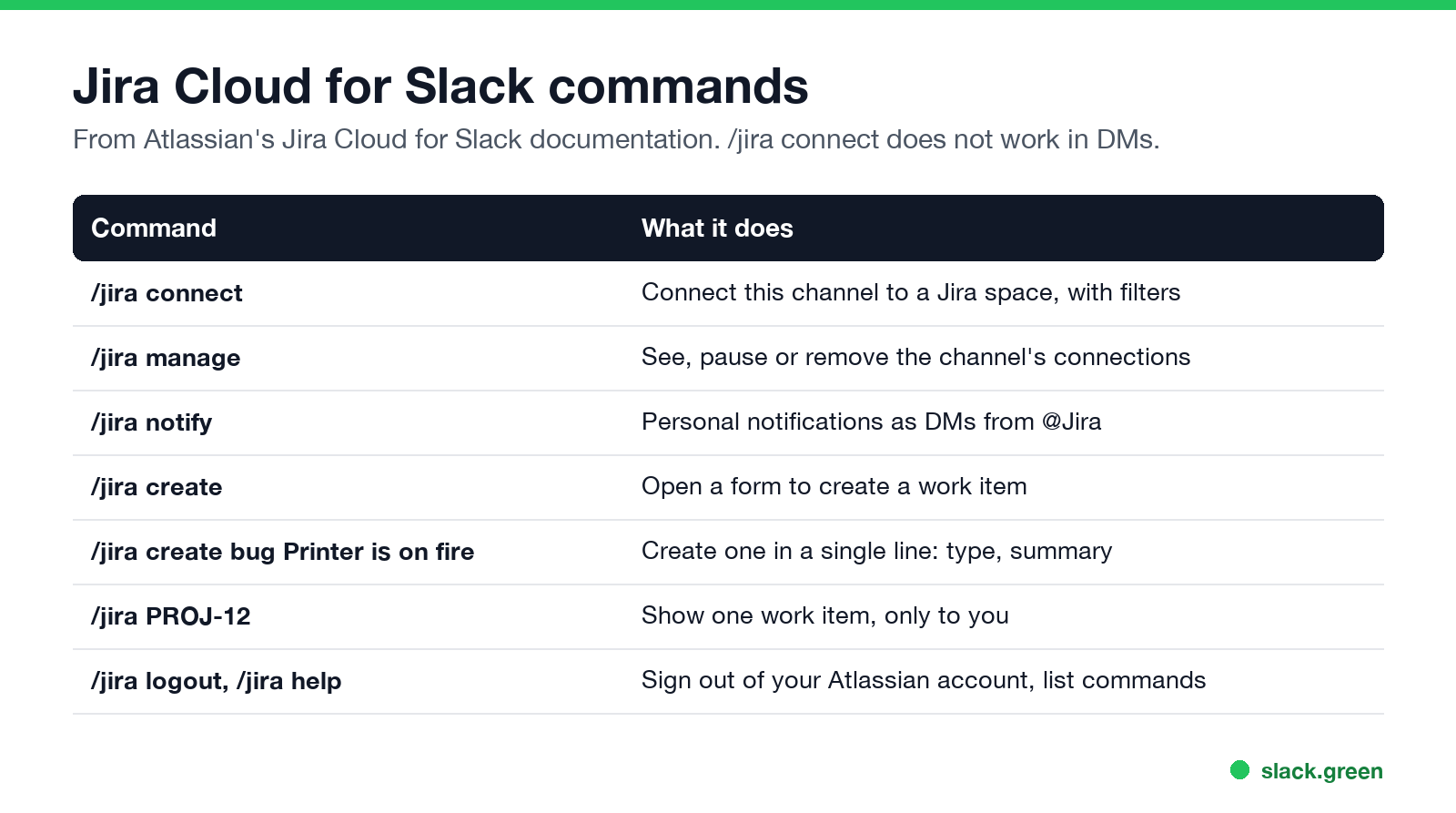
| Command | What it does |
|---|---|
/jira connect | Connect this channel to a Jira space, with filters. Not available in DMs |
/jira manage | See, update, pause or disconnect the channel's subscriptions |
/jira notify | Set up or change personal notifications as DMs from @Jira |
/jira create | Open a form: space, work type, summary, description |
/jira create bug Printer is on fire | Create a work item in one line |
/jira PROJ-12 | Show one work item; only you see it |
/jira logout | Sign out of your Atlassian account; subscriptions keep running |
/jira help | List the commands available to you |
The one-line form takes the work type, then the summary; a description can follow on a new line:
/jira create bug Printer is on fire
The printer on floor 16 is on fire. I suspect this has a high priority
That example is Atlassian's own. If the channel is connected to a Jira space, /jira create picks that space automatically. Every other built-in Slack command is in Slack slash commands.
Create a Jira ticket from a Slack message
Ne jamais plus apparaître "absent" sur Slack
Basé sur le cloud. Sans téléchargement. Fonctionne 24/7 même avec votre PC éteint.
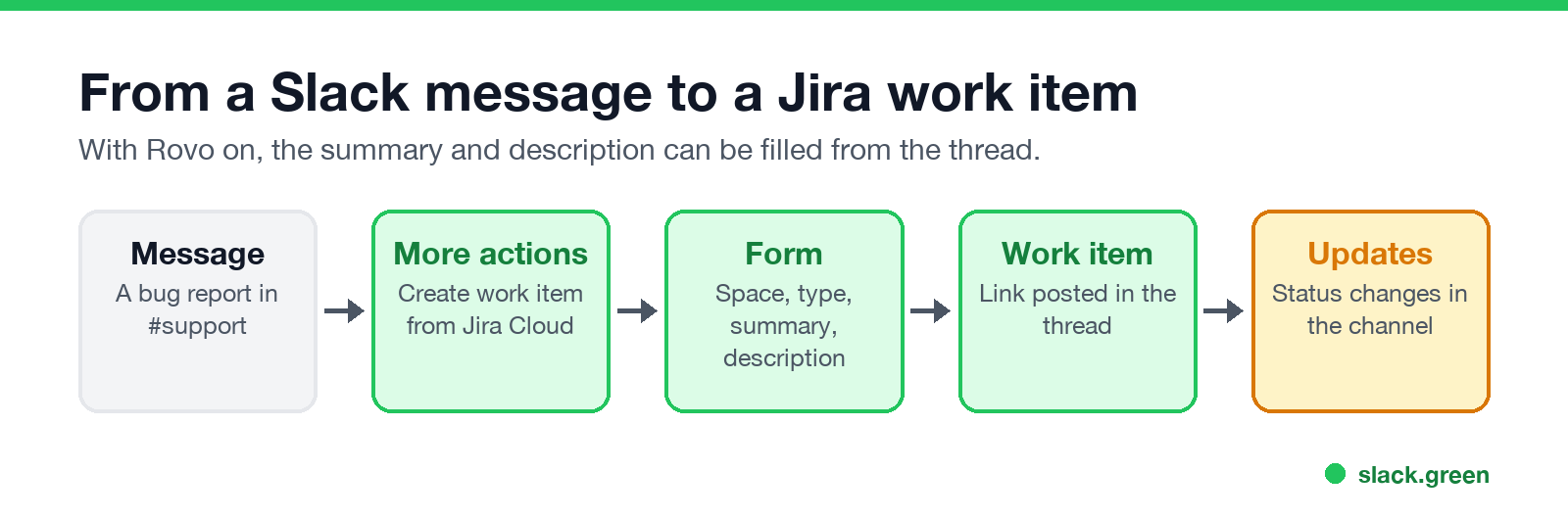
If your organization has Atlassian's Rovo AI turned on, a toggle fills the summary and description from the whole thread in a channel, or from the single message in a DM. Rovo also powers @Jira: type @Jira create a bug for the login issue discussed in this thread and it creates the work item from context. An organization admin has to activate Rovo first.
Once a work item exists, its preview card in Slack lets anyone edit fields inline, watch it, push the thread's replies to Jira as comments, or add a Slack message to it as a comment.
Jira notifications in Slack
For yourself: type /jira notify in a DM with @Jira. Choose Essentials (work assigned to you, mentions, comments on your work items, status changes on items you watch) or All, add filters by space, work type or priority, and Submit. Then turn off Jira's email copies in Jira's notification settings, under Send me emails for work item activity, so you do not get everything twice.
For a channel: type /jira connect in the channel, pick the site and space, and set filters. Space admins can also start from Jira: space settings, Notifications, Connect to Slack, with JQL filters for fine control. Keep channel filters tight; a channel that gets every comment on every ticket gets muted. If you mute it, Slack red dot won't go away explains which unreads still count.
Jira automation: send a Slack message
For a message Jira Cloud for Slack does not send, such as "post in #releases when a version ships", use a Jira automation rule with the Send Slack message action. It posts through a Slack incoming webhook URL, which you create in a Slack app you control. The other direction, a Slack workflow that starts from a web request, is shown in Slack Workflow Builder examples.
Jira Slack integration not working
Ne jamais plus apparaître "absent" sur Slack
Basé sur le cloud. Sans téléchargement. Fonctionne 24/7 même avec votre PC éteint.
DEV-36, not dev-36), and connect the channel to that space with /jira connect. Full links unfold anywhere the app is present./jira connect fails in a DM. It works only in public and private channels./jira notify again to check your triggers. If you switched Atlassian accounts, /jira logout and sign in again./jira manage and check whether the subscription is paused or its filters exclude the events you expect.FAQ
Is the Slack Jira integration free?
The Jira Cloud for Slack app is free to install. You need a Jira Cloud site, and your Slack workspace may limit how many apps you can install on the free plan.
Can I create a Jira ticket from Slack without leaving the conversation?
Yes. Use More actions on a message and Create work item from Jira Cloud, or type /jira create.
How do I stop Jira notifications in Slack?
For yourself, run /jira notify and change the triggers. For a channel, run /jira manage and pause or disconnect the space.
Can others see what I look up with /jira PROJ-12?
No. Atlassian's docs say that result is visible only to the person who ran the command.
Does the integration work with Jira Server?
Not this app. Jira Cloud for Slack is for Jira Cloud.
Arrêtez de Bouger la Souris.
Des centaines de télétravailleurs ne se soucient plus de leur statut Slack. Configurez une fois, restez vert pour toujours.
Related Articles
Slack Lists Tutorial: Create, Organize and Share a List
Slack lists are tables of tasks inside Slack, with fields, assignees, due dates, a board view and a comment thread on every item. How to create a list from scratch or a template, set up fields, turn it into a kanban board, add messages to it, share it, and what the plan limits are.
How to Create a Slack Workspace, on Desktop or Phone
Go to slack.com/get-started, enter your email, type the confirmation code, and click Create a Workspace. It is free to start, you become the Primary Owner, and it takes about five minutes. Steps for desktop, iPhone and Android, and what to set up next.
Slack Sidebar Sections: Create, Sort, Share and Fix Them
Slack sidebar sections are custom groups of channels, DMs and apps in your sidebar. Only you see them, and they need a paid plan. How to create one on desktop and mobile, move many channels at once, sort and filter each section, share a section with your team, and get disappeared sections back.