
Does Harvest Track Mouse Movement? No, Only Idle Time
Harvest does not track mouse movement, keystrokes, screenshots, apps or websites. Its Mac and Windows apps only notice when the computer has been idle for 10 minutes and ask you what to do with that time. What Harvest records, what managers see, and how it compares with Hubstaff and Time Doctor.
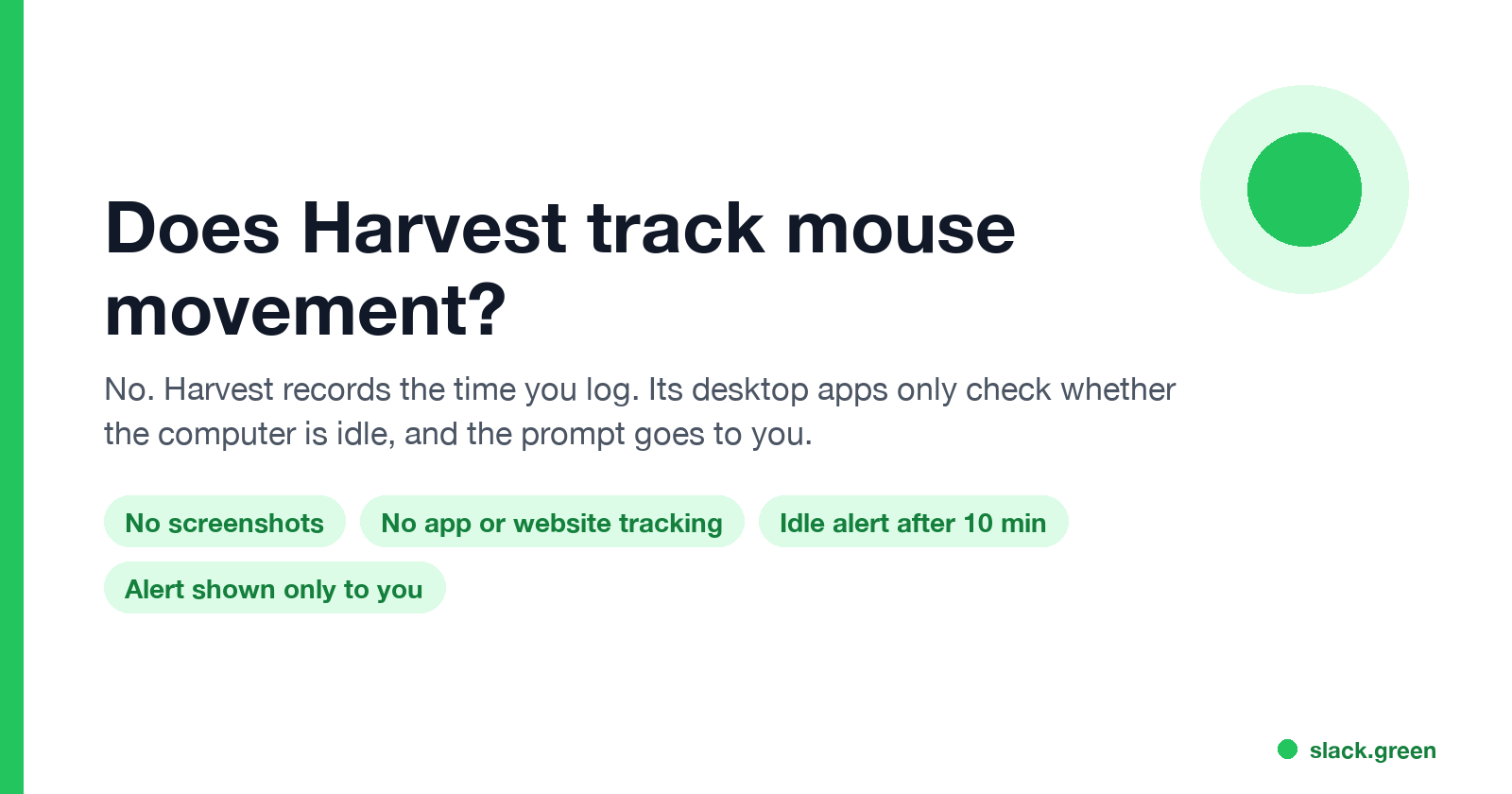
No, Harvest does not track your mouse movement. It also takes no screenshots, records no keystrokes, and does not log which apps or websites you use; Harvest's help center answers "No" to each of these. The only place Harvest looks at your input is the idle timer in its Mac and Windows apps: if the computer has had no input for 10 minutes while a timer runs, the app asks you whether to keep or remove those minutes. That prompt appears on your screen. It is not a report to your manager.
What Harvest does record is the time you log: each entry, when a timer starts and stops, and every edit. Managers and administrators can read those in the timesheet activity log.
We read Harvest's help center articles on 28 September 2026 for this page and quote them below.
What Harvest tracks and what it does not
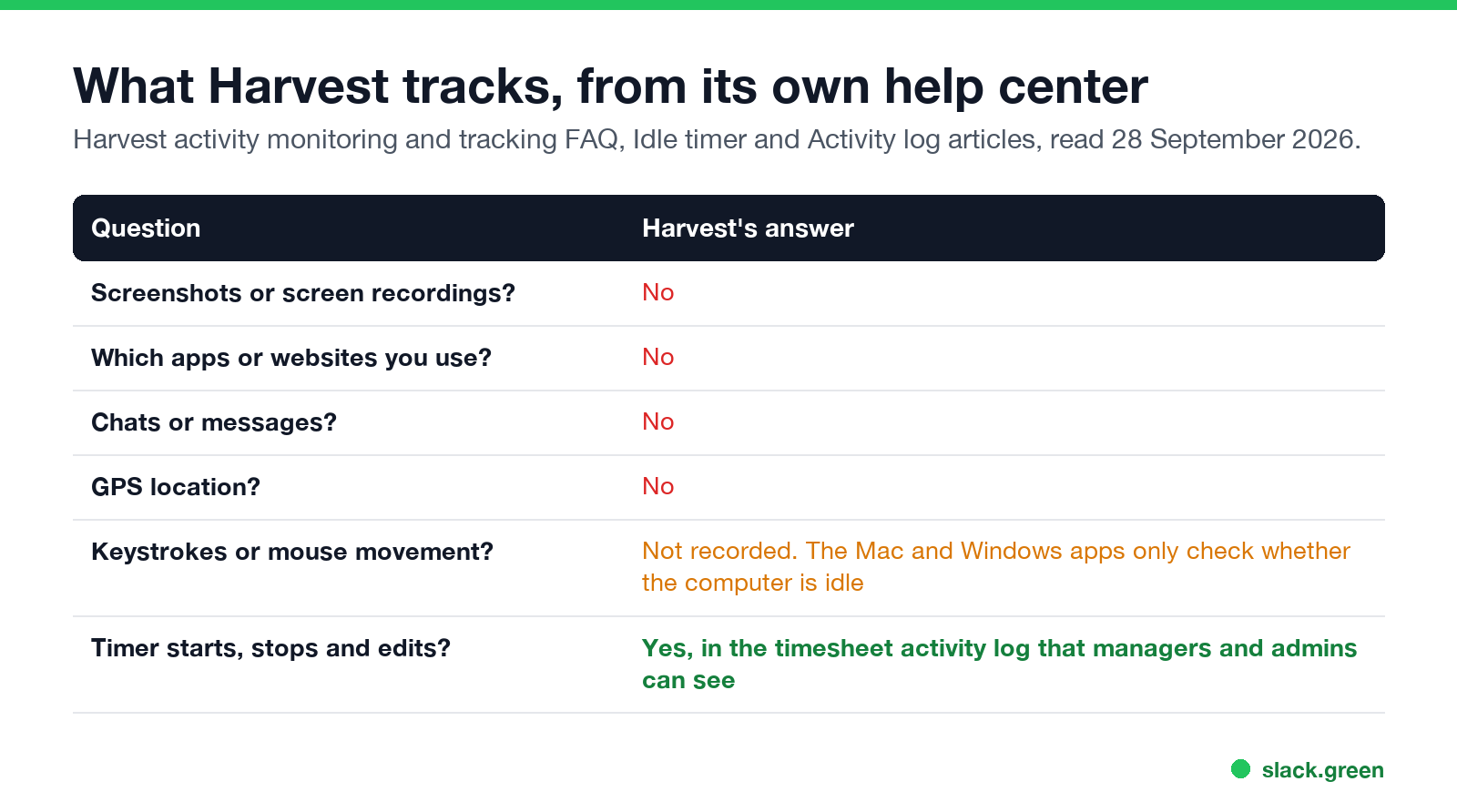
Harvest's "activity monitoring and tracking FAQ" answers the common questions directly:
| Does Harvest... | Harvest's answer |
|---|---|
| Take screenshots or video recordings of your computer? | "No." |
| Monitor your chats or messages? | "No." |
| Track which websites or apps you use? | "No." |
| Track your location by GPS? | "No." |
| Record keystrokes or mouse movement? | Not listed as a feature. The desktop apps only check whether the computer is idle |
Harvest is a timesheet and invoicing tool. It knows what you type into it: the project, task, notes and hours, and when you start and stop timers. It has no view of what happens on the rest of your computer.
How Harvest's idle timer works
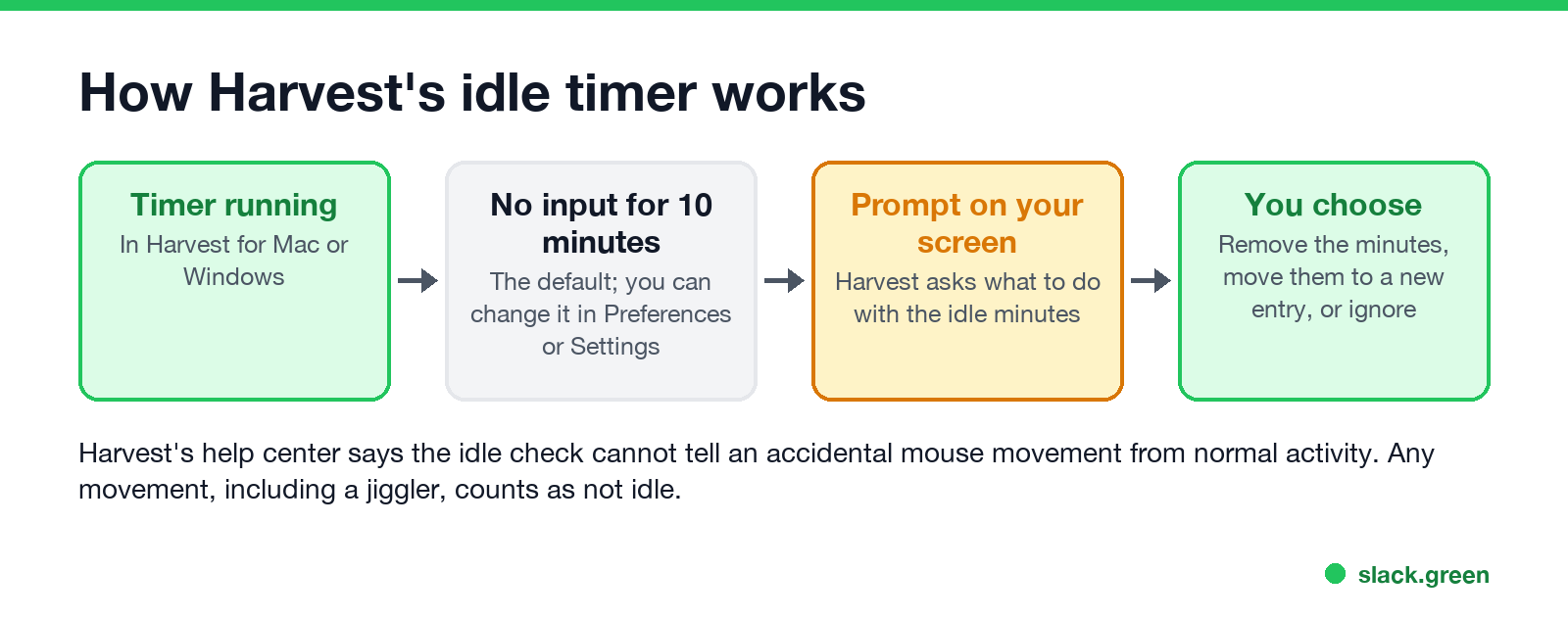
Harvest for Mac and Harvest for Windows "automatically detect when your computer has been idle for a specified number of minutes". The default is 10 minutes. You change it in the Mac app under Preferences, General, and in the Windows app under the gear icon, Settings. When the alert appears you can:
- • Stop timer and remove X minutes. The timer stops and the idle minutes come off the total.
- • Continue timing and remove X minutes. The timer keeps running without the idle minutes.
- • Add X minutes as a new entry. The idle time moves to a new entry you can assign to another project.
- • Ignore. The timer keeps running with the idle minutes included.
- • new and deleted time entries,
- • each start and stop of a timer,
- • edits to the project, task, date or hours of an entry,
- • who made each change, and on whose timesheet.
Harvest's own list of limits says the idle timer "can't differentiate accidental mouse movements (e.g., someone accidentally bumps into your desk while you're away) from normal activity". Any input counts. The idle check is there to help you log accurate hours, and the choice stays with you.
What your manager can see in Harvest
Managers see your time entries for the people and projects they manage, and administrators see everyone's. The timesheet activity log (Reports, Activity log, Timesheets) lists:
So a manager can see that a timer ran from 9:02 to 12:47 and that you later changed an entry from 4 hours to 3. They cannot see what was on your screen during those hours. Harvest's docs list edits to hours in that log; we did not test whether removing idle minutes from the prompt shows up there as an edit.
Never appear "away" on Slack again
Cloud-based. No downloads. Works 24/7 even when your laptop is off.
Does a mouse jiggler work with Harvest?
A mouse jiggler moves the pointer, so the Harvest desktop app never sees the computer as idle and never shows the prompt. Harvest has no jiggler detection, because it records no mouse data to check. The timer simply keeps counting.
That does not make the hours invisible. The hours still go on an invoice or a client report, and the client or manager judges them by the work delivered. A 9-hour timer with nothing to show for it is easy to question. Are mouse jigglers legal covers what has happened to people who were caught in other tools.
Harvest is often one of several tools. A company that uses Harvest for invoices may also run monitoring software, which sees tiny moves on a fixed rhythm and no typing. Can a mouse jiggler be detected explains what those tools check, and how to tell if you are being monitored at work shows how to check your own laptop.
Harvest vs monitoring time trackers
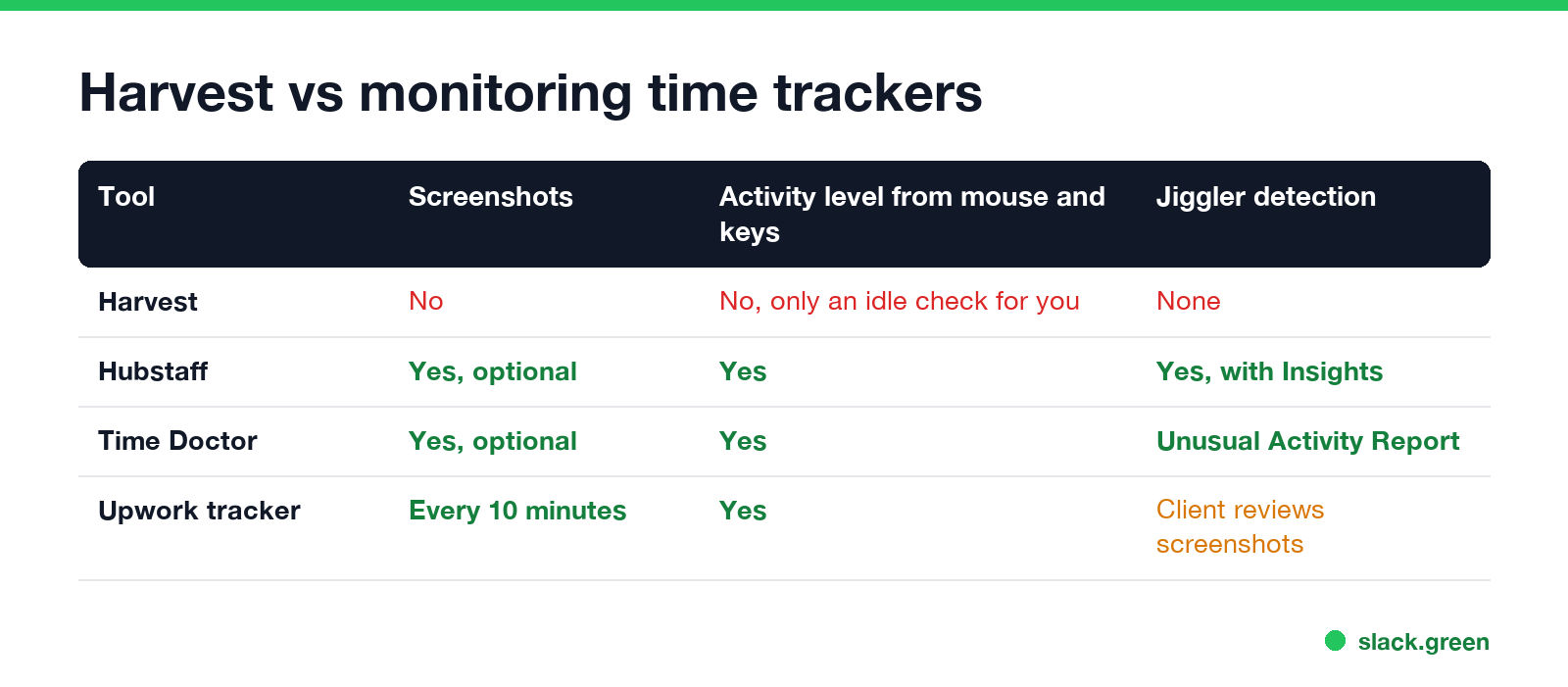
The difference is what the tool measures. Harvest measures the hours you log. Monitoring trackers measure activity while the timer runs:
If your company switched from Harvest to one of these, the rules changed with it.
Harvest and your Slack status
Harvest does not change your Slack status, and a running Harvest timer does not keep Slack active. Slack counts only input inside the Slack window and sets you away 10 minutes after your last input there. If you are in Harvest, a spreadsheet or a call, Slack still shows you as away; why Slack goes idle so quickly explains the rule.
FAQ
Does Harvest take screenshots?
No. Harvest's help center says it "does not take screenshots or video recordings of your computer."
Does Harvest track keystrokes?
No. Harvest does not record what you type or how often. The desktop app only notices when there has been no input at all for the idle period you set.
Does Harvest track your screen or the websites you visit?
No. Harvest "does not track websites or apps you use", and it cannot see your screen.
What is Harvest idle time?
It is the time a Harvest timer kept running while your computer had no mouse or keyboard input, 10 minutes by default. The Mac and Windows apps ask whether to remove it, move it to a new entry, or keep it.
Can my manager see my idle time in Harvest?
The idle prompt appears only on your screen, and the choice is yours. Your manager sees the resulting time entries, timer starts and stops, and edits in the timesheet activity log.
Can Harvest detect a mouse jiggler?
No. Harvest records no mouse data, so it has nothing to detect a jiggler with. A jiggler only stops the idle prompt from appearing.
Stop Jiggling Your Mouse.
Join hundreds of remote workers who never worry about their Slack status. Set it up once, stay green forever.
Related Articles
How to Make an Emoji From a Video (Slack and Discord)
To make an emoji from a video, cut 1 to 2 seconds, crop it to a square, scale it to 128 x 128 and save it as a GIF under 128 KB for Slack or 256 KB for Discord. One tested ffmpeg command, the frame rate and color settings that decide the file size, and a free browser tool that shrinks the GIF for you.
How to Make a Custom Emoji for Discord (From Any Image)
To make a custom Discord emoji, crop an image to a square, keep it under 256 KB, name it with letters, numbers and underscores, and upload it with Add Emoji in the emoji picker or Server Settings, Emoji. How to make one from a photo, a GIF or text for free, add animation, and use it in other servers.
Can Slack Messages Be Subpoenaed? Yes, Here Is How It Works
Yes. Slack messages, including DMs, can be requested in a lawsuit or an investigation. Most requests go to the company that owns the workspace, which exports them. Slack itself gives out message content only with a search warrant and tells the company first. Slack's own policy, its disclosure numbers, legal holds, and what deleted messages mean.