
Does Teams Notify Screenshots? No, but Some Orgs Can Block Them
Microsoft Teams sends no alert when you take a screenshot of a chat, channel or meeting, on any device. What can happen instead: Teams Premium can black out meetings in captures, Intune can block screenshots on Android, and the Record button tells everyone.
No. Microsoft Teams does not notify anyone when you take a screenshot of a chat, a channel, a meeting or a shared screen. That holds on Windows, Mac, the web, iPhone and Android. A screenshot is taken by your operating system, which saves the image without telling the app, so Teams has nothing to report. Two things can happen instead of a notification: an organization with Teams Premium can make meetings show up black in screenshots, and an Intune app policy can block screenshots of Teams on Android. Nobody is alerted in either case.
The one action that does tell everyone is the Teams Record button: all participants see a recording banner. If you also use Slack, the answer there is the same; see does Slack notify screenshots. We build Slack Green, which keeps your Slack status green from our servers.
What Teams tells anyone, action by action
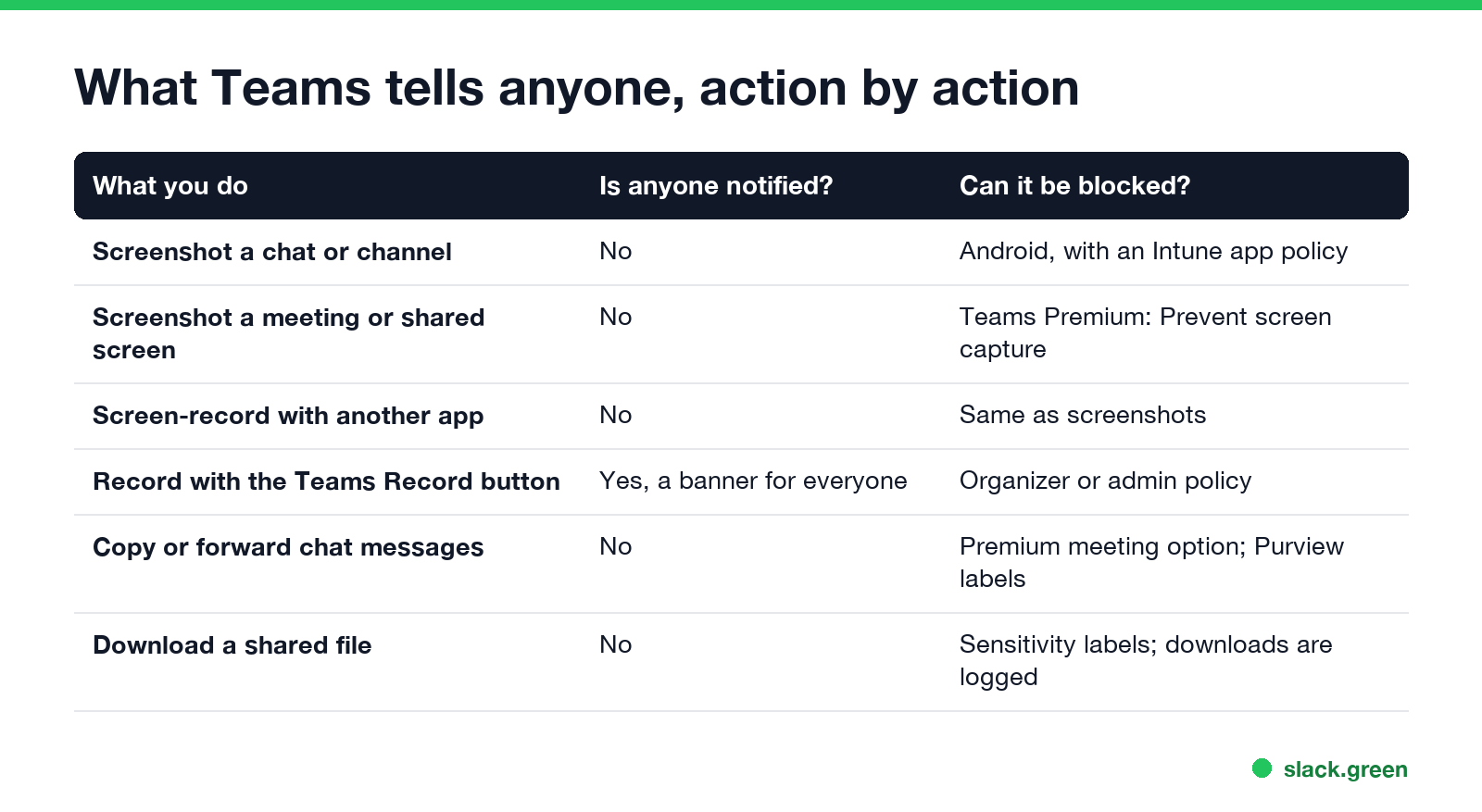
| What you do | Is anyone notified? | Can it be blocked? |
|---|---|---|
| Screenshot a chat or channel | No | On Android, with an Intune app protection policy |
| Screenshot a meeting or a shared screen | No | Teams Premium: Prevent screen capture |
| Screen-record with another app (Snipping Tool, QuickTime, OBS) | No | Same as screenshots |
| Record with the Teams Record button | Yes, every participant sees a banner | Organizer options and admin meeting policy |
| Copy or forward chat messages | No | Teams Premium meeting option; Purview sensitivity labels |
| Download a file shared in Teams | No | Sensitivity labels; downloads appear in Purview audit |
There is no setting, for users or admins, that sends a notification when someone takes a screenshot in Teams. Microsoft's Teams Premium feature list includes "Prevent screen capture in meetings", which blocks the capture. It does not report it.
Does Teams notify screenshots in meetings?
No. You can screenshot a Teams meeting, including other people's video and a shared screen, and nobody is told. The same goes for a screen recording made with another app.
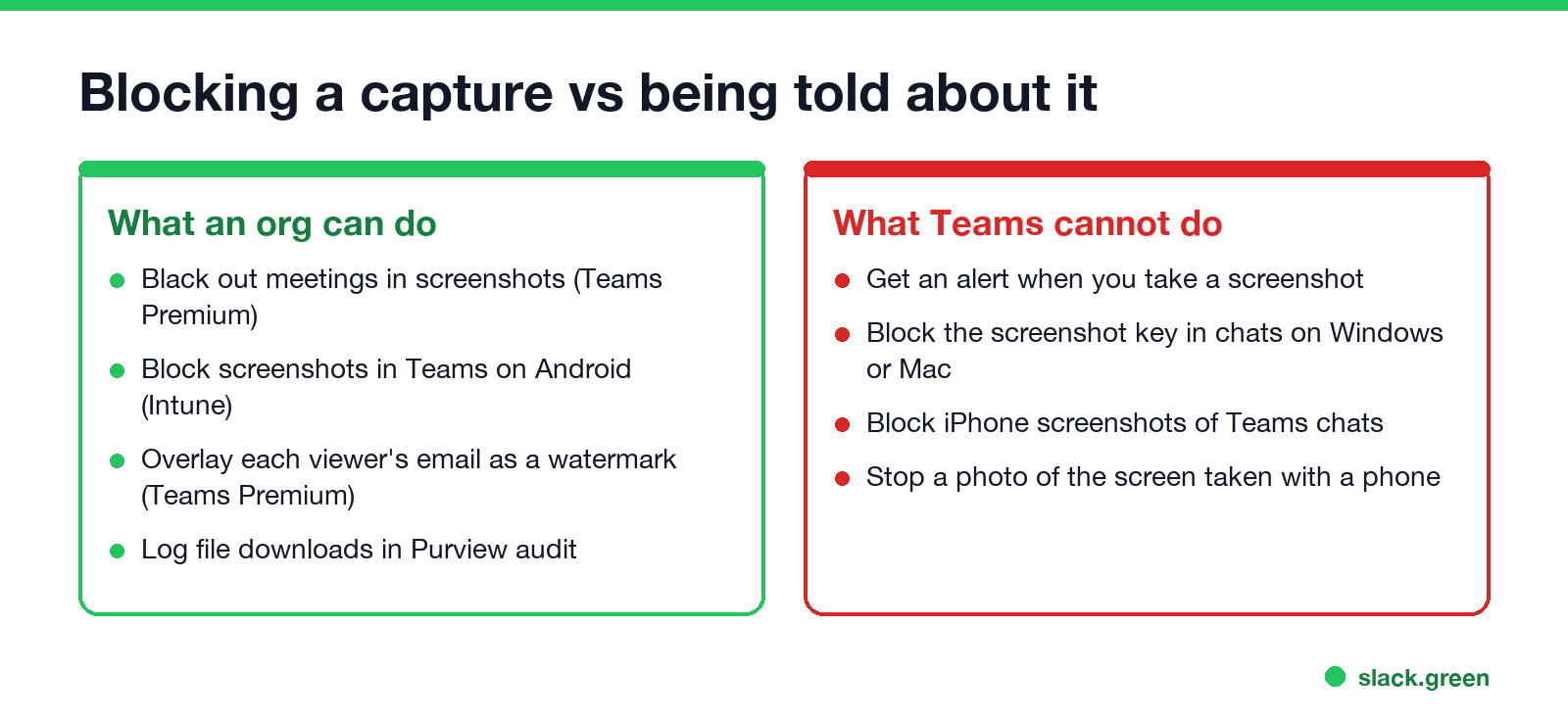
Meetings are where an organization can stop the capture. With a Teams Premium license, an organizer can turn on Prevent screen capture in the meeting options, if the admin allows it. Participants on the Teams desktop and mobile apps then get a black area where the shared content and video should be when they take a screenshot. Teams Premium can also add a watermark that overlays each participant's email address on shared content and video; Microsoft's admin page says "each participant sees their own email address", so a leaked screenshot shows who took it.
Built-in Teams recording is the opposite case. Starting a recording or a transcript shows a notice to everyone in the meeting, and people who join later see it too. How the Teams banner and privacy rules work around calls is in can my employer listen to my Teams calls.
Can Teams detect screenshots on iPhone or Android?
Never appear "away" on Slack again
Cloud-based. No downloads. Works 24/7 even when your laptop is off.
Teams does not detect or report them on either platform. What differs is whether your company can block them:
- • Android: a Microsoft Intune app protection policy can block screen capture in Teams and other Microsoft 365 apps. You get a blank or black image, or a message that screenshots are not allowed. Nobody is notified.
- • iPhone: Intune app policies cannot block screenshots of Teams chats on iOS. Screenshots work.
What your employer can see instead
A screenshot leaves no trace in Teams, but other activity does. Microsoft Purview audit logs can record file downloads, message edits and deletions, and meeting joins. Endpoint monitoring software installed on a company laptop can capture your screen or log key presses, whatever app you use; see can my employer see my screen. Teams itself keeps an edit history on changed messages; how that looks to others is in does Teams show edited messages.
A photo of the screen taken with a phone gets around every block above, which is why companies that care use watermarks rather than trying to stop every capture.
FAQ
Does Microsoft Teams notify when you screenshot? No. Teams sends no alert to anyone when you take a screenshot of a chat, channel, meeting or shared screen.
Can Teams detect screenshots? No. The screenshot is taken by the operating system, and Teams is not told. Some organizations can block captures, but not detect them.
Does Teams notify screen recording? Only the Teams Record button notifies participants. Recording your screen with another app sends no alert.
Why is my Teams screenshot black? The meeting uses Teams Premium's Prevent screen capture, or your company's Intune policy blocks screenshots on Android.
Can the other person see if I screenshot a Teams chat? No. They get no alert, and nothing appears in the chat.
Stop Jiggling Your Mouse.
Join hundreds of remote workers who never worry about their Slack status. Set it up once, stay green forever.
Related Articles
KeepingYouAwake vs Amphetamine: Which Mac Keep-Awake App to Use
KeepingYouAwake is a free, open-source menu bar switch that runs Apple's caffeinate for you. Amphetamine is a free App Store app with triggers, schedules and a closed-lid mode. Pick KeepingYouAwake for one click and Homebrew, Amphetamine for automation. Neither keeps Slack or Teams active.
Computer Locks After 15 Minutes? How to Tell If Group Policy Set It
A work laptop that locks after exactly 15 minutes, with screen settings greyed out, is almost always following a policy from IT: the Windows machine inactivity limit, a forced screen saver, or an Intune device lock. Security baselines and PCI DSS ask for 15 minutes. How to see which policy it is, and what you can and cannot change.
How to Keep a Citrix Session Active: Find Which Timeout Logs You Out
A Citrix session can end from four different timers: Windows locking inside the virtual desktop, the Citrix session idle timer, the Citrix Gateway session time-out, and the StoreFront web page timeout. Only input from your own device into the Citrix window resets them. How to tell which one hit you and what keeps each one quiet.