
pmset disablesleep: Keep a Mac Awake With the Lid Closed, and Undo It
sudo pmset -a disablesleep 1 stops all system sleep on a Mac, lid closed included, and sudo pmset -a disablesleep 0 turns normal sleep back on. How to check whether it is on, why it outlives a restart, and the pmset and caffeinate commands to use instead.
sudo pmset -a disablesleep 1 tells macOS never to enter system sleep, and that includes closing the lid of a MacBook with no external display. sudo pmset -a disablesleep 0 turns normal sleep back on at once. The setting needs an admin password, has no timer and no menu bar icon, and stays on after a restart. It is also missing from Apple's pmset manual page: on macOS 26.5.2, man pmset does not mention it once. Check it with pmset -g, and undo it as soon as the job is done.
If the reason you want the Mac awake is to keep Slack green, this command will not do it. Slack sets you to away after 10 minutes without input in the Slack window, even when the Mac never sleeps. Slack Green keeps your Slack status active on a schedule from the cloud, so the Mac can sleep with the lid shut.
The commands
sudo pmset -a disablesleep 1   # never sleep, lid closed included
sudo pmset -a disablesleep 0   # normal sleep again
pmset -g                       # check: look for SleepDisabled
sudo is needed because the change applies to the whole system, not to your user. The -a flag means all power sources (battery, charger and UPS). For disablesleep it makes no practical difference, because the flag is a single system-wide value rather than a per-power-source setting. Guides that write sudo pmset disablesleep 1 without -a set the same thing.
Nothing else changes. The display still turns off on its own timer, the screen still locks on its own timer, and closing the lid still turns off the built-in display. The CPU, network and disks keep running.
How to check whether disablesleep is on
Run pmset -g in Terminal. When the setting is on, the first section lists it:
System-wide power settings:
 SleepDisabled          1
Currently in use:
 ...
SleepDisabled 1 means sleep is off. SleepDisabled 0 means normal sleep. On a Mac where nobody ever set it, the line may be missing entirely; on our test MacBook Pro (macOS 26.5.2, M2 Max) the System-wide section was empty.
The value is stored in /Library/Preferences/com.apple.PowerManagement.plist under SystemPowerSettings, which is why it survives a restart. A Mac that stopped sleeping weeks ago, with no app running, is worth checking for this line first. Other causes, from Power Nap to apps that hold sleep assertions, are in why is my Mac not going to sleep.
pmset -g assertions answers a different question. It lists the running processes that are holding the Mac awake right now, such as caffeinate or Amphetamine. disablesleep does not show there, because it is a setting, not a process.
How to undo it
Never appear "away" on Slack again
Cloud-based. No downloads. Works 24/7 even when your laptop is off.
- Run
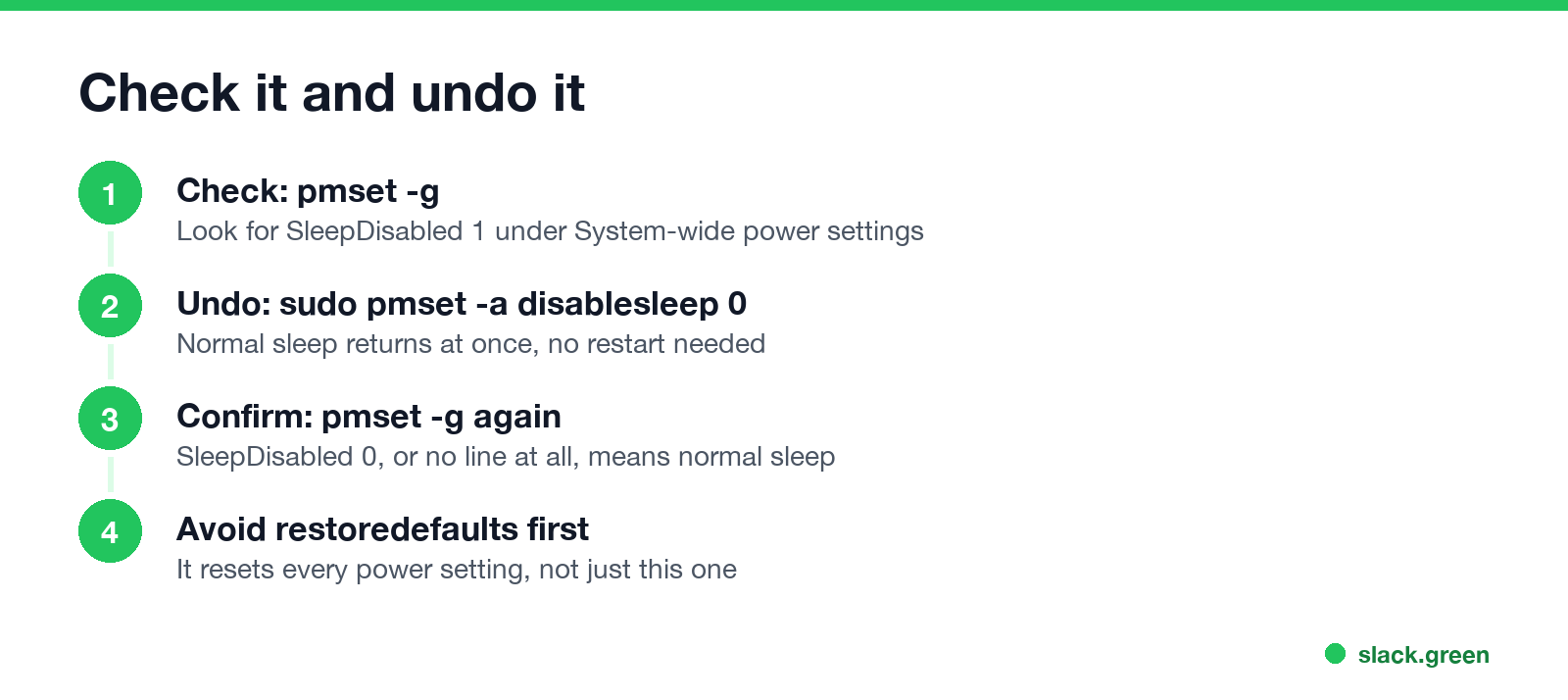
sudo pmset -a disablesleep 0and enter your password. - Run
pmset -gand confirm the line readsSleepDisabled 0. - Close the lid to test. The Mac should sleep within a few seconds.
- •
pmset sleep 0sets the idle sleep timer to never. It is in the manual ("0 to disable"), but it only stops idle sleep. Closing the lid still puts the Mac to sleep. Use-cinstead of-ato apply it on the charger only. - •
pmset noidleholds an assertion while it runs and needs no admin rights. We ran it on macOS 26.5.2 andpmset -g assertionsshowedNoIdleSleepAssertion named: "pmset prevent sleep"until we pressed Ctrl-C. The manual marks it deprecated in favor ofcaffeinate. - •
caffeinateis the supported tool for keeping the Mac awake for one job or one stretch of time, and it ends by itself. Every flag, with timers and examples, is in caffeinate on Mac. - • Heat. A closed MacBook that keeps working in a bag or on a bed has little airflow. Keep it on a hard surface.
- • Battery. The setting also applies on battery, so a closed Mac can run until the battery is empty.
- • Forgetting. There is no indicator. Put the undo command in the same terminal line as the job:
sudo pmset -a disablesleep 1; ./long-job.sh; sudo pmset -a disablesleep 0. - • Undocumented. Apple does not list
disablesleepinpmset(1), so a macOS update could change it without notice.
There is no need to restart. Avoid sudo pmset restoredefaults as a first fix: it resets every power setting as a group, including display sleep times and Power Nap choices you made on purpose. Use it only if pmset -g shows other values you cannot explain.
pmset disablesleep vs sleep 0, noidle and caffeinate
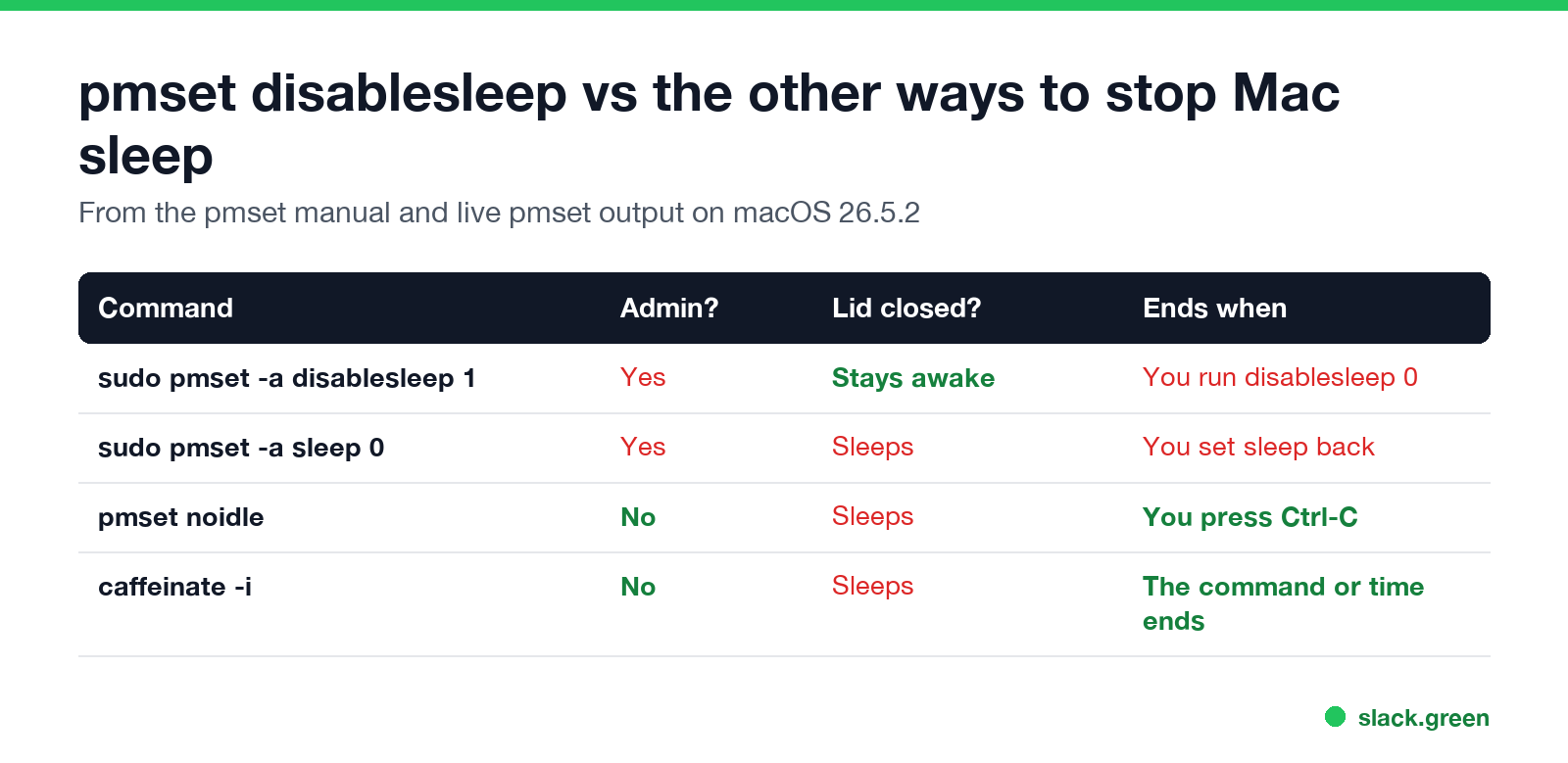
| Command | Admin rights | Lid closed | Ends when |
|---|---|---|---|
sudo pmset -a disablesleep 1 | Yes | Stays awake | You run disablesleep 0 |
sudo pmset -a sleep 0 | Yes | Sleeps | You set a sleep time again |
pmset noidle | No | Sleeps | You press Ctrl-C |
caffeinate -i | No | Sleeps | The command or timer ends |
Only disablesleep covers a closed lid with no external display. With a display, keyboard and power connected, macOS supports lid-closed use on its own (clamshell mode), and that needs no command. Both setups are compared in how to keep a laptop awake with the lid closed.
When to use it, and the risks
disablesleep fits a Mac that has to keep a download, a render, a backup or a server running with the lid shut and no display attached. For everything else a timed command or an app is safer.
If you want a menu bar switch instead of Terminal, Amphetamine has a closed-display mode with its own helper. How it compares with KeepingYouAwake is in KeepingYouAwake vs Amphetamine, and the wider list is in best app to keep a Mac awake.
Does disablesleep keep Slack or Teams active?
Never appear "away" on Slack again
Cloud-based. No downloads. Works 24/7 even when your laptop is off.
No. A Mac that never sleeps still has an idle user. Slack sets you to away after 10 minutes with no input in the Slack window, and Teams after about 5 minutes of inactivity, whatever the power settings say. The same test for the popular apps is in does Amphetamine keep Slack active, and the options that do work on a Mac are in keep Slack active on Mac.
FAQ
What does sudo pmset -a disablesleep 1 do?
It turns off system sleep for the whole Mac, on every power source, including when you close the lid. It stays on until you run sudo pmset -a disablesleep 0.
How do I turn off pmset disablesleep?
Run sudo pmset -a disablesleep 0, then check pmset -g for SleepDisabled 0. No restart is needed.
Does pmset disablesleep stay on after a restart? Yes. It is saved in the system power preferences, so it lasts until you set it back to 0.
Is pmset disablesleep safe? For the Mac, yes, if it has airflow. The risks are heat in a closed bag, a drained battery and forgetting to turn it off.
Why is disablesleep not in man pmset?
It is undocumented. Apple's manual lists sleep, noidle and the other settings, but not disablesleep, so treat it as unsupported.
Does disablesleep stop the screen from turning off?
No. The display still sleeps on its displaysleep timer and the screen still locks. Only system sleep stops.
Stop Jiggling Your Mouse.
Join hundreds of remote workers who never worry about their Slack status. Set it up once, stay green forever.
Related Articles
Can My Employer See What I Watch on YouTube at Work?
On a work laptop or the office network, your employer can see that you used YouTube, when, and for how long. With HTTPS inspection or monitoring software, they can see which videos, because the video address and the browser tab title both name it. On your own phone on mobile data, they see nothing.
Can My Employer See My iMessages on a Work Mac?
Not through device management or the network: Jamf or Intune cannot read Messages, and iMessage is end-to-end encrypted. But if you sign in to Messages on a work Mac, your texts are stored on that Mac, where monitoring screenshots, backups and admin access can reach them. How to check, and how to take iMessage off the Mac without deleting it from your iPhone.
Can My Boss See My Private Outlook Calendar Events?
Usually not the details. When you mark an Outlook event Private, someone who can read your calendar sees only Private appointment, the time and a lock. The exceptions are delegates you gave Can view private items, the people invited to the event, anyone with full access to your mailbox in new Outlook or the web, and compliance admins. How to check who has which access, and what Private does not hide.