
Slack Emoji Packs: Add, Download and Bulk Upload Them
Slack has built-in emoji packs you add from the emoji menu: Add Emoji, Emoji packs, Add Pack. For more, download free packs from sites like slackmojis.com and bulk upload them with an open-source Chrome extension. Steps, sizes, and a script to download every custom emoji in your workspace.
Slack has built-in emoji packs. From the emoji menu, click Add Emoji, open the Emoji packs tab, pick a pack and click Add Pack; every emoji in it appears under the Slack icon in the emoji picker for the whole workspace. For more, download free emoji from sites such as slackmojis.com or GitHub, then add them one by one or all at once with a bulk uploader. Slack's help center says square images under 128 KB with a transparent background work best, and GIFs can have up to 50 frames.
Need to make or shrink an emoji first? The free Slack emoji maker and Slack emoji resizer run in your browser. And if your team uses a custom emoji as a status, Slack Green keeps your presence dot green next to it during the working hours you set.
How to add a Slack emoji pack
These are the packs Slack makes for Slack. Owners, admins and members with permission to add emoji can add one.
- On desktop, click the smiley face icon in the message field.
- Click Add Emoji.
- Click the Emoji packs tab at the top.
- Choose a pack and click Add Pack.
Only owners and admins can remove a pack, from the same tab, and you cannot remove single emoji from a pack. If the button is missing, your owner has limited who can add emoji; see how to add custom emoji to Slack for that and other reasons it fails.
Where to get free Slack emoji packs
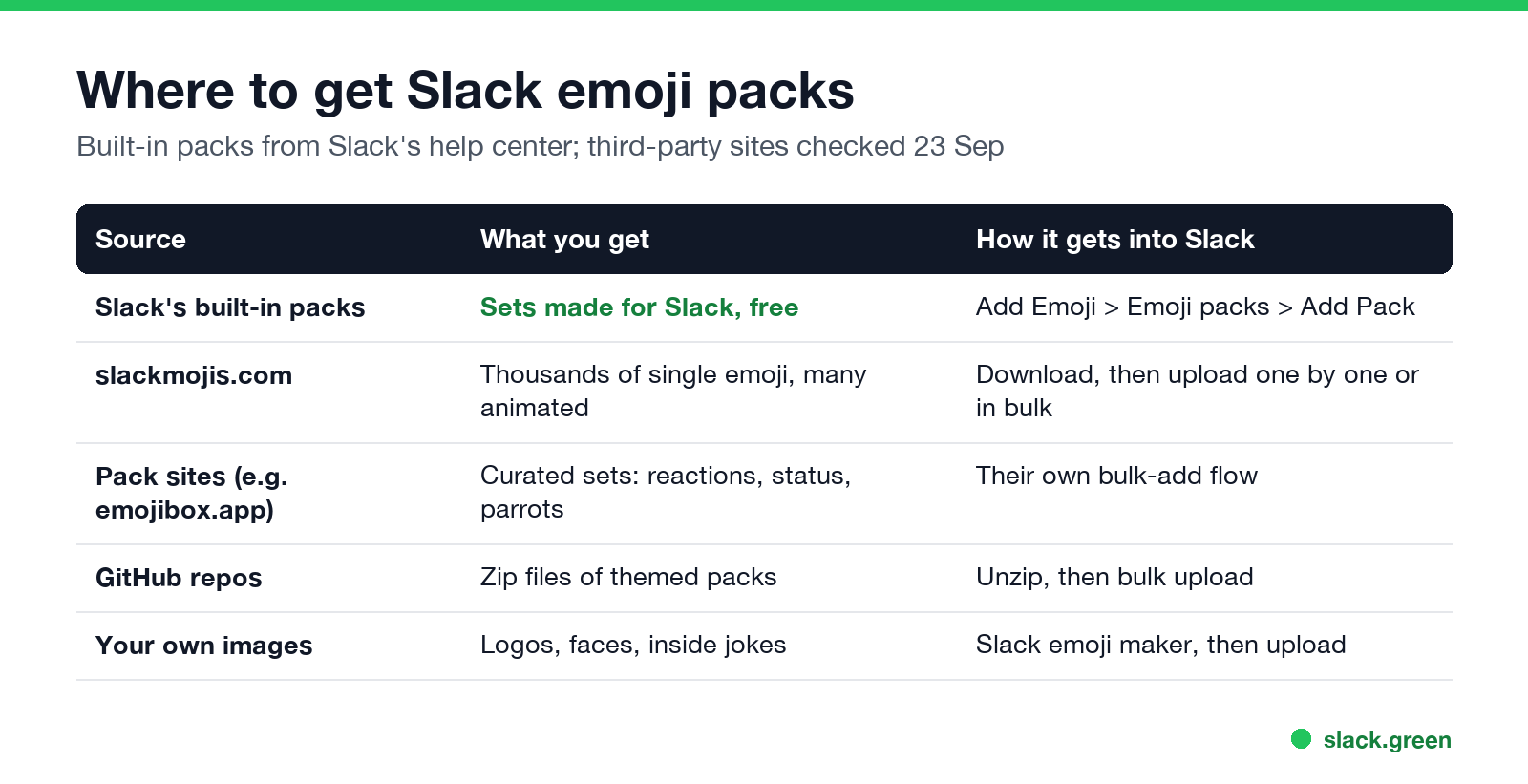
| Source | What you get | How it gets into Slack |
|---|---|---|
| Slack's built-in packs | Sets made for Slack | Add Emoji > Emoji packs > Add Pack |
| slackmojis.com | Thousands of single emoji, many animated, including party parrots and developer logos | Download, then upload |
| Pack sites such as emojibox.app | Curated sets: reactions, status, celebrations | Their own bulk-add flow |
| GitHub repositories | Zip files of themed packs | Unzip, then bulk upload |
| Your own images | Logos, faces, inside jokes | Make with the emoji maker, then upload |
Funny Slack emojis people add first: party parrots, :this:, :thisisfine:, :facepalm:, :+1: variants and animated "loading" spinners. Developer packs usually hold language and tool logos, :lgtm:, :shipit:, :merged: and CI status badges, which pair well with reactions in code review channels.
Check the licence of logos and faces before you add them to a work workspace. Custom emoji are visible to everyone in the workspace, and in Slack Connect channels people from other companies can see them too.
Bulk upload Slack emoji
Slack पर फिर कभी "away" न दिखें
क्लाउड-आधारित। कोई डाउनलोड नहीं। लैपटॉप बंद होने पर भी 24/7 काम करता है।
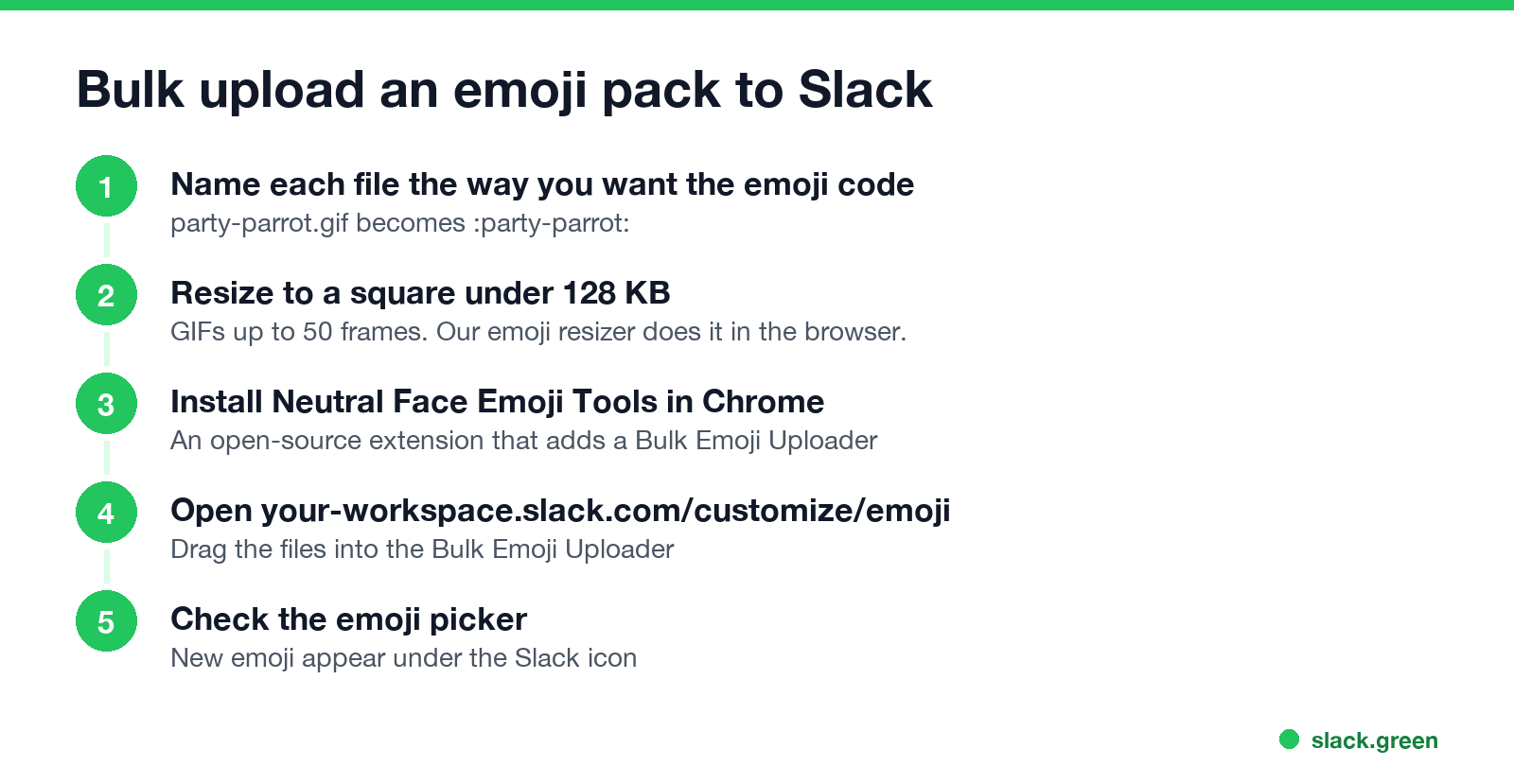
Slack's own upload takes one image at a time. For a whole pack, most teams use Neutral Face Emoji Tools, an open-source Chrome extension:
party-parrot.gif becomes :party-parrot:.https://your-workspace.slack.com/customize/emoji and drag the files into the new Bulk Emoji Uploader.The extension runs with your own Slack login, so it can only do what you are allowed to do. If your owner restricts emoji, bulk upload fails the same way single upload does.
Download every custom emoji in your workspace
To move a pack between workspaces, or keep a backup, Slack's Web API method emoji.list returns the name and image URL of every custom emoji. It needs a token with the emoji:read scope, from a Slack app you create:
import os, pathlib, requests

token = os.environ["SLACK_TOKEN"]   # bot or user token with emoji:read
out = pathlib.Path("slack-emoji")
out.mkdir(exist_ok=True)

emoji = requests.get("https://slack.com/api/emoji.list",
                     headers={"Authorization": f"Bearer {token}"}).json()["emoji"]

for name, url in emoji.items():
    if url.startswith("alias:"):   # aliases point at another emoji
        continue
    ext = url.rsplit(".", 1)[-1]
    (out / f"{name}.{ext}").write_bytes(requests.get(url).content)
    print("saved", name)
The files come out named after their codes, so the folder is ready to drag into the bulk uploader in another workspace. Aliases are skipped because they have no image of their own.
Slack emoji pack FAQ
Are Slack emoji packs free?
Yes. Slack's built-in packs cost nothing on any plan, and most third-party packs are free downloads.
How do I download a Slack emoji pack?
From a pack site, download the zip or single images. From your own workspace, use the emoji.list script above.
Can I bulk upload emoji to Slack?
Not with Slack's own upload. Use an extension such as Neutral Face Emoji Tools, which adds a bulk uploader to the customize page.
Why can't I add an emoji pack?
Your workspace owner has limited who can add custom emoji, or you are a guest. Ask an owner or admin.
How do I remove an emoji pack?
Owners and admins open Add Emoji > Emoji packs and remove it there. Single emoji in a pack cannot be removed. Other emoji: see how to delete a Slack emoji.
माउस हिलाना बंद करें।
सैकड़ों रिमोट वर्कर्स अब Slack स्टेटस की चिंता नहीं करते। एक बार सेटअप करें, हमेशा के लिए हरे रहें।
Related Articles
Slack Lists Tutorial: Create, Organize and Share a List
Slack lists are tables of tasks inside Slack, with fields, assignees, due dates, a board view and a comment thread on every item. How to create a list from scratch or a template, set up fields, turn it into a kanban board, add messages to it, share it, and what the plan limits are.
Slack Jira Integration: Setup, /jira Commands and Notifications
Install the Jira Cloud for Slack app, type /jira connect in a channel to send a Jira space's updates there, /jira notify for personal notifications as DMs, and create work items from any message with More actions. Every /jira command, Jira automation to Slack, and fixes when previews or notifications stop.
How to Create a Slack Workspace, on Desktop or Phone
Go to slack.com/get-started, enter your email, type the confirmation code, and click Create a Workspace. It is free to start, you become the Primary Owner, and it takes about five minutes. Steps for desktop, iPhone and Android, and what to set up next.