
Slack API Unread Messages: last_read, unread_count and conversations.mark, Tested
Slack's Web API has no single unread-messages call. We tested what conversations.info returns for channels and DMs, counted unreads from last_read, and moved the sidebar badge with conversations.mark.
Slack's Web API has no method that lists your unread messages. For a DM, conversations.info called with a user token returns unread_count and unread_count_display. For a channel it returns only last_read, the timestamp of the last message you have read; you count the messages after it with conversations.history. conversations.mark moves last_read in either direction, and Slack's sidebar badge followed it within 3 seconds in our test. We ran all of this on 5 October 2026 in our free-plan test workspace with a throwaway app, a bot token and a user token.
What conversations.info returns
Our bot posted three @mentions of the user in a channel the user had not opened, and replied in a DM. Then we called conversations.info on both with each token:
| Call | last_read | unread_count | unread_count_display |
|---|---|---|---|
| User token, channel | 0000000000.000000 | not returned | not returned |
| Bot token, same channel | the bot's own join ts | not returned | not returned |
| User token, DM with the bot | 1791164277.091689 | 1 | 1 |
| Bot token, same DM | 0000000000.000000 | 16 | 2 |
What the table says:
- • Unread counts only come back for DMs. For channels you get
last_readand nothing else. - • Each token reads its own position. The bot's
last_readsays nothing about the user's. - •
0000000000.000000means never opened. The user had created the channel but never viewed it. - •
unread_countcounts every message afterlast_read, your own included: the bot's DM count of 16 was mostly its own messages.unread_count_displaywas 2, which matches the two messages the user sent. Useunread_count_displayfor the number a person would expect. - • The user's DM count of 1 came from a bot reply inside a thread, so thread replies count there.
The scopes were channels:read, groups:read, im:read and mpim:read for conversations.info, plus the matching :history scopes to read messages. The conversations.info test has the rest of its fields.
Count unread messages from last_read
This script lists every conversation with unread messages for the user who owns the token. We ran it with slack_sdk and a user token:
import os
from slack_sdk import WebClient
from slack_sdk.errors import SlackApiError

client = WebClient(token=os.environ["SLACK_USER_TOKEN"])  # xoxp- user token
me = client.auth_test()["user_id"]

convs = client.users_conversations(types="public_channel,private_channel,im", limit=200)["channels"]
for c in convs:
    try:
        info = client.conversations_info(channel=c["id"])["channel"]
    except SlackApiError as e:  # DMs with deleted bots: channel_not_found
        print(f"{c['id']:28} skipped: {e.response['error']}")
        continue
    last_read = info.get("last_read") or "0"
    if set(last_read) <= {"0", "."}:  # never opened: "0000000000.000000" fails as oldest
        last_read = "0"
    msgs = client.conversations_history(channel=c["id"], oldest=last_read, limit=200)["messages"]
    unread = [m for m in msgs if m.get("user") != me and m.get("subtype") not in ("channel_join", "channel_leave")]
    mentions = [m for m in unread if f"<@{me}>" in m.get("text", "")]
    if unread:
        name = info.get("name") or "DM " + info.get("user", "")
        print(f"{name:28} last_read={last_read}  unread={len(unread):3}  mentions={len(mentions)}  api_unread_count={info.get('unread_count')}")
Output:
sglab-1005-unread            last_read=1791162215.204419  unread=  3  mentions=3  api_unread_count=None
sglab-1005-wh-arch           last_read=1791162399.724609  unread=  2  mentions=0  api_unread_count=None
sglab-1005-jump              last_read=1791162214.797289  unread=181  mentions=0  api_unread_count=None
DM USLACK                    last_read=1782657530.318529  unread=  7  mentions=0  api_unread_count=7
D0B7EEAMNH4                  skipped: channel_not_found
The two guards are there because the first version crashed twice. Passing 0000000000.000000 as oldest returned invalid_ts_oldest, and users.conversations listed a DM with a deleted bot that conversations.info then rejected with channel_not_found. For the DM with Slackbot, our count of 7 matched the API's unread_count.
Two limits of this method. conversations.history returns only top-level messages, so thread replies need conversations.replies. And past 200 unread messages you have to page with cursor; the busy channel above was still growing while a bot posted into it.
Never appear "away" on Slack again
Cloud-based. No downloads. Works 24/7 even when your laptop is off.
Mark messages as read, or unread, with conversations.mark
conversations.mark sets last_read to the ts you pass. With the user token we moved it three times in the channel with three mentions, with Slack web open on a different channel:
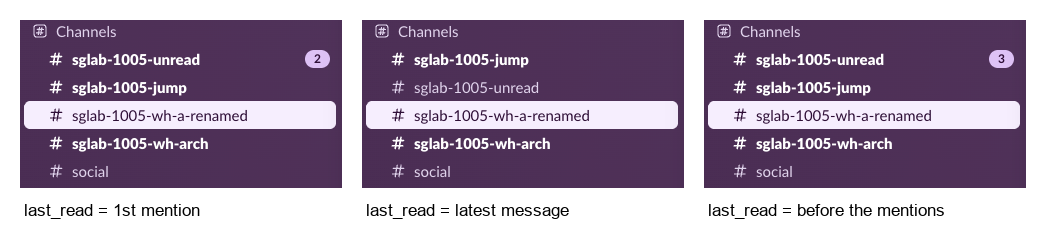
The badge changed within 3 seconds each time, without a reload. Setting an older ts works as "mark as unread", which Slack's own menu also offers. Slack's internal counts for the web app said the same thing: mention_count 2, then 0, then 3.
A bot token can call conversations.mark too and gets {"ok": true}, but it only moves the bot's own position. The user's badge did not change. To clear what a person sees, the call needs that person's user token with channels:write (groups:write, im:write or mpim:write for the other conversation types).
users.counts and client.counts
Older answers point to users.counts. It still answered for our user, but the test channel showed unread_count: 0 and mention_count: 0 while the sidebar showed 3 mentions. The web app reads a different method, client.counts, which returned mention_count: 3 and has_unreads: true for the same channel. Neither is in Slack's documented API, so do not build on them; last_read plus conversations.history is the documented path.
FAQ
Can a bot see whether a user has read a message?
No. In our test a bot token's conversations.info returned the bot's own last_read, never the user's. Slack also has no read receipts; see does Slack have read receipts.
How do I get all unread messages at once, like the All unreads view?
There is no single call. Loop over your conversations as in the script above. The view itself is covered in Slack All Unreads.
Which token types does this need?
A user token (xoxp-) for anything about a person's unread state. Token types are explained in Slack bot token.
Stop Jiggling Your Mouse.
Join hundreds of remote workers who never worry about their Slack status. Set it up once, stay green forever.
Related Articles
Slack Jump to Date: Where the Menu Is and What Each Option Does
Slack's Jump to date menu hides in the date divider above messages. We tested it in a 500-message channel and an older channel: which options appear, how far back the calendar goes, and how to do it by API.
Slack Themes: Custom Theme Strings That Import, Tested
Slack's custom theme now takes 4 colors. We pasted old 8-color strings, Slack's own Share output and our own themes into Import, and logged which ones Slack accepted.
Slack agent_view vs assistant_view: Both Tested Side by Side
We switched one Slack app from assistant_view to agent_view and recorded what the user sees, which events arrive, and which status and title calls still work.