
Slack vs Discord: Which One for Work, Teams and Communities
Slack is built for companies: business apps, admin controls and shared channels with other firms, for $7.25 a user a month on Pro. Discord is free for everyone with unlimited history and group voice, but has no SSO, retention or compliance tools. Prices, limits, calls and status compared.
Pick Slack for a company and Discord for a community. Slack is built for work: 2,600+ business apps, shared channels with other companies, and admin tools such as retention settings, data exports and single sign-on on paid plans. It costs $7.25 a user a month on Pro, paid yearly. Discord is free for everyone, keeps your full message history, and lets groups drop into voice channels without paying. It has no single sign-on, retention settings or compliance exports, which is why most companies do not run on it.
Both apps show whether you are around. Slack turns your dot grey 10 minutes after your last input in the Slack window; Discord switches you to Idle after several minutes without input. Slack Green keeps your Slack dot green during the working hours you set, from the cloud.
Slack vs Discord, side by side
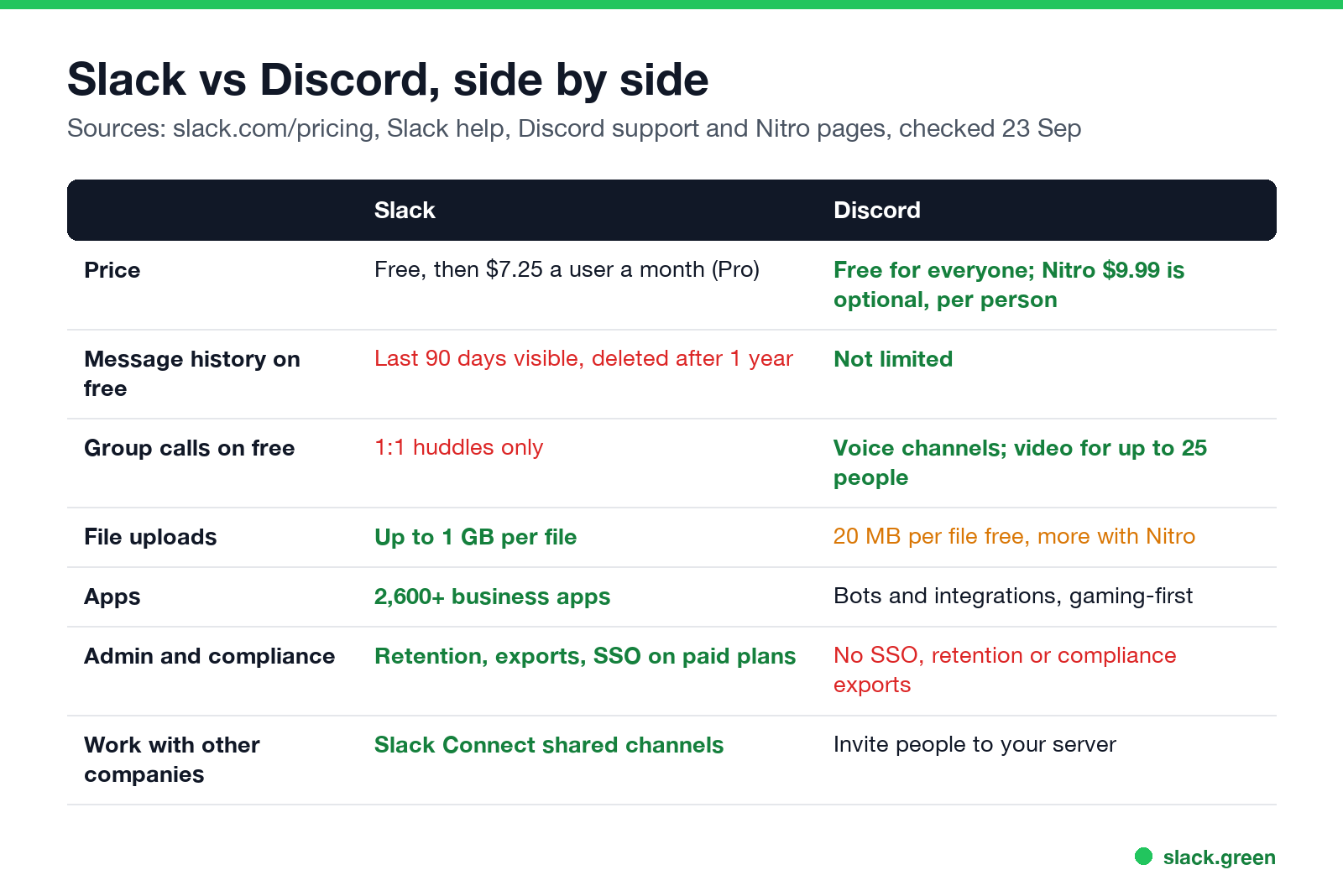
| Slack | Discord | |
|---|---|---|
| Price | Free; Pro $7.25 a user a month paid yearly; Business+ $15 | Free; Nitro $9.99 a month is optional and per person |
| Message history, free | Last 90 days visible, data older than 1 year deleted | Not limited |
| Group calls, free | 1:1 huddles only | Voice channels; up to 25 people in a server video chat |
| File uploads | Up to 1 GB per file | 20 MB per file free, more with Nitro |
| Apps | 2,600+ in the Slack Marketplace | Bots and integrations, mostly for communities and gaming |
| Admin and compliance | Retention settings, data exports, SSO and audit logs by plan | No SSO, retention settings or compliance exports |
| Working with other companies | Slack Connect shared channels | Invite outside people into your server |
Sources: slack.com/pricing and Slack's help center; Discord's support articles on file attachments and video calls, and third-party price listings for Nitro. Checked on 23 September.
Discord vs Slack free tier
Discord's free tier is more generous. It keeps all your messages, allows group voice and video, and has no app limit. Nitro only adds personal perks such as bigger uploads and custom emoji; nobody on your team has to pay for the server to work.
Slack's free plan shows only the last 90 days of messages and files, deletes data older than a year, allows 10 apps, and limits huddles to two people. The full list is in Slack free plan limits. If you want a work tool with full free history, see free Slack alternatives.
Is Discord better than Slack for business?
Slack에서 다시는 '자리 비움'으로 표시되지 마세요
클라우드 기반. 다운로드 불필요. 노트북이 꺼져 있어도 24시간 작동.
For most companies, no. Four things hold Discord back at work:
- • No company controls. No SAML single sign-on, no SCIM provisioning, no retention policies, no data export of private channels and DMs for admins. A company cannot remove a former employee's access through its identity provider.
- • Personal accounts. People join with their own Discord account, often the one they use for games, with their friends list next to work.
- • Fewer work integrations. Jira, Salesforce, Google Drive and GitHub all have deep Slack apps. On Discord, most integrations are bots and webhooks.
- • No shared channels between companies. Slack Connect links two companies' workspaces; on Discord, outsiders join your server.
Discord makes sense for small teams that are really communities: open-source projects, game studios that talk to players, creators, and startups that care more about free voice rooms than about compliance.
Slack vs Discord for community
For a public or semi-public community, Discord usually wins. It is free at any size, keeps history, has roles and permissions built for large groups, stage and voice channels, and forum channels. Many members already have an account. Slack communities hit the 90-day history limit on the free plan, and paid Slack costs per member, which rarely makes sense for a community.
Slack still suits professional communities where members use Slack at work all day and would rather not open another app.
Status and presence: Slack vs Discord
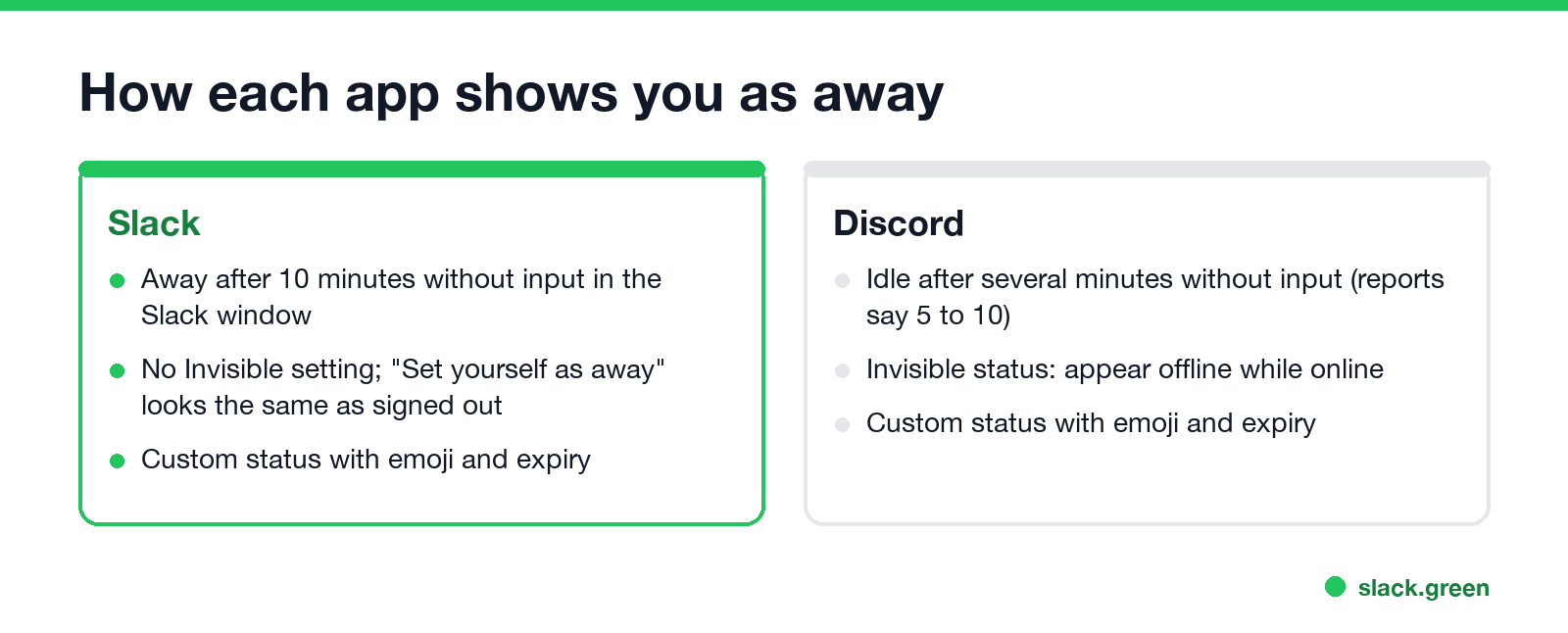
| Slack | Discord | |
|---|---|---|
| Goes idle | After 10 minutes without input in the Slack window | After several minutes without input (reports say 5 to 10) |
| Appear offline | No invisible mode; "Set yourself as away" looks the same as signed out | Invisible status |
| Custom status | Emoji, text and an expiry time | Emoji, text and an expiry time |
On Slack the away timer is fixed and you cannot change it; see can you change Slack's away time. How to look offline is in can you appear offline on Slack.
Slack vs Discord vs Teams
Slack에서 다시는 '자리 비움'으로 표시되지 마세요
클라우드 기반. 다운로드 불필요. 노트북이 꺼져 있어도 24시간 작동.
FAQ
What is the difference between Discord and Slack?
Slack is a paid work tool with business apps and admin controls. Discord is a free community app with voice channels, full history and personal accounts.
Is Discord better than Slack?
For communities, often yes. For companies, usually no, because Discord has no single sign-on, retention settings or compliance exports.
Is Discord free for teams?
Yes. Servers are free at any size. Nitro is an optional personal subscription.
Can I use Discord instead of Slack at work?
You can, and some startups do. You give up SSO, admin exports, retention settings and most business integrations.
Did Discord copy Slack?
They grew from different places. Slack launched in 2014 as team chat for companies; Discord launched in 2015 as voice and text chat for gamers. Their channel lists look alike, but the products target different users.
Related Articles
Slack Lists Tutorial: Create, Organize and Share a List
Slack lists are tables of tasks inside Slack, with fields, assignees, due dates, a board view and a comment thread on every item. How to create a list from scratch or a template, set up fields, turn it into a kanban board, add messages to it, share it, and what the plan limits are.
Slack Jira Integration: Setup, /jira Commands and Notifications
Install the Jira Cloud for Slack app, type /jira connect in a channel to send a Jira space's updates there, /jira notify for personal notifications as DMs, and create work items from any message with More actions. Every /jira command, Jira automation to Slack, and fixes when previews or notifications stop.
How to Create a Slack Workspace, on Desktop or Phone
Go to slack.com/get-started, enter your email, type the confirmation code, and click Create a Workspace. It is free to start, you become the Primary Owner, and it takes about five minutes. Steps for desktop, iPhone and Android, and what to set up next.