
Does Slack Notify Screenshots? No, and What It Can Log Instead
No. Slack does not tell anyone when you screenshot a message, copy text, or save an image, on desktop, iPhone, or Android. What Enterprise admins can block and log instead.
No. Slack does not notify anyone when you take a screenshot of a message, a DM, or a channel. That is true on Mac, Windows, the browser, iPhone, and Android. Slack also sends no alert when you copy message text or save an image someone posted.
A screenshot happens in your operating system, not in Slack, so Slack has nothing to report. Two exceptions are worth knowing: some Enterprise orgs block screenshots on Android, and Enterprise audit logs record file downloads. Both are below, with what your admin can and cannot see.
We build Slack Green, which keeps your Slack status green from our servers, so we read Slack's admin and API docs closely. Every claim on this page links to the Slack page it comes from.
Does Slack notify when you screenshot?
No. Slack has no screenshot alert of any kind. Snapchat and Instagram DMs tell the sender when you capture a disappearing message. Slack does not, in DMs, private channels, public channels, or threads.
The r/Slack thread that ranks first for this question comes from someone whose phone took screenshots by accident in the middle of a DM. The top answer is one line: "No it does not." Years of replies from people in the same spot agree.
The reason is technical. The screenshot key belongs to macOS, Windows, iOS, or Android. The system saves the image before any app is involved, and it does not tell the app. Slack sees your screen as little as it sees your mouse outside its window, as we tested in does Slack track mouse movement.
What Slack tells anyone, action by action
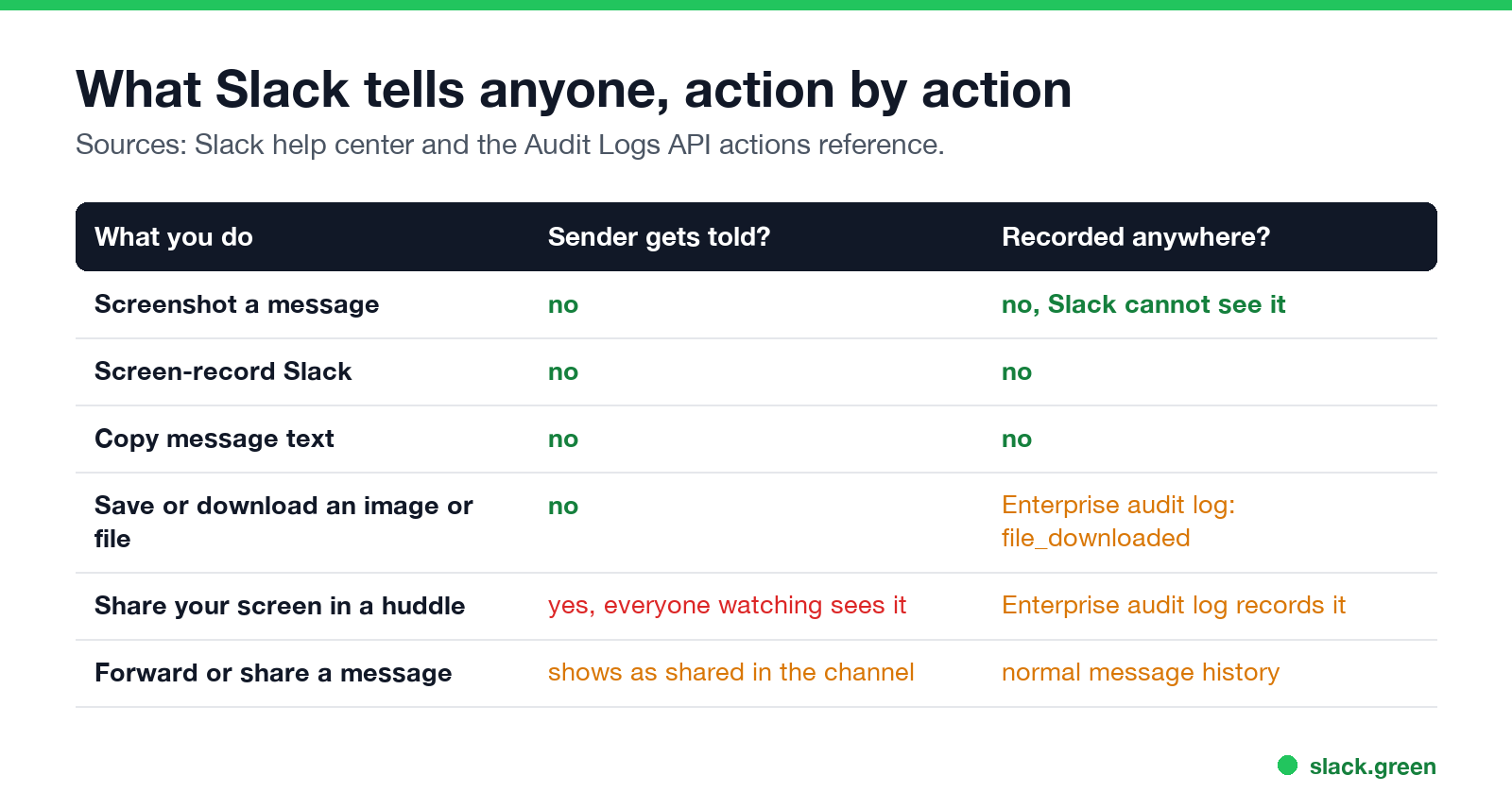
| What you do | Does the sender get told? | Is it recorded anywhere? |
|---|---|---|
| Screenshot a message | No | No. Slack cannot see it. |
| Screen-record Slack | No | No |
| Copy message text | No | No |
| Save or download an image or file | No | Enterprise audit logs record file_downloaded |
| Share your screen in a huddle | Everyone in the huddle sees it | Enterprise audit logs record it |
| Share a message to another channel | It appears where you shared it | Normal message history |
Slack's Audit Logs API lists file_downloaded as "a file was downloaded or viewed within Slack". It fires on a view as well as a download, so it cannot tell a saved image from a glance. Audit logs exist only on Enterprise plans, and only owners and admins can read them. They are not sent to the person who posted the file.
Does Slack notify screenshots on iPhone or Android?
Больше никогда не показывать "отошёл" в Slack
Облачное решение. Без загрузок. Работает 24/7 даже при выключенном ноутбуке.
No, on both. The phone apps send no alert.
One setting changes what you can do on Android. In an Enterprise org, owners can require a mobile passcode. Slack's help page for that setting says: "Members and guests won't be able to take screenshots on Android devices while viewing any workspaces in your Enterprise org. The ability to prevent screenshots on iOS devices isn't supported at this time."
So on a locked-down Enterprise org:
- • Android: Android blocks the screenshot. Nobody is notified that you tried.
- • iPhone: the screenshot works as normal.
- • Monitoring software on a work laptop. Some employers install tools that take periodic screenshots of the whole screen. That happens outside Slack, and Slack has no part in it. We cover what Slack itself records in can Slack be used to monitor employees.
- • Your own screen share. In a huddle or a video call, everyone watching sees what you show. Slack does not record huddles; what it keeps is in are Slack huddles recorded.
- • The other side. Anyone can screenshot what you post, and you will not know. Treat any Slack message as something that can be copied.
On Free, Pro, and Business+ plans this setting does not exist, and screenshots work on every device.
Where a screenshot can still be seen
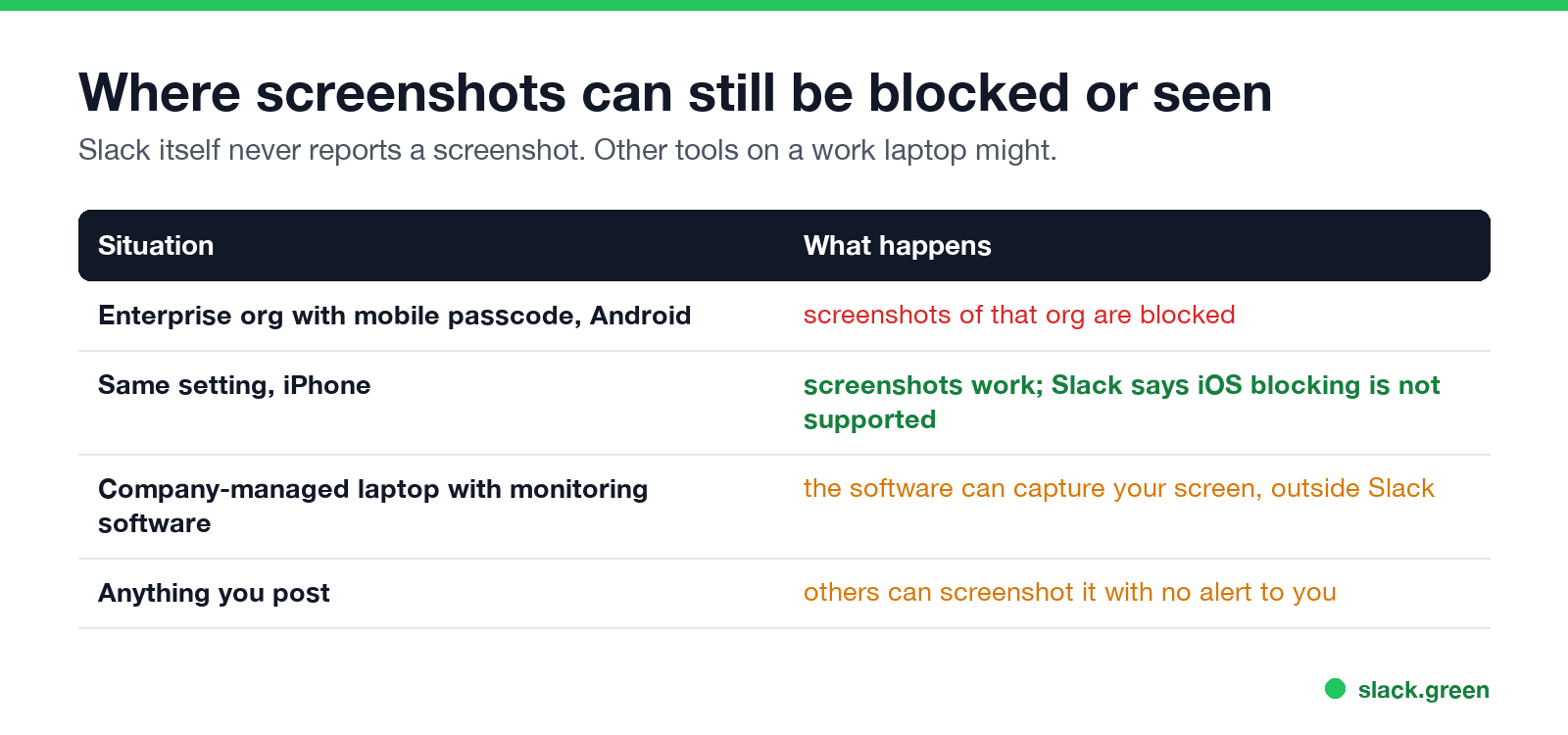
Slack does not report screenshots. Other tools can still see what is on your screen:
What your admin can see instead
Admins do not see screenshots, but they can see a lot of what you write. On paid plans, owners can export messages under set conditions, and Enterprise orgs can keep and search all messages. The rules per plan are in can Slack admins see your DMs.
What admins cannot see is when you were last online. Slack keeps no last-seen time, as covered in does Slack show last seen. Your dot shows only whether you are active right now. That dot is also what Slack Green works on: it keeps you green on a schedule, with no software on your laptop. If you are asking whether your employer would notice, will I get caught using Slack Green goes through each signal.
FAQ
Больше никогда не показывать "отошёл" в Slack
Облачное решение. Без загрузок. Работает 24/7 даже при выключенном ноутбуке.
Does Slack notify when you screenshot a DM?
No. DMs, group DMs, and channels all work the same way. Nobody gets an alert.
Does Slack notify if you save an image?
No. The person who posted it is not told. On Enterprise plans, the audit log records a file_downloaded event, which admins can read.
Does Slack notify when you copy a message?
No. Copying text sends no alert and is not logged.
Does Slack notify when you leave a channel or edit a message?
No one is pinged, but Slack posts a "left" line and marks edits with (edited). Every case is in does Slack notify when you leave a channel.
Can my boss see my Slack screenshots?
Not through Slack. Slack never learns that you took one. Monitoring software on a company laptop is a separate tool that can capture your screen.
Does Slack show when someone reads my message?
No. Slack has no read receipts. See does Slack have read receipts.
Can Slack block screenshots?
Only on Android, and only in Enterprise orgs that require a mobile passcode. Slack says iOS blocking is not supported.
Хватит Двигать Мышкой.
Сотни удалённых работников больше не беспокоятся о статусе Slack. Настройте один раз, оставайтесь зелёными навсегда.
Related Articles
Slack User Groups: How to Create, Mention and Manage Them
A Slack user group is a named list of people with one @handle, like @designers, that notifies all of them and can add them to up to 100 default channels. How to create one, who can, how to mention it, and how it differs from a channel.
How to Contact Slack Support: Form, Chat, Email and /feedback
To contact Slack support, open slack.com/help/requests/new and click Contact support, or use Help > Contact us inside Slack, or type /feedback in any message box. Email feedback@slack.com if you cannot sign in. Slack lists no support phone line. Response times by plan and what to include.
How to Make a Private Slack Channel Public, and Who Can
Open the channel, click its name, go to Settings, and choose Change to a public channel. By default only Workspace Owners, Org Owners and Org Admins can do it. The whole history and every file become visible to the workspace.