
Does Slack Notify When You Leave a Channel? Leave, Edit, Delete and More
Slack does not ping anyone when you leave a channel, but it posts a line saying you left, unless an admin turned join and leave messages off. Edits show (edited), deletes leave no alert, forwards do not tell the author, and removing someone does notify them. What each action shows, and how to leave quietly.
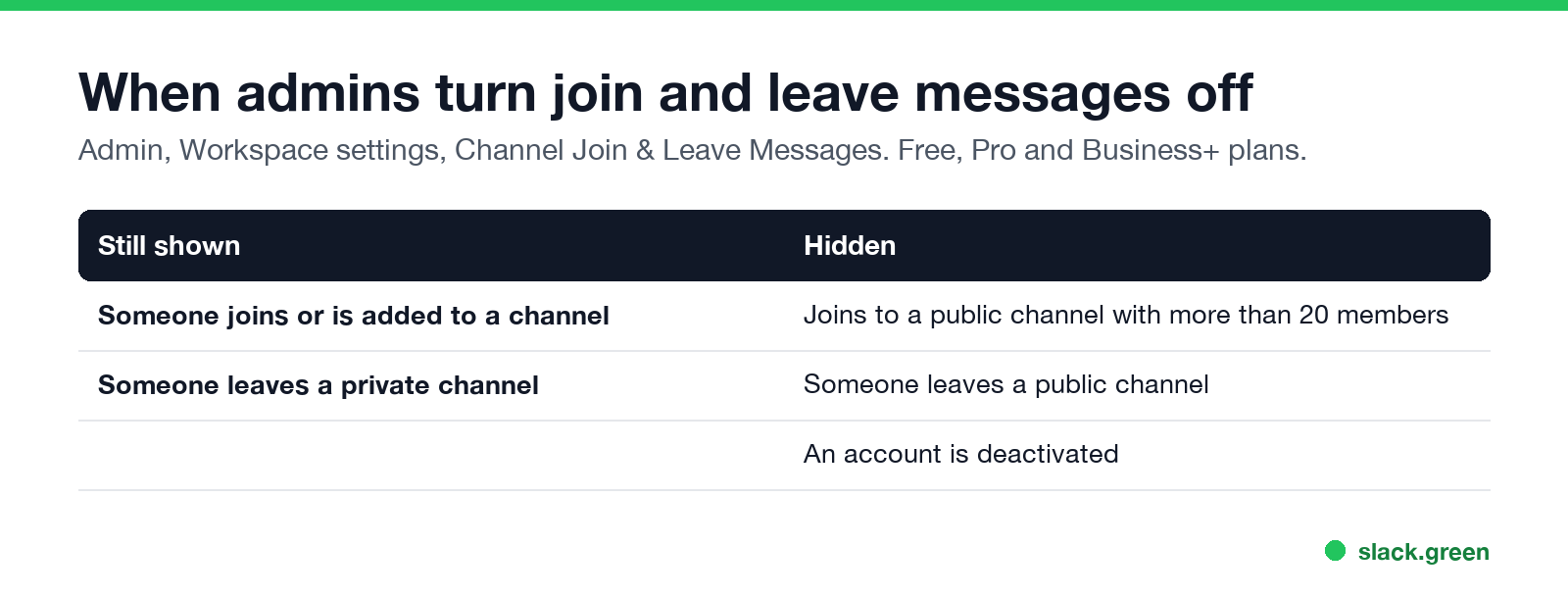
Slack does not send anyone a notification when you leave a channel, but it does post a line in the channel saying you left, and anyone who scrolls past sees it. Workspace owners and admins can turn these join and leave messages off. Even then, Slack still shows when someone leaves a private channel; leaves from public channels are hidden. You cannot turn the message off yourself, so if you want to go quietly from a public channel, mute it instead of leaving. The other actions people ask about: an edited message shows (edited), a deleted message sends no alert, forwarding does not tell the original author, and removing someone from a channel does notify that person.
Your presence is the thing Slack does broadcast all day: your dot turns grey 10 minutes after your last input in the Slack window. Slack Green keeps it green during the working hours you set, from the cloud.
Does Slack notify people? Action by action
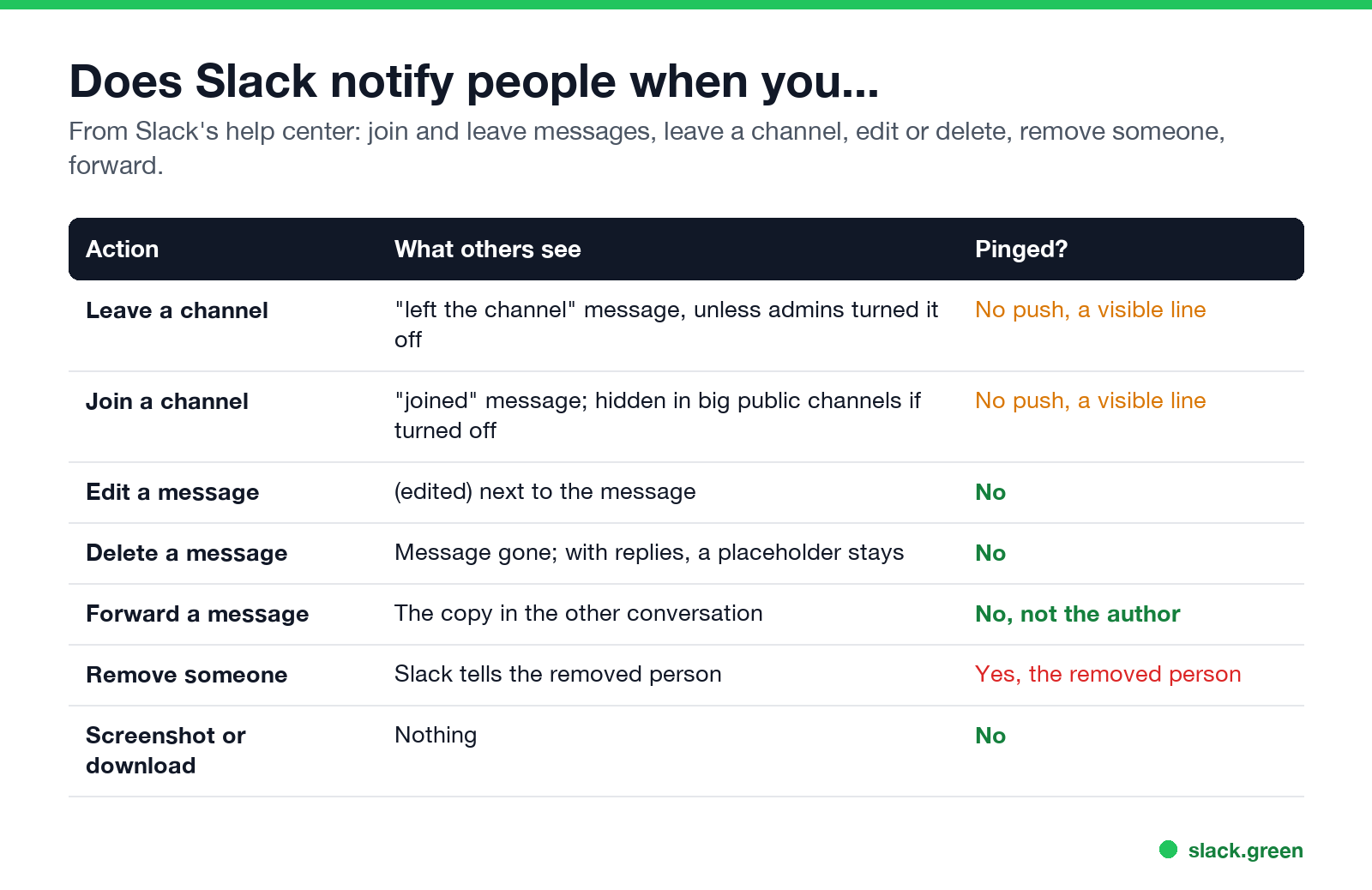
| Action | What others see | Does anyone get a notification? |
|---|---|---|
| Leave a channel | A "left" line in the channel, unless admins turned it off | No |
| Join a channel | A "joined" line, hidden in big public channels if admins turned it off | No |
| Edit a message | (edited) next to the message | No |
| Delete a message | The message disappears; if it had thread replies, a placeholder stays | No |
| Forward a message | The forwarded copy, in the conversation you chose | No, not the author |
| Remove someone from a channel | Slack tells the removed person | Yes, the removed person |
| Screenshot, copy or download | Nothing | No |
Does Slack notify when you leave a channel?
Nobody gets a ping, a badge or an email. What Slack does is post a system message in the channel, "name left the channel" or similar, as its help article Manage join and leave messages describes: "By default, messages are shown when someone joins, is added to, or leaves a channel." In a busy channel, few people will notice. In a small private channel, everyone will.
What you lose when you leave, from Slack's Leave a channel page:
- • A private channel's messages and files disappear from your search results, and you need a member to add you back.
- • You cannot leave #general (the channel everyone is in).
- • Single-channel guests cannot leave their channel.
To leave, click the channel name in the header, then Leave channel. The command /leave does the same. To clear out many at once, open Manage my sidebar from Home and choose Leave inactive channels.
How to leave a Slack channel without anyone noticing
You have three options, and only one of them is fully silent:
/mute. It drops out of your unreads and stops notifying you, and nothing is posted. You stay a member, so you can still find its messages.Does Slack notify when you edit a message?
No one is notified. The message shows (edited) next to it, so readers can tell it changed, but Slack does not show the earlier text. If you edit a message to add an @mention, do not rely on it to reach that person; send a new message with the mention. Owners and admins can stop members from editing messages at all.
For a typo you spot right away, Slack's desktop app can unsend: within 15 seconds of sending, with the message box empty and the conversation still open, press Cmd+Z or Ctrl+Z and confirm. The message comes back into the box for you to fix. Steps are in Slack's Edit or delete messages.
Does Slack notify when you delete a message?
No. The message disappears for everyone. If it had thread replies, a small placeholder stays so the replies still make sense. Two things are outside your control: a push notification or email already sent may still show the original text on someone's phone or inbox, and people may have read it before you deleted it. Slack calls deleting permanent. Whether admins can still see it depends on the plan and retention settings; see can Slack see deleted messages.
Does Slack notify when you forward a message?
No. Forwarding (Forward message on hover, or Copy link and paste) posts the message into another channel or DM with your optional note. Slack's forwarding help page describes no notice to the person who wrote it. They will see it only if they are in the conversation you forwarded to. If you paste a link to a message from a private channel or DM, Slack asks whether to Show message or Only show link.
Does Slack notify when you remove someone from a channel?
Yes. Slack's Remove someone from a channel page says: "When you remove someone from a channel, Slack will notify that person." By default, owners and admins can remove people from public channels, and members can remove people from private channels. Nobody can be removed from #general.
Does Slack notify when you join a channel?
Members get no notification, but a "joined" line appears in the channel. If admins turned join and leave messages off, joins to public channels with more than 20 members are hidden; joins to smaller or private channels still show.
What else Slack does and does not show
FAQ
Can people see that I left a Slack channel?
Yes, through the "left" line in the channel, unless an admin turned join and leave messages off and the channel is public.
Can you leave a Slack channel silently?
Not on your own. Mute it instead, which posts nothing.
Does Slack tell someone if I delete my message in a DM?
No. The message disappears. A notification already delivered to their phone may still show it.
Does the channel owner get notified when I leave?
No. Channel managers get no separate alert. They see the same "left" line as everyone else.
Does forwarding a DM tell the sender?
No. The sender sees it only if they are in the conversation you forwarded it to.
Related Articles
Slack Lists Tutorial: Create, Organize and Share a List
Slack lists are tables of tasks inside Slack, with fields, assignees, due dates, a board view and a comment thread on every item. How to create a list from scratch or a template, set up fields, turn it into a kanban board, add messages to it, share it, and what the plan limits are.
Slack Jira Integration: Setup, /jira Commands and Notifications
Install the Jira Cloud for Slack app, type /jira connect in a channel to send a Jira space's updates there, /jira notify for personal notifications as DMs, and create work items from any message with More actions. Every /jira command, Jira automation to Slack, and fixes when previews or notifications stop.
How to Create a Slack Workspace, on Desktop or Phone
Go to slack.com/get-started, enter your email, type the confirmation code, and click Create a Workspace. It is free to start, you become the Primary Owner, and it takes about five minutes. Steps for desktop, iPhone and Android, and what to set up next.