
Send a Slack Message From PowerShell: Webhook, Bot Token and Files
Working PowerShell for Slack: Invoke-RestMethod to a webhook, chat.postMessage with a bot token, Block Kit, and a file upload. Every script was run in PowerShell 7.6.6 against a real Slack workspace, with its output.
To send a Slack message from PowerShell, POST a JSON body to an incoming webhook URL with Invoke-RestMethod. Three lines do it, and you need no module. For more control (any channel, Block Kit, files, replies in threads) call chat.postMessage with a bot token in the Authorization header. On 6 October 2026 we ran every script on this page in PowerShell 7.6.6 on macOS against our free-plan test workspace. The output under each script is what we got. We had no Windows machine, so Windows PowerShell 5.1 was not run; the section on special characters shows the bytes it sends and what Slack makes of them.
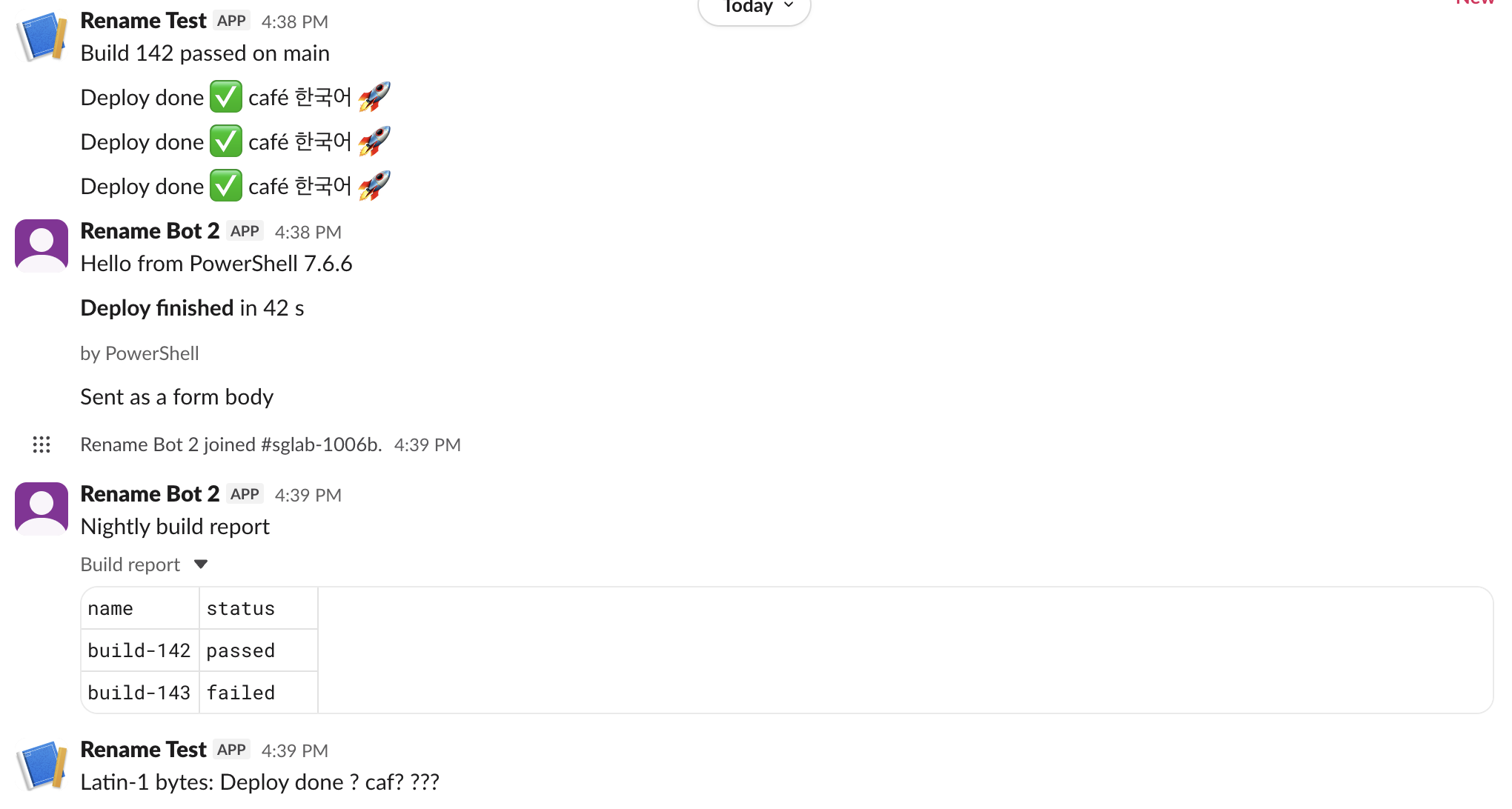
Send to an incoming webhook
Create the webhook first: make a Slack app, turn on Incoming Webhooks and pick a channel. Our webhook guide shows each screen. Keep the URL in an environment variable or a secret store. Anyone who has it can post to your channel.
$body = @{ text = "Build 142 passed on main" } | ConvertTo-Json
$r = Invoke-RestMethod -Uri $env:SLACK_WEBHOOK_URL -Method Post -ContentType 'application/json' -Body $body
"Response: $r"
$r.GetType().Name
Output:
Response: ok
String
A webhook answers with the plain text ok, not JSON, so $r is a string. Webhook messages appear under the app name. In the screenshot above they show as "Rename Test", while the chat.postMessage messages show the bot's name, "Rename Bot 2". A webhook always posts to the channel it was made for.
Send with a bot token and chat.postMessage
Give your app the chat:write scope, install it, and copy the xoxb- token from OAuth & Permissions. Add chat:write.public if the bot should post in public channels it has not joined.
$headers = @{ Authorization = "Bearer $env:SLACK_BOT_TOKEN" }
$body = @{ channel = $env:SLACK_CHANNEL; text = "Hello from PowerShell $($PSVersionTable.PSVersion)" } | ConvertTo-Json
$r = Invoke-RestMethod -Uri 'https://slack.com/api/chat.postMessage' -Method Post `
  -Headers $headers -ContentType 'application/json; charset=utf-8' -Body $body
"ok=$($r.ok) channel=$($r.channel) ts=$($r.ts) error=$($r.error)"
Output:
ok=True channel=C0C6UGBU151 ts=1791272338.444699Use a channel ID such as C0C6UGBU151, not a name; this guide shows where to find it. Keep ts: pass it back as thread_ts to reply in a thread, or to chat.update to edit the message. A plain form body also worked. -Body @{ channel = ...; text = ... } with no ConvertTo-Json and no content type returned ok=True, because the Web API accepts form fields. That only works for flat fields; blocks and attachments need JSON.
Block Kit: the ConvertTo-Json depth trap
ConvertTo-Json stops at a depth of 2 by default. Block Kit payloads are deeper, so the blocks get cut off. This is the payload we sent:
$payload = @{
  channel = $env:SLACK_CHANNEL
  text    = "Deploy report"
  blocks  = @(
    @{ type = "section"; text = @{ type = "mrkdwn"; text = "*Deploy finished* in 42 s" } },
    @{ type = "context"; elements = @( @{ type = "mrkdwn"; text = "by PowerShell" } ) }
  )
}
$json2 = $payload | ConvertTo-Json            # default depth
$json10 = $payload | ConvertTo-Json -Depth 10 # deep enough
With the default depth, PowerShell printed a warning and wrote the inner objects as the text System.Collections.Hashtable:
WARNING: Resulting JSON is truncated as serialization has exceeded the set depth of 2.
{
  "text": "Deploy report",
  "blocks": [
    {
      "type": "section",
      "text": "System.Collections.Hashtable"
    },
    {
      "type": "context",
      "elements": "System.Collections.Hashtable"
    }
  ],
  "channel": "C0C6UGBU151"
}
Slack rejected it:
ok=False error=invalid_blocks [ERROR] failed to match all allowed schemas [json-pointer:/blocks/0/text] | [ERROR] must provide an object [json-pointer:/blocks/0/text] | [ERROR] must provide an array [json-pointer:/blocks/1/elements]With -Depth 10 the same payload posted with ok=True. If you see System.Collections.Hashtable in an error or in a message, add -Depth. Our invalid_blocks guide lists the other causes of that error.
Never appear "away" on Slack again
Cloud-based. No downloads. Works 24/7 even when your laptop is off.
Upload a file
files.upload no longer works (details). The new way takes three calls. The bot needs files:write and has to be in the channel.
$headers = @{ Authorization = "Bearer $env:SLACK_BOT_TOKEN" }
$path = Join-Path $PSScriptRoot 'report.csv'
"name,status`nbuild-142,passed`nbuild-143,failed" | Set-Content -Path $path -NoNewline
$size = (Get-Item $path).Length
# 1. ask for an upload URL (form fields, not JSON)
$u = Invoke-RestMethod -Uri 'https://slack.com/api/files.getUploadURLExternal' -Method Post -Headers $headers `
  -Body @{ filename = 'report.csv'; length = $size }
"step1 ok=$($u.ok) file_id=$($u.file_id) error=$($u.error)"
# 2. send the bytes to that URL
$up = Invoke-WebRequest -Uri $u.upload_url -Method Post -InFile $path -ContentType 'application/octet-stream'
"step2 status=$($up.StatusCode) body=$($up.Content)"
# 3. finish and share in the channel
$done = @{ files = @(@{ id = $u.file_id; title = 'Build report' }); channel_id = $env:SLACK_CHANNEL; initial_comment = 'Nightly build report' } | ConvertTo-Json -Depth 5
$c = Invoke-RestMethod -Uri 'https://slack.com/api/files.completeUploadExternal' -Method Post -Headers $headers -ContentType 'application/json; charset=utf-8' -Body $done
"step3 ok=$($c.ok) files=$($c.files.Count) error=$($c.error)"
The first run, before the bot had joined the channel:
step1 ok=True file_id=F0C6VN0C6J1 error=
step2 status=200 body=OK - 45
step3 ok=False files=0 error=not_in_channel
Steps 1 and 2 pass and only the last call fails, so the file is uploaded but never shared. chat:write.public does not help here. After we added the bot to the channel (conversations.join), the same script returned step3 ok=True files=1, and Slack showed the CSV as a table. The not_in_channel guide covers the ways to add a bot.
Errors: when Invoke-RestMethod throws and when it does not
The Web API returns HTTP 200 even when the call fails, so Invoke-RestMethod does not throw. Always check $r.ok. A webhook returns a real HTTP error, so there you need try/catch.
| What we sent | PowerShell result |
|---|---|
chat.postMessage with a wrong token | no exception, ok=False error=invalid_auth |
chat.postMessage to a channel ID that does not exist | no exception, ok=False error=channel_not_found |
Webhook with {"text":""} | HttpResponseException, status 400, body no_text |
Webhook with a hashtable body and no ConvertTo-Json | HttpResponseException, status 400, body invalid_payload |
This is how we read the status and the body in the catch block:
try { Invoke-RestMethod -Uri $env:SLACK_WEBHOOK_URL -Method Post -ContentType 'application/json' -Body '{"text":""}' }
catch { "status=$([int]$_.Exception.Response.StatusCode) body=$($_.ErrorDetails.Message)" }
The webhook errors by status code are in our webhook troubleshooting page.
Emoji and accented letters show as question marks
In PowerShell 7.6.6, a string body reached Slack as correct UTF-8 with or without charset=utf-8 in the content type: "Deploy done ✅ café 한국어 🚀" arrived the same all three ways we sent it. Windows PowerShell 5.1 encodes a string body as ISO-8859-1 when the content type has no charset. We could not run 5.1, so we sent the same text as ISO-8859-1 bytes from PowerShell 7. Slack posted Latin-1 bytes: Deploy done ? caf? ???: the emoji, the é and the Korean all became question marks, as in the last line of the screenshot. The fix works in both versions: send the body as UTF-8 bytes.
$bytes = [System.Text.Encoding]::UTF8.GetBytes($body)
Invoke-RestMethod -Uri $env:SLACK_WEBHOOK_URL -Method Post -ContentType 'application/json; charset=utf-8' -Body $bytes
For another PowerShell script we tested, see how to keep a Windows PC awake with PowerShell.
FAQ
Do I need the PSSlack module?
No. Every script here uses only Invoke-RestMethod and Invoke-WebRequest, which ship with PowerShell. A module adds nothing you need for sending messages.
Can I mention a user from PowerShell?
Yes. Put the member ID in angle brackets, such as <@U0B7L4YK420>, in the text. In our webhook test that showed as a linked @sieun mention, while the typed @sieun next to it stayed plain text with no link.
Stop Jiggling Your Mouse.
Join hundreds of remote workers who never worry about their Slack status. Set it up once, stay green forever.
Related Articles
Export a Slack Canvas to PDF or Markdown: What Works, Tested
Slack has no download or export button for canvases. We checked every menu on a test canvas, used Print canvas for PDF, and turned the API's HTML download into clean Markdown with a script we ran.
Slack Forward Multiple Messages: No Multi-Select, 3 Workarounds Tested
Slack forwards one message at a time. We checked the message menu, shift-click and the forward dialog, then tested three ways to move 10 messages at once: a thread, a copied range, and a script that posts links.
Slack App Name Change: Why the Bot Name Does Not Update, Tested
We renamed a Slack app and its bot user eight times in a test workspace. Which names changed, how fast Slack showed them, the App Home edit that never reached Slack, and the exact validation messages.