
Slack conversations.info: Real Responses for 6 Channel Types
conversations.info returns one channel's name, topic, purpose and flags from its ID. We called it on a public, private, archived and DM channel with a test bot and recorded every field and error.
conversations.info takes one channel ID and returns that channel's name, topic, purpose, privacy flags and your bot's membership. It does not take a channel name, and it does not tell a bot about private channels it is not in. We tested it on 4 October 2026 with a throwaway app in a free-plan workspace: a bot token with channels:read, groups:read and im:read, called on a public channel, a private channel with and without the bot, a DM, an archived channel and a channel the bot never joined.
The call
It is a plain POST with the token in the Authorization header. Two optional flags add fields:
curl -s https://slack.com/api/conversations.info \
  -H "Authorization: Bearer $SLACK_BOT_TOKEN" \
  -d channel=C0C6MGP65BK \
  -d include_num_members=true \
  -d include_locale=true
The channel argument must be an ID. We sent sglab-pm-pub and #sglab-pm-pub for a channel that exists, and both returned channel_not_found. To get a channel's name from its ID, read channel.name from this call. To go the other way, from a name to an ID, page through conversations.list and match name.
What each channel type returned
These are the fields we got back with include_num_members=true, cut down to the ones that change between types. The bot was a member of every channel except the last two rows:
| Channel | is_private | is_archived | is_member | num_members | Result |
|---|---|---|---|---|---|
| Public, bot is in it | false | false | true | 2 | ok |
| Private, bot is in it | true | false | true | 2 | ok |
| Archived public | false | true | true | 2 | ok |
| DM between bot and a person | (not sent) | false | (not sent) | 2 | ok |
| Public, bot never joined | false | false | false | 1 | ok |
| Private, bot not in it | channel_not_found |
Three things that table shows:
- • A bot can read any public channel without joining it.
is_memberis simply false. - • A private channel the bot is not in looks exactly like a channel that does not exist. The same channel returned
okfor the owner's user token, which is a member. If you need to tell "no access" from "deleted", there is no way to do it with a bot token. - • An archived channel still answers
ok, withis_archived: true. Archiving does not remove the bot. - •
include_num_members=trueaddednum_members. Without it, the key was missing, not zero. - •
include_locale=trueadded"locale": "en-US". Our test channels had no locale set, so this is the workspace default.
A DM answers with a different shape. It has no name, topic or purpose, and adds user (the other person's ID), is_open, unread_count, latest and priority.
The fields, and the two flags
Without flags, our public channel came back with 28 keys, including name, topic.value, purpose.value, created, creator, is_general, is_shared and last_read. num_members and locale only appear when you ask:
We renamed the test channel from sglab-pm-pub to sglab-pm-pub2 and called again. name changed at once, and previous_names, an empty list before, now held ["sglab-pm-pub"]. The ID stayed the same, which is why you should store channel IDs and not names.
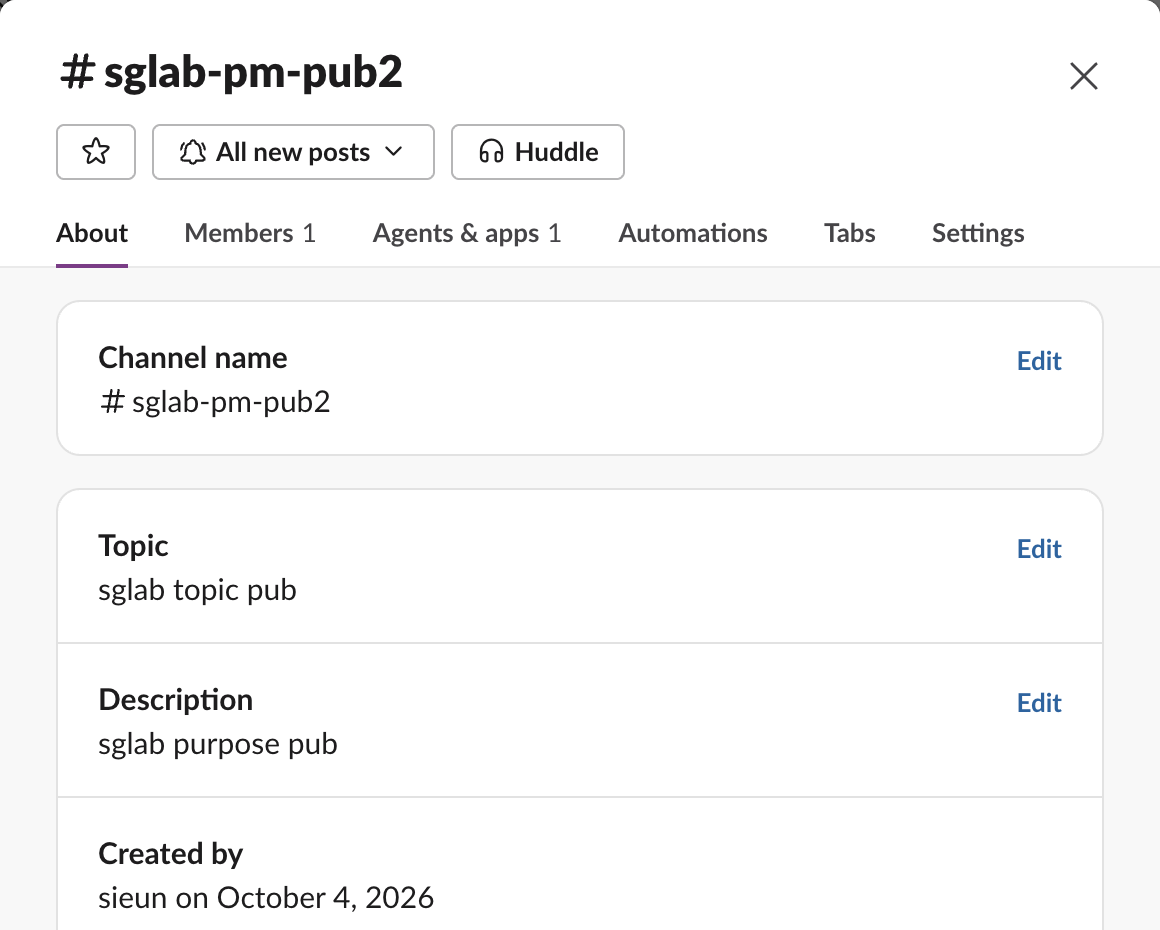
The topic and description in the dialog match topic.value and purpose.value from the API. The member count does not. Slack's dialog shows Members 1 and Agents & apps 1, while num_members was 2, so the API count includes bot users. If you show a member count to people, subtract the bots you find with users.info.
Never appear "away" on Slack again
Cloud-based. No downloads. Works 24/7 even when your laptop is off.
The errors we hit
| What we sent | Response |
|---|---|
| A private channel ID the bot is not in | channel_not_found |
A made-up ID (C0123456789) | channel_not_found |
A channel name or #name instead of an ID | channel_not_found |
A user ID (U...) instead of a channel ID | channel_not_found |
No channel argument | invalid_arguments, with [ERROR] missing required field: channel |
| No token | not_authed |
An app-level xapp- token | not_allowed_token_type |
channel_not_found covers almost every mistake, so log the ID you sent next to the error. Our longer walkthrough of that error is on Slack channel_not_found, and the scope errors are on missing_scope.
Checking whether a channel exists
conversations.info is the cheapest existence check: one call, no paging. We ran 30 calls in a row and they took 12.2 seconds, about 0.4 seconds each, with no rate limit error. Treat ok: true as "exists and visible to this token", and channel_not_found as "missing or private". Then decide whether the bot needs an invite, which is the step behind most not_in_channel errors.
To find an ID by hand instead of in code, see how to find a Slack channel ID.
FAQ
Does conversations.info need channels:read or channels:history?
Only the read scopes: channels:read for public channels, groups:read for private ones, im:read and mpim:read for DMs. It does not return messages. For those you need conversations.history and the history scopes.
Can I call conversations.info with a user token?
Yes. A user token sees what that person sees, so it also works on private channels the person belongs to. In our test the owner's user token got ok for the private channel that returned channel_not_found to the bot.
Stop Jiggling Your Mouse.
Join hundreds of remote workers who never worry about their Slack status. Set it up once, stay green forever.
Related Articles
Slack App Shortcuts: Where Global and Message Shortcuts Appear, Tested
Slack apps can add two kinds of shortcut: global ones in the composer's shortcut list and message ones in a message's menu. We added one of each, found where Slack puts them, logged both payloads and recorded what users see when the app does not answer.
Slack Datepicker, Timepicker and Datetimepicker: Payloads and Time Zones
We posted Slack's datepicker, timepicker and datetimepicker in a message and a modal, picked values and logged every payload. The datetimepicker returns a Unix timestamp; the timepicker returns a bare HH:mm with no zone unless you set one.
Slack Button Style: Primary, Danger, URL Buttons and Their Limits
A Slack Block Kit button has three looks: no style, primary (green) and danger (red). We posted every kind, clicked each one, logged the block_actions payloads and recorded the errors for colors, disabled buttons and long labels.