
Is It Illegal to Use a Mouse Jiggler? The Law vs Your Job
No law bans owning or using a mouse jiggler. The risk is employment, not criminal: breaking a company device policy, or backing paid hours with fake activity, can get you disciplined or fired, as Wells Fargo showed in 2024. Where the risk sits, and what to check first.
Free tool, runs in this tab
Keep your screen awake and see when Slack sets you away
Press Start. This tab keeps the screen on while it stays open, and shows the minute Slack, Teams and Zoom would set you away if nothing touches the keyboard or mouse.
This tab cannot move your pointer or press keys, so on its own it cannot keep Slack or Teams active. It reads the same idle time the Slack desktop app, Teams and Zoom read. To test a jiggler, start, then take your hands off for 6 minutes: if Your computer stays green, the jiggler keeps them active.
- Your computerNot measured yetPress Start and allow idle detection.
- Slack desktop app-Away after 10 min, any input.
- Microsoft Teams-Away after about 5 min, any input.
- Zoom-Away after 15 min by default, any input.
No, using a mouse jiggler is not illegal. No law bans owning one or plugging it into your own computer, and they are sold openly. The risk is to your job, not a criminal charge. Using one on a company laptop can break an acceptable-use or device policy, and if you are paid by the hour and your time is tracked by activity, fake activity behind paid hours can be treated as falsifying time records. In 2024 Wells Fargo fired more than a dozen employees after reviewing what its FINRA filings called "simulation of keyboard activity creating impression of active work". If the goal is a green Slack dot, Slack Green keeps it green from a server with no jiggler and the laptop closed, free for 7 days with no card. This page is general information, not legal advice.
Most people want a jiggler for one thing: a green dot in Slack or Teams while they read, think or step away. For the Slack desktop app, a jiggler works while the computer is awake and unlocked; it does not cover sleep, a lock, a closed lid or your phone. The policy question applies to any presence tool, and we cover it plainly in whether a presence tool can get you caught.
Where the real risk sits
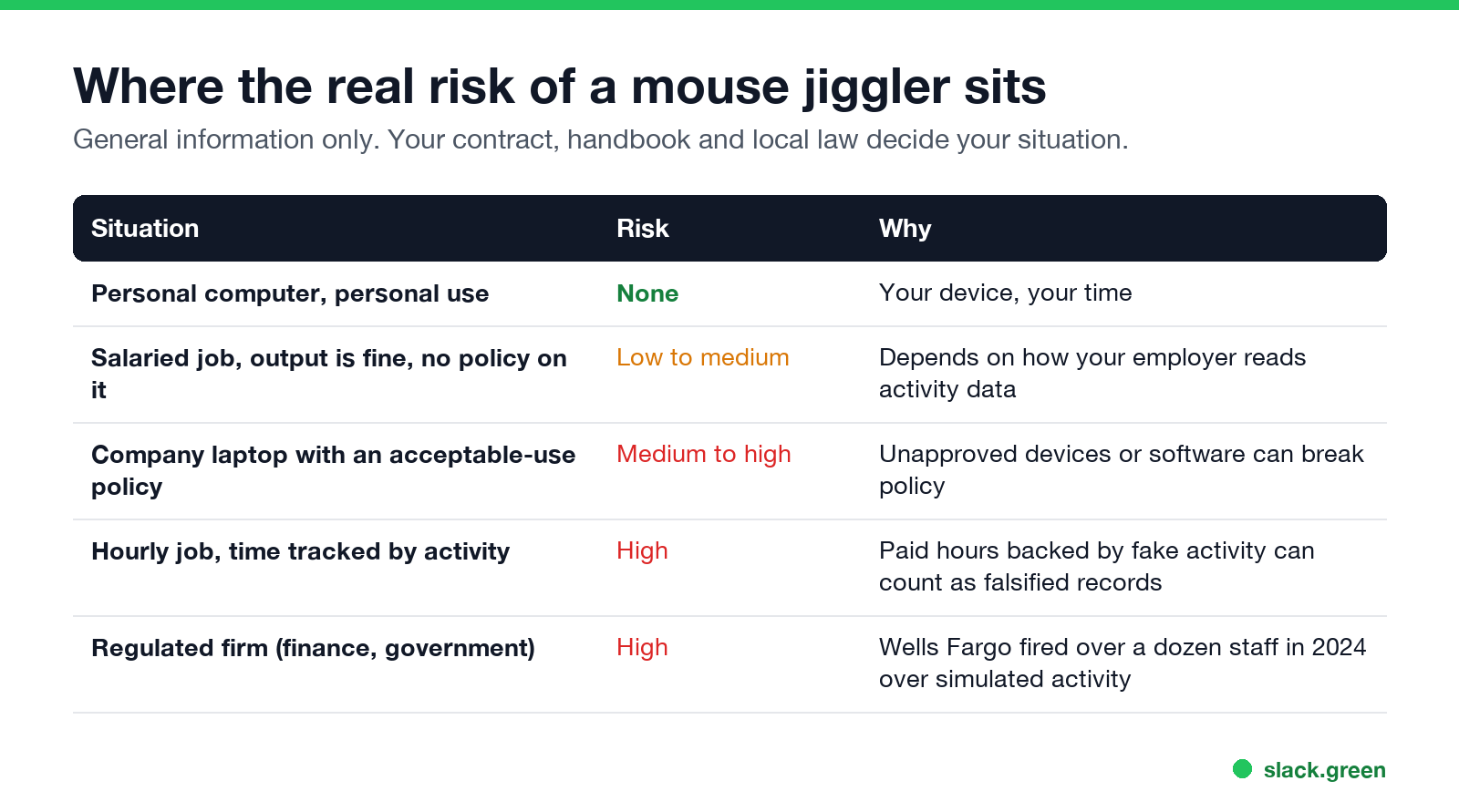
| Situation | Risk |
|---|---|
| Personal computer, personal use | None |
| Salaried job, output fine, no policy on it | Low to medium |
| Company laptop with an acceptable-use policy | Medium to high |
| Hourly job, time tracked by activity | High |
| Regulated firm, such as finance or government | High |
Can you get fired for using a mouse jiggler?
Yes. In the US most jobs are at-will, so an employer can let you go for breaking a policy or for dishonesty without any law being broken. Elsewhere, employers usually need a fair reason and a process, and misrepresenting your work can be one. The Wells Fargo case in 2024 is the best-known example: the bank's filings with FINRA, reported by Bloomberg, gave "simulation of keyboard activity creating impression of active work" as the reason.
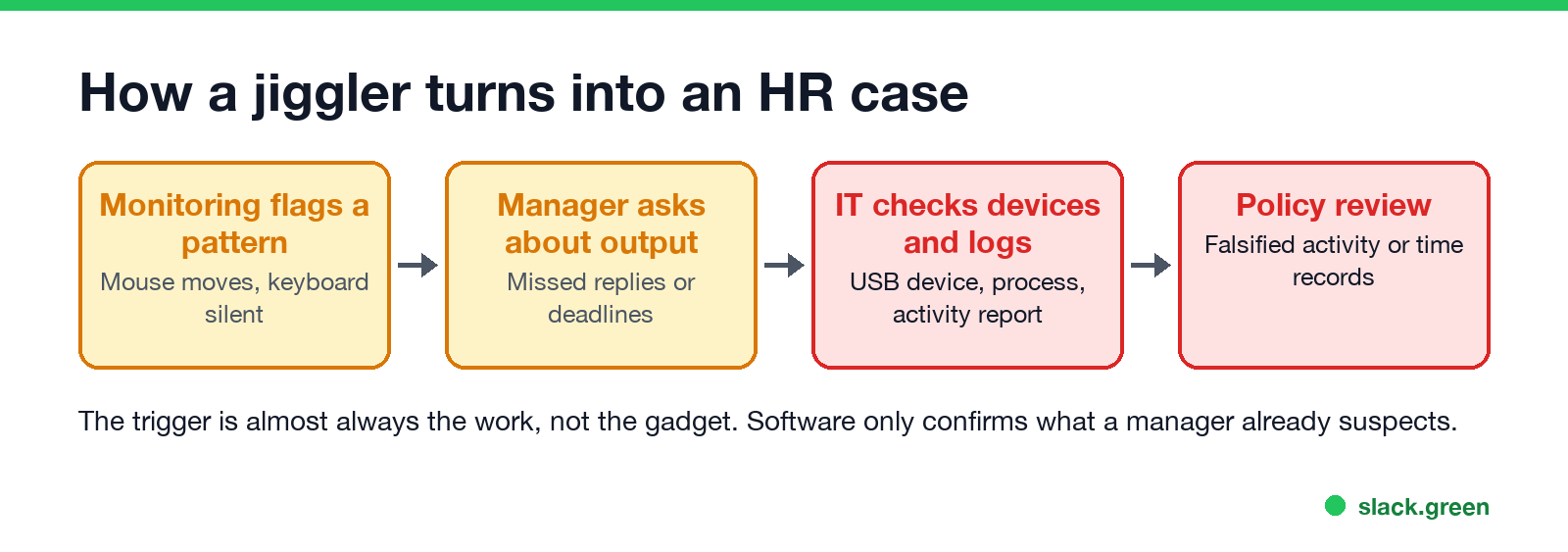
In most reported cases the jiggler is found after a manager notices slow replies or missing work, not before. How IT then finds it is in can a mouse jiggler be detected. Whether a jiggler is safe for the computer itself, from malware to antivirus alerts, is in are mouse jigglers safe.
Whatever your policy says, a jiggler keeps the Slack desktop app active only while the computer is awake and unlocked. A server-side tool keeps your Slack dot green with no input, even with the laptop closed and nothing installed on it.
Is a mouse jiggler "time theft"?
"Time theft" is an HR term, not a crime by that name. If you are paid for hours and those hours are recorded from activity data, keeping a jiggler running while you are not working can make the record false. That can be a firing matter and, in some jobs and places, a legal one. If you are salaried and judged on output, the question is usually about policy and trust rather than hours.
Are mouse jigglers allowed at work?
Check three documents before you plug anything in:
- Your employment contract for anything on working hours, availability or conduct.
- The IT or acceptable-use policy for rules on connecting devices or installing software. Many forbid unapproved USB devices on company laptops.
- The monitoring notice. Some US states, including New York, Connecticut and Delaware, require employers to tell you about electronic monitoring; the rules by state and country are in is it legal for my employer to monitor me. What your employer can see through Slack is in can Slack be used to monitor employees.
- • Say what you are doing. A status such as "Heads down on the Q4 plan until 3" explains a grey dot; see Slack status examples.
- • Agree on response times. A written norm ("reply within an hour during core hours") makes the dot irrelevant.
If none of them mention it and your output speaks for itself, the practical risk is lower. If they do, the safest move is not to use one on company equipment.
A better fix for the problem behind the jiggler
Jigglers exist because presence dots are read as a work meter. Two options that avoid the gadget:
If your team still reads the dot, compare every way to keep it green, with or without a device, in how to keep Slack active and a server-side presence tool vs a mouse jiggler.
FAQ
Is it illegal to use a mouse jiggler?
No. No law bans them. The risk is breaking your employer's policy.
Can you get fired for using a mouse jiggler?
Yes. Wells Fargo fired more than a dozen employees in 2024 over simulated keyboard activity.
Is using a mouse jiggler time theft?
It can be treated that way if you are paid by the hour and your hours are recorded from activity data.
Are USB mouse jigglers detectable?
Often, on a company laptop. They appear as an extra mouse in device logs. See can a mouse jiggler be detected.
Related Articles
Can Time Doctor Detect a Mouse Jiggler? Yes, With One Report
Yes, if your company has Time Doctor's Unusual Activity Report. It checks keyboard and mouse activity in 30-minute blocks and flags mouse movement without clicks and input that is unusually regular, which is what app and USB jigglers produce. It does not look at app names. What the report flags, who sees it, and what else Time Doctor records.
Can ActivTrak Detect a Mouse Jiggler? Yes, in Three Ways
ActivTrak detects mouse jigglers three ways: known jiggler apps running on the computer, uniform input patterns from software or USB devices, and 45 minutes on one screen. Flagged time drops out of reports even when no alarm is on.
Can Hubstaff Detect a Mouse Jiggler? What It Tracks and Flags
Yes. With Hubstaff Insights, Hubstaff flags known mouse jiggler apps by name and uses an AI check to flag input that looks automated. Hardware jigglers trip pattern checks such as mouse use with no keyboard for 50 minutes. What Hubstaff records, what it does not, and what managers see.