
Is It Illegal to Use a Mouse Jiggler? The Law vs Your Job
No law bans owning or using a mouse jiggler. The risk is employment, not criminal: breaking a company device policy, or backing paid hours with fake activity, can get you disciplined or fired, as Wells Fargo showed in 2024. Where the risk sits, and what to check first.
No, using a mouse jiggler is not illegal. No law bans owning one or plugging it into your own computer, and they are sold openly. The risk is to your job, not a criminal charge. Using one on a company laptop can break an acceptable-use or device policy, and if you are paid by the hour and your time is tracked by activity, fake activity behind paid hours can be treated as falsifying time records. In 2024 Wells Fargo fired more than a dozen employees after reviewing what its FINRA filings called "simulation of keyboard activity creating impression of active work". This page is general information, not legal advice.
Most people want a jiggler for one thing: a green dot in Slack or Teams while they read, think or step away. For Slack, a jiggler often fails anyway, since Slack counts only input inside its own window. Slack Green keeps your Slack dot green from its own servers during the working hours you set, with no device on your computer; the policy question still applies, and we cover it plainly in will I get caught using Slack Green.
Where the real risk sits
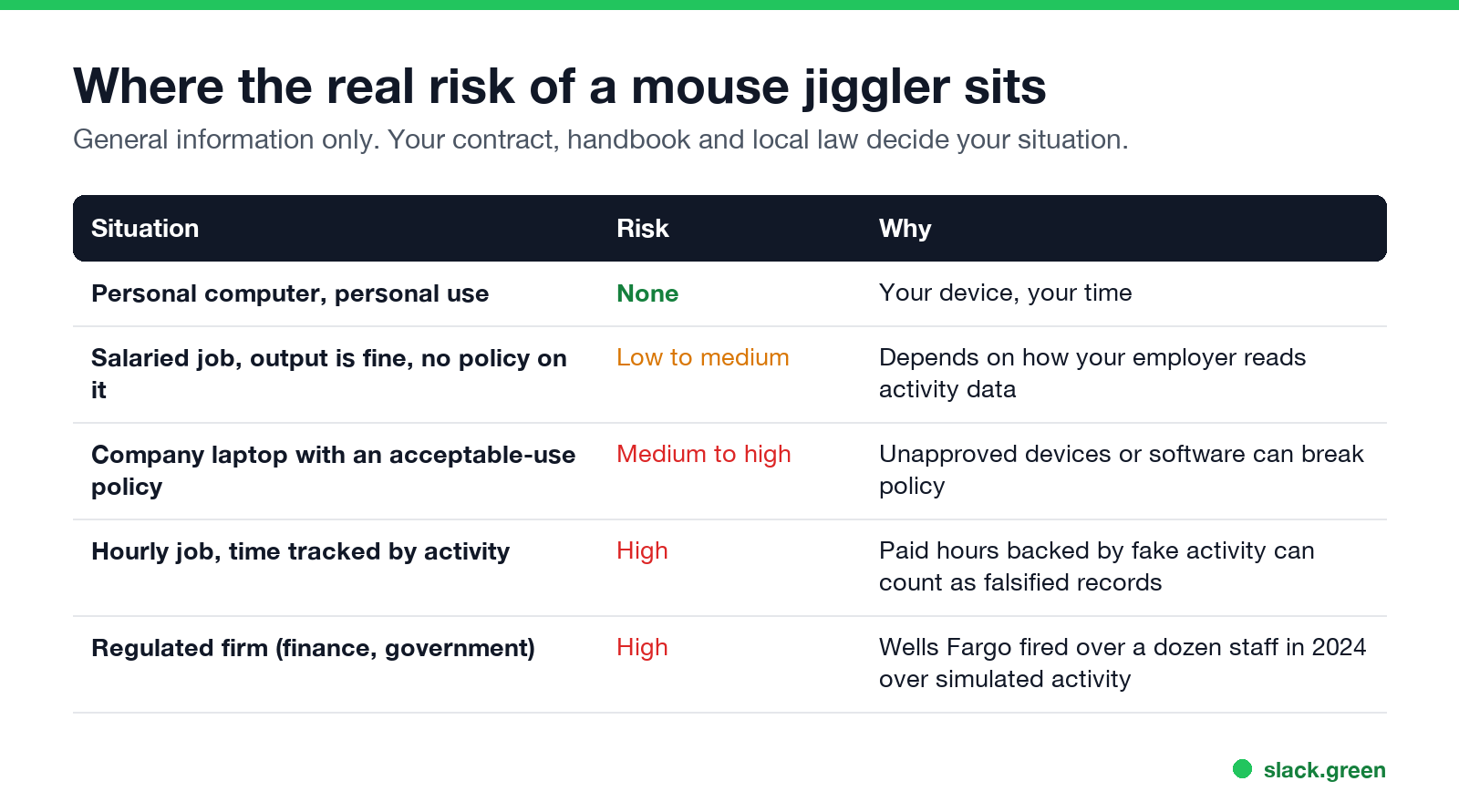
| Situation | Risk |
|---|---|
| Personal computer, personal use | None |
| Salaried job, output fine, no policy on it | Low to medium |
| Company laptop with an acceptable-use policy | Medium to high |
| Hourly job, time tracked by activity | High |
| Regulated firm, such as finance or government | High |
Can you get fired for using a mouse jiggler?
Yes. In the US most jobs are at-will, so an employer can let you go for breaking a policy or for dishonesty without any law being broken. Elsewhere, employers usually need a fair reason and a process, and misrepresenting your work can be one. The Wells Fargo case in 2024 is the best-known example: the bank's filings with FINRA, reported by Bloomberg, gave "simulation of keyboard activity creating impression of active work" as the reason.
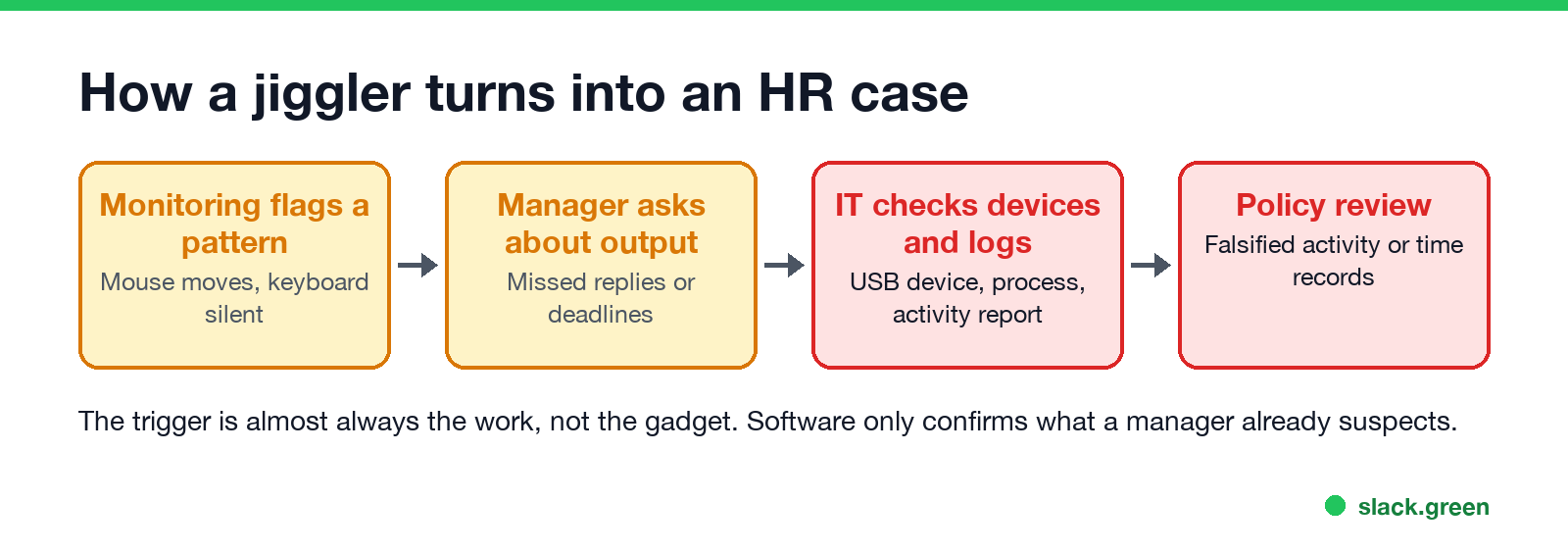
In most reported cases the jiggler is found after a manager notices slow replies or missing work, not before. How IT then finds it is in can a mouse jiggler be detected.
Is a mouse jiggler "time theft"?
Ne jamais plus apparaître "absent" sur Slack
Basé sur le cloud. Sans téléchargement. Fonctionne 24/7 même avec votre PC éteint.
"Time theft" is an HR term, not a crime by that name. If you are paid for hours and those hours are recorded from activity data, keeping a jiggler running while you are not working can make the record false. That can be a firing matter and, in some jobs and places, a legal one. If you are salaried and judged on output, the question is usually about policy and trust rather than hours.
Are mouse jigglers allowed at work?
Check three documents before you plug anything in:
- Your employment contract for anything on working hours, availability or conduct.
- The IT or acceptable-use policy for rules on connecting devices or installing software. Many forbid unapproved USB devices on company laptops.
- The monitoring notice. Some US states, including New York, Connecticut and Delaware, require employers to tell you about electronic monitoring. What your employer can see through Slack is in can Slack be used to monitor employees.
- • Say what you are doing. A status such as "Heads down on the Q4 plan until 3" explains a grey dot; see Slack status examples.
- • Agree on response times. A written norm ("reply within an hour during core hours") makes the dot irrelevant.
If none of them mention it and your output speaks for itself, the practical risk is lower. If they do, the safest move is not to use one on company equipment.
A better fix for the problem behind the jiggler
Jigglers exist because presence dots are read as a work meter. Two options that avoid the gadget:
If your team still reads the dot, Slack Green keeps it on your working-hours schedule without a device or process on your laptop. Compare every method in how to keep Slack active and Slack Green vs mouse jiggler.
FAQ
Ne jamais plus apparaître "absent" sur Slack
Basé sur le cloud. Sans téléchargement. Fonctionne 24/7 même avec votre PC éteint.
Is it illegal to use a mouse jiggler?
No. No law bans them. The risk is breaking your employer's policy.
Can you get fired for using a mouse jiggler?
Yes. Wells Fargo fired more than a dozen employees in 2024 over simulated keyboard activity.
Is using a mouse jiggler time theft?
It can be treated that way if you are paid by the hour and your hours are recorded from activity data.
Are USB mouse jigglers detectable?
Often, on a company laptop. They appear as an extra mouse in device logs. See can a mouse jiggler be detected.
Is Slack Green allowed at work?
The same rule applies: your employer's policy decides. Read will I get caught using Slack Green before you use any presence tool.
Arrêtez de Bouger la Souris.
Des centaines de télétravailleurs ne se soucient plus de leur statut Slack. Configurez une fois, restez vert pour toujours.
Related Articles
Can Slack Admins See What You Search? And What Else They See
No. Slack gives admins no record of your search terms. On Enterprise they can see how many searches you ran each day. What admins see about edits, private channels, scheduled messages, analytics and read receipts.
How to Work Two Remote Jobs at the Same Time
Working two remote jobs at once takes four things: contracts that allow it, fully separate devices and accounts, a calendar that protects both jobs, and a chat status that stays believable in both. The practical setup, and the risks.
How Do Employers Monitor Remote Workers? What Each Tool Sees
Employers monitor remote workers through five layers: work apps like Slack and Teams, laptop management, monitoring software, the network, and your output. What each one sees, how to check your own laptop, and what the law says.