
Does Outlook Show Away When You Are Idle? Yes, After About 5 Minutes
Outlook shows your Microsoft Teams status, so it turns to Away, a yellow clock, after about 5 minutes without keyboard or mouse input, or at once when you lock the computer. Outlook has no idle timer of its own. Why it can show Away while you work, and what changes it.
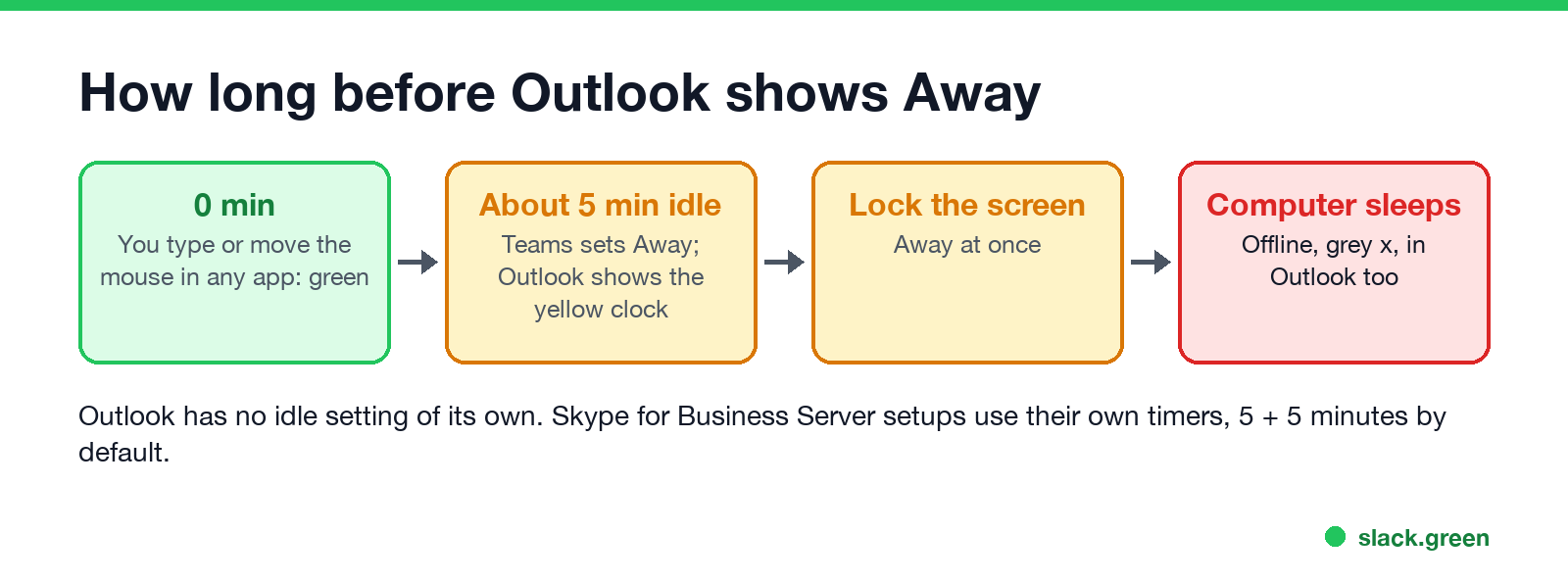
Yes. Outlook shows you as Away when you are idle, because the status dot in Outlook is your Microsoft Teams presence. Teams sets Away, a yellow clock, after about 5 minutes without keyboard or mouse input anywhere on the computer, and at once when you lock the screen. When the computer sleeps, Teams and Outlook both show Offline. Outlook has no idle setting of its own, so the timer can only be changed where Teams gets its presence, and Teams has no setting for it either.
Microsoft's admin documentation for Teams says a user's presence "becomes Away automatically if they're inactive for a few minutes or if the computer is locked; and it becomes Offline when the computer enters sleep mode." If you use Slack alongside Outlook, Slack has its own rule: away after 10 minutes without keyboard or mouse input on the computer.
How long before Outlook shows Away
| What happens on your computer | Status in Outlook |
|---|---|
| You type or move the mouse in any app | Available, green |
| About 5 minutes with no input | Away, yellow clock |
| You lock the screen | Away, straight away |
| The computer sleeps, or Teams is quit | Offline, grey x, after a few minutes |
| A meeting from your calendar starts | Busy or In a meeting, red |
Microsoft does not publish an exact idle time; "a few minutes" in its documentation is about 5 minutes in practice. Work in any app counts, including Outlook itself, a browser or Excel, because the Teams desktop app reads input across the whole computer. The Teams side of the timer is in how long before Teams shows Away, and why it cannot be lengthened is in how to change the Teams away time.
Skype for Business Server. Some companies still run Skype for Business on their own servers, and there Outlook shows the Skype status. Skype for Business has two timers you can change under Tools > Options > Status: 5 minutes to Inactive and 5 more to Away by default, each up to 360 minutes. Details in how to keep Skype status active.
Why Outlook shows Away while you are working
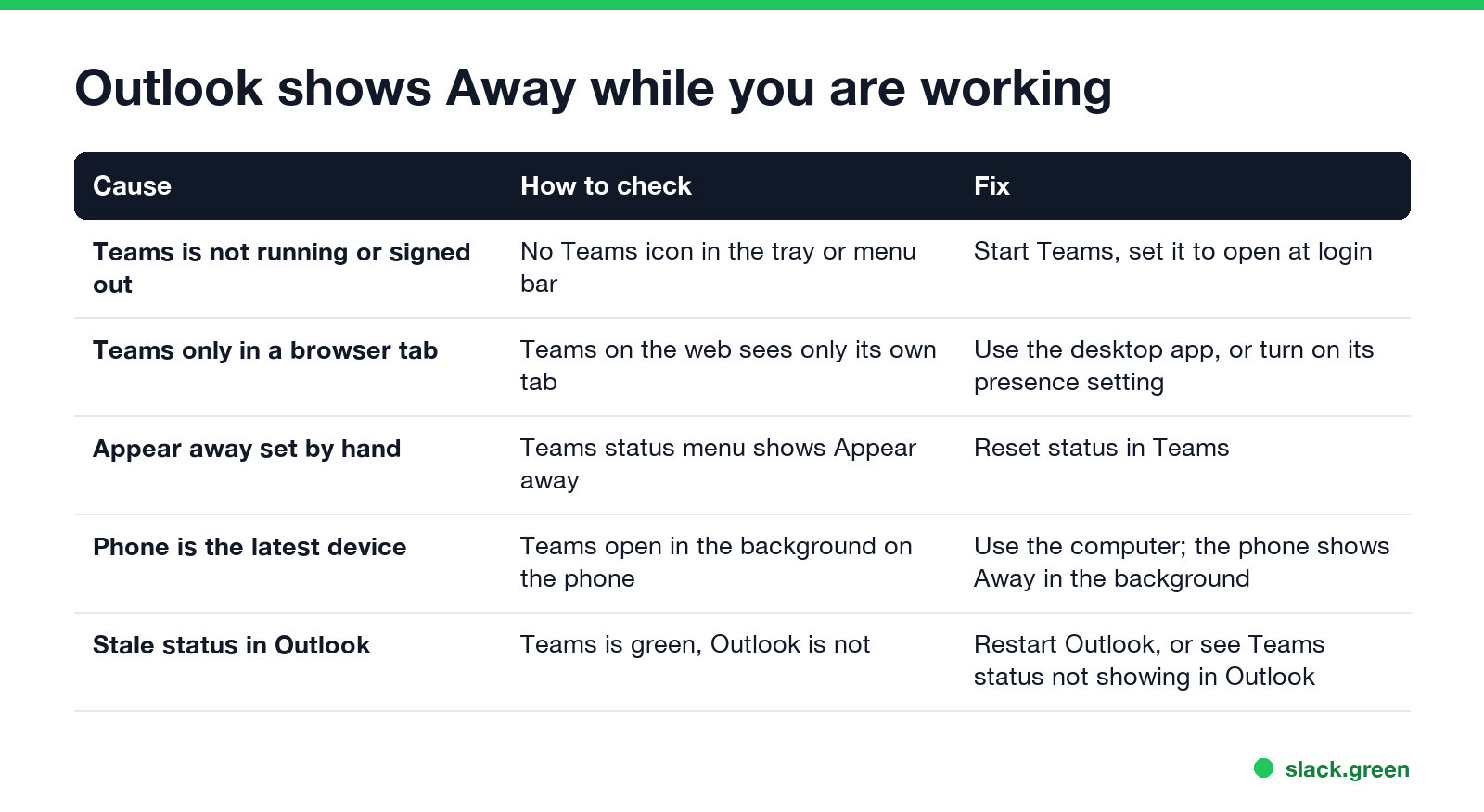
| Cause | How to check | Fix |
|---|---|---|
| Teams is not running, or signed out | No Teams icon in the tray or menu bar | Start Teams, and set it to open at login |
| Teams only in a browser tab | Teams on the web sees only its own tab | Use the desktop app, or turn on its presence setting |
| Appear away set by hand | The Teams status menu shows Appear away | Reset status in Teams |
| Your phone was the last device used | Teams in the background on your phone | Use the computer; a backgrounded phone shows Away |
| Outlook shows an old status | Teams is green, Outlook is not | Restart Outlook; see Teams status not showing in Outlook |
Teams in a browser is the most common surprise. A web page cannot see input in other apps, so a Teams tab can show Away while you type in Word. Teams added a setting that uses the browser's idle detection permission to fix this; see does Teams show Away when minimized.
Can you stop Outlook from showing Away?
Not with a setting. Picking Available in Teams does not stop the idle timer. What does change the result:
- • Keep the computer in use and unlocked. Any keyboard or mouse input resets the timer.
- • Keep the computer awake. Sleep turns the dot grey; see how to stop your computer from sleeping.
- • Keep Teams running on the computer, not only in a browser.
The full list, including what a mouse jiggler does and does not change, is in how to keep your Outlook status green. Every color Outlook can show, and what sets it, is in Outlook status colors meaning.
FAQ
Does Outlook show Away when idle? Yes. Outlook shows your Teams status, which turns Away after about 5 minutes without input, or when you lock the computer.
How long before Outlook shows Away? About 5 minutes without keyboard or mouse input. With Skype for Business Server, 5 minutes to Inactive and 5 more to Away by default.
Can I change the Outlook away timer? Not in Outlook or Teams. Only Skype for Business Server has a timer you can change.
Why does Outlook say I am Away when I am working? Teams is closed, running only in a browser tab, set to Appear away, or your phone was the last device used.
Does Outlook show Offline when my computer is off? Yes. Once no device is signed in to Teams, Outlook shows the grey Offline icon.
Related Articles
Teams: Keep My Current Status When Active Outside of Teams
Keep my current status when I'm active outside of Teams on the web is a Teams web setting under Settings, Notifications and activity, Presence. Turn it on and click Allow, and Teams stops setting you Away while you work in other tabs or apps. It needs Chrome or Edge. What it detects, why it can fail, and what it does not do.
How to Change Your Status in Outlook (Available, Busy, Away)
In new Outlook and Outlook on the web, click your profile picture and pick a status. Classic Outlook has no status picker: it shows your Teams status, so you change it in Teams. How to set Available, Busy, Appear away or a status message, how long each one lasts, and why the status changes back by itself.
What Does the Yellow Clock Mean in Outlook?
Next to a person's name or photo, the yellow clock in Outlook means Away or Be right back, a status Microsoft Teams sets. On an email, a clock means Outlook is holding that message for later: a scheduled send or a snooze.