
Keep Awake Chrome Extension: What It Does, and Why Slack Still Goes Away
A keep-awake Chrome extension stops your screen from dimming and your computer from sleeping through Chrome's power API. It does not type or click, so Slack still shows you away after 10 minutes and Teams after a few. How the Keep Awake modes work, which platforms they suit, and what to use instead.
A keep-awake Chrome extension stops your screen from dimming and your computer from going to sleep while it is on. The best-known one, Keep Awake, adds an icon to Chrome's toolbar with three modes: a sun keeps the screen on, a sunset keeps the system awake but lets the screen turn off, and a moon leaves power settings alone. It works through Chrome's chrome.power API. What it does not do is move the mouse or press keys. So it does not keep Slack active: Slack still shows you away 10 minutes after your last input in the Slack window. Microsoft Teams, which counts input anywhere on the computer, still switches to Away after a few minutes too.
If the goal is a green dot, not a lit screen, a power setting cannot do it. Slack Green keeps your Slack status active during the working hours you set, from the cloud, whether your computer is awake, asleep or shut.
What a keep-awake extension does
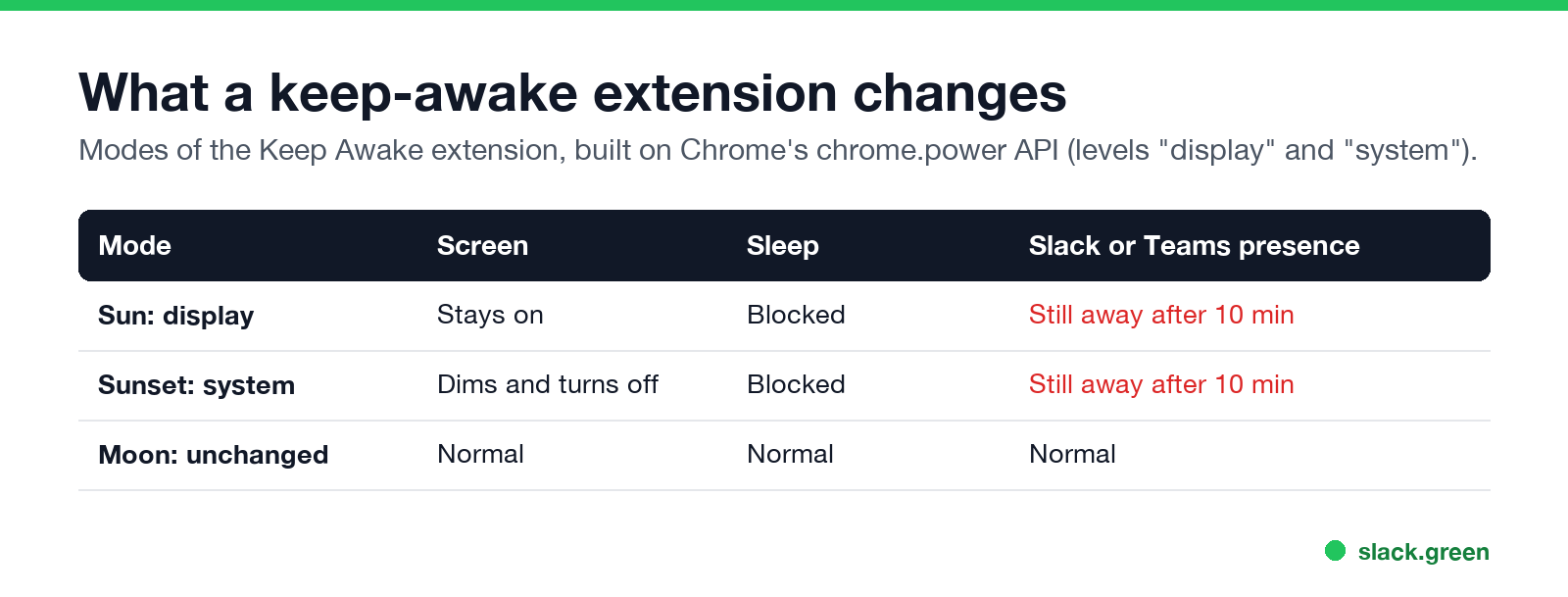
Chrome's power API lets an extension ask the operating system to hold off its power saving at one of two levels:
| Level | Keep Awake icon | Screen | Sleep from inactivity | Slack or Teams presence |
|---|---|---|---|---|
display | Sun | Stays on | Blocked | Still goes away |
system | Sunset | Dims and turns off | Blocked | Still goes away |
| none | Moon | Normal | Normal | Normal |
The whole mechanism is one call:
// What a keep-awake extension does, in full
chrome.power.requestKeepAwake("display"); // or "system"
// ...and to stop:
chrome.power.releaseKeepAwake();
Nothing in it creates a click or a keystroke. The operating system keeps the lights on; apps that watch for input see a user who has not touched anything.
The Keep Awake listing on the Chrome Web Store says it is made for ChromeOS, and it answers one common question plainly: it does not keep a Chromebook awake with the lid closed, unless an external display is connected. On a Chromebook, it is the simplest option. On Windows and Mac, the built-in tools below do the same job without an extension.
Does a keep-awake extension keep Slack active?
No. Slack decides you are away when there has been no mouse or keyboard input in the Slack window for 10 minutes, as its help center describes. A keep-awake extension sends no input at all, to Slack or to anything else. Your dot turns grey on the normal schedule. The full rule is in how long Slack stays active.
There is one thing it does change. When a computer sleeps, Slack loses its connection and you go away at once. Keeping the computer awake removes that instant drop, so you get the full 10 minutes instead of zero. That is the same effect, and the same limit, as the Mac tools covered in does Caffeine keep Slack active and does Amphetamine keep Slack active.
Does it keep Teams awake?
لا تظهر أبداً كـ "غائب" على Slack
يعمل على السحابة. بدون تنزيلات. يعمل 24/7 حتى عندما يكون الكمبيوتر مغلقاً.
Also no. Microsoft Teams counts keyboard and mouse input anywhere on the computer, not only in Teams, and shows you as Away after a few minutes without it. A keep-awake extension adds no input, so the timer runs. It does stop one Teams trigger: Teams goes Away at once when the computer locks or sleeps, and a keep-awake mode that stops the screen locking avoids that. The timing is in how long before Teams shows Away.
Keep your screen awake without an extension
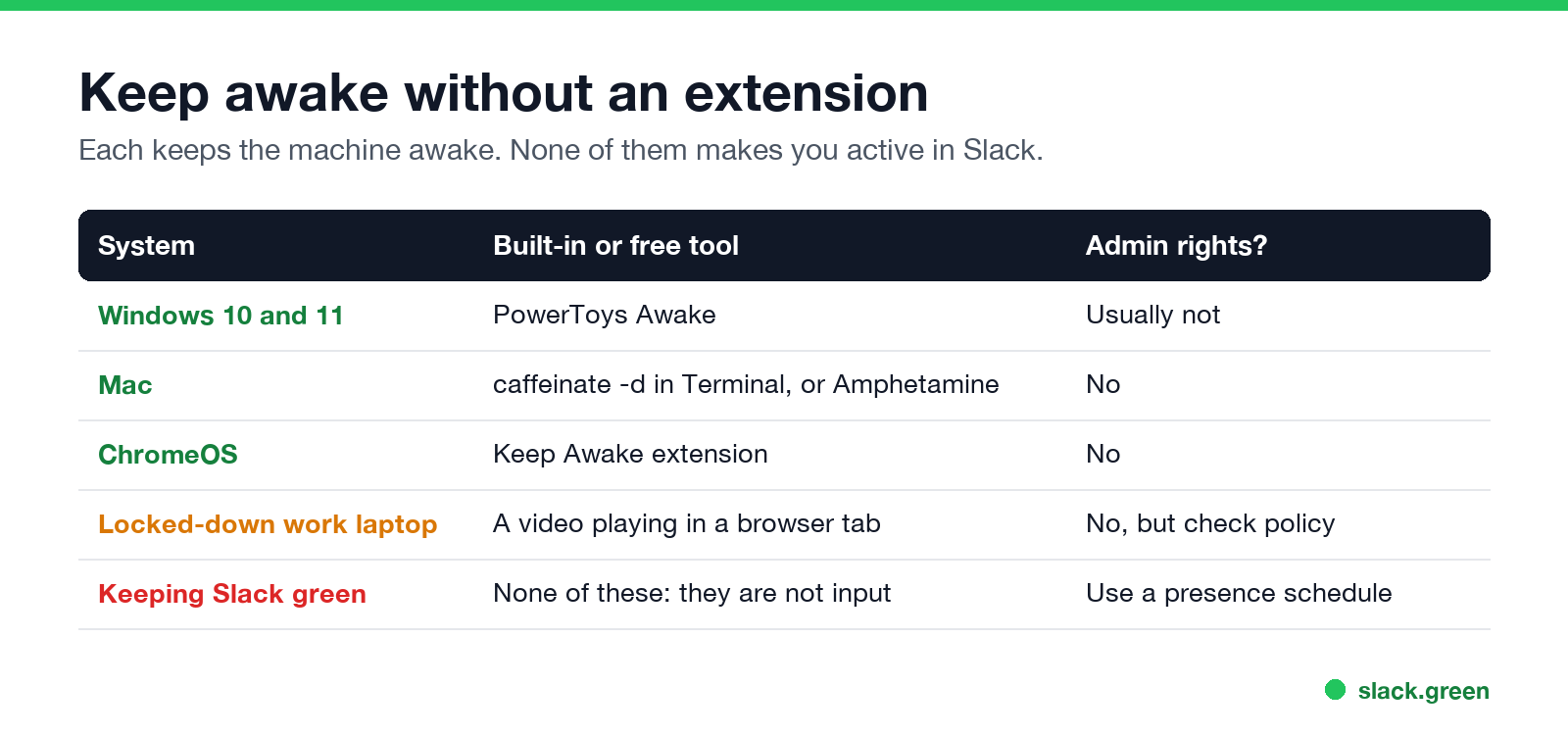
| System | Tool | Admin rights? |
|---|---|---|
| Windows 10 and 11 | PowerToys Awake | Usually not |
| Mac | caffeinate -d in Terminal, or Amphetamine | No |
| ChromeOS | Keep Awake extension | No |
| Locked-down work laptop | A video playing in a browser tab | No, but check your company's policy |
On a Mac, one Terminal command keeps the display on until you press Ctrl+C:
caffeinate -dAdd -t 3600 to stop after an hour. On Windows, PowerToys Awake sits in the tray with the same modes as the extension; setup is in PowerToys Awake and Slack. If you cannot install anything, see keep your computer awake without admin rights. To stop a Mac from locking, see keep your Mac screen from locking.
What about extensions that keep Slack active?
Extensions that did simulate activity inside the Slack tab existed, and the largest was removed from the Chrome Web Store in 2024. Clones that took its place asked for access to the tab that holds your Slack session. The history and what is left are in Slack Chrome extensions. A keep-awake extension is lower risk by comparison: Keep Awake's release notes say it dropped the tabs permission, and the power API itself cannot read pages. It just does not solve the Slack problem.
Which one to use
لا تظهر أبداً كـ "غائب" على Slack
يعمل على السحابة. بدون تنزيلات. يعمل 24/7 حتى عندما يكون الكمبيوتر مغلقاً.
- • You want the screen to stay on while you read or present: a keep-awake extension on ChromeOS, PowerToys Awake on Windows,
caffeinate -don a Mac. - • You want downloads, syncs or a remote session to survive: the
systemlevel (sunset), which lets the screen turn off. - • You want Slack to stay green: none of the above. Slack needs input in its own window, or a service that sets your presence for you on a schedule, such as Slack Green. All the options are compared in how to keep Slack active.
FAQ
Is there a Chrome extension to keep my screen on?
Yes. Keep Awake is the best-known one. Pick the sun icon to keep the screen on and the computer awake.
Does a keep-awake extension work on Windows and Mac?
Its listing says it is made for ChromeOS. On Windows and Mac, PowerToys Awake and caffeinate are more dependable.
Will a keep-awake extension keep Slack green?
No. It sends no input, and Slack only counts input in its own window. You go away after 10 minutes.
Does it stop my computer from locking?
The display level stops the screen from turning off from inactivity. A lock policy set by your company can still lock the screen on its own timer.
Is a keep-awake extension safe?
The power API it uses cannot read pages or tabs. Still, check the permissions Chrome lists before you install any extension.
توقف عن تحريك الماوس.
مئات العاملين عن بعد لم يعودوا قلقين بشأن حالة Slack. قم بالإعداد مرة واحدة، ابقَ أخضر للأبد.
Related Articles
Slack Lists Tutorial: Create, Organize and Share a List
Slack lists are tables of tasks inside Slack, with fields, assignees, due dates, a board view and a comment thread on every item. How to create a list from scratch or a template, set up fields, turn it into a kanban board, add messages to it, share it, and what the plan limits are.
Slack Jira Integration: Setup, /jira Commands and Notifications
Install the Jira Cloud for Slack app, type /jira connect in a channel to send a Jira space's updates there, /jira notify for personal notifications as DMs, and create work items from any message with More actions. Every /jira command, Jira automation to Slack, and fixes when previews or notifications stop.
How to Create a Slack Workspace, on Desktop or Phone
Go to slack.com/get-started, enter your email, type the confirmation code, and click Create a Workspace. It is free to start, you become the Primary Owner, and it takes about five minutes. Steps for desktop, iPhone and Android, and what to set up next.