
Can You See Slack Status History? No, Here Is What Exists
No. Slack shows your active or away dot and your custom status only as they are right now, and keeps no history of either that coworkers or admins can open. Admins on paid plans see a last active date and sign-in logs. How to keep your own status log with the Slack API, from today on.
No. Slack does not keep a status history that anyone can open. The dot next to a name shows only whether that person is active or away right now, and the custom status shows only what they set now and when it clears. There is no timeline of when you were green, and no list of your past statuses for coworkers or admins to scroll through. Slack's audit logs, on Enterprise plans, do not record active status either.
What does exist is narrower. On paid plans, owners and admins can see the date each member was last active, split by desktop, iPhone and Android, and a log of sign-ins with IP address and device. You can see your own recent statuses in the status menu. And anyone with API access can start logging presence from today, but not before.
We build Slack Green, which keeps your Slack status green from our servers during the hours you set, so we spend a lot of time on what Slack records about presence. The "last seen" side of this question is in does Slack show last seen.
What history Slack keeps, and who can see it
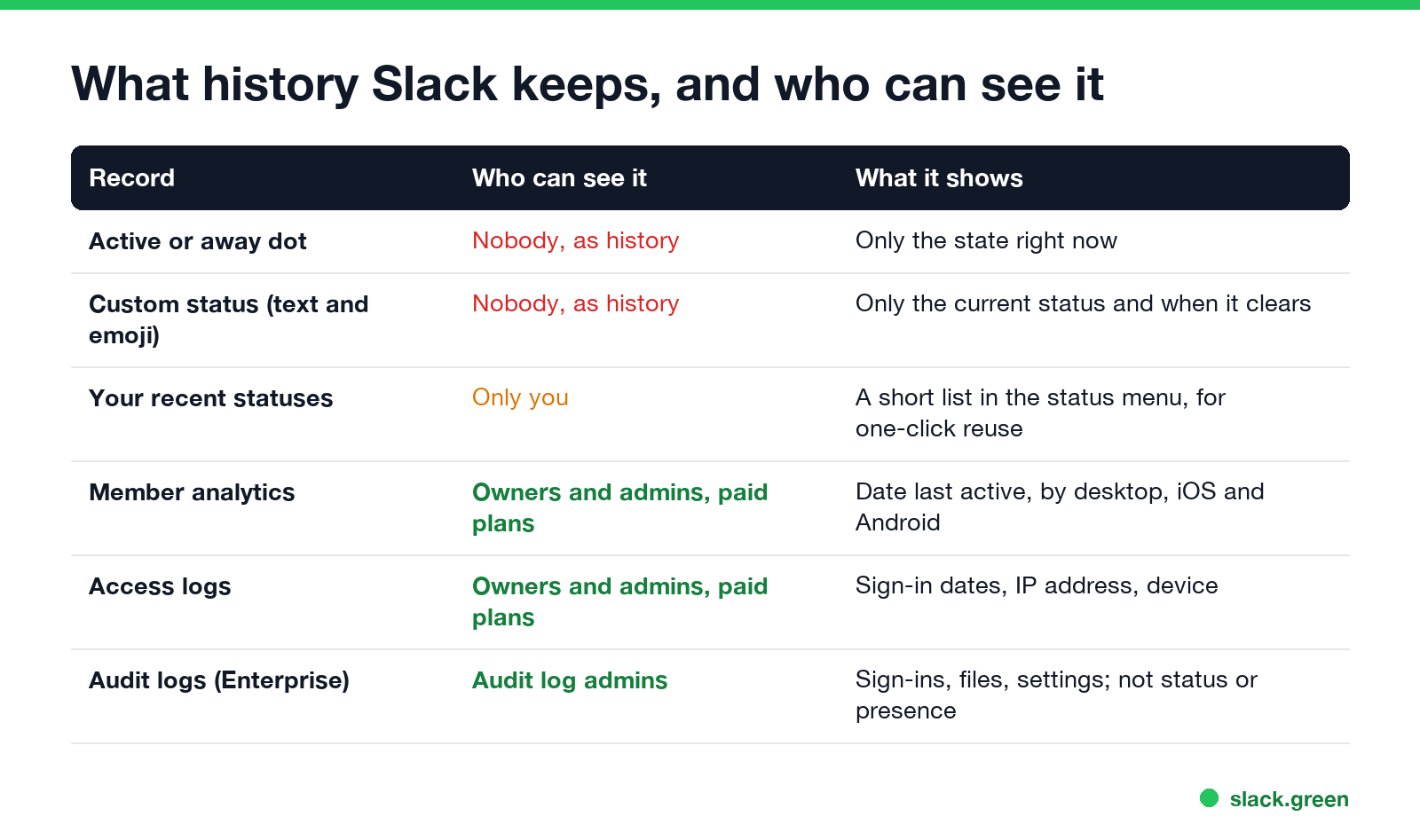
| Record | Who can see it | What it shows |
|---|---|---|
| Active or away dot | Nobody, as history | Only the state right now |
| Custom status (text and emoji) | Nobody, as history | The current status and when it clears |
| Your recent statuses | Only you | A short list at the top of the status menu, for one-click reuse |
| Member analytics | Owners and admins, paid plans | Date last active, by desktop, iOS and Android |
| Access logs | Owners and admins, paid plans | Sign-in dates, IP address, device and app |
| Audit logs | Audit log admins, Enterprise plans | Sign-ins, file downloads, app installs, settings; not status or presence |
So an admin can answer "when did this person last use Slack" to the day, and "which devices signed in this month". They cannot answer "was she green at 3 p.m. on Tuesday" or "what did his status say last week". The details of each admin view are in Slack audit logs and in the member analytics section of does Slack show last seen.
How to see when someone was last active on Slack
Without admin rights, you have two clues:
- Their last message. Search
from:@namein Slack. The newest result shows the last time they posted in a channel you can see. - The dot right now. Hover over their name. Green means input in the last 10 minutes; a hollow dot means none, or that they set themselves away.
Neither tells you when they went away. Slack also does not alert you when someone comes online; the workarounds are in get notified when someone comes online in Slack.
See your own status history
Never appear "away" on Slack again
Cloud-based. No downloads. Works 24/7 even when your laptop is off.
Slack keeps no full history of your own statuses either. The Recent section in Update your status holds the last few you used, so you can pick one again with one click. Scheduled statuses you have not reached yet sit under Scheduled in the same menu.
If you want a record, for time sheets or to check how often Slack set you away, log it yourself.
Build your own Slack presence log
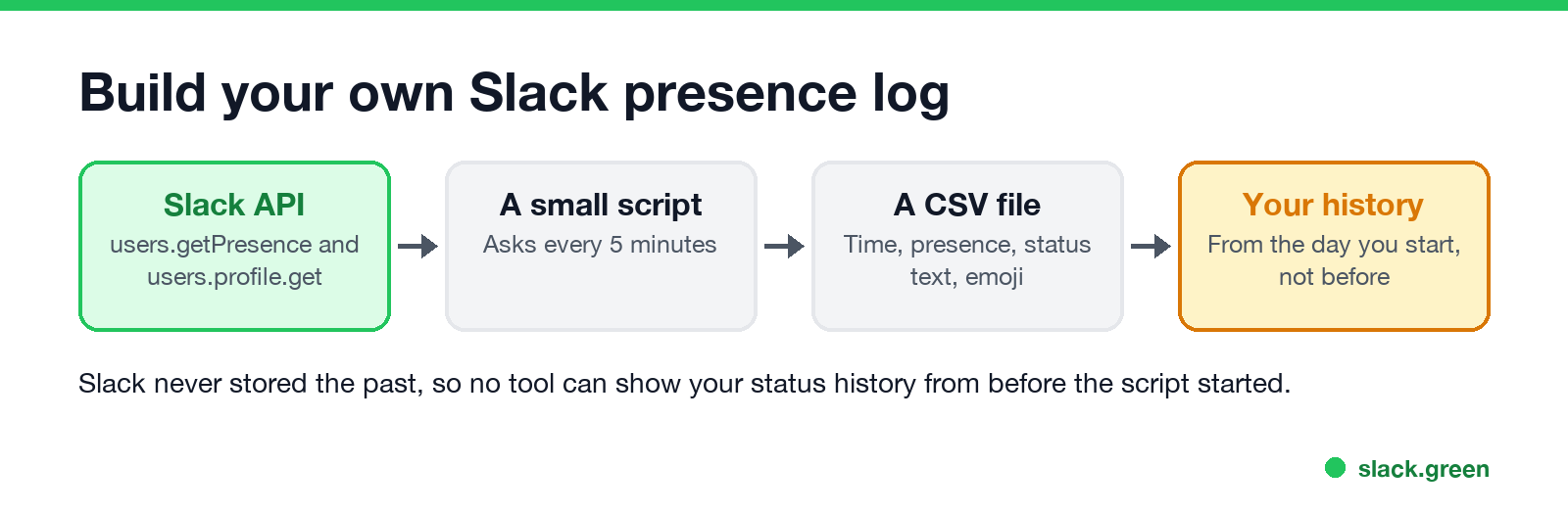
Slack's Web API has users.getPresence, which returns active or away, and users.profile.get, which returns the current status text, emoji and expiry. A script that asks every few minutes and writes a line to a file is a status history from the moment it starts. This one logs your own account with a user token that has the users:read and users.profile:read scopes:
import csv, os, time
from datetime import datetime, timezone
from slack_sdk import WebClient

client = WebClient(token=os.environ["SLACK_USER_TOKEN"])
me = client.auth_test()["user_id"]

while True:
    presence = client.users_getPresence(user=me)["presence"]   # "active" or "away"
    profile = client.users_profile_get(user=me)["profile"]
    with open("slack_status_log.csv", "a", newline="") as f:
        csv.writer(f).writerow([
            datetime.now(timezone.utc).isoformat(timespec="seconds"),
            presence,
            profile.get("status_text", ""),
            profile.get("status_emoji", ""),
        ])
    time.sleep(300)  # every 5 minutes
Five minutes is well inside Slack's rate limits for both methods. For changes as they happen instead of polling, Slack sends presence_change events over a socket connection; the setup, scopes and limits are in Slack presence API.
Logging your own account is your business. Logging coworkers' presence is technically possible for any member with a token, and it is the kind of tracking many workplaces forbid; check your company's policy first.
Slack vs Teams status history
Microsoft Teams is similar: no status timeline for coworkers, but a "Last seen" time next to Away or Offline, and admin reports with more detail. See can you see Teams status history.
FAQ
Never appear "away" on Slack again
Cloud-based. No downloads. Works 24/7 even when your laptop is off.
Can my boss see my Slack status history? No. Your boss sees your dot and status as they are now. An admin on a paid plan can see the date you were last active and your sign-ins.
Can Slack admins see when I was online? They see the last active date and sign-in logs, not the hours your dot was green.
Does Slack record when you change your status? Not in any log that admins or coworkers can view. Only the current status is stored on your profile.
Can I see who viewed my Slack status? No. Slack does not record who looked at your profile or status.
Stop Jiggling Your Mouse.
Join hundreds of remote workers who never worry about their Slack status. Set it up once, stay green forever.
Related Articles
Can My Employer See What I Watch on YouTube at Work?
On a work laptop or the office network, your employer can see that you used YouTube, when, and for how long. With HTTPS inspection or monitoring software, they can see which videos, because the video address and the browser tab title both name it. On your own phone on mobile data, they see nothing.
Can My Employer See My iMessages on a Work Mac?
Not through device management or the network: Jamf or Intune cannot read Messages, and iMessage is end-to-end encrypted. But if you sign in to Messages on a work Mac, your texts are stored on that Mac, where monitoring screenshots, backups and admin access can reach them. How to check, and how to take iMessage off the Mac without deleting it from your iPhone.
Can My Boss See My Private Outlook Calendar Events?
Usually not the details. When you mark an Outlook event Private, someone who can read your calendar sees only Private appointment, the time and a lock. The exceptions are delegates you gave Can view private items, the people invited to the event, anyone with full access to your mailbox in new Outlook or the web, and compliance admins. How to check who has which access, and what Private does not hide.