
How to Add Custom Emoji to Slack (Desktop and iPhone)
To add a custom emoji to Slack, click the smiley face in the message field, click Add Emoji, upload a square JPG, PNG or GIF under 128 KB, name it and save. Everyone in the workspace can use it. Size rules, GIFs, aliases, emoji packs, and why you might not be allowed.
To add a custom emoji to Slack on desktop, click the smiley face icon in the message field, click Add Emoji, click Upload Image, choose a JPG, PNG or GIF, enter a name, and click Save. The emoji is then available to everyone in your workspace under the Slack icon in the emoji picker, and you can type it as :name:. Slack's help center recommends square images under 128 KB with a transparent background; animated GIFs can have up to 50 frames. You can also add custom emoji from an iPhone or iPad, but not from the Android app.
Need the image first? Our free Slack emoji maker turns a photo or logo into an emoji-ready image, and the Slack emoji resizer shrinks any image or GIF to the right size in your browser.
How to add a custom emoji to Slack on desktop
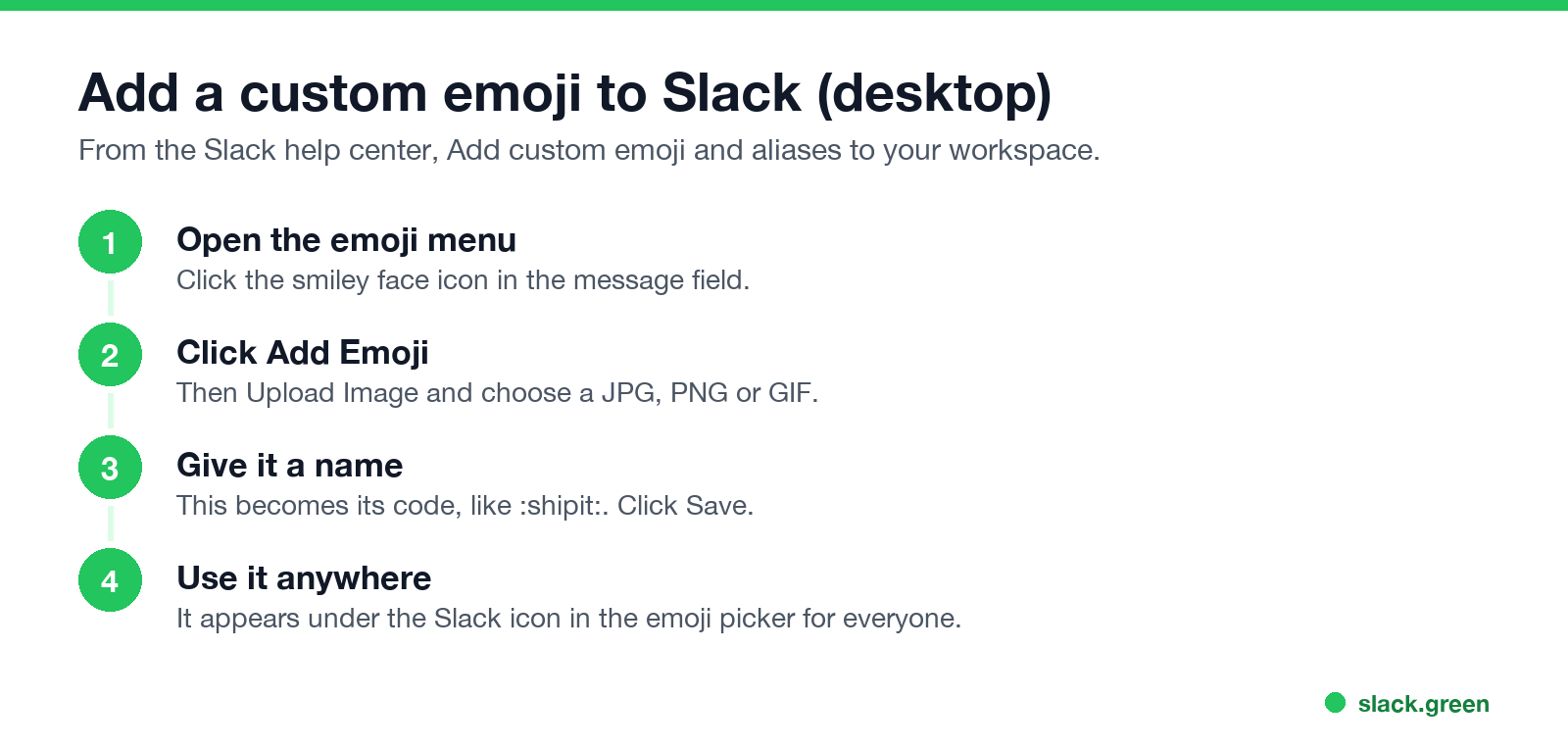
- In any conversation, click the smiley face icon in the message field.
- Click Add Emoji.
- Click Upload Image and choose your file.
- Under Give it a name, type the code people will use, such as
shipitorthanks-team. - Click Save.
- Tap the smiley face icon in the message field.
- Enter a name, then tap Add custom emoji. If the name is taken, choose another.
- Choose where the image comes from and follow the prompts.
- Tap Add in the top right.
Names must be unique in the workspace. Short, lowercase names with hyphens are easiest to type.
How to add a custom emoji on iPhone or iPad
The Slack Android app does not support adding custom emoji. Use the desktop app or a browser.
Slack custom emoji size and format
Nunca más aparezcas como "ausente" en Slack
Basado en la nube. Sin descargas. Funciona 24/7 incluso con tu laptop apagada.
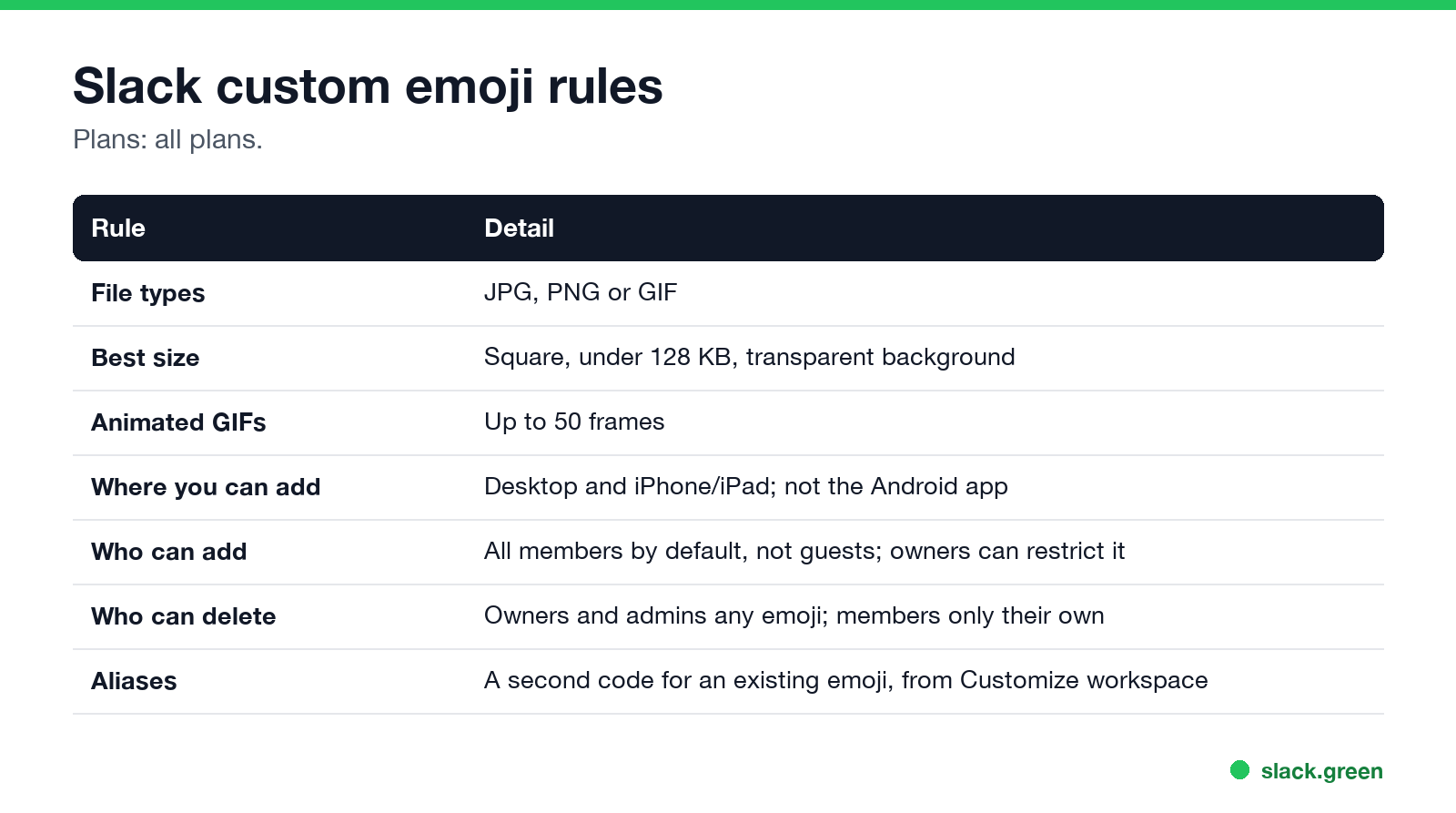
| Rule | Detail |
|---|---|
| File types | JPG, PNG or GIF |
| Best size | Square, under 128 KB, transparent background |
| Animated GIFs | Up to 50 frames |
| Where you can add | Desktop, iPhone and iPad |
Emoji show small, so a simple shape with bold lines reads better than a detailed photo. Crop to a square with little empty space around the subject. If your file is too big, run it through the Slack emoji resizer, which shrinks images and GIFs in the browser without uploading them anywhere. To make one from scratch or from a photo, use the Slack emoji maker.
How to add a GIF emoji to Slack
The steps are the same; choose a GIF in Upload Image. Keep it to 50 frames or fewer and small in file size. Long or large GIFs are the most common reason an upload fails, so trim frames or resize it first with the emoji resizer. Slack shows animated emoji frozen for people who turned off animations in their accessibility preferences.
Slack emoji aliases and emoji packs
:+1: also as :yes:. Click your workspace name, choose Customize [workspace] (owners and admins go through Settings & administration first), click Add Alias, choose the emoji, type the new code, and Save.Why can't I add emoji to Slack?
Nunca más aparezcas como "ausente" en Slack
Basado en la nube. Sin descargas. Funciona 24/7 incluso con tu laptop apagada.
How to remove a custom emoji
Click your workspace name, choose Customize [workspace], open the Emoji tab, find the emoji and click the delete icon, then Delete Emoji. Members can delete only emoji they added; owners and admins can delete any. More on replacing and removing emoji in how to delete a Slack emoji.
Custom emoji as your status
A custom emoji works as a status emoji too, so a team logo or an :on-call: badge can sit next to your name. Status meanings are in Slack status icons meaning, and reaction meanings in what does the eyes emoji mean in Slack. A status explains where you are; it does not keep your dot green. Slack Green does that during the working hours you set, from the cloud.
FAQ
Nunca más aparezcas como "ausente" en Slack
Basado en la nube. Sin descargas. Funciona 24/7 incluso con tu laptop apagada.
How do I upload a custom emoji to Slack?
Click the smiley face in the message field, then Add Emoji, Upload Image, name it and Save.
What size should a Slack emoji be?
Square, under 128 KB, ideally with a transparent background. Use the Slack emoji resizer to get there.
Can I add emoji to Slack from my phone?
From an iPhone or iPad, yes. From Android, no.
Why can't I add custom emoji in Slack?
Your workspace owner may have restricted it, you may be a guest, or you are on the Android app.
Can I use another company's custom emoji?
In a Slack Connect channel or DM, you can right-click another organization's custom emoji to add it to your own.
Deja de Mover el Ratón.
Cientos de trabajadores remotos ya no se preocupan por su estado de Slack. Configúralo una vez, mantente verde para siempre.
Related Articles
Slack vs Discord: Which One for Work, Teams and Communities
Slack is built for companies: business apps, admin controls and shared channels with other firms, for $7.25 a user a month on Pro. Discord is free for everyone with unlimited history and group voice, but has no SSO, retention or compliance tools. Prices, limits, calls and status compared.
Can Slack Admins See What You Search? And What Else They See
No. Slack gives admins no record of your search terms. On Enterprise they can see how many searches you ran each day. What admins see about edits, private channels, scheduled messages, analytics and read receipts.
Does Slack Notify When You Leave a Channel? Leave, Edit, Delete and More
Slack does not ping anyone when you leave a channel, but it posts a line saying you left, unless an admin turned join and leave messages off. Edits show (edited), deletes leave no alert, forwards do not tell the author, and removing someone does notify them. What each action shows, and how to leave quietly.