
Does PowerToys Awake Keep Slack or Teams Active? No, Here Is Why
PowerToys Awake keeps a Windows PC from sleeping, but it does not keep Slack or Teams active. Slack sets you away 10 minutes after your last input in its window and Teams after 5 minutes of inactivity, awake or not. How Awake works, its modes, and what does keep you green.
No. PowerToys Awake keeps a Windows PC from going to sleep, and with Keep screen on it keeps the display on too. It does not create keyboard or mouse input. Slack sets you away 10 minutes after your last input in the Slack window, and Microsoft Teams sets you away after 5 minutes of inactivity, whether the PC is awake or not. Awake fixes only one thing: the instant away you get when Windows sleeps or locks.
If a green dot in Slack is the goal, Slack Green keeps your Slack presence active from its own servers during the working hours you set. It needs no app on your PC, so Windows can sleep.
What PowerToys Awake does
Awake is a free utility in Microsoft PowerToys. Microsoft Learn describes it as a way to keep your computer awake without changing its power and sleep settings. While Awake runs, Windows does not go to sleep; when you turn it off, your normal power plan returns.
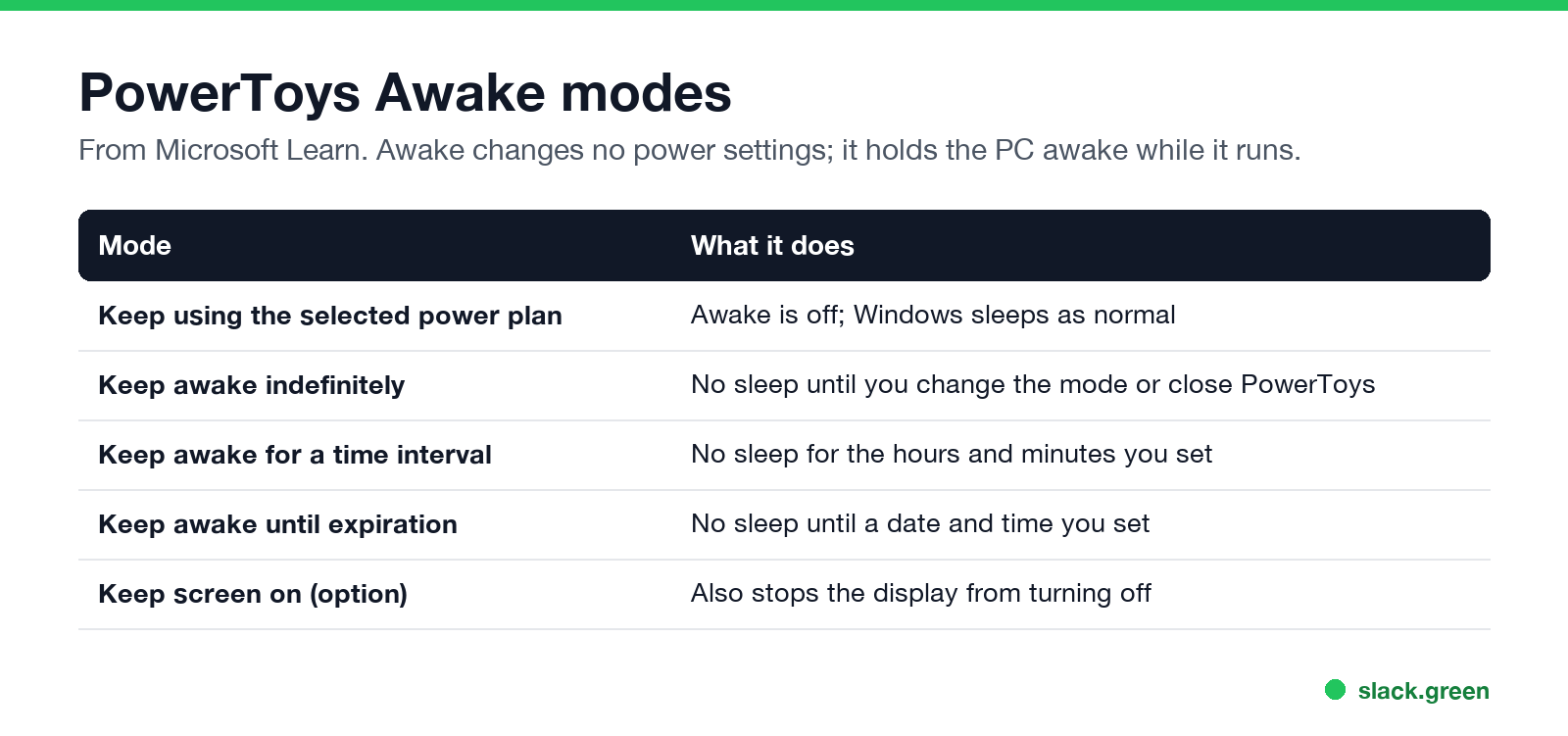
| Mode | What it does |
|---|---|
| Keep using the selected power plan | Awake is off |
| Keep awake indefinitely | No sleep until you change it |
| Keep awake for a time interval | No sleep for the time you set |
| Keep awake until expiration | No sleep until a date and time |
| Keep screen on | Also keeps the display on |
How to set up PowerToys Awake
- Install PowerToys from the Microsoft Store, GitHub or winget (
winget install Microsoft.PowerToys). A per-user installer is available if you have no admin rights. - Open PowerToys Settings, select Awake, and turn on Enable Awake.
- Pick a mode, and turn on Keep screen on if you want the display to stay lit.
- Or right-click the Awake cup icon in the system tray and choose a mode there.
Does PowerToys Awake keep Teams active?
Nunca más aparezcas como "ausente" en Slack
Basado en la nube. Sin descargas. Funciona 24/7 incluso con tu laptop apagada.
No. Teams shows you as Away after 5 minutes of inactivity. Awake keeps the PC from sleeping, so you avoid the instant away on sleep, but Teams still counts down because Awake sends no input. Other Teams options are in keep Teams and Slack active.
Does PowerToys Awake keep Slack active?
No. Slack counts only input inside its own window. We tested the same kind of tool on a Mac: with Caffeine running, Slack stayed green until minute 10 and then went away with the screen still on. See does Caffeine keep Slack active. The Windows rules are in keep Slack active on Windows.
PowerToys Awake vs mouse jiggler
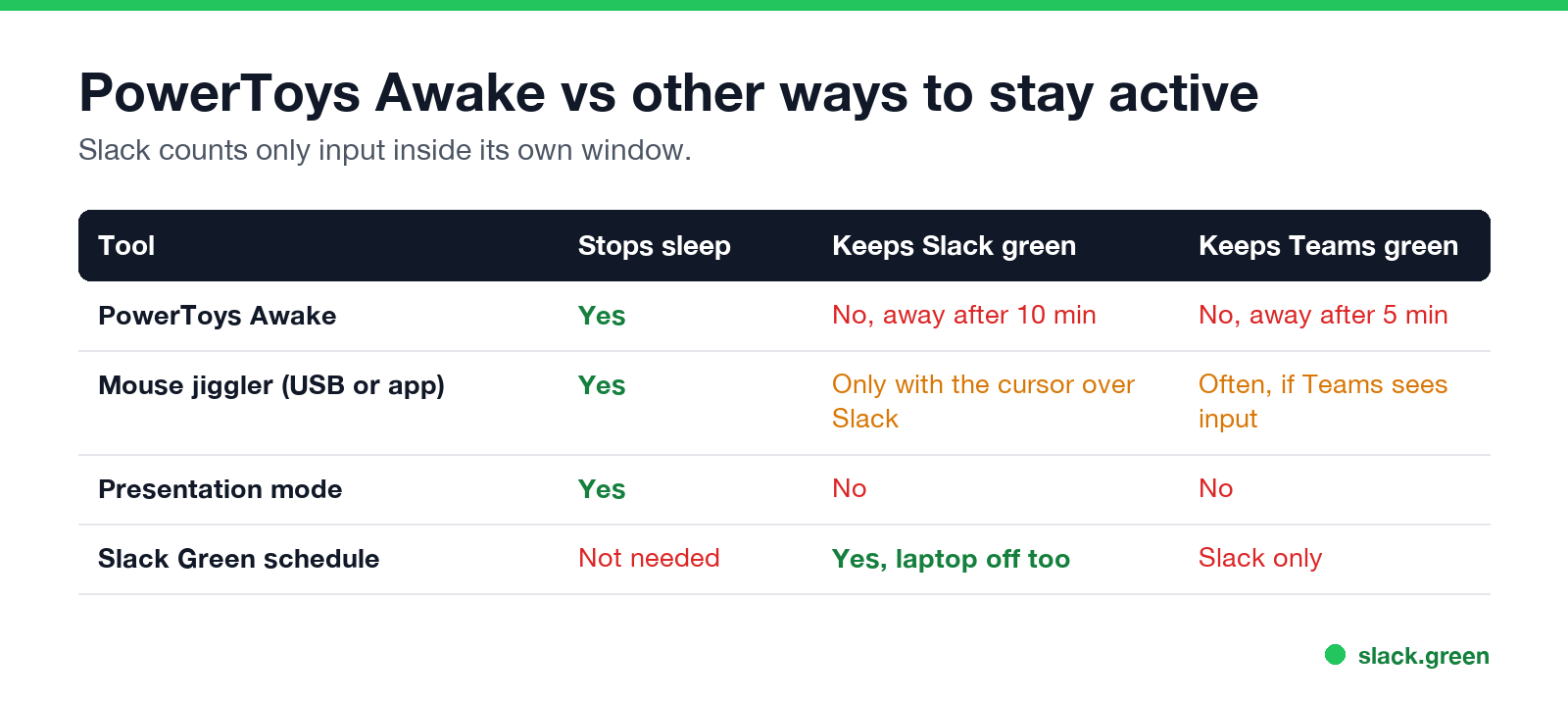
| Tool | Stops sleep | Keeps Slack green | Keeps Teams green |
|---|---|---|---|
| PowerToys Awake | Yes | No | No |
| Mouse jiggler | Yes | Only with the cursor over Slack | Often |
| Presentation mode | Yes | No | No |
| Slack Green schedule | Not needed | Yes, laptop off too | Slack only |
A jiggler creates input, so it can reset the idle timers that Awake cannot. The most used Windows one is covered in Mouse Jiggler for Windows. For Slack it only works when the movement lands in the Slack window, and jigglers leave traces on company PCs; see can a mouse jiggler be detected and Slack Green vs mouse jiggler.
PowerToys Awake not working
Nunca más aparezcas como "ausente" en Slack
Basado en la nube. Sin descargas. Funciona 24/7 incluso con tu laptop apagada.
For more ways to keep a PC awake, including methods with no install, see keep a work computer awake without admin rights. A script version is in keep a Windows PC awake with PowerShell.
FAQ
Does PowerToys Awake keep Teams active?
No. Teams sets you away after 5 minutes of inactivity. Awake stops sleep only.
Does PowerToys Awake keep Slack active?
No. Slack sets you away 10 minutes after your last input in the Slack window.
Is PowerToys Awake safe to use at work?
It is a Microsoft tool and changes no power settings. Your company may still restrict installing PowerToys.
What is the Mac version of PowerToys Awake?
The built-in caffeinate command; see our caffeinate guide. Amphetamine is the app equivalent.
How do I keep Slack green on Windows without a jiggler?
Use a server-side tool such as Slack Green, which keeps your presence active on a schedule without anything running on the PC.
Deja de Mover el Ratón.
Cientos de trabajadores remotos ya no se preocupan por su estado de Slack. Configúralo una vez, mantente verde para siempre.
Related Articles
How to Keep Your Outlook Status Green (It Comes From Teams)
Your Outlook status shows your Microsoft Teams presence, so to keep Outlook green you keep Teams Available: Teams signed in and running, input on the computer, no lock or sleep, and no leftover status. What sets you Away, and what you can change.
Slack Multiple Workspaces: Use, Switch and Stay Active in Each
You can sign in to several Slack workspaces in one app and switch with Ctrl+Tab or Cmd/Ctrl plus a number. Each workspace has its own account, status, presence and Do Not Disturb, so you can be active in one and away in another. How to add, switch and manage them.
How to Keep a Mac Screen From Locking (Without Breaking IT Rules)
To stop a Mac from locking, open System Settings, Lock Screen, set the screen saver and display-off times to Never or longer, and raise Require password after screen saver begins or display is turned off. Or run caffeinate -d. What a managed Mac allows, and why Slack still shows you away.