
40 Slack Emoji Ideas Your Team Will Actually Use
The custom Slack emoji that get used are short text badges (lgtm, on-it, blocked), reactions that replace a reply, status icons, and a few team in-jokes. 40 ideas grouped by job, how to make each one in a minute with a free emoji maker, and the size rules Slack sets.
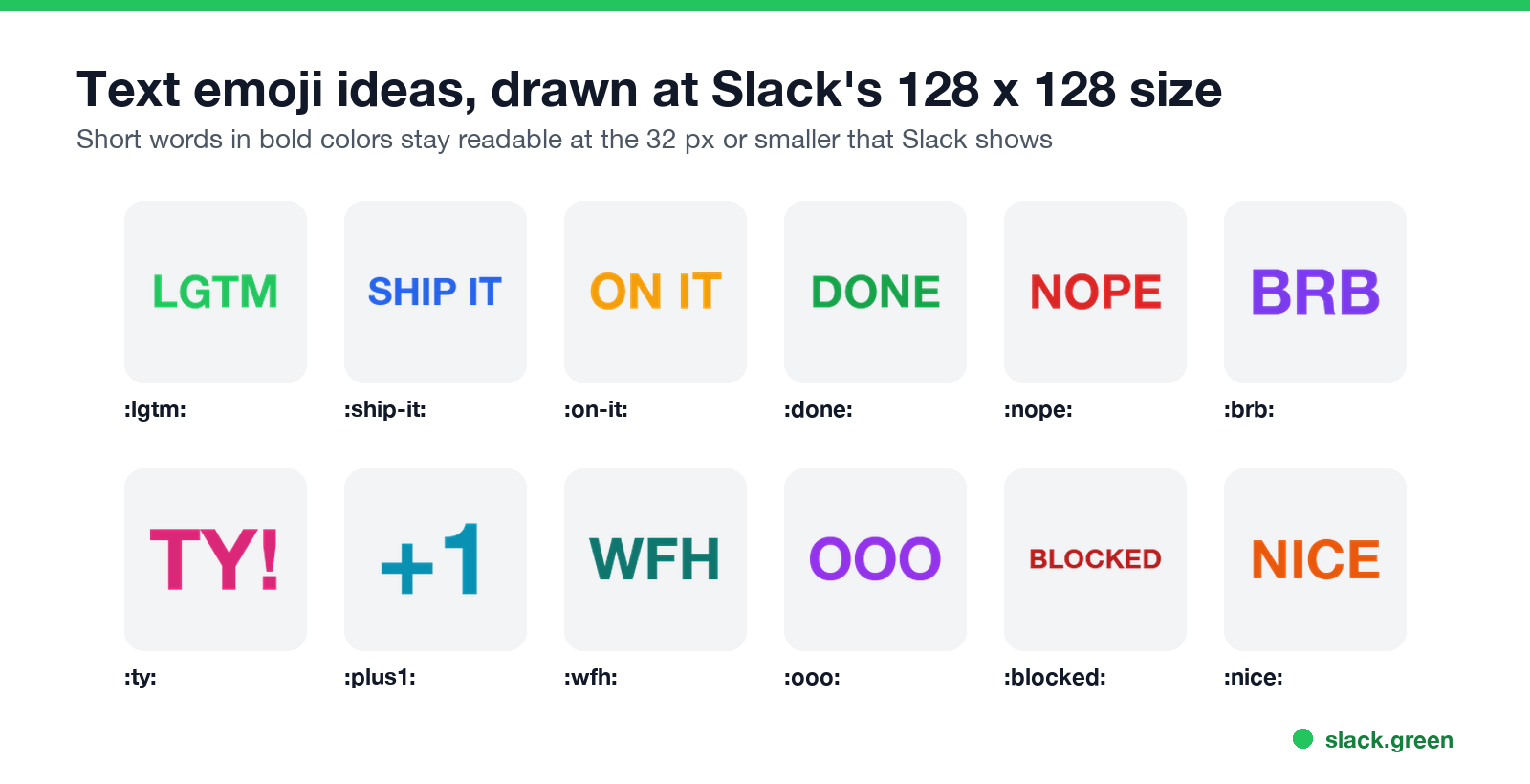
The best custom Slack emoji ideas do a job: they let someone answer a message with one click. Start with text badges for reviews and handoffs (:lgtm:, :ship-it:, :blocked:), reactions that say you saw something (:on-it:, :done:), icons for your status (:focus:, :on-call:), and a few team in-jokes such as your logo or the office dog. Short words in bold colors read best, because Slack shows emoji at 32 pixels or smaller. You can make any idea on this page in a minute with our free Slack emoji maker: type the word, pick a color, add an effect, download.
Custom emoji do not keep you active. Reacting counts as activity only while you are in Slack, and your dot turns away after about 10 minutes without input. Slack Green keeps it green from a server during the hours you set.
Custom Slack emoji ideas by job
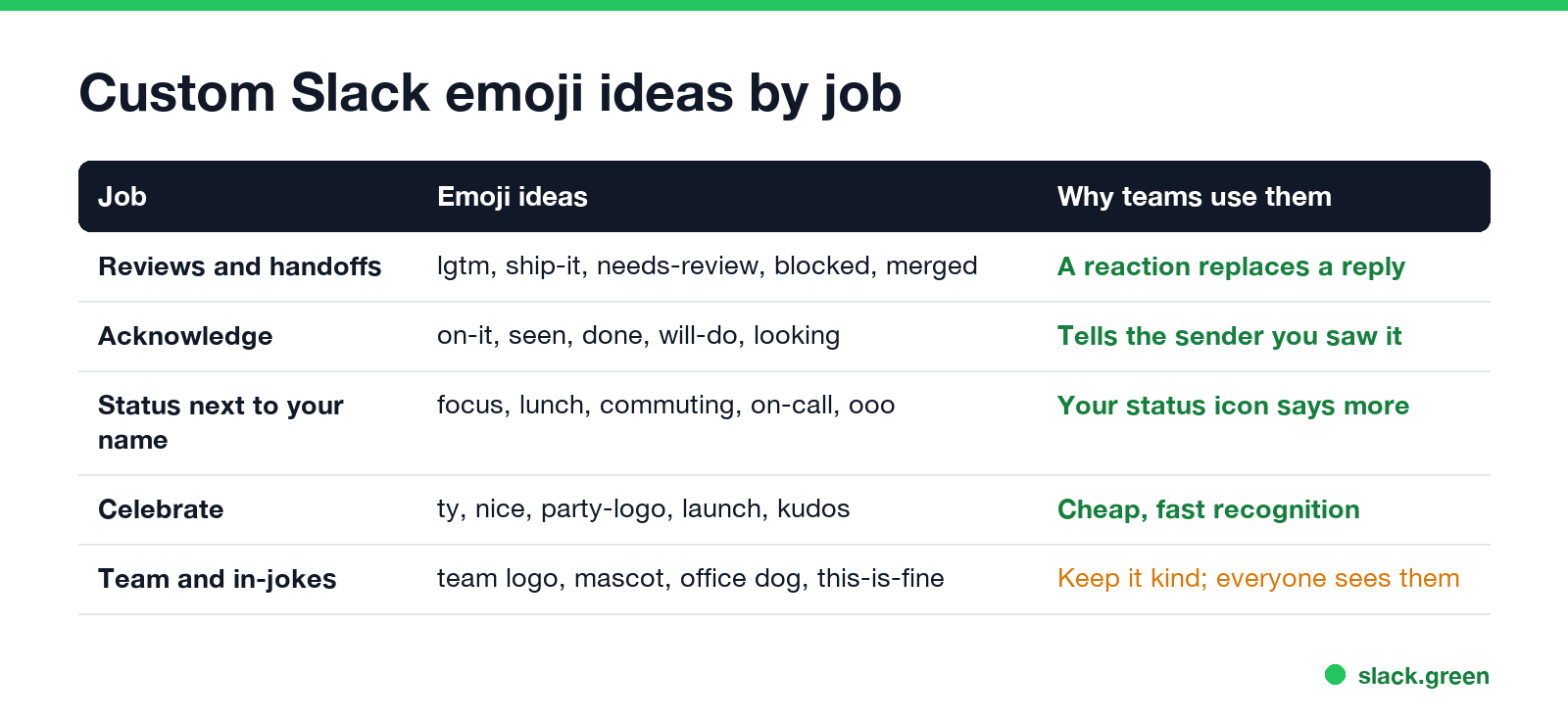
An emoji earns its place when people reach for it every week. Group ideas by the job they do, and add the ones your team would use today.
Reviews and handoffs
:lgtm:looks good to me, the classic code review reaction:ship-it:approved, go ahead and release:needs-review:waiting for someone to look:blocked:I cannot move until something changes:merged:the pull request is in:reverted:it went out and came back:qa-passed:tested and fine:wip:work in progress, do not review yet:on-it:I saw this and I am working on it:seen:read, no reply needed:done:finished, close the loop:will-do:I agree and will do it later:looking:checking now, answer soon:nope:a friendly no:same:I have the same problem:plus1:a text version of the thumbs up, for teams that want one:focus:heads down, reply later:on-call:first person to page tonight:lunch-break:back in an hour; see Slack status for lunch:commuting:on the move:ooo:out of office:wfh:working from home:brb:back in a few minutes; see Slack be right back status:in-a-meeting:your company's version of the calendar icon:ty:thank you:nice:good work:kudos:public credit:launch:for release days:party-logo:your logo with a party effect:first-pr:a new hire's first merged change:100-intensifies:for the big wins:clap-team:the whole team did it- Your company logo, still and animated
- The team mascot or the office dog
:this-is-fine:for a production incident:it-depends:for every architecture question:coffee-first:not before 9:30:mind-blown:for the good ideas- Faces of the team, only with each person's consent
- A picture of your product's loading spinner
- • One word or one shape. Up to about seven letters stay readable.
BLOCKEDin the grid above is at the limit. - • Bold color, no thin lines. A light grey word vanishes on Slack's dark theme.
- • Transparent background. The emoji then sits on any theme.
- • A name people guess. Short, lowercase, hyphens between words:
:ship-it:, not:shipitnow2:. - • Slack's limits. A square JPG, PNG or GIF under 128 KB; an animated GIF can have up to 50 frames.
Acknowledge a message
Slack's built-in :eyes:, :white_check_mark: and :raised_hands: (see the Slack emoji codes list) already cover some of these; the custom versions remove the guessing. What the built-in reactions usually mean is in what does the eyes emoji mean in Slack.
Status icons
A custom emoji works in your status, so these sit next to your name. More status wording is in our Slack status generator.
Celebrate and thank
Team and in-jokes
Keep jokes kind. Every custom emoji is visible to the whole workspace, and a member can only delete the emoji they added, so an unkind one sticks around until an owner or admin removes it; see how to delete a Slack emoji.
What makes a good custom Slack emoji
How to make these emoji in a minute
Never appear "away" on Slack again
Cloud-based. No downloads. Works 24/7 even when your laptop is off.
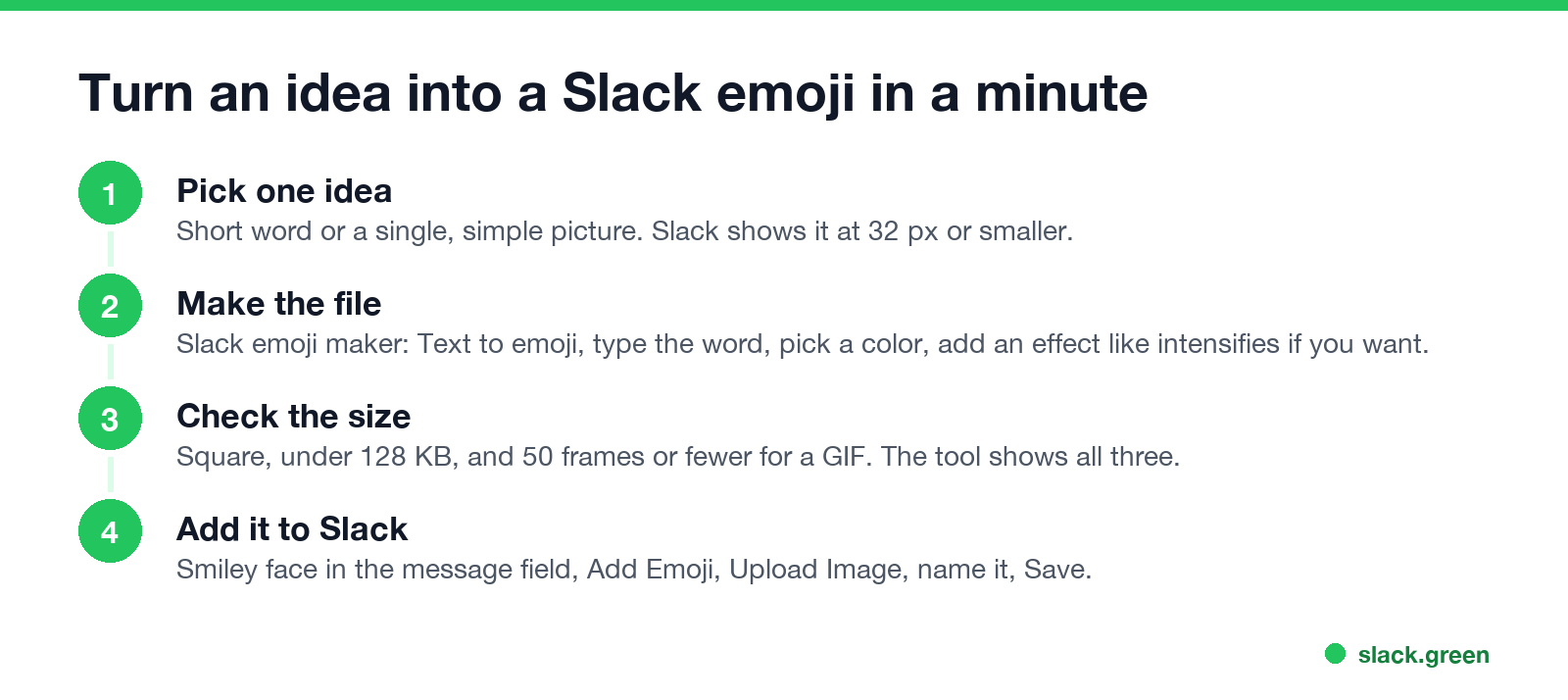
If a GIF is over 128 KB, shrink it with the Slack emoji resizer. For a whole set at once, see Slack emoji packs.
Make a batch of text emoji with a script
For many badges at once, a short Python script with Pillow writes each one as a 128 x 128 PNG with a transparent background. Change TEXT and COLOR and run it again:
from PIL import Image, ImageDraw, ImageFont

TEXT = "LGTM"
COLOR = "#22c55e"
FONT = "/System/Library/Fonts/HelveticaNeue.ttc"  # any bold .ttf/.ttc on your machine

img = Image.new("RGBA", (128, 128), (0, 0, 0, 0))  # transparent background
draw = ImageDraw.Draw(img)
size = 90
while size > 10:
    font = ImageFont.truetype(FONT, size, index=1)  # index 1 = bold in this file
    left, top, right, bottom = draw.textbbox((0, 0), TEXT, font=font)
    if right - left <= 120 and bottom - top <= 120:
        break
    size -= 2
x = (128 - (right - left)) / 2 - left
y = (128 - (bottom - top)) / 2 - top
draw.text((x, y), TEXT, font=font, fill=COLOR)
img.save(TEXT.lower() + ".png")
print("saved", TEXT.lower() + ".png", "font size", size)
On our Mac it saved lgtm.png at 1,357 bytes, far under Slack's 128 KB limit. The font path is the macOS Helvetica file; on Windows or Linux point FONT at any bold font file and drop index=1.
FAQ
What are good custom emoji for Slack?
Short text badges people use as replies: lgtm, on-it, done, blocked, ship-it, ty. Then a few status icons and one or two team jokes.
How do I make a custom Slack emoji?
Make a square image under 128 KB, for example with our Slack emoji maker, then click the smiley face in the message field, Add Emoji, Upload Image, name it and Save.
What size should a Slack emoji be?
Square, under 128 KB. 128 x 128 pixels is the usual size, and animated GIFs can have up to 50 frames.
Can I use a custom emoji as my Slack status?
Yes. Custom emoji show up in the status emoji picker like the built-in ones.
Who can add custom emoji in Slack?
Members can, unless an owner or admin limited it to themselves.
Stop Jiggling Your Mouse.
Join hundreds of remote workers who never worry about their Slack status. Set it up once, stay green forever.
Related Articles
Slack Emoji for Announcements, Updates and Reminders
The standard Slack emoji for an announcement is 📣 :mega: or 📢 :loudspeaker: at the start of the post. Use 🚨 :rotating_light: only for real emergencies, 🆕 :new: for updates, ⏰ :alarm_clock: for reminders, and ask readers to react with ✅ :white_check_mark: once they have read it. Templates and a custom emoji idea.
Slack Status for a Doctor Appointment: 24 Statuses and Emoji
A Slack status for a doctor appointment says you are out and when you are back, such as 🏥 'At an appointment, back at 2 PM.' You do not have to say what kind. 24 statuses for doctor, dentist and other appointments, the emoji codes, and how to schedule the status so it clears by itself.
Slack Status for Limited Availability: 30 Statuses to Copy
A Slack status for limited availability says you are around but slow, until when, and how to reach you if it is urgent, such as ⏳ 'Limited availability today, replies after 3 PM. Urgent: @mention me.' 30 statuses for busy days, slow replies and catching up, the emoji to use, and when to pause notifications too.