
Is Slack Pro Worth It? Price, What You Get and Who Should Skip It
Slack Pro is worth it if your team needs messages older than 90 days, group huddles, shared channels with clients or workflows. It costs $7.25 a user a month paid yearly. What Pro adds over free, what it costs for 5 to 50 people, and when Business+ is the better buy.
Slack Pro is worth it if your team needs any of four things: messages older than 90 days, group huddles, shared channels with clients, or workflows. It costs $7.25 a user a month paid yearly, or $8.75 paid monthly, and Slack bills only members who were active in the last 28 days. It is not worth it for a small team that chats every day, never searches old messages and holds group calls in another tool. The free plan does that job.
Pro and free show your status the same way: grey 10 minutes after your last input in Slack. Slack Green keeps you green during the working hours you set, from the cloud, on any plan.
What Slack Pro gives you over free
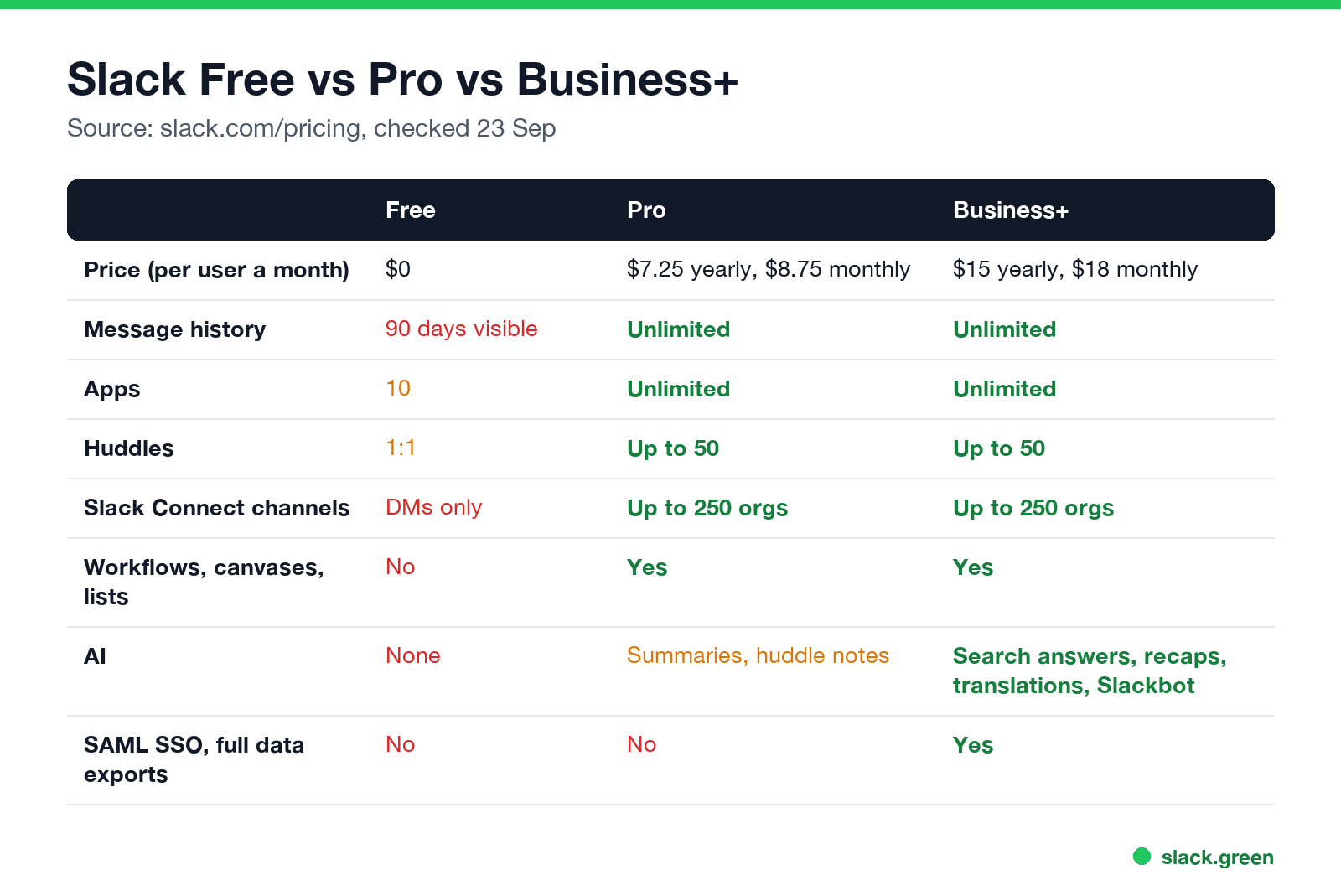
| Free | Pro | Business+ | |
|---|---|---|---|
| Price per user a month | $0 | $7.25 yearly, $8.75 monthly | $15 yearly, $18 monthly |
| Message and file history | Last 90 days visible, deleted after 1 year | Unlimited | Unlimited |
| Apps | 10 | Unlimited | Unlimited |
| Huddles | 1:1 | Up to 50 people | Up to 50 people |
| Slack Connect | 1:1 DMs | Channels with up to 250 orgs | Channels with up to 250 orgs |
| Workflows, canvases, lists | No | Yes | Yes |
| Guests and user groups | No | Yes | Yes |
| AI | None | Summaries, huddle notes | Plus search answers, recaps, translations, Slackbot |
| SAML SSO, full data exports | No | No | Yes |
| Support | Help center | 24/7 | 24/7, 4-hour first response |
*Free and Pro workspaces that connect a Salesforce org can use SSO. Source: slack.com/pricing and Slack's help center, checked on 23 September.
The one feature most teams upgrade for is history. On free, anything older than 90 days is hidden from view and search, and anything older than a year is deleted. The full list of free plan limits is in Slack free plan limits.
What Slack Pro costs for your team
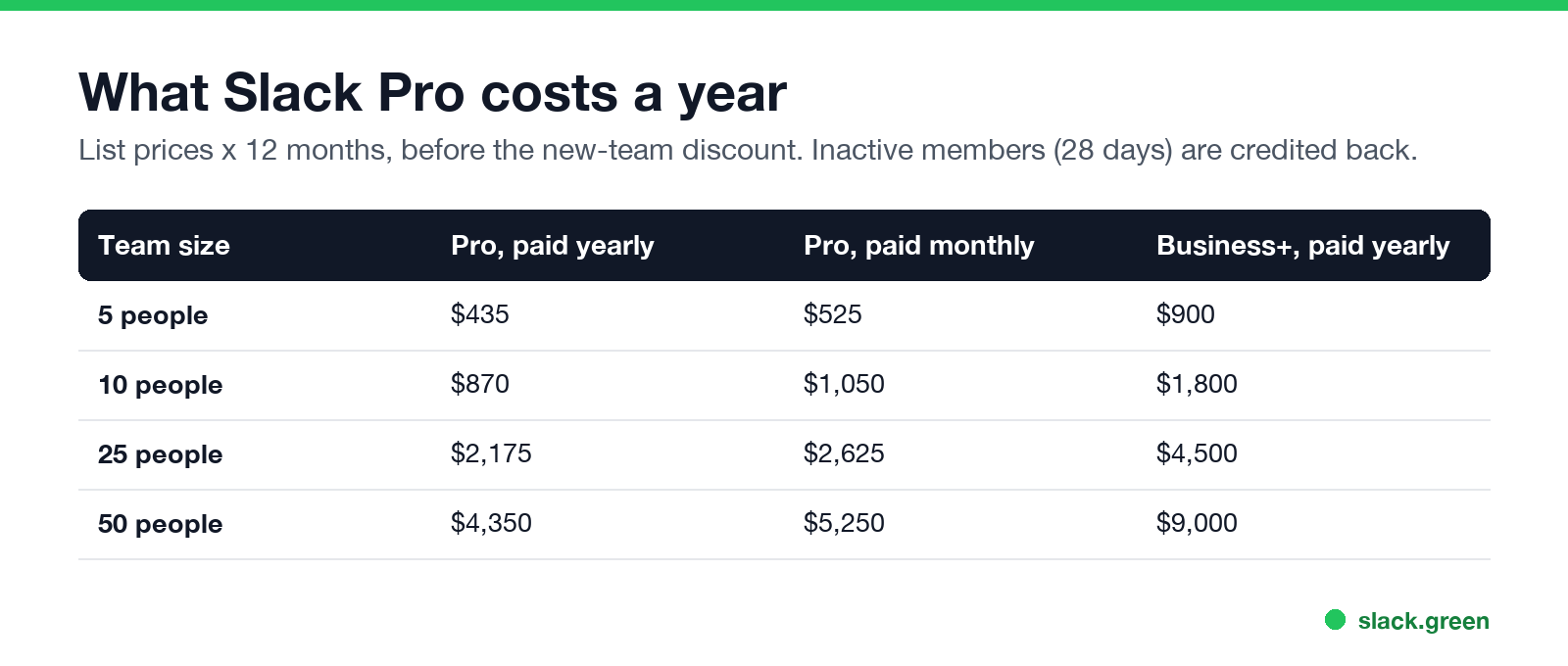
| Team size | Pro, paid yearly | Pro, paid monthly | Business+, paid yearly |
|---|---|---|---|
| 5 people | $435 | $525 | $900 |
| 10 people | $870 | $1,050 | $1,800 |
| 25 people | $2,175 | $2,625 | $4,500 |
| 50 people | $4,350 | $5,250 | $9,000 |
Three things lower the bill:
- • Fair billing. Members who take no action in Slack for 28 days are not billed. If you already paid for them, Slack adds a prorated credit.
- • New-team discount. Slack's pricing page offers 50% off Pro and Business+ for the first 3 months to teams that buy online, on monthly billing, within 7 days of creating the workspace.
- • Nonprofit and education pricing. Slack offers discounts to qualified nonprofits and educational institutions.
Why is Slack Pro so expensive?
Slack पर फिर कभी "away" न दिखें
क्लाउड-आधारित। कोई डाउनलोड नहीं। लैपटॉप बंद होने पर भी 24/7 काम करता है।
Compared with Microsoft Teams, it is. Teams Essentials is $4 a user a month, and Teams is included in Microsoft 365 Business Basic at $7, which also gives you email and 1 TB of storage per user. Slack sells only chat, calls and apps, so a company already paying for Microsoft 365 pays twice. The comparison is in Slack vs Teams.
Against tools built only for chat, Slack's price reflects its app marketplace (2,600+ apps), search and Slack Connect. If those do not matter to you, free Slack alternatives keep full history at no cost.
Slack Pro vs Business+
Business+ costs about twice as much ($15 vs $7.25 paid yearly). It is worth it when you need:
For a team under about 50 people without an SSO requirement, Pro is usually the right paid plan.
When Slack Pro is worth it, and when it is not
Worth it:
Not worth it:
FAQ
Slack पर फिर कभी "away" न दिखें
क्लाउड-आधारित। कोई डाउनलोड नहीं। लैपटॉप बंद होने पर भी 24/7 काम करता है।
How much is Slack Pro?
$7.25 a user a month paid yearly, or $8.75 paid monthly, in US dollars.
Is there a Slack Pro free trial?
Slack's pricing page currently offers new teams 50% off for 3 months if they buy within 7 days of creating the workspace. Trial offers change, so check the billing page in your workspace.
What happens to my messages if I downgrade from Pro?
Messages older than 90 days are hidden, and anything older than a year is deleted. Workflows stop, and canvases and lists become read-only.
Is Slack Pro billed for inactive users?
No. Members who are inactive for 28 days are not billed, and you get a prorated credit for time already paid.
Does Slack Pro include Slack AI?
Partly. Pro includes conversation summaries and huddle notes. Search answers, recaps and Slackbot need Business+.
माउस हिलाना बंद करें।
सैकड़ों रिमोट वर्कर्स अब Slack स्टेटस की चिंता नहीं करते। एक बार सेटअप करें, हमेशा के लिए हरे रहें।
Related Articles
Slack Lists Tutorial: Create, Organize and Share a List
Slack lists are tables of tasks inside Slack, with fields, assignees, due dates, a board view and a comment thread on every item. How to create a list from scratch or a template, set up fields, turn it into a kanban board, add messages to it, share it, and what the plan limits are.
Slack Jira Integration: Setup, /jira Commands and Notifications
Install the Jira Cloud for Slack app, type /jira connect in a channel to send a Jira space's updates there, /jira notify for personal notifications as DMs, and create work items from any message with More actions. Every /jira command, Jira automation to Slack, and fixes when previews or notifications stop.
How to Create a Slack Workspace, on Desktop or Phone
Go to slack.com/get-started, enter your email, type the confirmation code, and click Create a Workspace. It is free to start, you become the Primary Owner, and it takes about five minutes. Steps for desktop, iPhone and Android, and what to set up next.