
Slack API: Change a Profile Picture With users.setPhoto, Tested
We called users.setPhoto 18 times on a test Slack workspace: PNG, JPEG and GIF, crop boxes, a 27 MB file and a broken one. What Slack stored, the errors, and how fast the new photo showed up.
To change a Slack profile picture by API, send the image file to users.setPhoto as a multipart upload, with a user token (xoxp-) that has the users.profile:write scope. A bot token does not work: both users.setPhoto and users.deletePhoto returned not_allowed_token_type for our xoxb- token. On 6 October 2026 we made a test app in our free-plan test workspace and called users.setPhoto 18 times with different files and crop values. This page lists what Slack stored for each call, the two errors we got, and how fast an open Slack tab showed the new photo.
The call that worked
This is the script we ran. It reads the token from an environment variable, uploads avatar.png, and crops a square out of it:
import os, requests

token = os.environ["SLACK_USER_TOKEN"]  # xoxp- token with users.profile:write

with open("avatar.png", "rb") as f:
    r = requests.post(
        "https://slack.com/api/users.setPhoto",
        headers={"Authorization": f"Bearer {token}"},
        data={"crop_x": 600, "crop_y": 0, "crop_w": 600},  # optional square crop
        files={"image": f},
        timeout=60,
    )
body = r.json()
print(body["ok"], body.get("error"), body.get("profile", {}).get("avatar_hash"))
Output:
True None 76dabddc02c1The field name must be image, and the file goes in the body, not as a URL. Slack has no parameter that takes an image URL. If you leave the file out, the reply is {"ok": false, "error": "no_image"}.
A successful reply holds a profile object with a new avatar_hash and eight URLs: image_24, image_32, image_48, image_72, image_192, image_512, image_1024 and image_original. The hash changed on every upload, also when we sent the same file twice. To get a user token with the scope, add users.profile:write under User Token Scopes and install the app; our oauth.v2.access guide shows where the xoxp- token comes back. Token types explains why a bot cannot change a person's photo.
What Slack stored for each file
We downloaded every URL that came back and read the real pixel size of each file.
| File we sent | Result | image_original | image_1024 | Time |
|---|---|---|---|---|
| 512 x 512 PNG, 7 KB | ok | 512 x 512 PNG | 1024 x 1024 (scaled up) | 1.2 s |
| 200 x 200 PNG | ok | 200 x 200 | 1024 x 1024 (scaled up) | 1.2 s |
| 800 x 800 JPEG | ok | 800 x 800 JPEG | 1024 x 1024 JPEG | 3.8 s |
| 512 x 512 GIF | ok | GIF | GIF | 2.1 s |
| 1400 x 1400 PNG, 5.9 MB | ok | 1400 x 1400 | 1024 x 1024 | 12.7 s |
| 3000 x 3000 PNG, 27 MB | ok | 3000 x 3000 | 1024 x 1024 | 34.1 s |
| 8000 x 8000 PNG, 0.2 MB | ok | 8000 x 8000 | 1024 x 1024 | 22.0 s |
190 bytes of text named .png | bad_image | - | - | 1.5 s |
We did not hit a size limit. A 27 MB file went through, and we got no too_large error at any size we tried. Large files are slow, though, because Slack makes all eight sizes before it replies: 34 seconds for the 27 MB file. Set your HTTP timeout well above the default of many clients.
Slack keeps the file format. A JPEG stays a JPEG and a GIF stays a GIF in every size. Small images are scaled up: our 200 px file came back as a blurry 1024 px image_1024. Send at least 1024 x 1024 if you want the large size to look sharp.
Crop boxes and non-square images
users.setPhoto takes three optional numbers: crop_x and crop_y for the top-left corner, and crop_w for the width of a square crop. We uploaded a 1200 x 600 image with "L" on the left half and "R" on the right half.
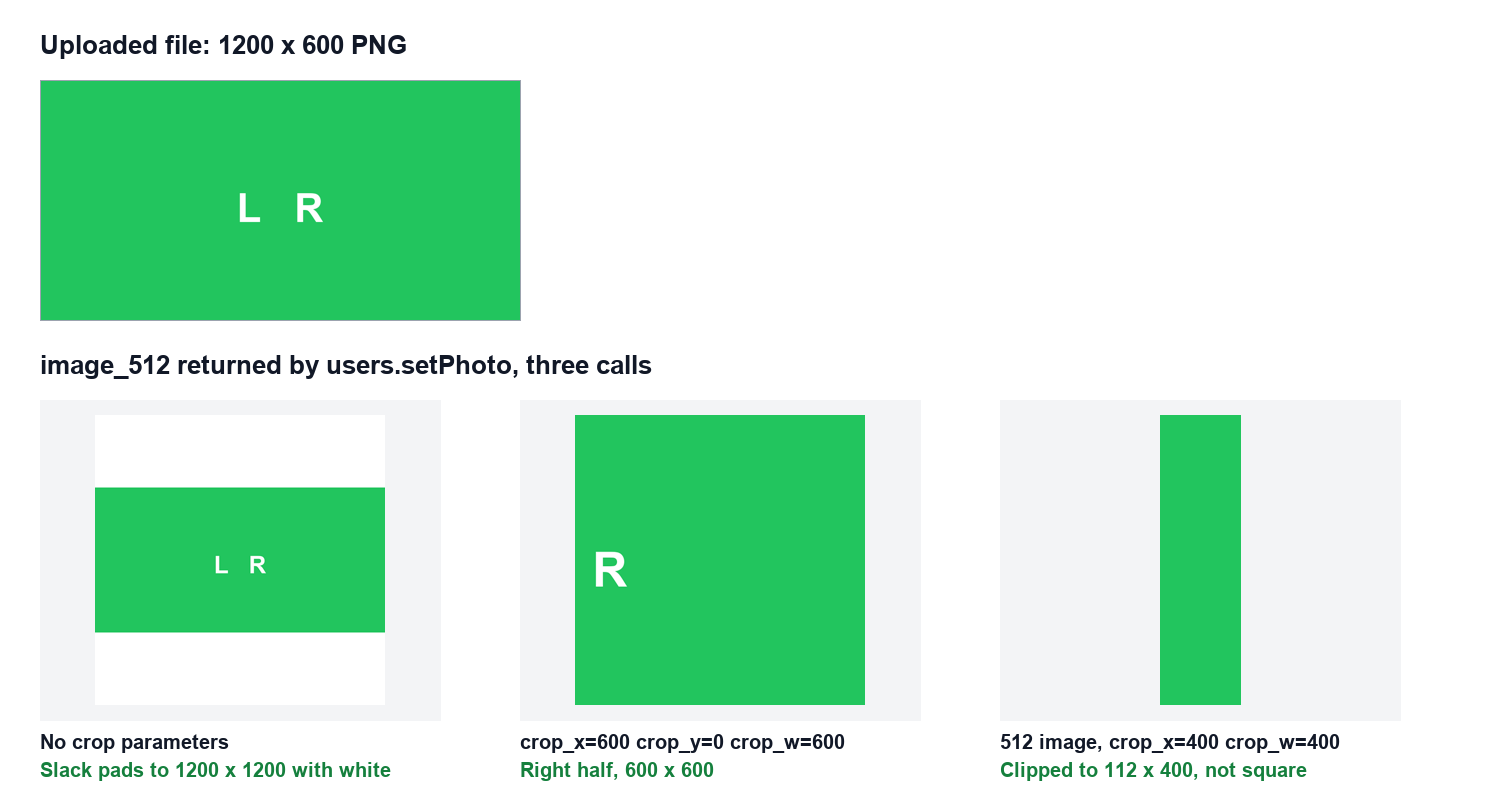
- • No crop values. Slack did not cut anything off. It padded the image with white to 1200 x 1200, so the avatar shows white bars above and below. On a transparent PNG you get white, not transparency.
- •
crop_x=600, crop_y=0, crop_w=600. Slack kept the right half, 600 x 600, as asked. - • Only
crop_w=100.crop_xandcrop_ydefault to 0, so we got the top-left 100 x 100 corner. - • A crop box that runs past the edge. On a 512 px wide image,
crop_x=400withcrop_w=400returnedok, but Slack clipped the box at the edge. The avatar became a 112 x 400 strip, andimage_512was 143 x 512. Slack does not check the box for you, so checkcrop_x + crop_wagainst the image width before you call.
Never appear "away" on Slack again
Cloud-based. No downloads. Works 24/7 even when your laptop is off.
How fast the new photo shows in Slack
We kept a Slack tab open on a channel with one of our own messages, then called users.setPhoto. The avatar on that message, and on the older messages above it, changed to the new image within 2.4 seconds, at our first check, without a page reload. The web client loads avatars from ca.slack-edge.com/<team>-<user>-<avatar_hash>-<size>, so the new hash also gives every client a new URL and skips old caches.

Remove the photo with users.deletePhoto
users.deletePhoto takes no arguments besides the token. It needs the same scope and also refuses bot tokens. After the call, our open tab showed the default person icon again within 9 seconds, and users.profile.get returned the same default as before the test: the same avatar_hash and the same image_512 URL. Slack keeps your default avatar color, so deleting the photo brings back the color you had; our page on Slack's default profile picture colors lists them. Calling users.deletePhoto when no photo is set still returns ok: true.
To read the current photo of any user, call users.info or users.profile.get and use profile.image_512 or image_1024. is_custom_image: true means the user uploaded a photo; the field is missing when they use the default. Our users.info guide shows the rest of the profile fields.
FAQ
Can a bot change its own profile picture with users.setPhoto?
No. The bot user's icon comes from the app's settings (Basic Information > Display Information > App icon), and users.setPhoto refused our bot token. To change the icon on single messages, see icon_emoji and icon_url.
Can an admin change another member's photo by API?
users.setPhoto has no user parameter. It always changes the photo of the person who owns the token, so each member has to install the app and grant users.profile:write themselves.
Why does my uploaded photo have white bars?
The image was not square and you sent no crop values. Slack pads it to a square with white. Send crop_x, crop_y and crop_w, or crop the file to a square before you upload it.
Stop Jiggling Your Mouse.
Join hundreds of remote workers who never worry about their Slack status. Set it up once, stay green forever.
Related Articles
Export a Slack Canvas to PDF or Markdown: What Works, Tested
Slack has no download or export button for canvases. We checked every menu on a test canvas, used Print canvas for PDF, and turned the API's HTML download into clean Markdown with a script we ran.
Slack Forward Multiple Messages: No Multi-Select, 3 Workarounds Tested
Slack forwards one message at a time. We checked the message menu, shift-click and the forward dialog, then tested three ways to move 10 messages at once: a thread, a copied range, and a script that posts links.
Send a Slack Message From PowerShell: Webhook, Bot Token and Files
Working PowerShell for Slack: Invoke-RestMethod to a webhook, chat.postMessage with a bot token, Block Kit, and a file upload. Every script was run in PowerShell 7.6.6 against a real Slack workspace, with its output.