
Does Playing a YouTube Video Keep Slack Active? No, Here Is Why
No. Slack counts only input inside its own window, so a YouTube video, a Zoom call, a game or Spotify keeps your computer busy but gives Slack nothing. You go away 10 minutes after your last input in Slack. What does count, and how to stay green.
No, playing a YouTube video does not keep Slack active. Slack counts only input inside its own window: clicks, keystrokes and scrolling in Slack. A video playing in a browser or another app gives Slack nothing, so your dot turns grey 10 minutes after your last input in Slack, video or not. The same goes for a Zoom call, a video game, Spotify, or work in any other app. At most, a playing video can stop your screen from sleeping, which prevents the instant away you get when the computer sleeps or locks.
To stay green while you watch, read or sit in a call, something has to act in Slack for you. Slack Green keeps your Slack presence active from its own servers during the working hours you set, with nothing running on your computer.
What counts as active on Slack
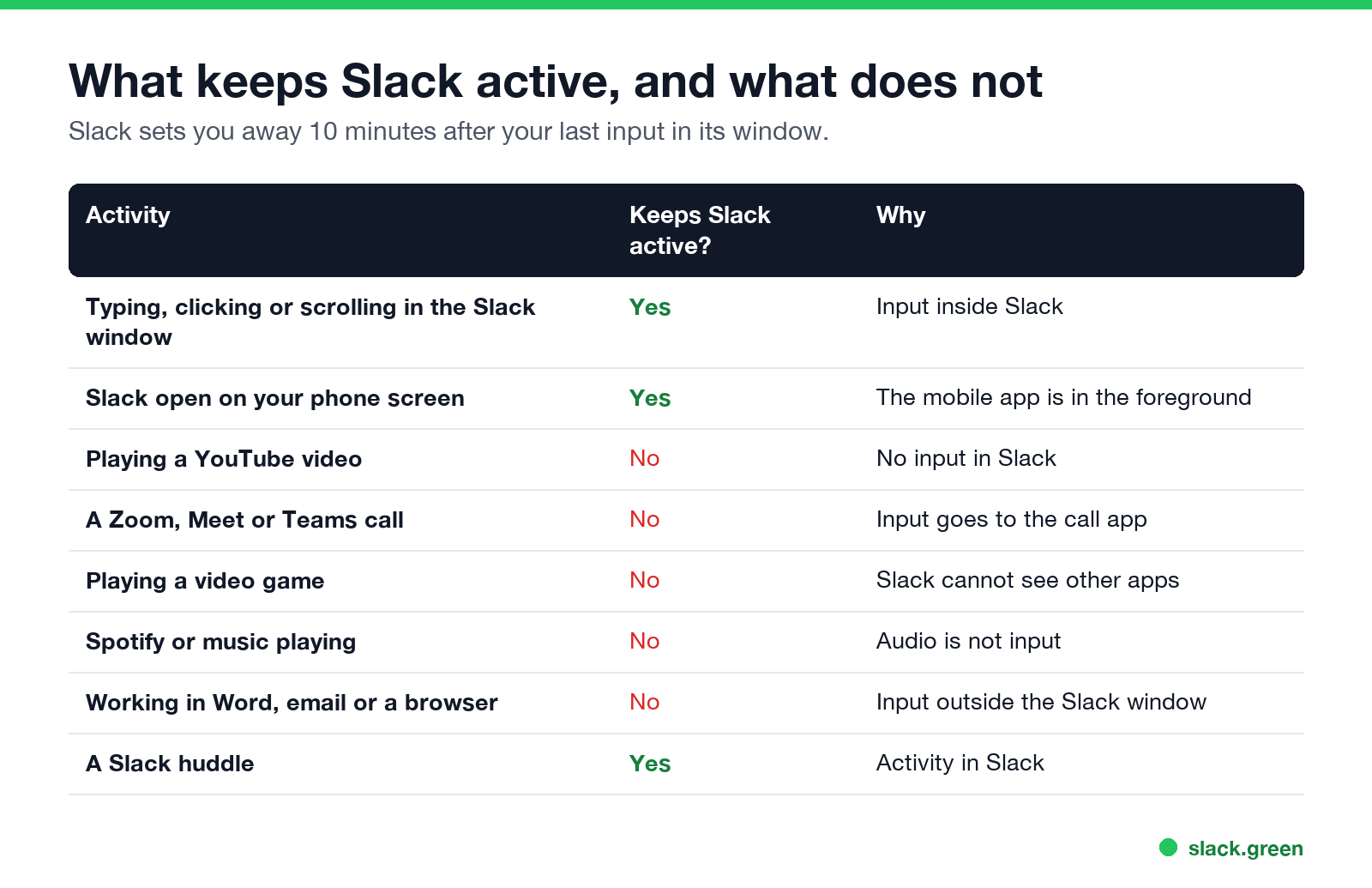
| Activity | Keeps Slack active? |
|---|---|
| Typing, clicking or scrolling in the Slack window | Yes |
| Slack open on your phone screen | Yes |
| Playing a YouTube video | No |
| A Zoom, Meet or Teams call | No |
| Playing a video game | No |
| Spotify or other music | No |
| Working in Word, email or a browser | No |
| A Slack huddle | Yes |
Slack's help center says you are set to away after 10 minutes of desktop inactivity, and Slack measures that inactivity in its own window only. The full rules are in how Slack decides when you are away, and the timings per device in how long does Slack stay active.
Does watching a video keep Slack active?
No, whether the video plays in a browser tab, the YouTube app or a video in Slack itself. Watching creates no input. Even with the Slack window in front, a video playing in it for more than 10 minutes without a click or scroll leaves you away.
Does a Zoom call keep Slack active?
No. Your input goes to Zoom. After 10 minutes in a call, your Slack dot is grey. A Slack huddle is different: it is activity in Slack. If you want people to know you are in a call, set a status such as 📆 In a meeting, or let your calendar do it; see sync Slack status with Google Calendar.
Does Slack show if you are playing video games?
No. Slack cannot see which apps you use or what is on your screen. It only knows that you have not touched Slack. Coworkers see a grey dot, not what you are doing. What Slack records is covered in does Slack track mouse movement.
Does Spotify keep Slack active?
No. Music is not input.
Slack vs Teams: why the answer differs
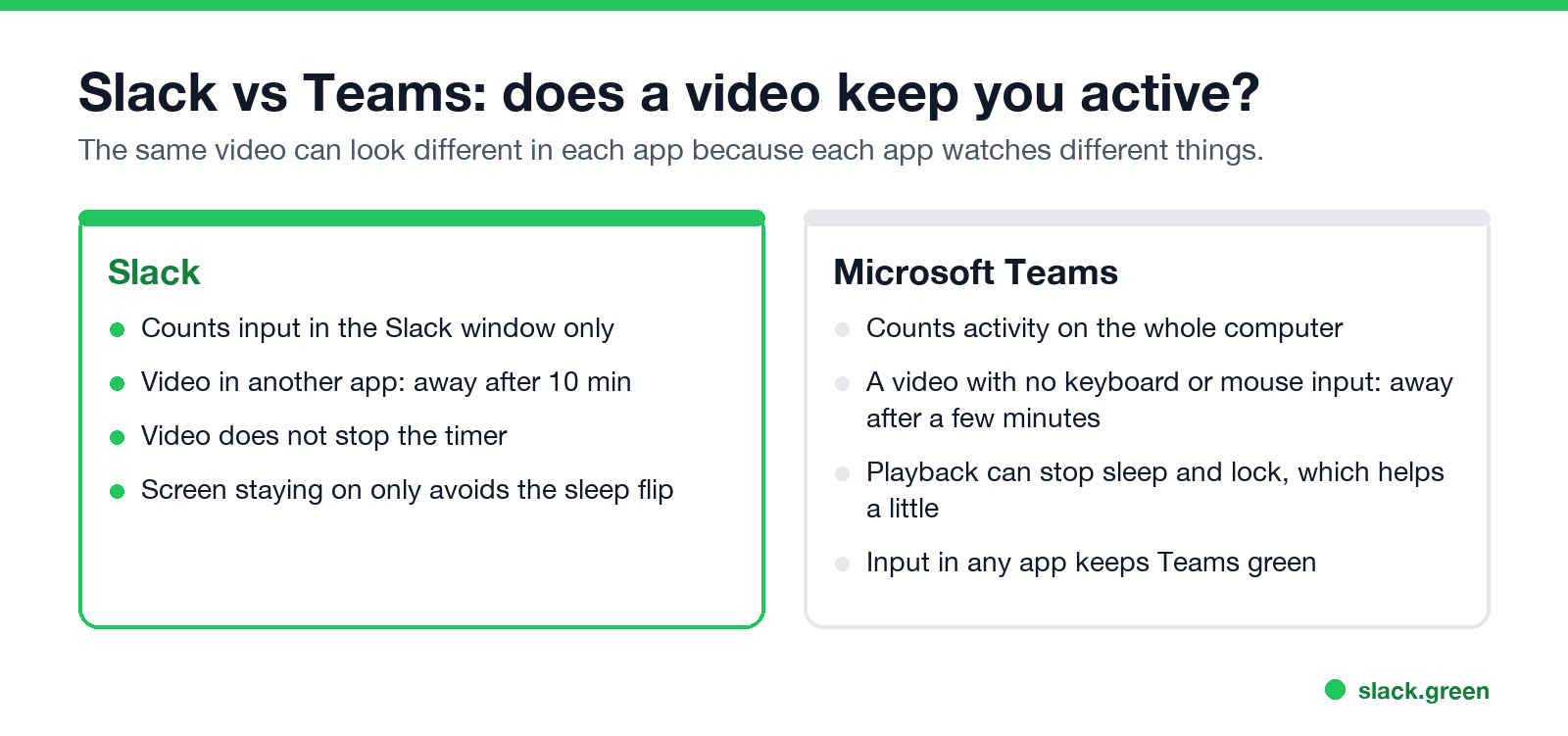
Microsoft Teams watches activity on the whole computer, so any keyboard or mouse input keeps it green. Slack watches only its own window. A video with no input leaves you away in both after a while, but everyday work in other apps keeps Teams green and not Slack. Details in how long before Teams shows you as Away.
What actually keeps Slack active
- • Touch Slack every few minutes. A click in a channel restarts the 10 minutes.
- • Keep Slack on screen on your phone. See keep Slack active on your phone.
- • Keep presence active from a server. Slack Green keeps you green during your working hours, laptop open or closed.
Keep-awake apps and jigglers help less than people expect: does Caffeine keep Slack active and Slack Green vs mouse jiggler. Every method is compared in how to keep Slack active.
FAQ
Does playing a YouTube video keep Slack active?
No. Slack counts only input in its own window and sets you away 10 minutes after the last one.
What counts as active on Slack?
Clicks, keystrokes and scrolling in the Slack window on a computer, the app open on screen on a phone, and being in a huddle.
Does Slack know I am watching YouTube?
No. Slack cannot see other apps. It only shows that you are away.
Does leaving Slack open keep me active?
No. An open window with no input counts as idle.
Does a video keep Teams active?
Not on its own. Teams needs keyboard or mouse input somewhere on the computer.
Related Articles
How to Look Busy on Teams: Busy Status, Calendar Blocks and Focus Time
To look busy on Microsoft Teams, set your status to Busy with a duration, or block time in your Outlook calendar so Teams shows In a meeting. Focus time shows Focusing, and a status message says what you are on. How long each lasts, what Teams does when you go idle, and what not to do.
How to Keep Webex Status Active (and Why It Says Active Minutes Ago)
Webex App on Windows or Mac shows you Available while you use your computer and switches to 'Active X minutes ago' when you stop. On a phone, only sending or reading messages counts. How to keep Webex active, what a keep-awake tool and a custom status do, and why your status may stick on inactive.
How to Keep Your Zoom Status Active and Stop Showing Away
Zoom sets you Away after 15 minutes of inactivity by default, and unlike Slack or Teams it lets you turn that off. The setting, step by step, and what still turns your Zoom status to Away or Offline.