
Slack /remind Command Examples: Channels, Yourself and Repeats
The Slack /remind format is /remind [#channel or me] [what] [when], for example /remind #team to submit expenses every Thursday at 4pm. Copy-paste examples for channels, yourself and recurring reminders, plus how to list, delete and change the default time.
The Slack /remind command follows one format: /remind [#channel or me] [what] [when]. For example, /remind #marketing-team to submit expenses every Thursday posts that reminder in #marketing-team every Thursday, and /remind me to call the bank at 3pm pings you once at 3pm. Type it in any message box and send. Slack confirms what it understood, so you can check the time before it fires. Reminders repeat by the day, such as every weekday or every Monday, not by the hour. Type /remind list to see and delete reminders.
Below are examples you can copy, the rules Slack uses to read them, and the limits that trip people up.
Slack /remind syntax
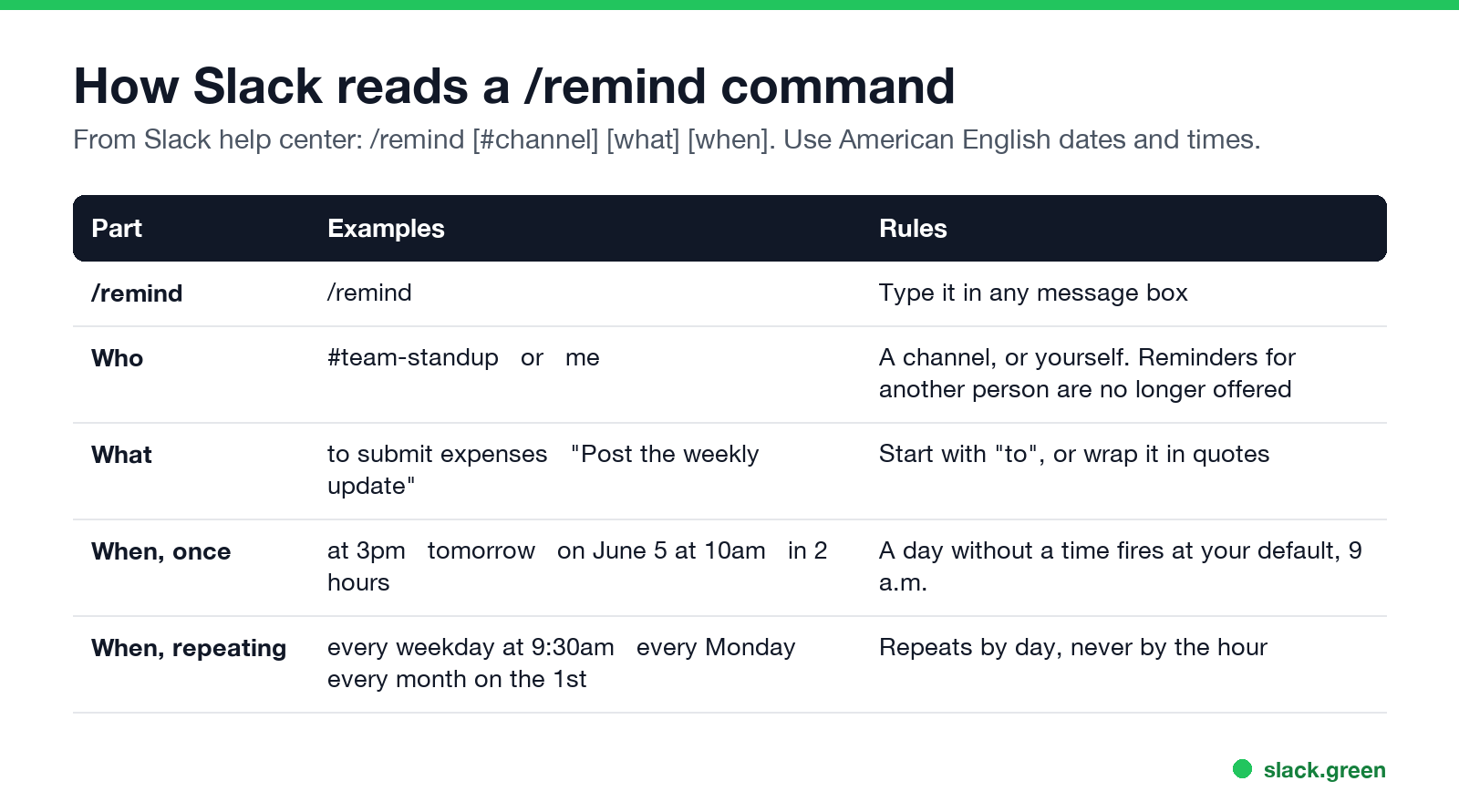
- • Who: a channel (
#team-standup) orme. - • What: start with
to, or wrap the text in quotes:"Post the weekly update". - • When: a time (
at 3pm), a day (tomorrow,on June 5), a delay (in 2 hours) or a repeat (every weekday at 9:30am). A delay makes/remindwork as a timer; pomodoro and countdown setups are in Slack timer.
Slack's help center recommends American English dates and times. A day with no time fires at your default reminder time, 9 a.m. in your time zone unless you changed it.
/remind examples for a channel
Channel reminders post a message in the channel at the time you set. They suit simple team reminders.
/remind #team to submit expenses every Thursday at 4pm
/remind #standup "Standup in 5 minutes, post blockers in the thread" every weekday at 9:25am
/remind #engineering to update the on-call sheet every Monday at 10am
/remind #sales "Pipeline review today, update your deals" every Tuesday at 9am
/remind #general "Timesheets are due today" every month on the 1st at 9am
/remind #marketing-team to review the launch checklist on October 3 at 2pm
/remind #design "Crit at 3, share your file link here" every Wednesday at 2:45pm
/remind #support to hand over open tickets every Friday at 5pm
If Slack does not understand a phrase, its confirmation shows a different schedule or an error. Rewrite it more plainly and check the confirmation again. A channel reminder can include @channel or @here; who each one reaches is in @here vs @channel vs @everyone.
/remind examples for yourself
/remind me to call the bank at 3pm
/remind me to follow up with Priya tomorrow
/remind me to check the deploy in 45 minutes
/remind me "Renew the domain" on November 1 at 10am
/remind me to stretch every weekday at 11am
Personal reminders appear in the Later tab when they are due, with a notification. How the Later tab works is in Slack saved for later. You can also skip the command: hover over any message, click the three dots, choose Remind me about this, and pick a time. On mobile, tap and hold the message and tap Remind me.
Slack recurring reminders
Repeats work by the day:
every weekday for Monday to Fridayevery Monday or every Monday and Wednesdayevery day at 8amevery month on the 1stTwo limits from Slack's help center: you cannot repeat in time steps such as every hour, and channel reminders cannot be edited, only deleted and created again. For a reminder every other week, try the phrase and read Slack's confirmation. If it does not match, use a Workflow Builder workflow with a scheduled trigger, which Slack itself recommends for anything more complex than a simple team reminder. Steps are in how to schedule a recurring message in Slack.
Can you set a Slack reminder for someone else?
Not directly anymore. Slack's current help center lists personal, message, list, canvas and channel reminders, and no reminder for another person. Users on r/Slack reported in 2023 that /remind @name stopped working when reminders moved to the Later tab. Your options:
/remind #project "@maria the report is due today" on Friday at 9am.List, delete and change reminders
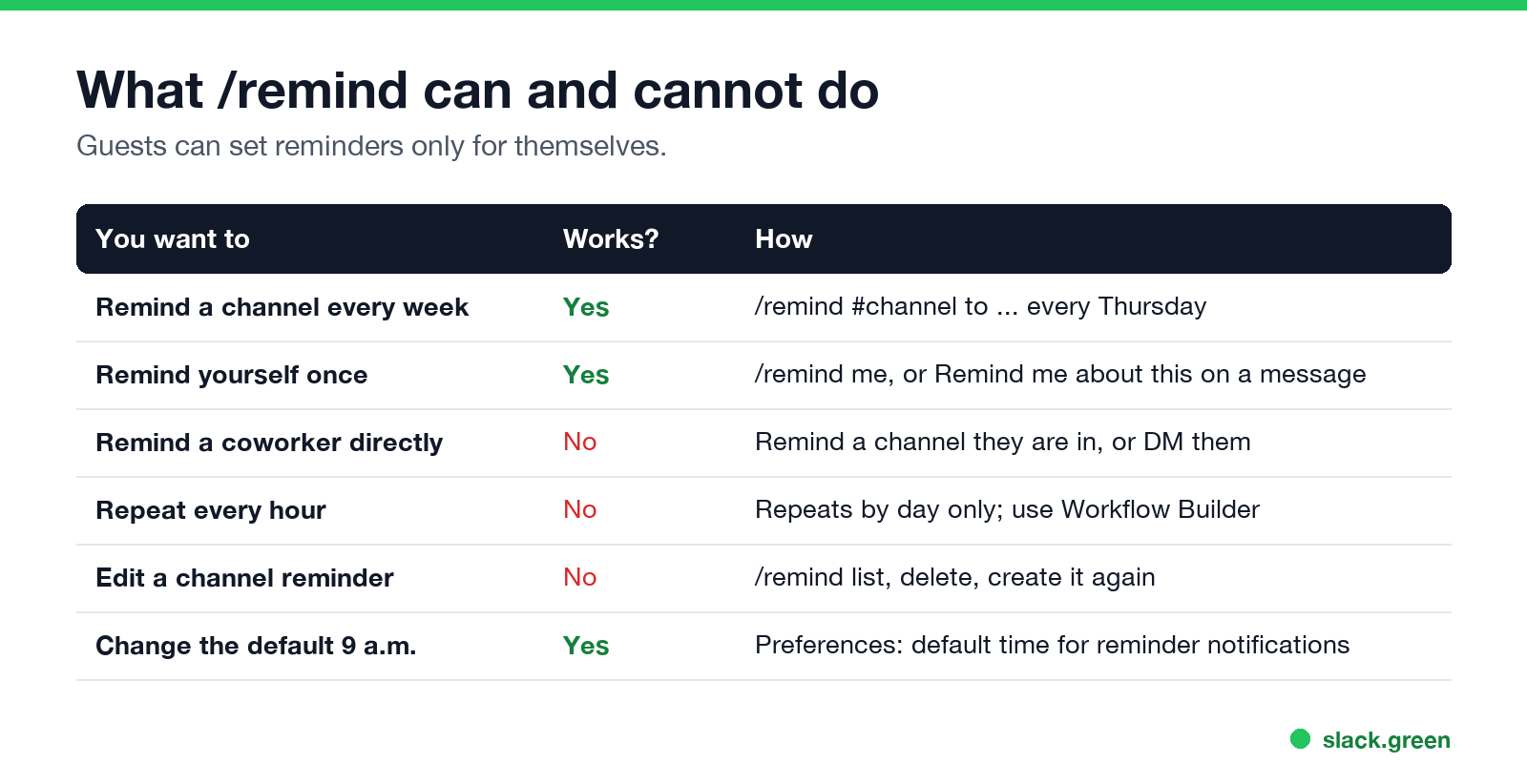
/remind list and send. Slack shows a list only you can see, with a Delete button on each.Guests can set reminders only for themselves. Every other built-in command is in the Slack slash commands list.
Reminders, scheduled messages and your status
A reminder notifies. A scheduled message posts as you at a set time; see how to delay and schedule Slack messages. A scheduled status changes the text next to your name; see how to schedule a Slack status.
None of them keep your dot green. A reminder at 9:25 does not mark you active if you are not at Slack, and your dot still turns grey 10 minutes after your last input in the Slack window. If your team reads the dot, Slack Green keeps it active during the working hours you set, from the cloud. The rules behind the dot are in how long does Slack stay active.
FAQ
What is the /remind format in Slack?
/remind [#channel or me] [what] [when], for example /remind #team to submit expenses every Thursday.
How do I set a reminder every weekday in Slack?
/remind #channel to post your update every weekday at 9:30am, or /remind me to ... every weekday at 9:30am.
How do I see all my Slack reminders?
Type /remind list in a channel to see its reminders. Your personal reminders are in the Later tab under In progress.
Can Slack remind me every hour?
No. Reminders repeat by the day, not by the hour. Use Workflow Builder for other schedules.
Why did my reminder fire at 9 a.m.?
You gave a day without a time. Slack uses your default reminder time, 9 a.m. unless you changed it in Preferences.
Can I edit a channel reminder?
No. Delete it from /remind list and create it again.
Related Articles
Slack Lists Tutorial: Create, Organize and Share a List
Slack lists are tables of tasks inside Slack, with fields, assignees, due dates, a board view and a comment thread on every item. How to create a list from scratch or a template, set up fields, turn it into a kanban board, add messages to it, share it, and what the plan limits are.
Slack Jira Integration: Setup, /jira Commands and Notifications
Install the Jira Cloud for Slack app, type /jira connect in a channel to send a Jira space's updates there, /jira notify for personal notifications as DMs, and create work items from any message with More actions. Every /jira command, Jira automation to Slack, and fixes when previews or notifications stop.
How to Create a Slack Workspace, on Desktop or Phone
Go to slack.com/get-started, enter your email, type the confirmation code, and click Create a Workspace. It is free to start, you become the Primary Owner, and it takes about five minutes. Steps for desktop, iPhone and Android, and what to set up next.