
회사에서 써도 되는 웃긴 Slack 상태 메시지 모음
집중 작업, 회의, 점심, 금요일, 휴가 상황별로 바로 복사해 쓸 수 있는 웃긴 Slack 상태 메시지를 모았습니다. 회사에서 무리 없는 농담의 두 가지 규칙과, 상태 메시지가 초록 점을 바꾸지 않는 이유도 정리했습니다.
회사용 웃긴 Slack 상태 메시지는 "어디 있어요?"라고 묻기 전에 답하고, 덤으로 한 번 웃게 만듭니다. 예를 들면 "집중 중. 답장은 3시, 간식은 환영" 이나 "회의 줄이기 회의 6번째". 잘 만든 상태는 나 자신이나 일을 소재로 삼고, 웃음 포인트를 앞에 둡니다. 저희 테스트에서 프로필 카드가 상태를 37자에서 잘랐기 때문입니다.
아래 문구는 무엇이든 복사해서 쓰면 됩니다. 직접 만든 문구를 설정하기 전에 확인하고 싶다면 Slack 상태 생성기에 붙여 넣으세요. 프로필 카드에서 잘리는 부분에 색이 칠해지고, 길이에 맞는 웃긴 첫 문구도 아홉 개 있습니다.
집중 작업
- • "집중 중. 답장은 오후 3시, 간식은 언제든 환영"
- • "생각 중. 버퍼링을 방해하지 마세요"
- • "몰입 중. 이 구역은 와이파이가 안 터집니다"
- • "생각 컴파일 중. 예상 소요 시간: 알 수 없음"
- • "회의 줄이기 회의, 오늘만 6번째"
- • "지금 일방적으로 듣는 중"
- • "상태 메시지로 끝났을 회의에 참석 중"
- • "캘린더가 자비를 베풀 때까지 연속 회의"
- • "점심 먹으러 나감. 정신은 원래 나가 있음"
- • "연료 보충 중. 기계에 다가가지 마세요"
- • "커피 사러 감. 주문은 받지만 기억은 못 함"
회의
점심과 휴식
Slack에서 다시는 '자리 비움'으로 표시되지 마세요
클라우드 기반. 다운로드 불필요. 노트북이 꺼져 있어도 24시간 작동.
금요일과 휴가
만료 날짜와 대신 연락할 사람까지 넣은 진지한 휴가용 문구는 부재 중 메시지 안내에 있습니다. 상황별 평범한 업무용 문구는 업무용 Slack 상태 메시지 예시를, 아픈 날에는 병가 때 Slack 상태의 담백한 문구를 쓰세요.
회사에서 무리 없는 농담의 두 가지 규칙
too_long이 돌아왔습니다), 프로필 카드에는 한 줄만 보이고 나머지는 잘립니다. 이름 옆에서는 이모지만 보입니다. 이모지는 많아야 하나.2026년 10월 7일 테스트 워크스페이스에서 "In my 6th meeting about reducing meetings. Back when the agenda is."로 설정하고 메시지의 내 이름을 눌렀습니다. 프로필 카드는 "In my 6th meeting about reducing meeti…"에서, 37자로 잘랐고, 프로필 패널에는 두 줄로 전부 보였으며, 메시지 머리글에는 달력 이모지만 보였습니다.
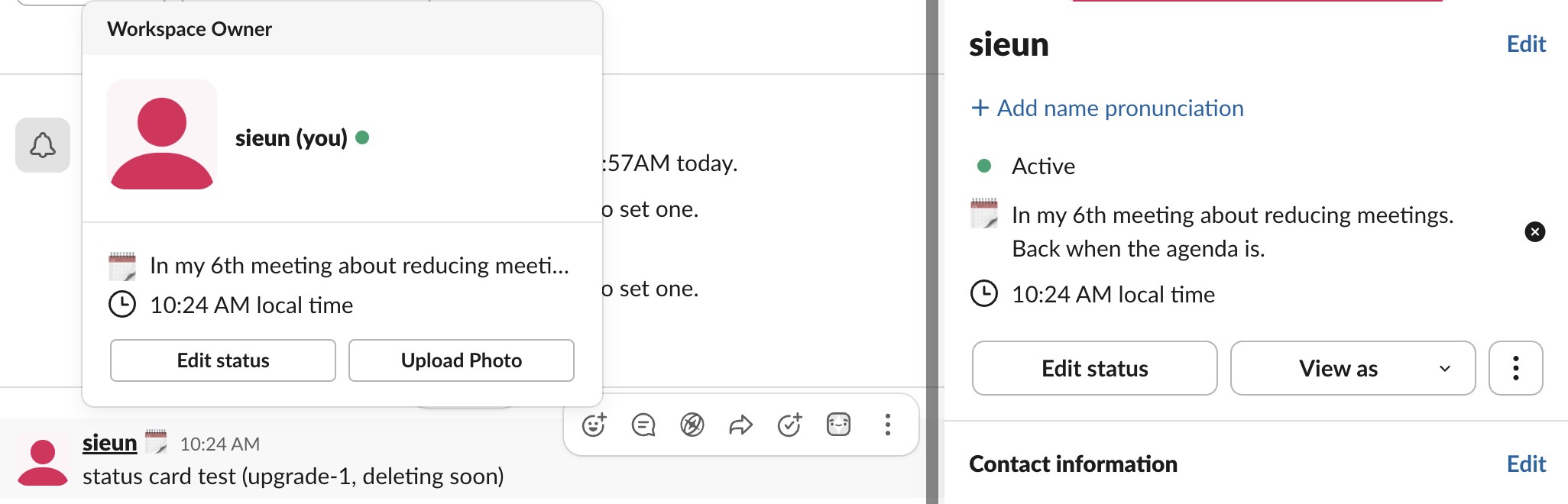
이 폭이면 한국어 상태도 뒷부분이 잘립니다. 웃음 포인트가 끝에 있는 상태는 거기서 웃음이 사라집니다.
자주 바꾸세요. 3월에 웃겼던 상태도 6월이면 가구처럼 보입니다. Microsoft Teams도 쓴다면 Teams용으로 쓴 100개 넘는 문구가 웃긴 Teams 상태 메시지에 있습니다.
상태 메시지가 못 하는 것
상태 문구와 초록 점은 서로 다른 시스템입니다. "집중 중"이라고 써 둬도 컴퓨터에서 키보드나 마우스 입력 없이 10분이 지나면 점은 회색이 됩니다. 그렇게 웃기지만 자리 비움인 상태가 됩니다. 회색 점이 농담을 망친다면 Slack 활성 상태 유지 방법에 저희 것을 포함한 모든 해결법이 있습니다. 긴 휴식 전후의 요령은 일하면서 눈치껏 쉬는 법에 정리했습니다.
자주 묻는 질문
Slack에서 상태를 설정하려면? 프로필 사진을 클릭하고 상태 업데이트를 누릅니다. 문구를 쓰고 이모지를 고른 뒤, 저절로 지워지도록 만료 시간을 정합니다. 휴대폰에서 하는 법과 상태를 일찍 지우는 법은 Slack 상태 변경하는 방법에 있습니다.
웃긴 상태 메시지가 회사에서 문제가 될 수 있나요? 위의 두 규칙이면 대부분의 회사에서는 괜찮습니다. 분위기가 딱딱한 회사라면 농담보다 담담한 문구가 안전합니다. 농담 없이 "답장은 오후 3시 이후"만 쓰세요.
상태 메시지로 대화 가능 여부가 바뀌나요? 아니요. 상태는 라벨일 뿐입니다. 표시 상태, 알림, 점은 모두 따로 움직입니다. Slack 상태의 작동 방식에서 다룹니다.
관련 기사
슬랙 상태를 항상 활성으로 유지하는 법: 데스크톱과 휴대폰, 6가지 비교
Slack 데스크톱 앱은 어느 앱에서든 마지막 키보드나 마우스 입력 후 10분이 지나면 자리비움으로 바꾸고, 이를 바꾸는 설정은 없습니다. Slack을 활성 상태로 유지하는 6가지 방법과 각각이 커버하는 범위, 자주 추천되지만 안 되는 방법을 정리했습니다.
슬랙 온라인 상태 유지하는 법: 되는 방법 전부
슬랙은 입력이 10분 없으면 자리비움으로 바뀌고, 온라인 상태를 고정하는 설정은 없습니다. 실제로 되는 방법과 안 되는 방법, 상황별 선택을 정리했습니다.
Slack 상태 매너: 무엇을 정하고, 언제 지우고, 회색은 무슨 뜻인지
Slack 상태 매너는 짧습니다. 평소 방법으로 연락이 안 될 때 상태를 정하고, 언제 돌아오는지나 누구에게 물으면 되는지 적고, 기간을 설정해 오래된 상태가 남지 않게 하세요. 회색 점만으로는 설명이 필요 없습니다. 회의, 집중, 점심, 병가, 휴가에 무엇을 정할지, 해야 할 것과 하지 말 것, 팀이 규칙을 정하는 법.