
Funny Slack Status Ideas That Survive a Work Channel
Copy-paste funny Slack statuses sorted by situation: deep work, meetings, lunch, Friday, and out of office. The two rules that keep a joke work-safe, and why the status never touches your green dot.
A funny Slack status for work answers "where are you" before anyone asks and earns one smile on the way: "Heads down. Replies at 3pm, bribes accepted." or "In my 6th meeting about reducing meetings." The best ones punch at yourself or the work, and put the joke near the start, because the hover card cut our test status after 37 characters.
Copy anything below. To check your own line before you set it, paste it into the Slack status generator. It shades the part the profile card cuts off and has nine funny starters that fit.
Deep work
- • "Heads down. Replies at 3pm, bribes accepted."
- • "Thinking. Do not interrupt the buffering."
- • "In the zone. The zone has no wifi."
- • "Compiling thoughts. Estimated time: unknown."
- • "In my 6th meeting about reducing meetings."
- • "Currently being talked at."
- • "In a meeting that could have been a status."
- • "Back-to-backs until my calendar shows mercy."
- • "Out to lunch. Emotionally, also generally."
- • "Refueling. Do not approach the machine."
- • "Coffee run. Accepting orders, ignoring them."
Meetings
Lunch and breaks
Never appear "away" on Slack again
Cloud-based. No downloads. Works 24/7 even when your laptop is off.
Fridays and vacations
More serious leave templates, with expiry dates and escalation contacts, are in the out-of-office guide. For plain work lines by situation, see Slack status examples for work. For a sick day, use the plain ones in Slack status for sick days.
The two rules of a work-safe joke
too_long in our API test), but the hover card shows one line and cuts the rest. Next to your name, people see only the emoji. One emoji, tops.On 7 October 2026 we set "In my 6th meeting about reducing meetings. Back when the agenda is." in our test workspace and clicked our own name on a message. The hover card cut it to "In my 6th meeting about reducing meeti…", 37 characters. The full Profile panel showed all of it on two lines, and the message header showed only the calendar emoji:
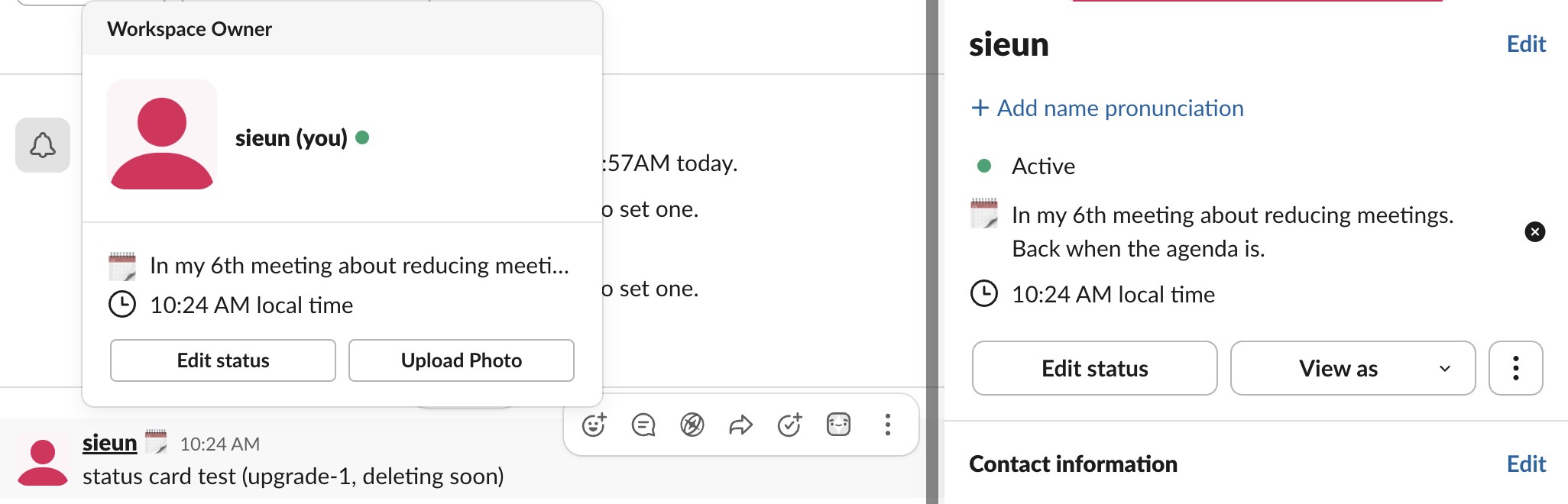
At that width "Heads down. Replies at 3pm, bribes accepted." loses the end of "accepted" and still works. A status whose punchline sits at the end does not.
Rotate them. A status that was funny in March reads like furniture in June. Using Microsoft Teams too? See funny Teams status messages for 100+ lines written for Teams.
The part the status cannot do
Your status text and your green dot are separate systems. "Heads down" does not stop the dot from going gray after 10 minutes with no keyboard or mouse input on your computer, which is how you end up funny AND away. If the gray dot undercuts the bit, how to keep Slack active covers every fix, including ours. For the rest of the routine around a long break, see how to slack off at work.
To match your status with your photo, see funny Slack profile pictures: 40 ideas that still work at work.
For your birthday in particular, see Slack status for your birthday: 30 statuses and the emoji codes.
Frequently asked questions
How do I set a status on Slack? Click your profile photo, then Update your status. Type the line, pick an emoji, and set an expiry so it clears itself. The mobile steps, and how to clear a status early, are in how to change your status on Slack.
Can a funny status be a problem at work? The two rules above cover most rooms. If your workspace is formal, the safe version is dry rather than jokey: "Replies after 3pm" with no bit attached.
Does the status change my availability? No. It is a label. Presence, notifications, and the dot all run separately, as covered in how Slack status works.
Stop Jiggling Your Mouse.
Join hundreds of remote workers who never worry about their Slack status. Set it up once, stay green forever.
Related Articles
Slack Status for Limited Availability: 30 Statuses to Copy
A Slack status for limited availability says you are around but slow, until when, and how to reach you if it is urgent, such as ⏳ 'Limited availability today, replies after 3 PM. Urgent: @mention me.' 30 statuses for busy days, slow replies and catching up, the emoji to use, and when to pause notifications too.
How to Change Your Status on Slack: Message, Emoji and Away Dot
Profile picture (bottom left), Update your status, Duration, Save. We tested every step, the emoji Slack fills in from your words, and how the away switch behaves.
How to Delay and Schedule Slack Messages, Tested
To schedule or delay a Slack message, click the arrow next to Send (long-press on mobile) and pick a time or Custom time. Scheduled messages wait in Drafts & sent > Scheduled. We tested the menu, the custom time, where they wait and whether Slack labels them.