
職場でも使えるおもしろいSlackステータス例
集中作業、会議、ランチ、金曜日、休暇の状況別に、そのまま使えるおもしろいSlackステータスを集めました。職場で滑らないジョークの2つのルールと、ステータスが緑の点を変えない理由も。
仕事用のおもしろいSlackステータスは、「今どこ?」と聞かれる前に答えて、ついでに1回笑ってもらうものです。たとえば「集中中。返信は15時、差し入れ歓迎」や「会議を減らすための会議、6本目」。うまいものは自分か仕事をネタにし、オチを前のほうに置きます。私たちのテストでは、プロフィールカードがステータスを37文字で切ったからです。
下の例はどれもそのままコピーして使えます。自分で考えた1行を設定する前に確かめたいなら、Slackのステータス生成ツールに貼り付けてください。プロフィールカードで切れてしまう部分に色がつき、収まるおもしろい書き出しも9つあります。
集中作業
- • 「集中モード中。返信は15時以降、差し入れは随時受付中」
- • 「考え中。読み込み中につきお静かに」
- • 「ゾーンに入っています。ゾーン内はWi-Fi圏外です」
- • 「思考をコンパイル中。完了予定時刻:不明」
- • 「会議を減らすための会議、本日6本目」
- • 「ただいま一方的に話を聞いています」
- • 「ステータスで済んだはずの会議に出席中」
- • 「カレンダーが慈悲を見せるまで会議が続きます」
- • 「ランチで席を外しています。心はずっと外出中」
- • 「燃料補給中。機械に近づかないでください」
- • 「コーヒーの買い出し中。注文は受け付けます、覚えるとは言っていません」
会議
ランチと休憩
金曜日と休暇
期限や代わりの連絡先を入れたまじめな休暇用の文面は、不在メッセージのガイドにあります。状況別のふつうの仕事用の文面は仕事で使えるSlackステータスの例を、病欠の日は病欠のときのSlackステータスのシンプルな例を使ってください。
職場で滑らないジョークの2つのルール
too_longが返りました)、プロフィールカードに出るのは1行だけで、残りは切られます。名前の横では、絵文字しか見えません。絵文字は多くても1つ。2026年10月7日に、テスト用のワークスペースで「In my 6th meeting about reducing meetings. Back when the agenda is.」と設定し、メッセージの自分の名前をクリックしました。プロフィールカードは「In my 6th meeting about reducing meeti…」の37文字で切り、プロフィールのパネルには2行で全文が出て、メッセージの見出しにはカレンダーの絵文字しか出ませんでした。
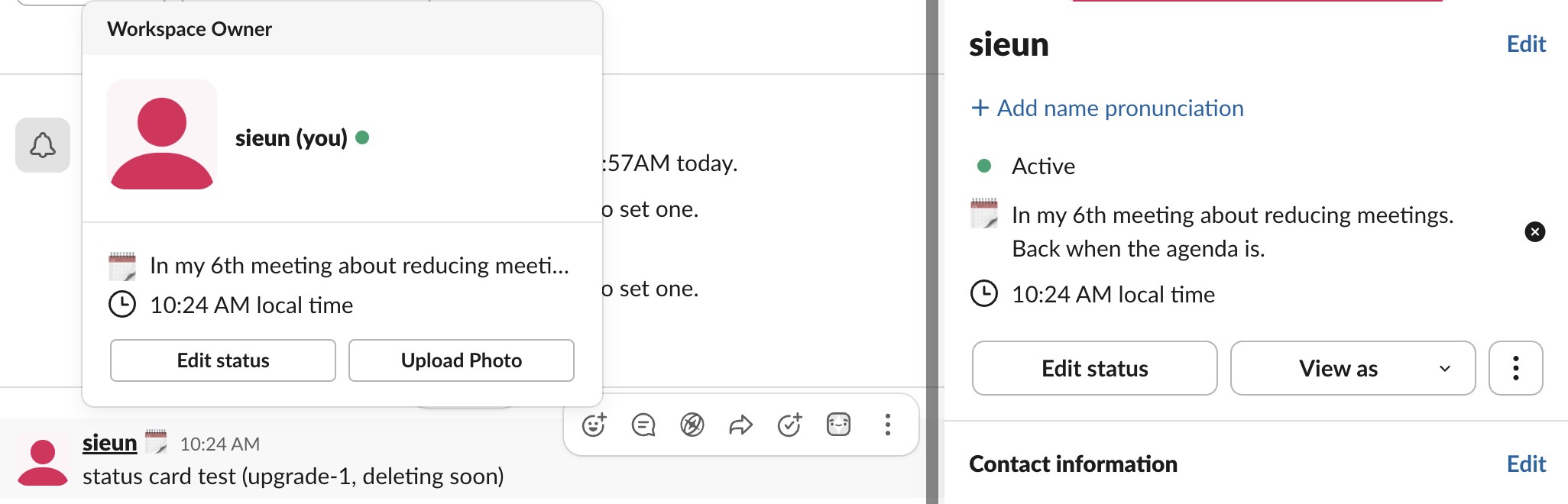
この幅だと、日本語のステータスでも後ろが切れます。オチが最後にあるステータスは、そこで笑いが消えます。
入れ替えも忘れずに。3月におもしろかったステータスは、6月にはただの家具に見えます。Microsoft Teamsも使っているなら、Teams向けに書いた100以上の文面がおもしろいTeamsのステータスメッセージにあります。
ステータスにできないこと
ステータスの文字と緑の点は別の仕組みです。「集中モード中」と書いても、パソコンでキーボードやマウスの入力がないまま10分たてば点は灰色になります。こうして、おもしろいのに離席中という状態ができあがります。灰色の点がネタを台無しにするなら、Slackをアクティブに保つ方法に、私たちのものを含むすべての対策があります。長めの休憩のまわりのことは仕事中にうまく息抜きする方法にまとめています。
よくある質問
Slackでステータスを設定するには? プロフィール写真をクリックし、「ステータスを更新する」を選びます。文面を入力して絵文字を選び、自動で消えるように期限を設定します。スマホでの手順と、ステータスを早めに消す方法はSlackのステータスを変更する方法にあります。
おもしろいステータスが職場で問題になることはありますか? 上の2つのルールを守れば、たいていの職場では大丈夫です。かための職場なら、ジョークより淡々とした言い方が安全です。ネタなしで「返信は15時以降」だけにします。
ステータスで対応可否は変わりますか? 変わりません。ステータスはラベルです。在席状況、通知、点はそれぞれ別に動いています。Slackのステータスの仕組みで説明しています。
関連記事
Slackのステータスを常にアクティブに保つ方法:PCとスマホ、6つの方法
Slackのデスクトップアプリは、どのアプリでも最後のキーボードやマウスの入力から10分で離席中にし、それを変える設定はありません。Slackをアクティブに保つ6つの方法と、それぞれがカバーする範囲、よく勧められるのに効かない方法をまとめました。
Slackのステータスのマナー:何を設定し、いつ消し、灰色は何を意味するか
Slackのステータスのマナーは短くまとまります。いつもの方法で連絡がつかないときに設定し、いつ戻るか誰に聞けばいいかを書き、期間を設定して古いまま残さないこと。灰色の点だけなら説明はいりません。会議、集中、昼食、病欠、休暇に何を設定するか、するべきこととしないこと、チームでルールを決める方法。
Slackのお悔やみに使う絵文字:選び方と無料でダウンロードできる5つ
❤️、🙏、🫂、💐でリアクションし、👍や✅は使わず、ひとこと添えます。実際のSlackで試した、やさしいカスタム絵文字5つも無料でダウンロードできます。