
How to Sync Your Slack Status With Google Calendar (and Outlook)
Install the Google Calendar app in Slack, connect your primary calendar, and turn on Status Sync. Slack then sets In a meeting for accepted events with other invitees and Out of Office for OOO or PTO events. Setup steps, the rules, Outlook, and why sync sometimes does nothing.
To sync your Slack status with Google Calendar, install the Google Calendar app in your Slack workspace, connect your Google account and your primary calendar, and turn on Status Sync in the app's settings. From then on, Slack sets your status to In a meeting when an accepted event with other invitees starts, and to Out of Office when an event's title contains OOO or PTO. The status clears when the event ends. Outlook users get the same through the Outlook Calendar app.
Calendar sync changes your status text only. It does not touch your green or grey dot, so an hour-long Zoom call still turns you grey after 10 minutes, with "In a meeting" next to it. If you want the dot to follow your working hours too, Slack Green keeps your presence active on the schedule you set, from the cloud, with nothing installed on your computer.
How to sync Slack status with Google Calendar
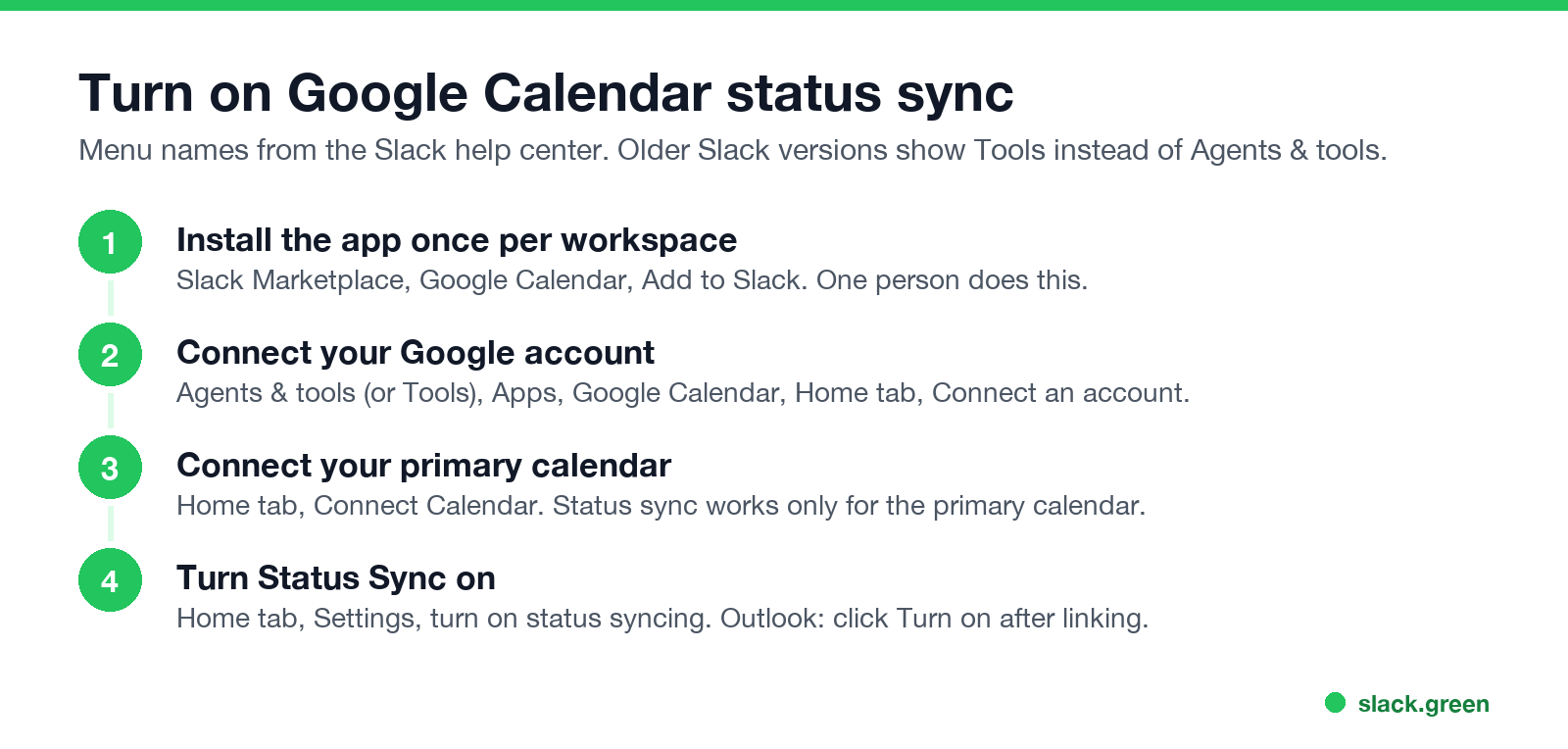
1. Install the app (once per workspace). Open the Google Calendar page in the Slack Marketplace, click Add to Slack, then Allow. If a coworker already installed it, skip this step. Some workspaces require admin approval for apps.
2. Connect your Google account. In Slack on desktop, click Agents & tools in the sidebar (older versions show Tools), select Apps, and open Google Calendar. On the app's Home tab, click Connect an account and follow the prompts.
3. Connect your calendar. On the Home tab, click Connect Calendar, choose your calendar under Accounts, and click Done. You can add several calendars for notifications, but status sync works only with your primary calendar.
4. Turn on Status Sync. On the Home tab, click Settings and switch status syncing on.
On mobile, tap Jump to, search for Google Calendar, and use the same Home tab and Settings.
How to sync Slack status with Outlook Calendar
- Install the Outlook Calendar app from the Slack Marketplace.
- Open it from Agents & tools, then Apps, and link your Microsoft account.
- Click Turn on to start status syncing.
Outlook sync sets In a meeting during meetings, and on Enterprise plans it can also set Slack's out of office status from your Outlook out of office events.
When the calendar sets your status, and when it does not
Slack에서 다시는 '자리 비움'으로 표시되지 마세요
클라우드 기반. 다운로드 불필요. 노트북이 꺼져 있어도 24시간 작동.
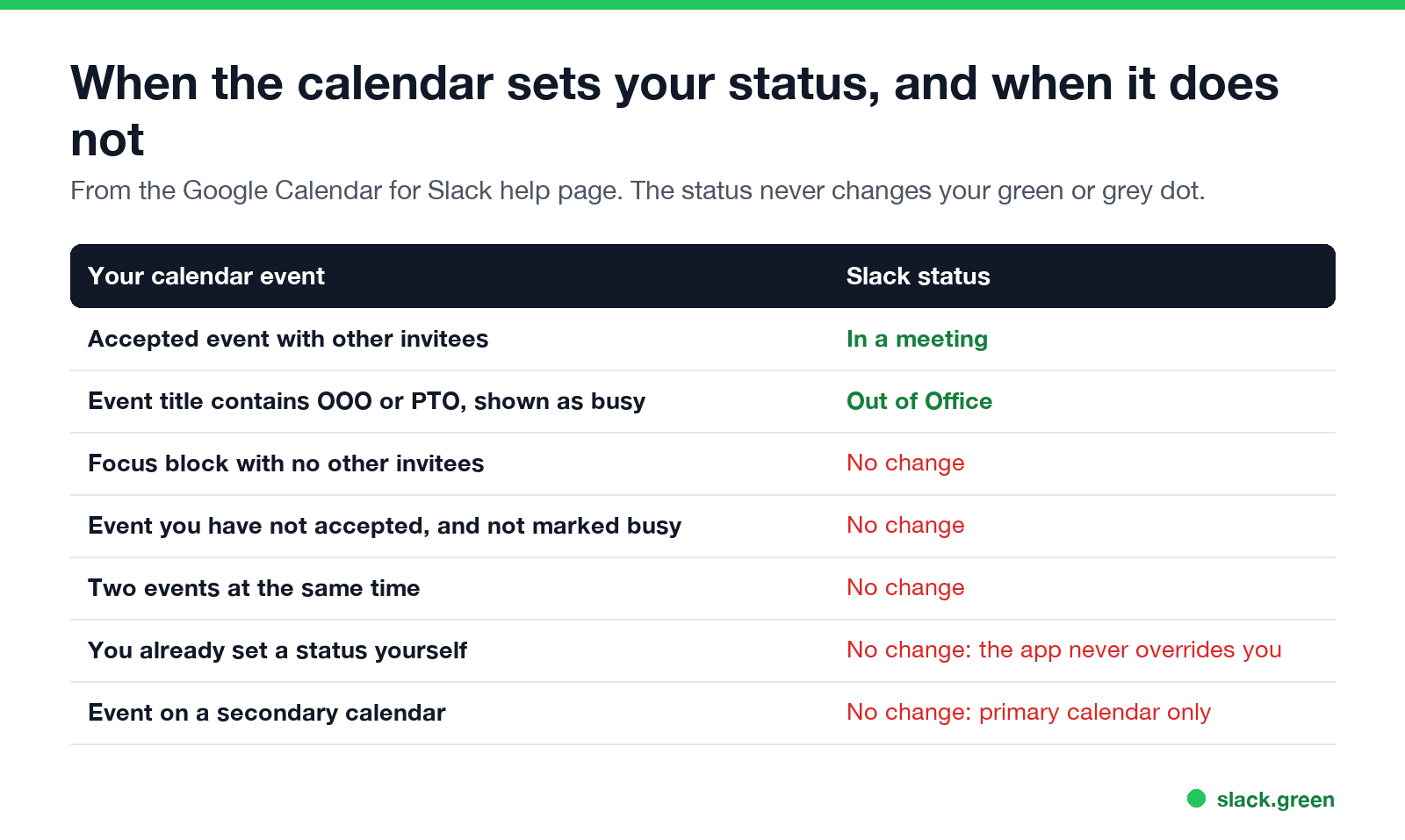
Slack's help center lists the rules for the Google Calendar app:
| Your event | Slack status |
|---|---|
| Accepted, with other invitees | In a meeting |
| Title contains OOO or PTO, and you are shown as busy | Out of Office |
| A focus block with nobody else invited | No change |
| Not accepted and not marked busy | No change |
| Overlaps another event | No change |
| You already set a status yourself | No change |
| On a secondary calendar | No change |
Two more details. The status never includes the meeting's name, so coworkers see "In a meeting" and nothing about what it is. And you can change or clear the synced status at any time.
Slack Google Calendar status not working? Check these
Match what you see to the rule above:
For Slack's own out of office status and message options, see Slack out of office.
Other ways to automate your Slack status
users.profile.set sets status_text, status_emoji and status_expiration. Code is in our Slack presence API guide.Status ideas for each kind of event are in the Slack status ideas tool and in Slack status examples.
Your status says "In a meeting", but your dot is grey
Slack에서 다시는 '자리 비움'으로 표시되지 마세요
클라우드 기반. 다운로드 불필요. 노트북이 꺼져 있어도 24시간 작동.
This is the gap calendar sync leaves open. During a Zoom or Google Meet call you give Slack no input, so after 10 minutes your dot goes grey. The status explains why, but many people read the grey dot first. Status and dot are separate systems, and the dot follows the rules in how long does Slack stay active.
To keep the dot green through meetings, Slack Green keeps your presence active during the working hours you set, so the calendar handles the text and the schedule handles the dot. Other methods are compared in how to keep Slack active.
FAQ
Can Slack automatically set my status from Google Calendar?
Yes. With the Google Calendar app installed and Status Sync on, Slack sets In a meeting and Out of Office from your primary calendar.
Why does my Slack status not say "In a meeting"?
Most often the event has no other invitees, you have not accepted it, it overlaps another event, or you already set a status yourself.
Does the Slack status show the meeting name?
No. Coworkers see "In a meeting" only.
Can I sync a shared or secondary calendar to my status?
No. Status sync works with your primary calendar only. Other calendars can still send you event notifications.
Does calendar sync keep me active on Slack during meetings?
No. It changes your status text. Your dot still goes grey after 10 minutes without input in Slack.
Does it work with Outlook?
Yes. The Outlook Calendar app for Slack syncs your status in the same way after you click Turn on.
Related Articles
Can Slack Admins See What You Search? And What Else They See
No. Slack gives admins no record of your search terms. On Enterprise they can see how many searches you ran each day. What admins see about edits, private channels, scheduled messages, analytics and read receipts.
Does Slack Notify When You Leave a Channel? Leave, Edit, Delete and More
Slack does not ping anyone when you leave a channel, but it posts a line saying you left, unless an admin turned join and leave messages off. Edits show (edited), deletes leave no alert, forwards do not tell the author, and removing someone does notify them. What each action shows, and how to leave quietly.
How to Connect Slack and Microsoft Teams: Calls, Messages and Status
Slack and Teams do not connect natively for chat. You can start Teams calls from Slack with the free Microsoft Teams Calls app, relay messages with a paid bridge such as Mio, and sync your Teams status to Slack with a short script. Every option, what it costs, and the setup steps.