
How to Slack Off at Work Without Getting Noticed
Slack off at work by taking short, planned breaks after real output, answering small things fast, and removing the signals people notice: a grey Slack dot, slow replies, an empty calendar. What gives breaks away, and what to skip.
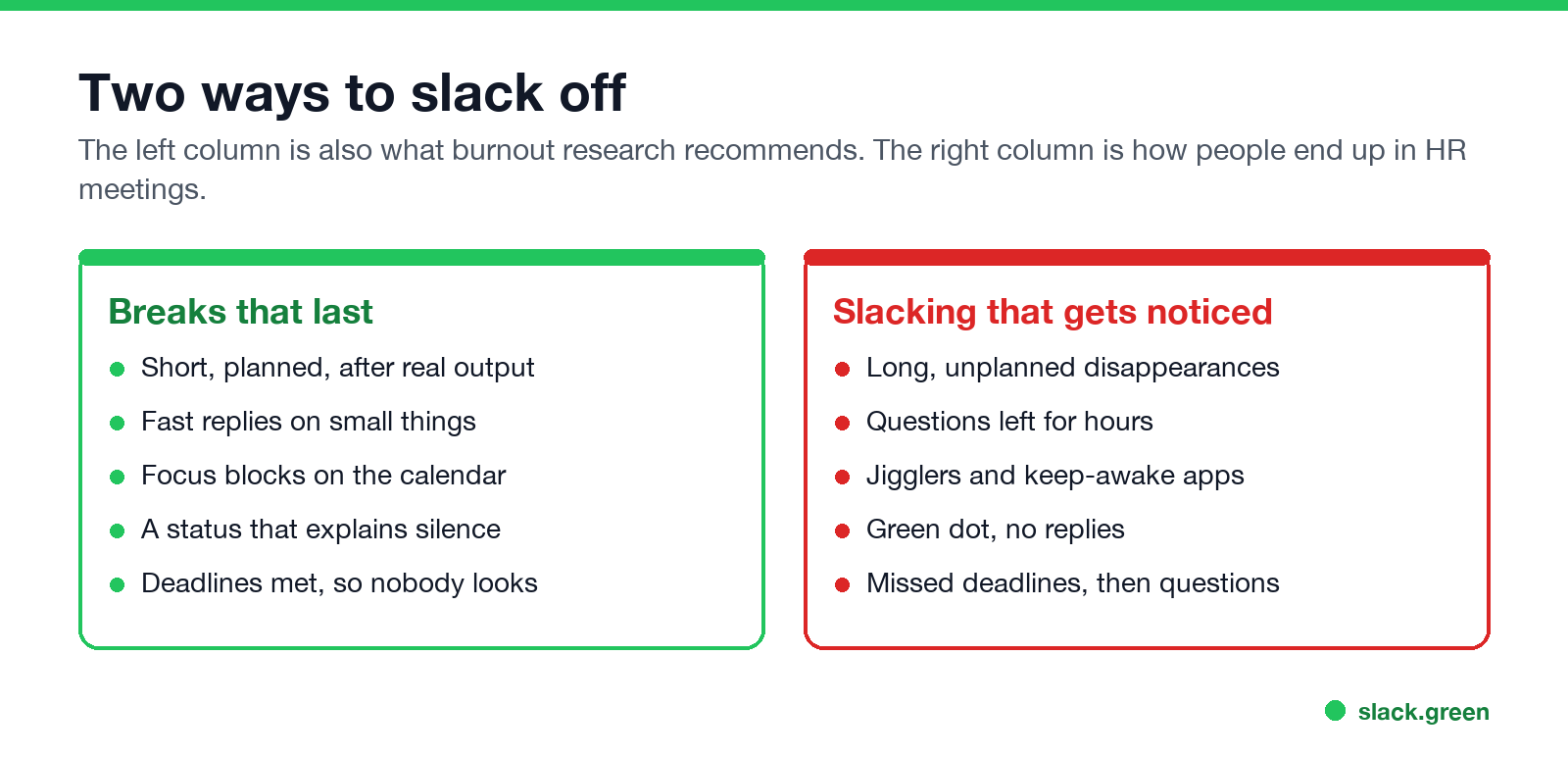
To slack off at work without anyone noticing, take short breaks that start after you have finished something, answer quick questions fast before you step away, and remove the signals people use to judge whether you are working. On a remote team those signals are a grey dot in Slack or Teams, a reply that takes two hours, an empty calendar, and messages sent at odd times. Nobody watches your screen. They notice what is left waiting on you.
What gets people in trouble is the opposite approach: long, unplanned disappearances covered by a trick. In May 2024 Wells Fargo fired more than a dozen employees after reviewing what its FINRA filings called "simulation of keyboard activity creating impression of active work". A mouse jiggler solves the wrong problem and leaves a trail. The legal and policy side is in is it illegal to use a mouse jiggler.
The most visible signal on a remote team is the Slack dot. On a computer it turns grey 10 minutes after your last input in the Slack window, even while you work in another app. Slack Green keeps it green from the cloud during the working hours you set, with your laptop closed and nothing installed on it. The rest of this guide covers the other signals, which matter just as much.
Is it okay to slack off at work?
Some of it is. Nobody does eight hours of focused work, and nobody is paid to. Breaks are part of doing the job well:
- • DeskTime's 2014 study of its own users found that the top 10% by productivity worked in stretches of about 52 minutes, then took breaks of about 17 minutes.
- • Microsoft's Human Factors Lab measured brain activity in 2021. People in back-to-back meetings showed stress building up across the session. People who took 10-minute breaks between meetings did not.
- Slow replies to small questions. A two-line question that waits two hours is the single most noticed thing on a remote team. The person who asked does not know or care where you were. They know they waited.
- Nothing shipped. No trick covers a missed deadline. It also turns every other signal into evidence.
- The grey dot. Coworkers glance at it before they message you. Managers glance at it when they feel uneasy. Some companies install apps that log it over time; we explain how in can Slack be used to monitor employees.
- An empty calendar. A blank afternoon invites a "quick sync" at 3 pm.
- Odd message times. A week of messages sent only at 11:58 pm and 8:01 am reads as "not around during the day".
- Gadgets. Jigglers and keep-awake apps are the only item on this list that software catches. See can a mouse jiggler be detected.
The line is output. If your work gets done, on time and at the level expected, a walk or a long lunch is a break. If it does not, the same walk is the reason people start watching.
What gives a break away
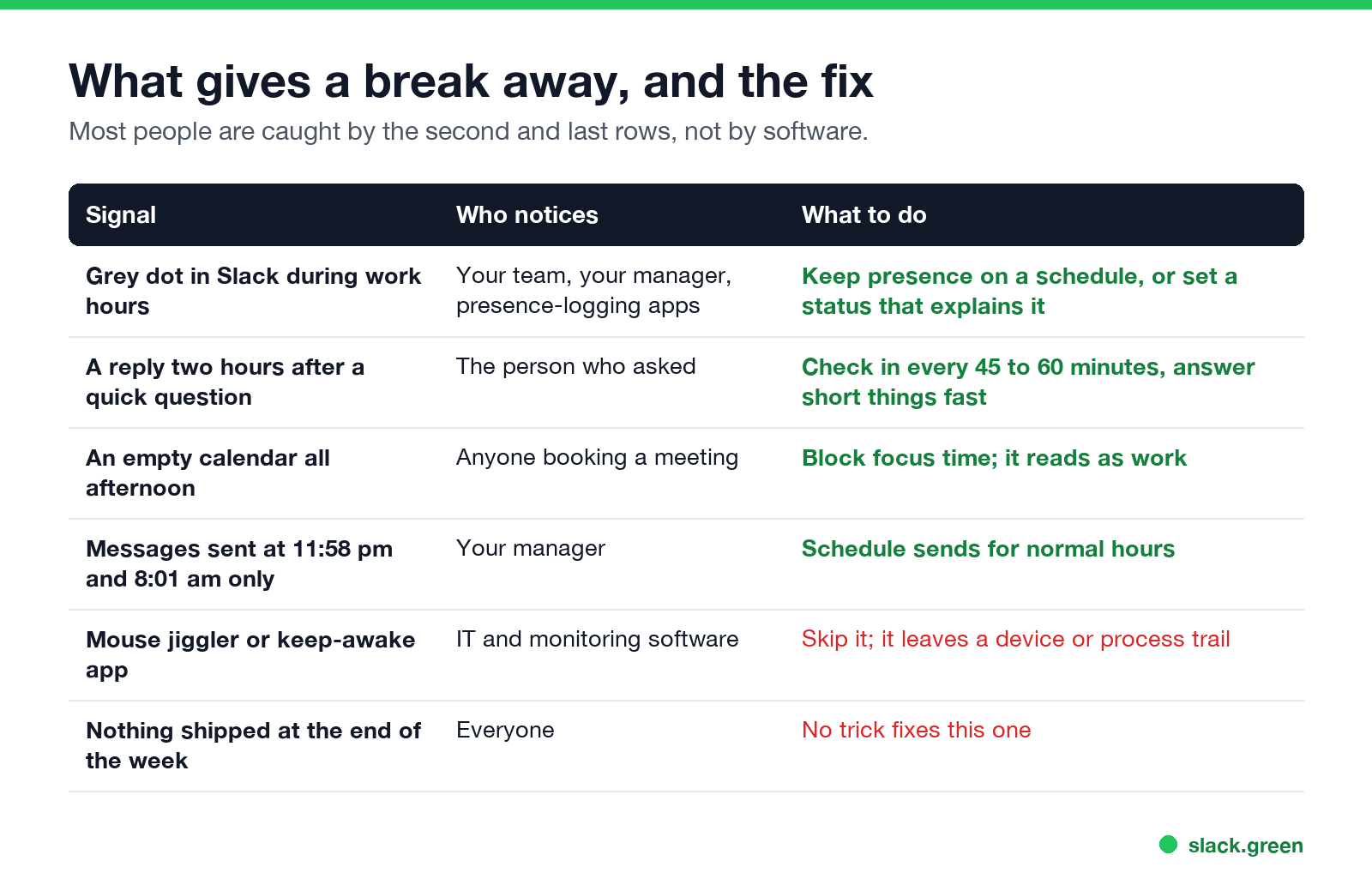
In order of how often they catch people:
How to slack off working from home
Nunca mais apareça como "ausente" no Slack
Na nuvem. Sem downloads. Funciona 24/7 mesmo com seu notebook desligado.
Working from home makes breaks easy to take and easy to misread. Here is a routine for a break of 30 to 60 minutes.
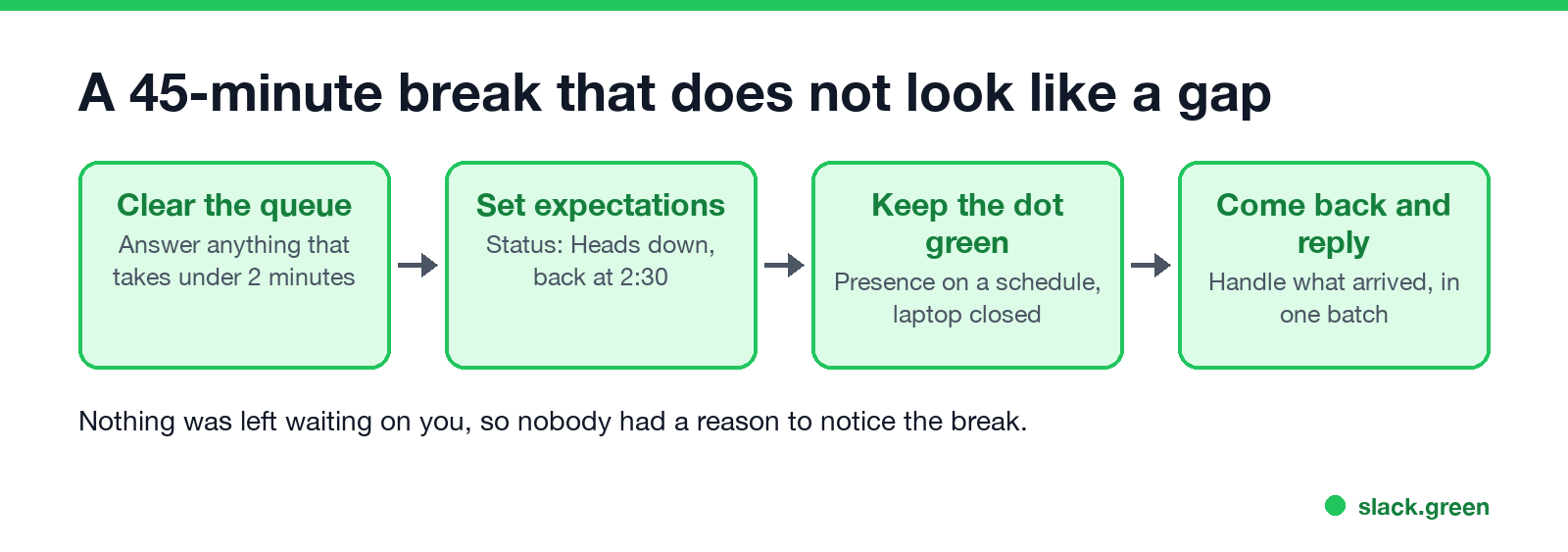
1. Clear the queue first. Before you step away, answer anything that takes under two minutes. That removes most of the reasons anyone would chase you.
2. Say something true in your status. "Heads down until 2:30" or "Focus block" is honest and explains silence. Our Slack status ideas tool has lines for every situation, and how to schedule a Slack status sets one ahead of time.
3. Keep the dot from going grey. The dot is what people see before they read your status. Slack sets you away after 10 minutes without input in its window, and on a phone as soon as you leave the app. Slack Green keeps your presence active on a schedule from its own servers, so the dot stays green through a walk, a school run or a long read. Other methods, with their limits, are in how to keep Slack active.
4. Keep your phone for real emergencies. Pause Slack notifications for the break and let urgent messages through. Slack Do Not Disturb lets senders notify you anyway, once per day, and a VIP list lets your manager through on paid plans.
5. Come back and reply in one batch. Handle everything that arrived in the first ten minutes back. To the sender, a 40-minute reply time during a focus block is normal.
How to look busy at work in the office
In an office the signals are physical, so the fixes are too:
What to skip
How to stop slacking off at work
Nunca mais apareça como "ausente" no Slack
Na nuvem. Sem downloads. Funciona 24/7 mesmo com seu notebook desligado.
If you are here because slacking off has become most of the day, the tricks above will not help for long. Three things work better:
FAQ
How do people slack off at work without getting caught?
They take breaks after finishing something, answer small questions fast, keep their calendar and status honest, and avoid gadgets that leave a trail. On remote teams they also keep the Slack or Teams dot from going grey during working hours. For Teams, a calendar block or Busy status does most of the work; see how to look busy on Teams.
How can I slack off working from home?
Clear quick messages before a break, set a status such as "Heads down until 2:30", keep your Slack presence active on a schedule, and reply to everything in one batch when you are back.
Can my boss see when I am inactive on Slack?
Your boss sees your dot, green or grey, like everyone else. On a computer it turns grey 10 minutes after your last input in the Slack window. Admins can also see days active and message counts in Slack analytics.
Is slacking off at work a firing offence?
Taking breaks is not. Missing work and faking activity can be. The Wells Fargo firings in 2024 were for simulated keyboard activity, not for taking breaks.
What is the best way to look busy on Slack?
Answer short messages quickly, set a status that explains longer silences, and keep your dot green during working hours. Slack Green handles the dot on a schedule. The other two are habits.
Pare de Mexer o Mouse.
Centenas de trabalhadores remotos não se preocupam mais com o status do Slack. Configure uma vez, fique verde para sempre.
Related Articles
Slack Jira Integration: Setup, /jira Commands and Notifications
Install the Jira Cloud for Slack app, type /jira connect in a channel to send a Jira space's updates there, /jira notify for personal notifications as DMs, and create work items from any message with More actions. Every /jira command, Jira automation to Slack, and fixes when previews or notifications stop.
How to Create a Slack Workspace, on Desktop or Phone
Go to slack.com/get-started, enter your email, type the confirmation code, and click Create a Workspace. It is free to start, you become the Primary Owner, and it takes about five minutes. Steps for desktop, iPhone and Android, and what to set up next.
Slack Sidebar Sections: Create, Sort, Share and Fix Them
Slack sidebar sections are custom groups of channels, DMs and apps in your sidebar. Only you see them, and they need a paid plan. How to create one on desktop and mobile, move many channels at once, sort and filter each section, share a section with your team, and get disappeared sections back.