
Can My Employer See Deleted Teams Messages? Retention Decides
Yes, if your company keeps Teams messages with a retention policy or a hold. The chat shows only that a message was deleted, but compliance admins can find the full text with eDiscovery, and the originals of edited messages too.
Yes, in many companies. When you delete a Teams message, the chat shows only "This message has been deleted." But if your company has a Microsoft Purview retention policy for Teams, or a legal hold on your mailbox, a copy of the message is kept and a compliance admin can find it with eDiscovery. Microsoft's documentation says the same about edits: the original text of an edited message is kept too. Without a retention policy or hold, Microsoft does not promise to keep a deleted message, and it goes away.
Your manager usually cannot do this from Teams. Searching deleted messages needs an eDiscovery role in Microsoft Purview, which IT, legal or HR compliance staff hold, and the search itself is logged. The details are below.
We build Slack Green, a Slack presence tool, so we write about what workplace chat tools record. The Slack answer to this question is in can Slack see deleted messages.
Where a deleted Teams message goes
Teams keeps a compliance copy of chat and channel messages in Exchange Online mailboxes. Chat messages go to a hidden folder in the mailbox of each person in the chat. Channel messages go to a hidden folder in the team's group mailbox. Microsoft says these folders "store data that compliance administrators can search with eDiscovery tools."
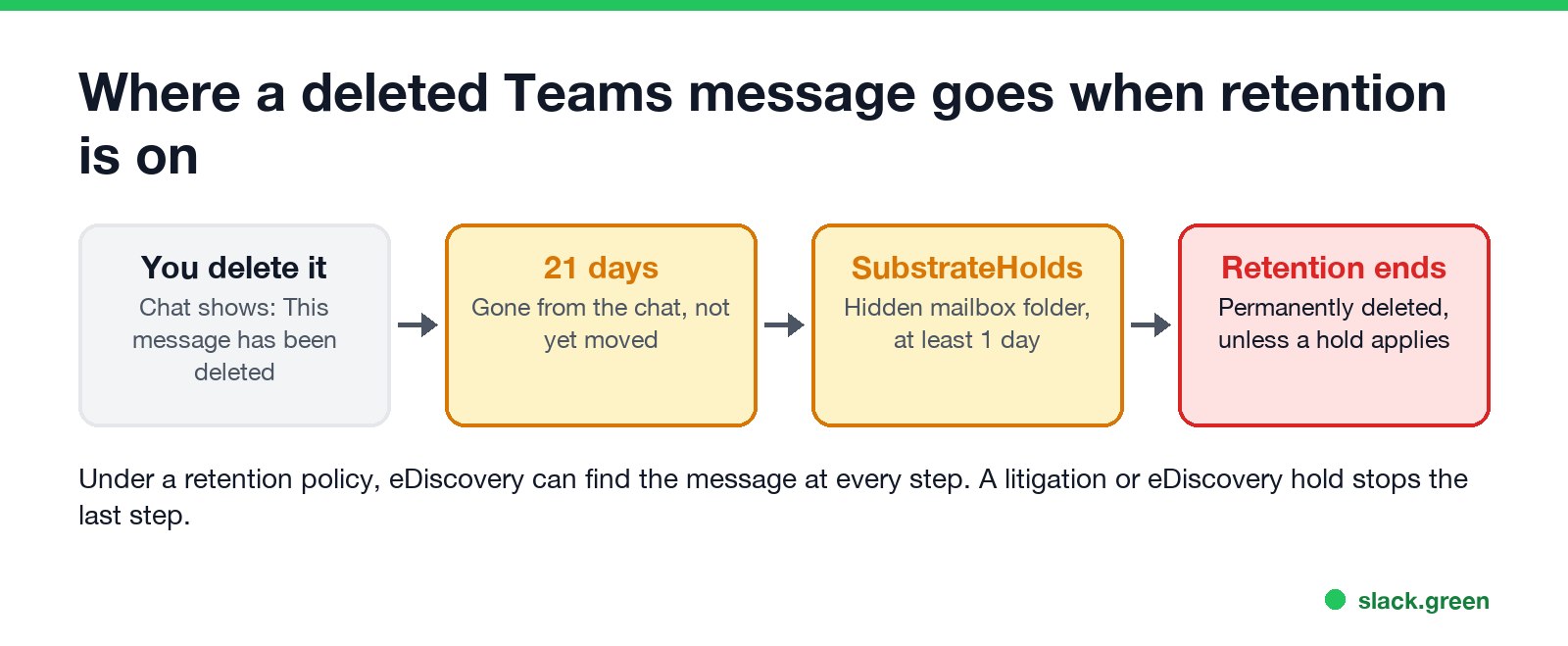
With a retention policy, Microsoft documents this path:
- You delete the message. It disappears from the Teams app for everyone in the chat.
- For 21 days, the message stays where it was, out of sight.
- Then it moves to SubstrateHolds, a hidden folder for soft-deleted items, for at least 1 day.
- When the retention period ends, a timer job deletes it for good, usually within 1 to 7 days.
A hold stops the last step. Microsoft: "While the mailbox is included in an applicable hold, Teams chat and channel messages that have been deleted will no longer be visible in the Teams app but will continue to be discoverable with eDiscovery." Holds are used for lawsuits and internal investigations, and you are not told when one is placed.
Can my employer see edited Teams messages?
Other people in the chat see the new text with an Edited label. They cannot open the old version. Teams has no edit history for users.
Compliance admins can. Microsoft's retention documentation says: "If a chat or channel message is edited or deleted by a user during the retention period, the original message is copied (if edited) or moved (if deleted) to the SubstrateHolds folder." So under a retention policy, each earlier version of an edited message stays searchable.
Who can see what
Never appear "away" on Slack again
Cloud-based. No downloads. Works 24/7 even when your laptop is off.
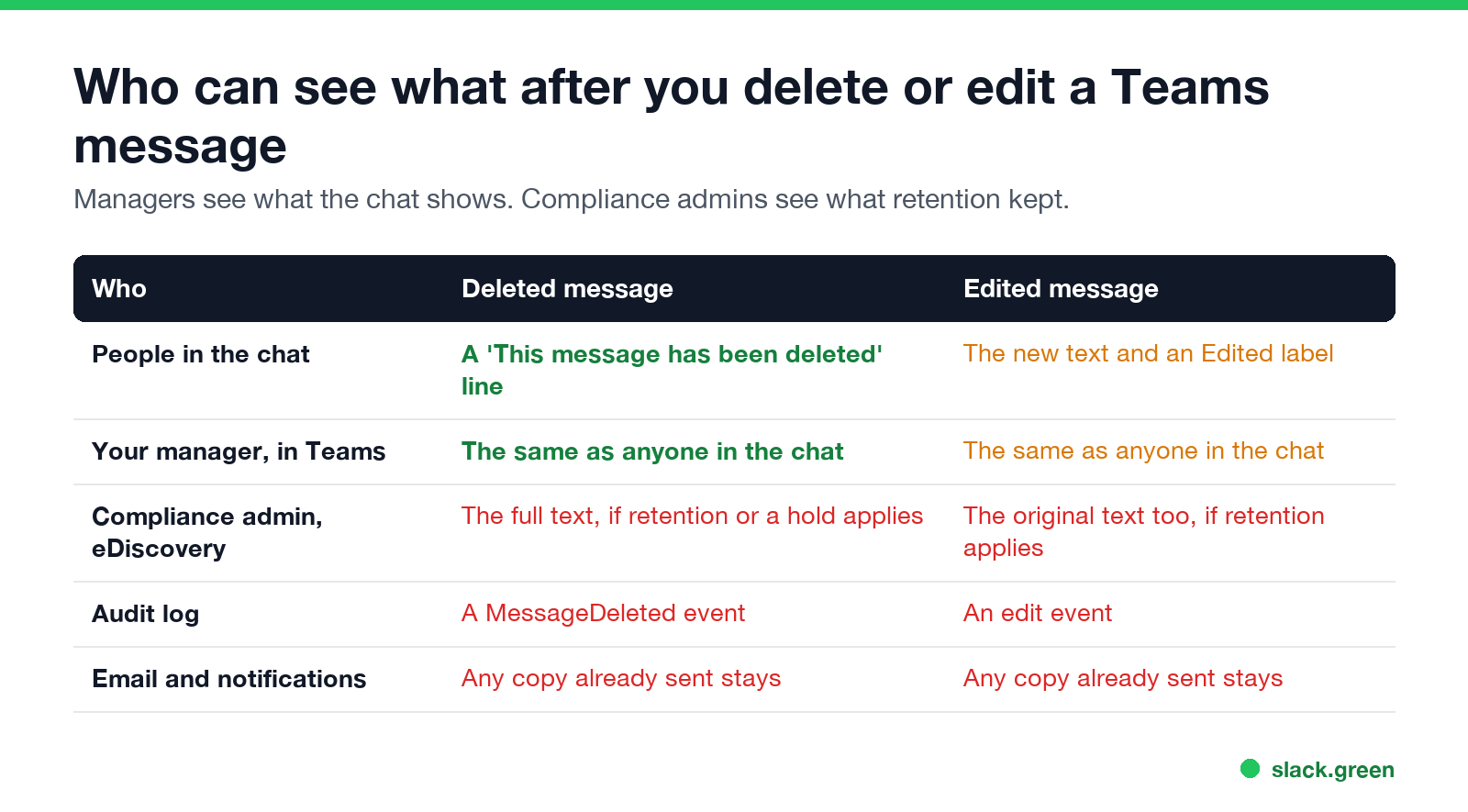
| Who | Deleted message | Edited message |
|---|---|---|
| People in the chat | A "This message has been deleted" line | The new text and an Edited label |
| Your manager, in Teams | The same as anyone in the chat | The same as anyone in the chat |
| Compliance admin, with eDiscovery | The full text, if retention or a hold applies | The original text too, if retention applies |
| The audit log | A "Deleted a message" event (MessageDeleted) | An "Edited a message" event |
| Email and notifications already sent | Any copy stays | Any copy stays |
The last row catches people out. If Teams already emailed a missed-message notice, or a colleague's phone showed the text in a notification, deleting the message later does not pull those copies back.
What an admin runs to find them
These are the searches a compliance admin can run: the audit search in Exchange Online PowerShell, the content search in Security & Compliance PowerShell. Both need admin roles a normal user does not have:
# audit log: who deleted Teams messages in the last 30 days
Search-UnifiedAuditLog -StartDate (Get-Date).AddDays(-30) -EndDate (Get-Date) `
  -Operations MessageDeleted -ResultSize 100

# content search: Teams messages in one person's mailbox
New-ComplianceSearch -Name "teams-review" -ExchangeLocation "person@company.com" `
  -ContentMatchQuery "kind:microsoftteams"
Start-ComplianceSearch -Identity "teams-review"
Microsoft marks some Teams audit events as available only with certain licenses, so not every company has the MessageDeleted record. The content search is available with the standard Purview tools.
Can my employer see all my Teams messages?
Every chat and channel message you send in a work account sits in company mailboxes, and a compliance admin with eDiscovery can search them, including private one-to-one chats. No one reads them by default. A search is a deliberate step, usually for a legal request, an HR case or a security review. Some companies also run communication compliance policies that scan messages for set words and flag matches to reviewers.
What Teams records beyond messages, such as sign-ins, activity counts and your status, is in does Teams track your activity. The wider picture of workplace monitoring is in how do employers monitor remote workers.
Can you undo or fully delete a message?
Never appear "away" on Slack again
Cloud-based. No downloads. Works 24/7 even when your laptop is off.
Teams vs Slack on deleted messages
| Microsoft Teams | Slack | |
|---|---|---|
| What the chat shows | "This message has been deleted" | "This message was deleted" or nothing |
| Kept for the employer when | A Purview retention policy or hold applies | The workspace keeps messages and edit logs, or uses a legal hold |
| Who can search it | Compliance admins with eDiscovery | Owners with exports or Discovery API access, by plan |
The Slack details, by plan, are in can Slack see deleted messages, and what Slack admins can read in DMs is in can Slack be used to monitor employees.
FAQ
Can my boss see my deleted Teams messages? Not from Teams. Your boss sees what anyone in the chat sees. A compliance admin can find the text with eDiscovery if your company retains Teams messages.
Does Teams keep deleted messages? Only if a retention policy or a hold applies. Then the message stays hidden for 21 days, moves to the SubstrateHolds folder, and is deleted when the retention period ends.
Does Teams show edited messages? It shows an Edited label, not the old text. Compliance admins can see the original if retention applies.
Can IT recover a deleted Teams chat? IT can find retained messages with eDiscovery and export them. They cannot restore them into your chat.
Is deleting a Teams message logged? It can be. The audit log has a MessageDeleted event, on the licenses where Microsoft records it.
Will I know if my employer searches my Teams messages? No. eDiscovery searches are logged for admins, not shown to you.
Stop Jiggling Your Mouse.
Join hundreds of remote workers who never worry about their Slack status. Set it up once, stay green forever.
Related Articles
How to Keep Skype Status Active: Skype for Business Idle Timers
To keep your Skype for Business status active, open Options, Status, and raise both idle timers, Inactive and then Away, from 5 minutes to as much as 360 minutes each. Consumer Skype shut down on May 5, 2025 and Skype for Business Online in 2021, so for most people the real question is now Teams. What still works, status icons, Outlook, and status not updating.
Is It Legal for My Employer to Monitor Me? US, EU and UK Rules
In the US it is mostly legal for an employer to monitor company devices, accounts and premises, often without asking. The limits are state notice laws in New York, Connecticut and Delaware, consent rules for audio recording and biometrics, bans on cameras in restrooms, and your personal devices. The EU, UK and parts of Canada and Australia add notice and proportionality rules.
Can My Employer See My Personal Email on My Work Computer?
Your employer cannot sign in to your Gmail, and doing so without permission can break the Stored Communications Act. But on a work computer, screenshot and keystroke monitoring, browser history, HTTPS inspection and Outlook's local cache can all expose personal email. Work email is fully visible, deleted messages included. Case by case, with what to do.