
Can My Employer See My WhatsApp Web on a Work Laptop?
Your employer cannot read WhatsApp Web messages off the office network, because they are end-to-end encrypted. On a work laptop with monitoring software, screenshots and keystroke logs can still show every chat you open and every message you type. What each method sees, and how to keep WhatsApp private at work.
Your employer cannot read your WhatsApp Web messages from the office network. WhatsApp encrypts every message end to end, including on linked devices such as WhatsApp Web, so the firewall and the Wi-Fi logs show only that you used web.whatsapp.com, when, and how much data moved. On a work laptop the network is not the main risk. Monitoring software can take screenshots of the chat on your screen and log every key you type, and the browser keeps you signed in until you log out. If the laptop belongs to the company, treat anything you open on it as visible to the company.
The same rule covers the work apps you are paid to be in. Slack shows a green or grey dot to every coworker and turns grey after 10 minutes without input in the Slack window. Slack Green keeps your Slack status active during the hours you set, from the cloud, with nothing installed on the work laptop.
What your employer can see, method by method
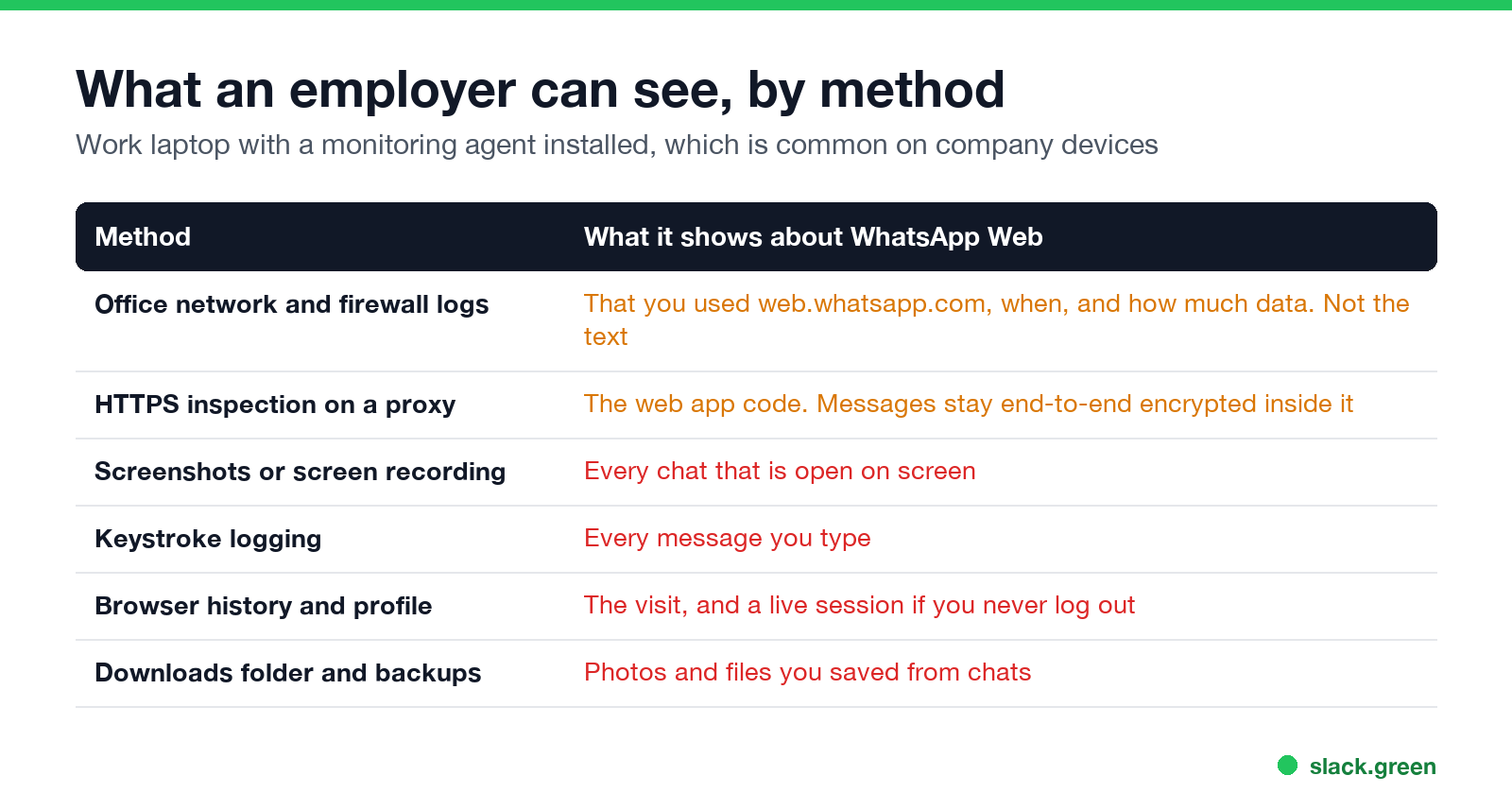
| Method | What it shows about WhatsApp Web | Common on work laptops? |
|---|---|---|
| Network, firewall and DNS logs | That you opened web.whatsapp.com, at what times, and how much data | Yes, on almost every company network |
| HTTPS inspection on a web proxy | The WhatsApp Web page itself. Messages inside it stay encrypted | Yes in larger companies |
| Screenshots or screen recording | Every chat that is open on screen, in full | Yes with monitoring suites |
| Keystroke logging | Every message you type, word for word | Some monitoring suites |
| Browser history and profile | The visits, and your live session if you stay logged in | Anyone with admin access to the laptop |
| Downloads folder and backups | Photos, voice notes and files you saved from chats | Yes if the laptop is backed up |
| Your personal phone on mobile data | Nothing | The company is not in the path |
The pattern: anything that happens on the network is encrypted, and anything that happens on the laptop is not. WhatsApp's encryption protects a message while it travels. It ends at the screen of the device you read it on, and a work laptop is a device the company controls.
Why the network cannot read WhatsApp Web messages
WhatsApp uses the Signal protocol for end-to-end encryption, and WhatsApp's help center says linked devices (Web, Windows, Mac and iPad) have it too. Each linked device gets its own keys. The phone does not relay your chats in plain form to the browser; the browser decrypts them itself.
That changes what company IT can see on the wire:
- • Normal firewall and DNS logs record the domains your laptop contacts, such as web.whatsapp.com and whatsapp.net, with timestamps and data volume. A report can show "WhatsApp, 47 minutes today". It cannot show who you talked to or what you said.
- • HTTPS inspection, where a company proxy decrypts web traffic with its own certificate, removes the outer HTTPS layer. WhatsApp's message payloads are encrypted a second time inside it, so the proxy still sees encrypted data. It can see that you loaded the page and, if the company chooses, block it.
So a company that blocks WhatsApp Web at the firewall is doing it by domain. It is not reading your messages on the way. How HTTPS inspection works in more detail, and what a VPN changes, is in can my employer see my browsing if I use a VPN.
Where WhatsApp Web is exposed on a work laptop
Never appear "away" on Slack again
Cloud-based. No downloads. Works 24/7 even when your laptop is off.
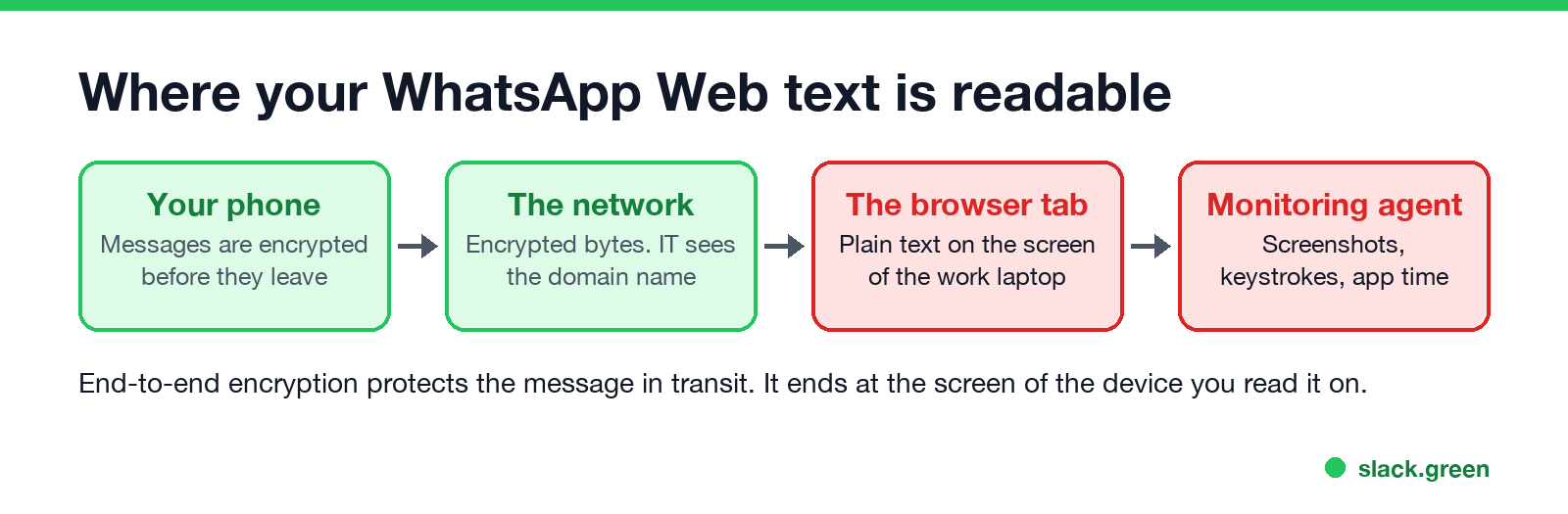
Once a message is on the screen of the work laptop, anything that can see the screen can see the message. Four things do that.
Monitoring software. Employee monitoring suites such as Teramind, ActivTrak, Hubstaff and Controlio run as an agent on the laptop. Depending on how IT sets them up, they record which apps and sites you use and for how long, take screenshots at intervals or on triggers, record video of the screen, and in some products log keystrokes. A screenshot of an open WhatsApp chat is as readable as the chat. A keystroke log holds everything you typed into WhatsApp, even though it cannot capture messages you only received. Details on each capability are in can my employer see my screen and can my employer see my keystrokes.
The browser session. WhatsApp Web stays signed in on that browser until you log out, the session is removed from your phone, or your phone goes unused for 14 days, which is when WhatsApp logs linked devices out. Anyone who can open the browser profile, including IT with admin access or a coworker at an unlocked desk, can open web.whatsapp.com and read the chats.
Files you download. A photo or document you save from a chat lands in the laptop's Downloads folder. Company backup and data-loss-prevention tools index that folder like any other.
Browser history and managed browsers. The visit to web.whatsapp.com is in the history, and a Chrome or Edge profile managed by the company can report browsing to IT and install extensions you did not choose. More on that in can my employer see my browsing history.
Telegram works differently, because its normal chats sync in full to every computer you log in on; see can my employer see my Telegram messages. Facebook Messenger is closer to WhatsApp: personal chats are end-to-end encrypted by default; see can my employer see my Facebook messages. The WhatsApp Desktop app for Windows and Mac changes little. It leaves no browser history, but app-usage reports list it by name, and screenshots and keystroke logging capture it the same way.
Is it legal for an employer to look?
On a company laptop, usually yes in the US. The Electronic Communications Privacy Act allows monitoring of company systems for business purposes and with consent, and the IT policy you signed at onboarding is normally that consent. New York, Connecticut and Delaware require written notice of electronic monitoring. What US law does not allow is logging in to your WhatsApp account without permission, the same as with personal email.
In Europe the limits are tighter. In Bărbulescu v. Romania (2017) the European Court of Human Rights found that an employer who read an employee's personal messages on a work messenger account breached his right to private life, because he had not been told in advance how far the monitoring went. Under the GDPR and the UK ICO's 2023 guidance on monitoring workers, monitoring has to be necessary, proportionate and disclosed. That limits what the employer may do. It does not stop the software from capturing your screen. The full picture by country is in is it legal for my employer to monitor me.
How to keep WhatsApp private at work
The same logic applies to personal email, which has one extra risk if you add the account to Outlook. That case is in can my employer see my personal email on my work computer.
FAQ
Never appear "away" on Slack again
Cloud-based. No downloads. Works 24/7 even when your laptop is off.
Can my employer see my WhatsApp messages if I use office Wi-Fi? Not the messages. On a personal phone the company network sees that you used WhatsApp, when, and how much data. The content is end-to-end encrypted.
Can IT see my WhatsApp Web chats? Not from the network. On a company laptop with monitoring software, screenshots and screen recordings show whatever chat is open, and keystroke logs show what you type.
Does WhatsApp Web show up in browser history? Yes. The visit to web.whatsapp.com is in the history like any other site, and a company-managed browser can report it to IT.
Is WhatsApp Desktop safer than WhatsApp Web on a work computer? Only slightly. It leaves no browser history, but monitoring software logs it as an app and can capture its window and your keystrokes.
Can my employer see my WhatsApp messages on my personal phone? Not unless the phone is enrolled in company device management with a work profile that includes WhatsApp, or they have physical access to it.
Does WhatsApp notify me if someone opens my chats on WhatsApp Web? No live alert. Your phone's Linked devices list shows every signed-in browser and when it was last active, so check it and log out sessions you do not recognize.
Stop Jiggling Your Mouse.
Join hundreds of remote workers who never worry about their Slack status. Set it up once, stay green forever.
Related Articles
Can My Employer See What I Watch on YouTube at Work?
On a work laptop or the office network, your employer can see that you used YouTube, when, and for how long. With HTTPS inspection or monitoring software, they can see which videos, because the video address and the browser tab title both name it. On your own phone on mobile data, they see nothing.
Can My Employer See My iMessages on a Work Mac?
Not through device management or the network: Jamf or Intune cannot read Messages, and iMessage is end-to-end encrypted. But if you sign in to Messages on a work Mac, your texts are stored on that Mac, where monitoring screenshots, backups and admin access can reach them. How to check, and how to take iMessage off the Mac without deleting it from your iPhone.
Can My Boss See My Private Outlook Calendar Events?
Usually not the details. When you mark an Outlook event Private, someone who can read your calendar sees only Private appointment, the time and a lock. The exceptions are delegates you gave Can view private items, the people invited to the event, anyone with full access to your mailbox in new Outlook or the web, and compliance admins. How to check who has which access, and what Private does not hide.