
Can People See When You Join a Slack Huddle?
Yes. You show in the participant list and the sidebar shows who is inside. Join with Mute my microphone on and the camera off, but never invisibly.
Yes. When you join a Slack huddle, you appear in its participant list with your name and profile picture, so everyone already in the huddle sees that you arrived. People in the channel or DM also see that a huddle is running and who is in it, from the sidebar and from a live message in the conversation. What you control is how you arrive: Slack can join you with your microphone muted, your camera stays off until you turn it on, and you can stop Slack from setting your status to In a huddle. There is no way to join a huddle invisibly or to listen without being listed.
We checked this in the Slack web app on 29 September 2026: we started a huddle in a test channel and took the screenshots below, and we read the preference labels from the web app's own Preferences window. The behaviour for other people comes from Slack's help articles "Use huddles in Slack" and "Adjust your huddles preferences", because our test workspace has one member.
What people see when you join a huddle
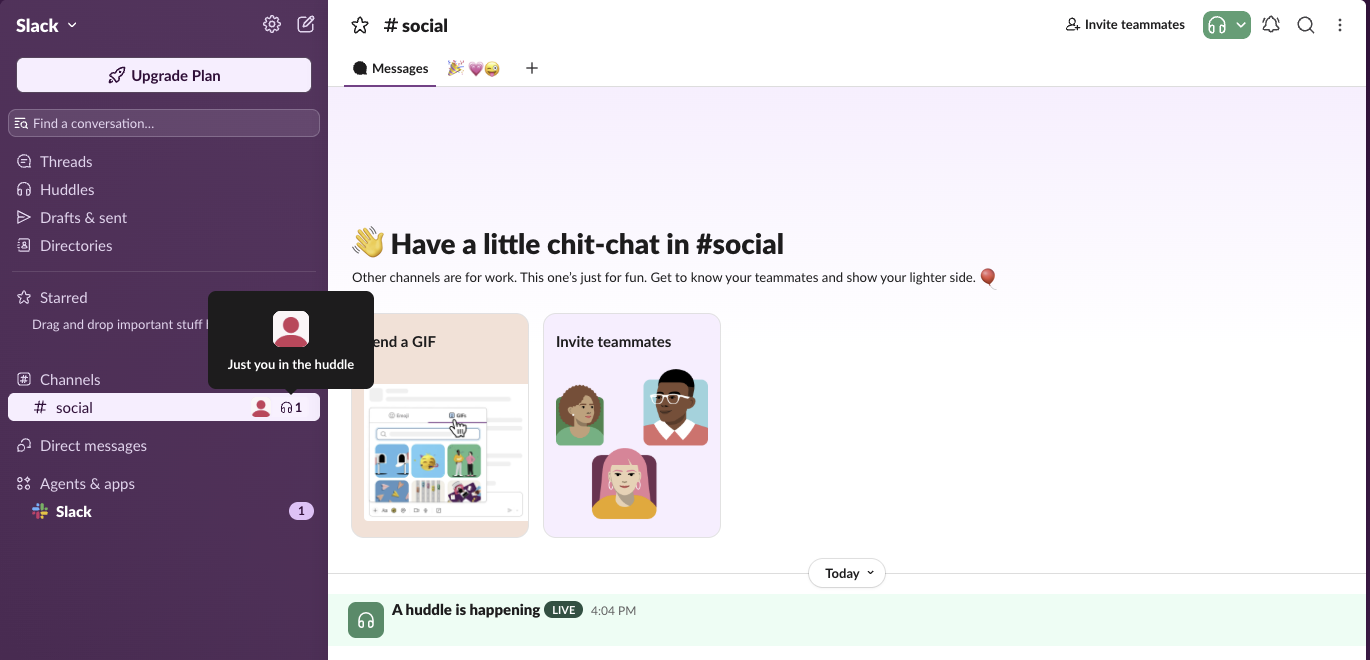
This is what the channel looked like while our huddle ran. Three things give you away, and the table says which ones you can hide:
| Who | What they see | Can you hide it? |
|---|---|---|
| People in the huddle | Your name and picture in the participant list | No |
| Channel or DM members, in the sidebar | Avatars and a headphones count next to the channel; hovering lists who is inside | No |
| Channel or DM members, in the conversation | An "A huddle is happening" message marked LIVE | No |
| Anyone who sees your status | "In a huddle", if that automatic status is on | Yes |
| Everyone in the huddle | Your audio and video, once you turn them on | Yes, join muted |
People outside the conversation see nothing, except the In a huddle status next to your name if you left it on. Slack's help says a huddle is open to anyone in the channel or DM where it started, and people invited from outside the conversation cannot see its messages or the huddle thread.
Your status dot follows the usual rule in and out of huddles: it turns away after about 10 minutes without keyboard or mouse input on the computer.
How to see who is in a Slack huddle before you join
- Look for the headphones icon next to a channel name in your sidebar. It shows the avatars and the number of people inside. Hover over it and Slack lists them; with one person it said "Just you in the huddle". The icon itself is explained in Slack headphones icon.
- Open the channel or DM. The "A huddle is happening" message stays in the conversation while the huddle runs.
- Join from the headphones button at the top of the conversation, or click Join in the pop-up if someone invited you or the huddle started in a DM.
- • A huddle in a DM, or an invite: the other person gets a pop-up with Join.
- • A huddle in a channel: members see the headphones icon next to the channel name and the LIVE message in the channel. If a later notice from Slackbot carries a grey LEGACY tag, that tag marks the old automated Slackbot, not the huddle.
- • You joining a running huddle: the count next to the headphones goes up by one and you appear in the participant list. Slack's help does not describe any separate notification to the channel.
On mobile, tap the headphones icon next to the channel or DM on Home, then Join. If you open a huddle link for a private channel or DM you are not in, you have to click Request Access, and anyone in the huddle can let you in; they see the request.
Does Slack notify people when you join a huddle?
Slack's help describes notifications for the start of a huddle, not for each person who joins:
Never appear "away" on Slack again
Cloud-based. No downloads. Works 24/7 even when your laptop is off.
How to join a Slack huddle quietly
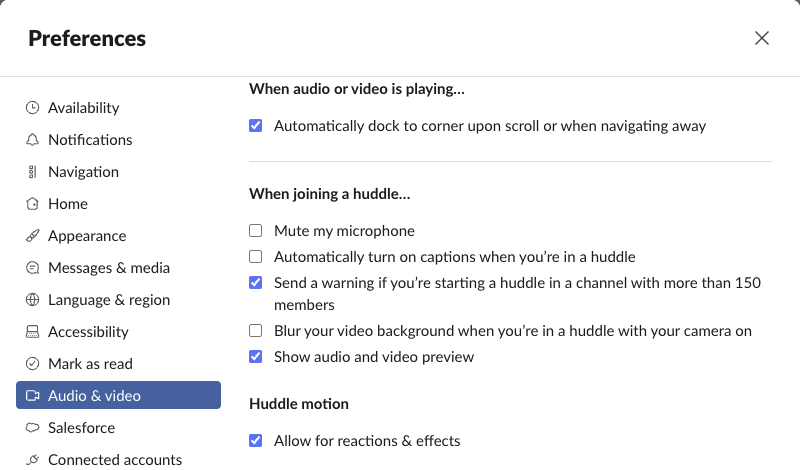
You cannot hide, but you can arrive without interrupting. Click your profile picture, open Preferences, select Audio & video, and under When joining a huddle… tick:
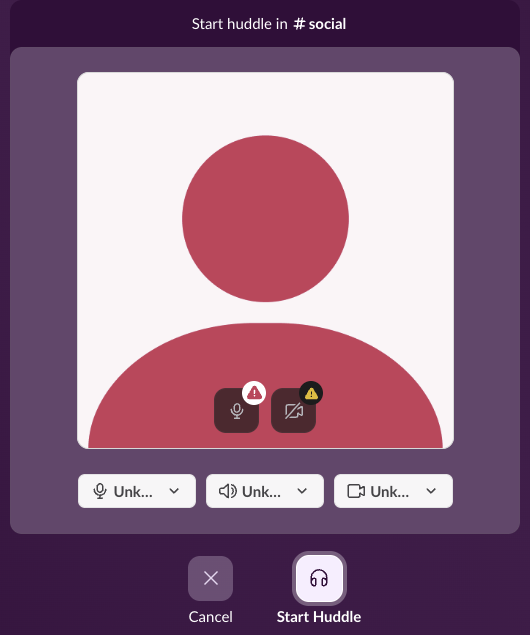
With the preview on, clicking the headphones shows this screen first. Nobody sees you until you click Start Huddle or Join, so it is the place to check that your microphone is muted and your camera is off. Our browser had no microphone or camera permission, which is why the pickers show "Unknown Device". Your camera stays off until you click the camera icon in the huddle.
Slack's help also lists an option to leave a huddle automatically when your computer locks. The web app did not show it on 29 September, so look for it in the desktop app.
How to stop Slack setting your status to In a huddle
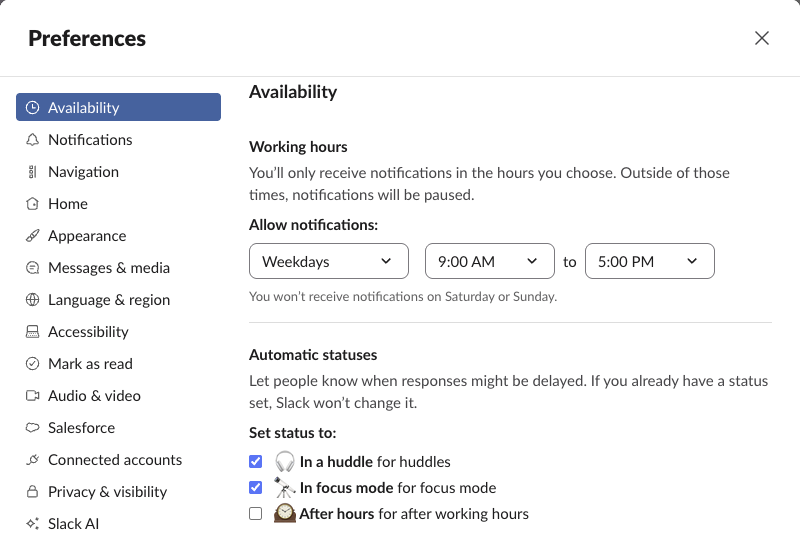
The status setting is not on the Audio & video page. It is under Preferences > Availability > Automatic statuses, as In a huddle for huddles. Untick it and your status stays as it is when you join. The same panel says Slack will not change a status you have already set, so a custom status also stops the automatic one. If you want a status that says you are heads-down instead, pick one in our Slack status generator.
For audio problems once you are in, see Slack huddle not working.
Can your boss see your huddles?
Your boss sees you in a huddle the same way anyone else does: in the participant list if they are in it, in the sidebar and the channel if they are a member, and through your status. Whether huddles are recorded or transcribed, and what admins can see afterwards, is covered in are Slack huddles recorded.
FAQ
Can I join a Slack huddle without anyone knowing?
No. Every participant is listed, and the headphones count in the sidebar goes up. You can join muted with your camera off.
Where is the Always join with your audio muted setting now?
In the web app it is called Mute my microphone, under Preferences > Audio & video > When joining a huddle.
Does my Slack status change in a huddle?
Only if In a huddle for huddles is ticked under Preferences > Availability > Automatic statuses, and only when you have no status of your own set.
Does the huddle message stay in the channel after it ends?
The message is marked LIVE while the huddle runs. In our test it left the channel after the huddle ended.
Stop Jiggling Your Mouse.
Join hundreds of remote workers who never worry about their Slack status. Set it up once, stay green forever.
Related Articles
What Do the Headphones Mean on Slack? The Huddle Icon in Each Spot
The headphones icon in Slack means huddles: the button that starts one, a live huddle next to a channel, the bar you are in. We started a huddle alone to show every spot, and checked whether you can huddle in your own DM.
Can Slack Messages Be Subpoenaed? Yes, Here Is How It Works
Yes. Slack messages, including DMs, can be requested in a lawsuit or an investigation. Most requests go to the company that owns the workspace, which exports them. Slack itself gives out message content only with a search warrant and tells the company first. Slack's own policy, its disclosure numbers, legal holds, and what deleted messages mean.
How to Hide Slack Message Previews in Notifications
To hide Slack message previews, open Preferences, Notifications, scroll to Sounds & appearance, and uncheck Include a preview of the message in each notification. On iPhone, Mac and Android, set Slack's notification previews to Never or When Unlocked. Screen sharing, lock screens and email notifications.