
How to Appear Offline on Google Chat: Set as Away
Google Chat has no invisible mode, but Set as away gives the same result: your status shows Away, which is also what people see when you are offline, and messages keep arriving. Steps for Gmail, the Chat app and phones, what others can still see, and how blocking and calendar status change it.
To appear offline on Google Chat, click the down arrow next to your status in Gmail or Google Chat and choose Set as away. Google Chat has no invisible or offline option, but Away is also the status it shows when you are not connected to the internet, so people cannot tell the two apart. Messages still arrive and notify you. Your status stays Away until you switch back to Automatic. The same menu is in the Chat and Gmail phone apps under Menu.
Most people want the opposite at work: to stay green while they are busy in another app. For Slack, Slack Green keeps your status active during the hours you set, from the cloud, with nothing running on your computer.
How to set yourself as away
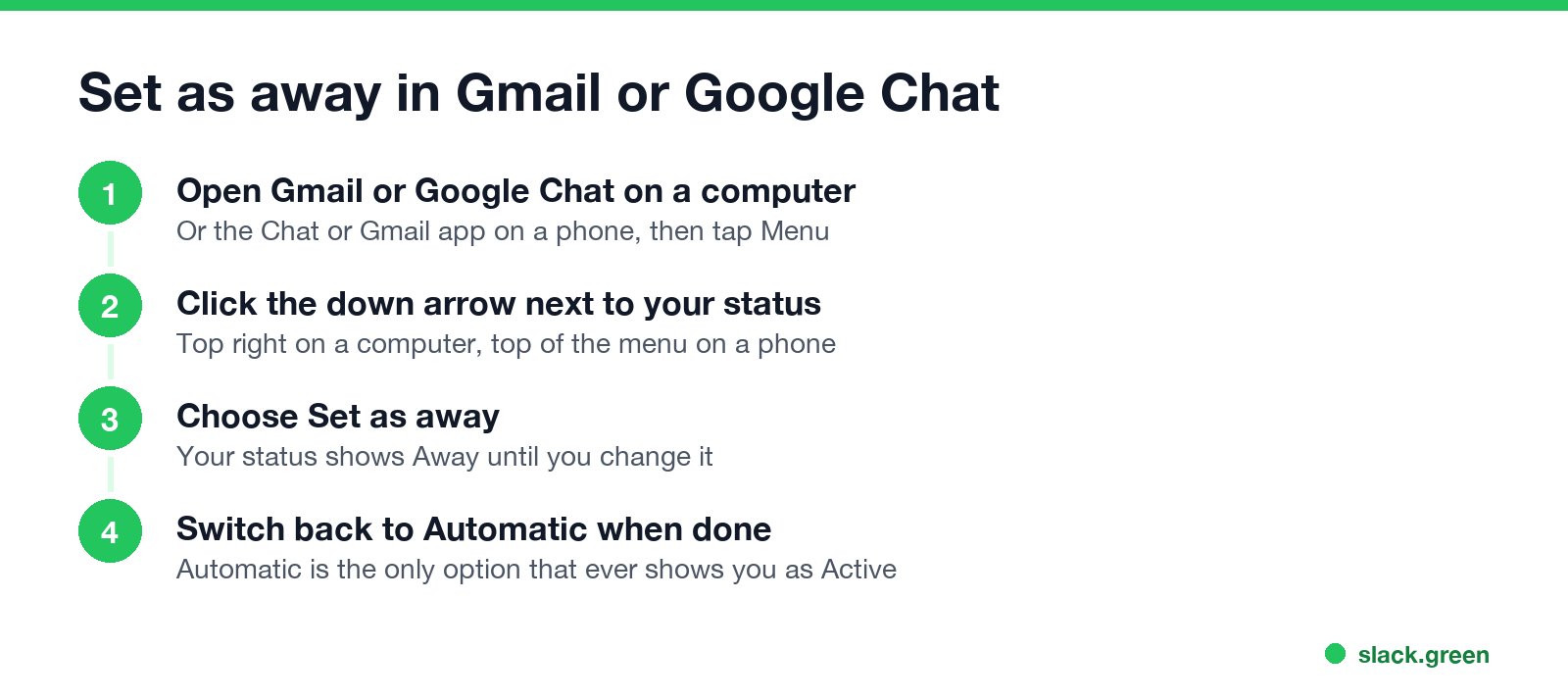
On a computer (Gmail or chat.google.com):
- Open Gmail or Google Chat.
- At the top right, next to your status indicator, click the down arrow.
- Choose Set as away.
- Open the Chat app or the Gmail app.
- Tap Menu at the top left.
- Next to your status indicator, tap the down arrow and choose Set as away.
- • you are not connected to the internet;
- • you have been idle for more than 10 minutes;
- • you chose Set as away.
On Android or iPhone (Chat app or Gmail app):
Your status belongs to your Google account, so setting it on one device sets it everywhere. To go back, open the same menu and choose Automatic. Google lists only three choices there: Automatic, Do not disturb and Set as away. Automatic is the only one that can ever show you as Active.
Is Set as away the same as offline?
To other people, yes. Google Chat Help gives three reasons for the Away status and shows the same icon for all of them:
Nobody sees which reason applies. Google Chat also shows no "last seen" time. So Set as away is as close to invisible as Google Chat gets. How each icon looks, including the orange Idle clock at 5 minutes, is in Google Chat status icons meaning.
The old Google Talk had an Invisible setting. Hangouts dropped it, and Google Chat never added it.
What others see, option by option
Never appear "away" on Slack again
Cloud-based. No downloads. Works 24/7 even when your laptop is off.
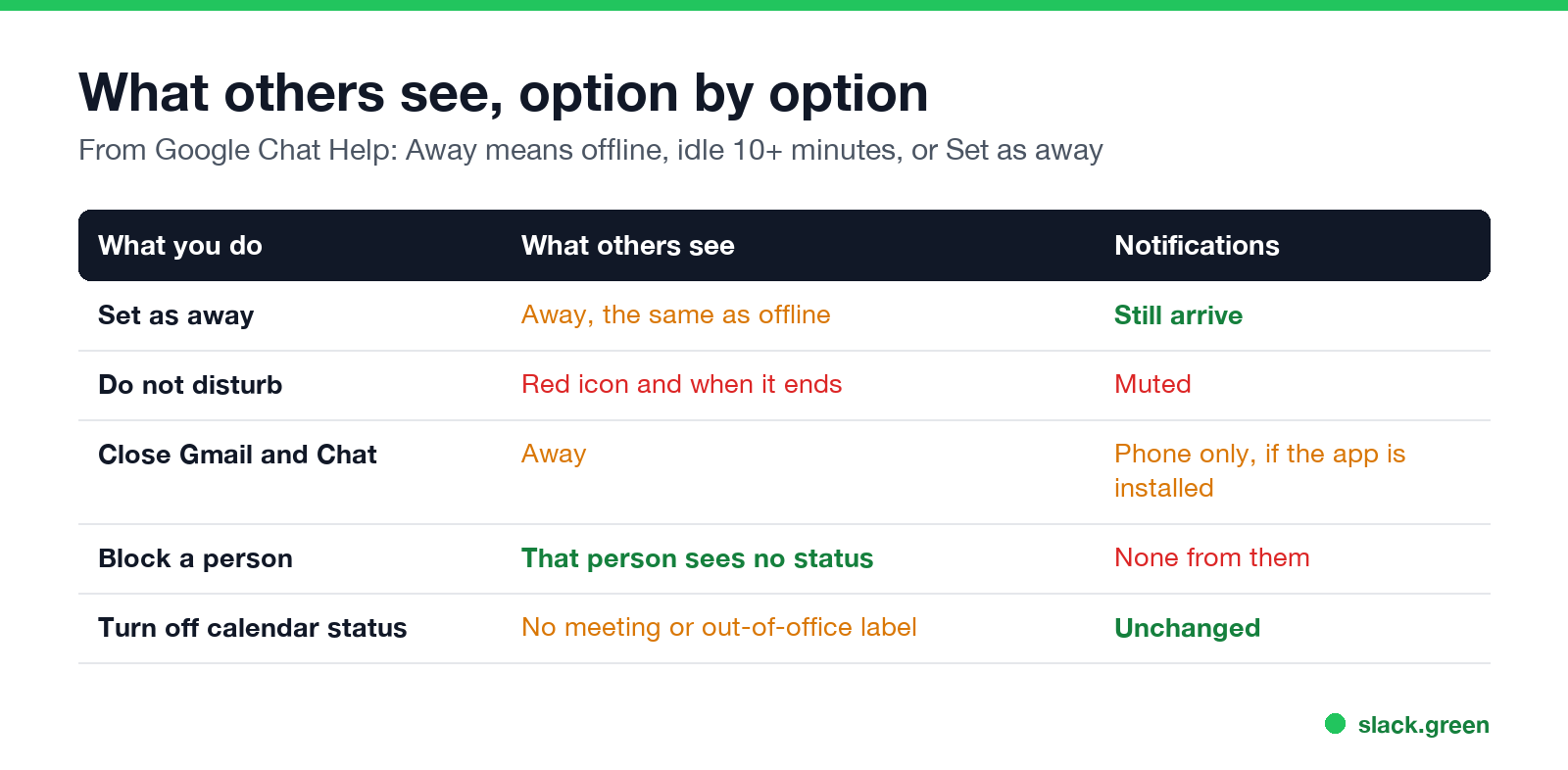
| What you do | What others see | Your notifications |
|---|---|---|
| Set as away | Away, the same as offline | Still arrive |
| Do not disturb | Do not disturb, and how long you paused notifications | Muted on all devices |
| Close Gmail and Chat | Away after you disconnect | Only on a phone with the app |
| Block a person | That person sees no status for you | None from that person |
| Turn off calendar status | No "In a meeting" or "Out of office" label | Unchanged |
Do not disturb is the wrong choice if you want to look offline. Google says people "can tell how long you paused notifications", so it tells them you are there and busy.
Can you appear offline to one person on Google Chat?
Only by blocking them. Google's help says your status is visible only to people you share a space with, people whose chat invite you accepted, and people you have not blocked. Blocking stops their messages as well, so it is a heavy tool for a coworker. There is no per-person "hide my status" setting. Slack has the same limit; see can you hide your Slack status from one person.
The rule also means people outside your spaces and chats cannot see your status at all. On a Google Workspace account, Do not disturb is visible only inside your organization's domain.
What still shows you are there
Away hides your status dot. It does not hide what you do:
Stop looking away when you are working
Never appear "away" on Slack again
Cloud-based. No downloads. Works 24/7 even when your laptop is off.
Automatic status goes Idle after 5 minutes without activity in Gmail or Chat and Away after 10. If you keep getting Away while you work, a leftover Set as away is the usual cause. The full list of fixes is in how to keep Google Chat active, and the timer is explained in how long before Google Chat shows away.
The same question for other apps: how to appear offline on Teams and how to appear offline on Slack.
FAQ
Can you go invisible on Google Chat? No. Google Chat has no invisible mode. Set as away is the closest option and looks the same as being offline.
How do I turn off the green dot on Google Chat? Choose Set as away from the arrow next to your status. The green dot turns to Away until you pick Automatic again.
Will I still get messages if I set myself as away? Yes. Set as away changes only your status. Use Do not disturb if you also want to mute notifications.
Does Set as away turn off by itself? No. It stays until you choose Automatic or Do not disturb.
Can people see when I was last online on Google Chat? No. Google Chat shows only your current status, not a last-seen time.
Stop Jiggling Your Mouse.
Join hundreds of remote workers who never worry about their Slack status. Set it up once, stay green forever.
Related Articles
Can My Employer See What I Watch on YouTube at Work?
On a work laptop or the office network, your employer can see that you used YouTube, when, and for how long. With HTTPS inspection or monitoring software, they can see which videos, because the video address and the browser tab title both name it. On your own phone on mobile data, they see nothing.
Can My Employer See My iMessages on a Work Mac?
Not through device management or the network: Jamf or Intune cannot read Messages, and iMessage is end-to-end encrypted. But if you sign in to Messages on a work Mac, your texts are stored on that Mac, where monitoring screenshots, backups and admin access can reach them. How to check, and how to take iMessage off the Mac without deleting it from your iPhone.
Can My Boss See My Private Outlook Calendar Events?
Usually not the details. When you mark an Outlook event Private, someone who can read your calendar sees only Private appointment, the time and a lock. The exceptions are delegates you gave Can view private items, the people invited to the event, anyone with full access to your mailbox in new Outlook or the web, and compliance admins. How to check who has which access, and what Private does not hide.