
Does Slack Track Your Location? What Admins and Coworkers See
Slack does not track GPS. Its access log records each sign-in's IP address with a country, city and internet provider, which Owners and Admins can see only on paid plans. We checked our own log, the Free-plan API and the Mac app's permissions.
No, Slack does not show your location to coworkers or track your GPS, and nobody in your workspace can see you on a map. Coworkers see only your local time. What Slack records is the IP address of each sign-in, in your access log, labelled with a country, city and internet provider. You can see your own log at my.slack.com/account/logs. Workspace Owners and Admins can see everyone's, but only on paid plans.
We checked this on 3 October 2026: in our own workspace's access log, through Slack's API as the Workspace Owner on the Free plan, and in the Slack desktop app on a Mac.
What your Slack access log shows
This is the top of our own access log. We blacked out the IP addresses; everything else is as Slack shows it:
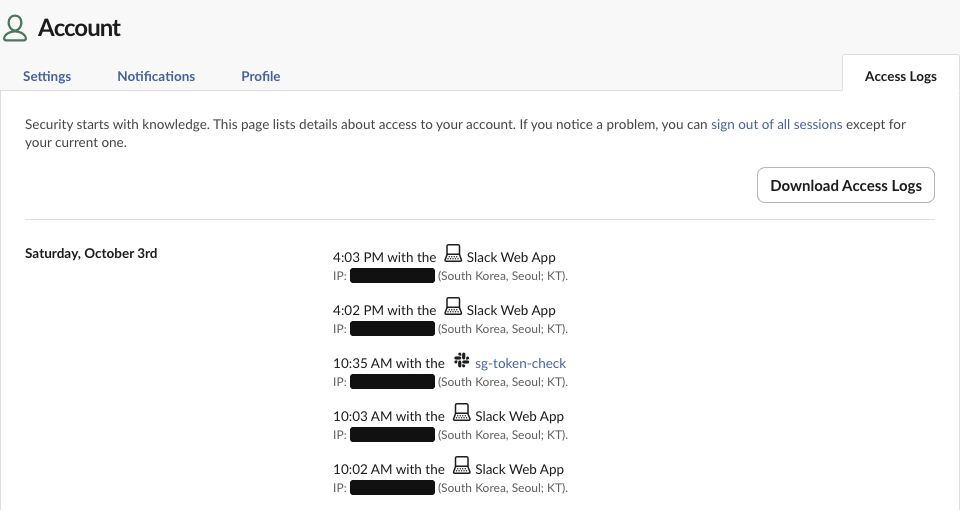
The first page of our log listed 45 sign-ins, back to 2 June. Each one has four things: the time, the client, the IP address, and a place in brackets. All 45 said "South Korea, Seoul; KT", which is the country, the city and the internet provider. Two different IP addresses from the same provider both came out as Seoul, so the place is a city-level guess from the IP, not a street address.
The client column is more telling than the location. 28 entries were "Slack Web App"; the other 17 named the app that signed in with our account, such as the test apps we build for these articles. Any tool that connects to Slack as you appears there under its own name and IP. What that means for presence tools is in whether a presence tool can get you caught.
Who can see your location in Slack
| Signal | Who sees it | How precise |
|---|---|---|
| Local time and time zone on your profile | Everyone in the workspace | Time zone only |
| IP address of each sign-in, with country, city and provider | You; Owners and Admins on paid plans | City, from the IP |
| Apps and clients that signed in as you | You; Owners and Admins on paid plans | No location |
| GPS or exact position | Nobody | Not requested by the desktop app |
On the Free plan an Owner cannot pull other people's access logs. We tried as the Primary Owner of our Free workspace:
team.accessLogs -> error: paid_onlySo on Free, even the Owner sees only their own log. On Pro, Business+ and Enterprise, Owners and Admins can see the same columns for every member.
Does the Slack app ask for your location?
The macOS app is allowed to, but on our Mac it never did. Slack 4.52.171 is signed with Apple's location entitlement, yet its Info.plist has no location prompt text, while camera and microphone have one:
$ codesign -d --entitlements :- /Applications/Slack.app | grep location
  "com.apple.security.personal-information.location" => true
$ plutil -p /Applications/Slack.app/Contents/Info.plist | grep -i UsageDescription
  "NSCameraUsageDescription" => "This app requires camera access to make video calls from your Slack workspaces."
  "NSMicrophoneUsageDescription" => "This app requires microphone access to make video calls from your Slack workspaces."
  (no NSLocationUsageDescription)
Slack's desktop log records every permission the app checks or requests. Over 16 days (17 September to 3 October) it logged 3,617 permission checks and no permission requests at all. A check only reads the current setting. 31 of the checks were for geolocation, and none was followed by a request, which is what a page must send to get your position. The desktop app's own code (its app.asar) does not mention the geolocation API.
Never appear "away" on Slack again
Cloud-based. No downloads. Works 24/7 even when your laptop is off.
What coworkers see about where you are
Your profile shows your local time. Through the API, these are the only location-like fields on a user: tz (Asia/Seoul for us), tz_label (Korea Standard Time) and tz_offset (32400 seconds). The profile has no country, city or address field.
Your time zone follows your computer unless you set it by hand, so travelling can change the local time coworkers see; how to change your time zone in Slack covers both settings. If you want people to know where you are, say it in your status; ideas are in Slack status examples. Microsoft Teams works differently and can show your work location, covered in does Teams show your location.
Can my boss see where I am on Slack?
Only through the IP address, and only if your boss is an Owner or Admin on a paid plan. The IP shows the city and provider you connected from, so it can show that you signed in from another city or country. It cannot tell home from a cafe in the same city.
A VPN or your company network replaces your home IP with its own, so the log shows that network's location instead. Monitoring software on a company laptop is a separate thing and can collect much more; see can Slack be used to monitor employees.
To check your own log, open my.slack.com/account/logs in a browser, or Download Access Logs for a copy; how to see devices logged into Slack shows what the CSV adds, such as the full browser string. If you see a client you do not recognise, use sign out of all sessions on the same page.
FAQ
Does the Slack mobile app use GPS?
Slack has no location feature on mobile. Your phone's IP address appears in the access log like any other device. What your employer can see on the phone itself depends on how it is enrolled; see can my employer see what I do on my phone.
Does Slack track my activity instead?
It records sign-ins, messages and presence, and admins on some plans see activity analytics. It does not record mouse movement; see does Slack track mouse movement.
Stop Jiggling Your Mouse.
Join hundreds of remote workers who never worry about their Slack status. Set it up once, stay green forever.
Related Articles
Productivity Theater: Meaning, Numbers and How It Starts
Productivity theater is work done to look busy rather than to get results: extra messages, status updates, meetings to show progress, and keeping a green dot on. Slack's 2023 survey of 18,000 desk workers put it at 32% of the working week. Microsoft ties it to productivity paranoia, where 85% of leaders doubt remote staff are productive.
Can Time Doctor Detect a Mouse Jiggler? Yes, With One Report
Yes, if your company has Time Doctor's Unusual Activity Report. It checks keyboard and mouse activity in 30-minute blocks and flags mouse movement without clicks and input that is unusually regular, which is what app and USB jigglers produce. It does not look at app names. What the report flags, who sees it, and what else Time Doctor records.
Can My Work Laptop Hear Me? When Your Employer Can Listen Through the Microphone
During calls and recorded meetings, yes. Outside calls, only if a program on the laptop turns the microphone on. Device management such as Intune or Jamf does not stream audio, and Windows and macOS both show when an app uses the mic. How to check, and where the law draws the line.