
Does Slack Track Your Location? What Admins and Coworkers See
Slack does not track your GPS location or show anyone a map. It records the IP address and device of each sign-in in access logs, which owners and admins can see on paid plans, and your profile shows your local time. What each person can learn about where you are.
No, Slack does not track your GPS location, and it has no feature that shows anyone where you are on a map. What Slack does record is the IP address and device of each sign-in, in access logs. You can see your own at my.slack.com/account under Access Logs; on Pro, Business+ and Enterprise plans, workspace owners and admins can see everyone's. An IP address points to a rough area, usually the city or region of your internet provider or VPN. Coworkers see less: your profile shows your local time, based on your time zone setting.
Location is one of the smaller things Slack shows about you. The bigger one is your presence dot, which turns grey 10 minutes after your last input in Slack. Slack Green keeps it active during the working hours you set, from the cloud.
What reveals your location in Slack
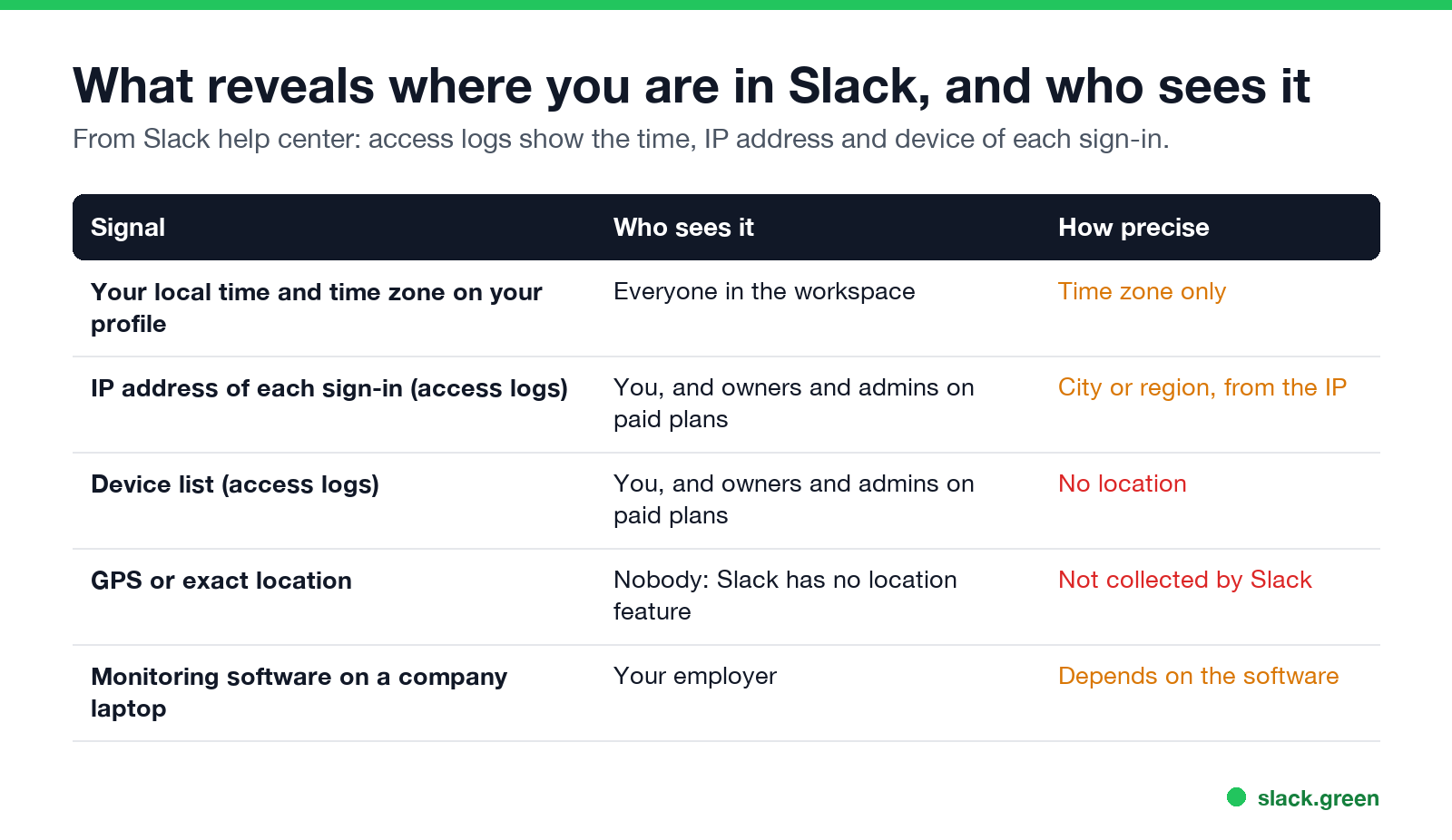
| Signal | Who sees it | How precise |
|---|---|---|
| Local time and time zone on your profile | Everyone in the workspace | Time zone only |
| IP address of each sign-in | You, and owners and admins on paid plans | City or region, from the IP |
| Device list | You, and owners and admins on paid plans | No location |
| GPS or exact location | Nobody | Not collected by Slack |
Can Slack see my location?
Slack sees the IP address you connect from, like every website and app. Its help center lists what access logs contain: the time and date of each new sign-in, the IP address of each device, and a list of devices. New entries appear when you sign in, open the app, connect from a new IP address, or change from away to active.
Slack does not use GPS, and its apps have no location-sharing feature. There is no "where is my teammate" map.
Can my boss see where I am on Slack?
Slack에서 다시는 '자리 비움'으로 표시되지 마세요
클라우드 기반. 다운로드 불필요. 노트북이 꺼져 있어도 24시간 작동.
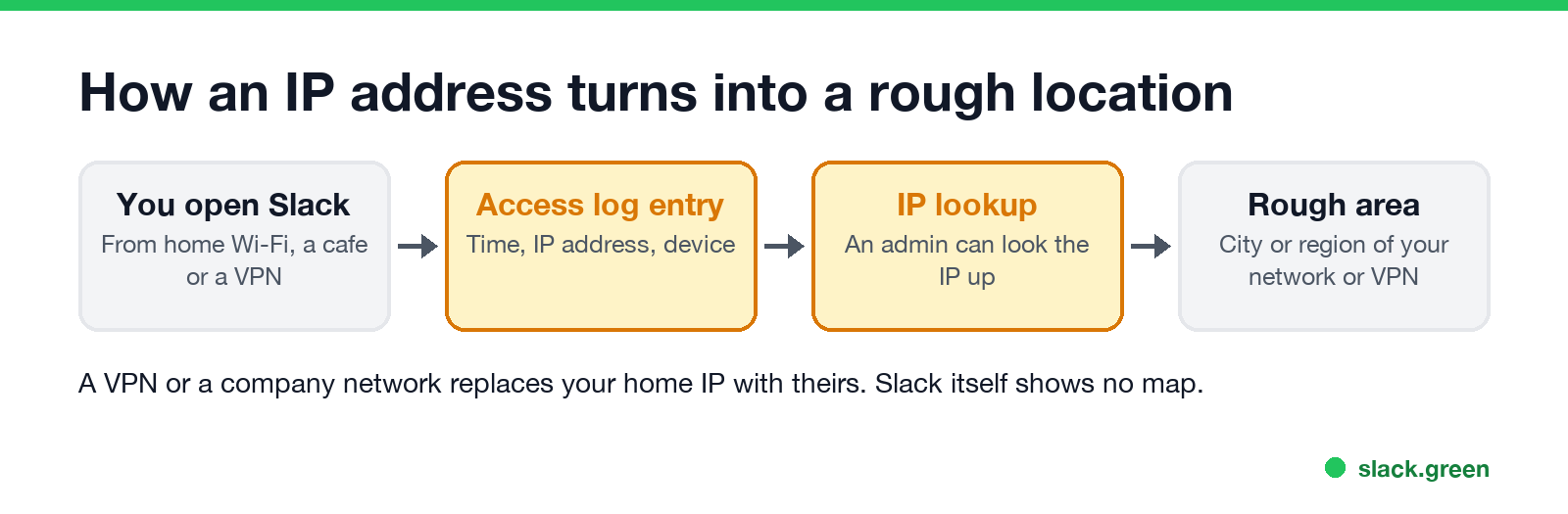
If your boss is a workspace owner or admin on a paid plan, they can open access logs and see the IP address you signed in from. Looking that IP up gives a rough area. It can show that you connected from another city or country. It cannot show an address, and it cannot tell home from a cafe in the same city.
If your boss is not an admin, they see what every coworker sees: your local time on your profile and your presence dot.
- • VPN. A VPN, or your company's network, replaces your home IP with its own. Admins then see the VPN's location.
- • Time zone. If your computer's time zone changes when you travel, Slack can update the local time on your profile too. You can set it by hand in your profile preferences.
- • Company laptop. Monitoring software on a company device can collect more, depending on what your employer installed; see can Slack be used to monitor employees.
Does Slack show your location to coworkers?
No. Coworkers see your name, title, local time and status. If you want to share where you are, set a status such as 🏡 Working remotely or ✈️ Travelling. Ideas are in Slack status examples.
What else Slack records about you
Location is a small part. Owners and admins can also see days active, messages posted and last active per device in analytics, and exports of messages depending on the plan. Everyone can see whether your dot is green or grey. The full list is in can Slack be used to monitor employees, and what Slack does not record, such as mouse movement, is in does Slack track mouse movement.
Any tool that signs in to Slack for you, from a phone app to a presence service, appears in access logs with its own IP address. What that looks like for Slack Green is in will I get caught using Slack Green.
How to check what Slack has on you
Slack에서 다시는 '자리 비움'으로 표시되지 마세요
클라우드 기반. 다운로드 불필요. 노트북이 꺼져 있어도 24시간 작동.
my.slack.com/account in a browser.FAQ
Does Slack track my location?
No GPS tracking. Slack records the IP address of each sign-in, which gives a rough area.
Can Slack admins see my IP address?
Yes, on Pro, Business+ and Enterprise plans, in the workspace access logs.
Does Slack show what country I am in?
Not directly. Your profile shows your local time, and an admin can look up your sign-in IP.
Does a VPN hide my location from Slack?
Slack and your admins see the VPN's IP address instead of yours.
Does the Slack mobile app use GPS?
Slack has no location feature. Your phone's IP address appears in access logs like any other device.
Related Articles
How to Keep Your Outlook Status Green (It Comes From Teams)
Your Outlook status shows your Microsoft Teams presence, so to keep Outlook green you keep Teams Available: Teams signed in and running, input on the computer, no lock or sleep, and no leftover status. What sets you Away, and what you can change.
Slack Multiple Workspaces: Use, Switch and Stay Active in Each
You can sign in to several Slack workspaces in one app and switch with Ctrl+Tab or Cmd/Ctrl plus a number. Each workspace has its own account, status, presence and Do Not Disturb, so you can be active in one and away in another. How to add, switch and manage them.
Slack Lunch Status: Set It, Automate It, and Lines to Copy
To set a Slack lunch status, click your profile picture, Update your status, pick an emoji such as the fork and knife, type "Lunch, back at 1:30", and set Remove status after to when you are back. How to schedule it, the ways to automate a daily lunch status, and what happens to your green dot.