
How to Create a Slack Workspace: Browser and In-App Steps
Start at slack.com/get-started#/createnew or Add a workspace in Slack, enter your email and the code, then name the workspace. Screenshots from our own run, plus the settings to check after.
To create a Slack workspace, go to slack.com/get-started#/createnew in a browser, enter your email address (or continue with Google or Apple), type the code Slack emails you, and follow the prompts to name the workspace and invite people. It is free: a new workspace starts on the Free plan, and the person who creates it becomes its Primary Owner. If you already use Slack, you can start the same flow from inside the app.
We followed both routes on 3 October 2026 while signed in to Slack, up to the email step, and checked the Owner role and settings in the workspace we created for our own tests.
Create a workspace from a browser
- Open slack.com/get-started#/createnew.
- On First, enter your email, type your email and click Continue, or pick Google or Apple. Slack suggests the address you use at work.
- Enter the confirmation code from the email Slack sends you.
- Follow the prompts to name the workspace, add your name and invite people.
- Click the workspace name at the top left of Slack.
- In the switcher, click Add a workspace.
- Choose Create a new workspace. The other two choices are Sign in to another workspace and Find workspaces.
Signing in to Slack first does not skip step 2. In our test the page still asked for an email, with no list of the workspaces we already belonged to.
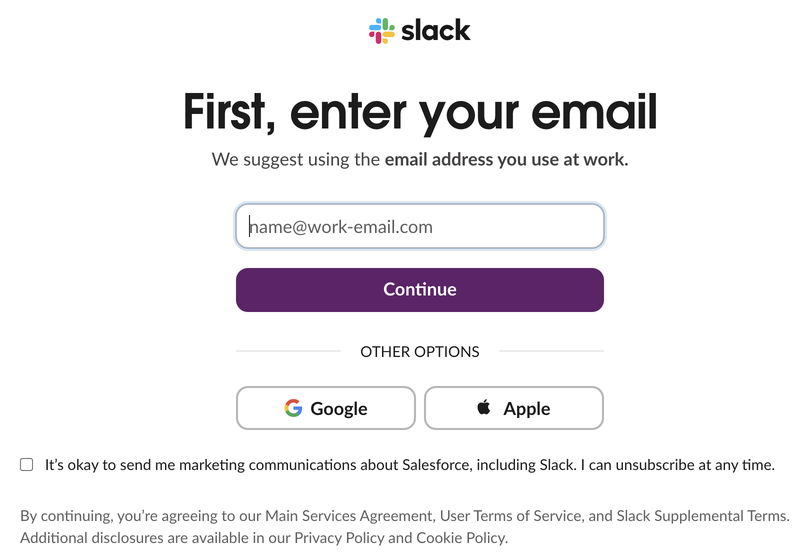
The in-app route below showed one extra line on this page: an unticked box for marketing email from Salesforce. Leave it unticked if you do not want those emails. Steps 3 and 4 above follow Slack's help article; we stopped at the email step, because the code goes to the inbox of the account and we did not create a throwaway workspace.
Create a new workspace when you already use Slack
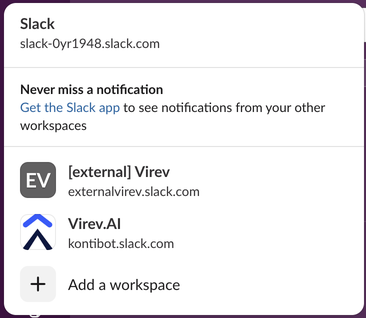
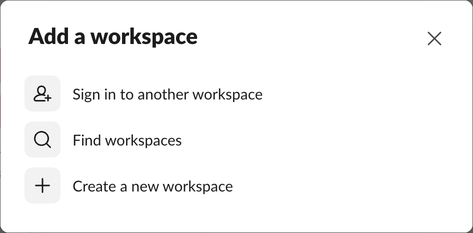
In the web app, Create a new workspace opened the same email page in a new browser tab. The new workspace is separate from your current one: separate account, status and presence, as we measured in using several Slack workspaces at once. If you only need to work with another company, Slack Connect links two workspaces without a new one.
On iPhone or Android
Open the Slack app, tap Get started, enter your email, confirm it, and choose to create a new workspace. We did not test the phone apps for this page; the steps are Slack's.
Never appear "away" on Slack again
Cloud-based. No downloads. Works 24/7 even when your laptop is off.
What you get: Owner role and Free plan
In our own test workspace, created the same way, Slack's API (users.info) reports the creator as is_primary_owner: true, is_owner: true and is_admin: true. Only the Primary Owner can delete the workspace or hand over that role; the other roles are compared in Slack workspace Owner vs Admin.
The workspace starts on the Free plan, with no time limit. The limit people notice first is history: in a six-month-old Free workspace we measured, channels and search returned messages back to exactly 90 days and nothing older (how long Slack keeps messages). The rest of the limits are in Slack free plan limits.
Settings to check after you create it
As the Primary Owner, open Admin, then Settings, then Settings & permissions. On our Free workspace that page had:
Then invite people, who join through the steps in how to join a Slack workspace. Only people you invite can join, unless you allow sign-ups from your company's email domain.
Frequently asked questions
Is it free to create a Slack workspace? Yes. New workspaces start on the Free plan and stay there until an Owner upgrades.
Do I need a company email? No. Slack's sign-up page suggests your work address, but any email you can receive a code at works.
Can I make a second workspace with the same email? Yes. Use Add a workspace in the switcher. Each workspace gets its own account, even with the same email.
How do I delete a workspace I created by mistake? As the Primary Owner, open Settings & permissions and use Delete Workspace at the bottom. It removes all messages and files for good.
Stop Jiggling Your Mouse.
Join hundreds of remote workers who never worry about their Slack status. Set it up once, stay green forever.
Related Articles
How to Make a Slack Channel Private, and Why It Can Fail for Members
Open the channel, click its name, go to Settings and choose Change to a private channel. We tried it as a regular member on a free workspace: Slack showed the option and then failed with Something went wrong.
How to Find Inactive Users in Slack (and What They Cost)
To find inactive users in Slack, a workspace owner or admin opens Admin, Workspace analytics, the Members tab, adds the Last active column and sorts oldest first. It needs a paid plan. Slack's Fair Billing Policy stops billing members after 28 days without use. How to check, export, and deactivate.
How to Turn Off Link Previews in Slack, for You or Everyone
To turn off link previews in Slack for yourself, open Preferences, Messages & media and uncheck Show images and files from linked websites and Show text previews of linked websites. To remove one preview, hover over it and click the x. How admins block a website, how bots send links without previews, and why a preview does not show.