
Discord Invisible vs Offline: What Others Can Tell
On Discord, Invisible and Offline show the same gray status. Offline means you are not signed in on any device. Invisible means you use Discord as normal, including sending messages, while everyone sees you as offline. What still gives you away, and what Invisible cannot do.
On Discord, Invisible and Offline look the same to other people: a gray status, with your name and avatar grayed out in member lists. The difference is on your side. Offline means you are not signed in to Discord on any device. Invisible means you are signed in and can use all of Discord as normal, including messaging friends, while everyone sees you as offline. Discord's own support article says Invisible "will make you appear offline entirely, but you'll still be able to access all of Discord as normal."
Nobody can check whether a gray user is invisible or offline from the status alone. What gives you away is what you do: a message you send, a reaction, or joining a voice channel.
Hiding your status at work is a different problem. On Slack you cannot pick Invisible at all, only Away; see can you appear offline on Slack. And if what you need is the opposite, a green Slack dot while you step away, we build Slack Green for that.
Discord statuses and what others see
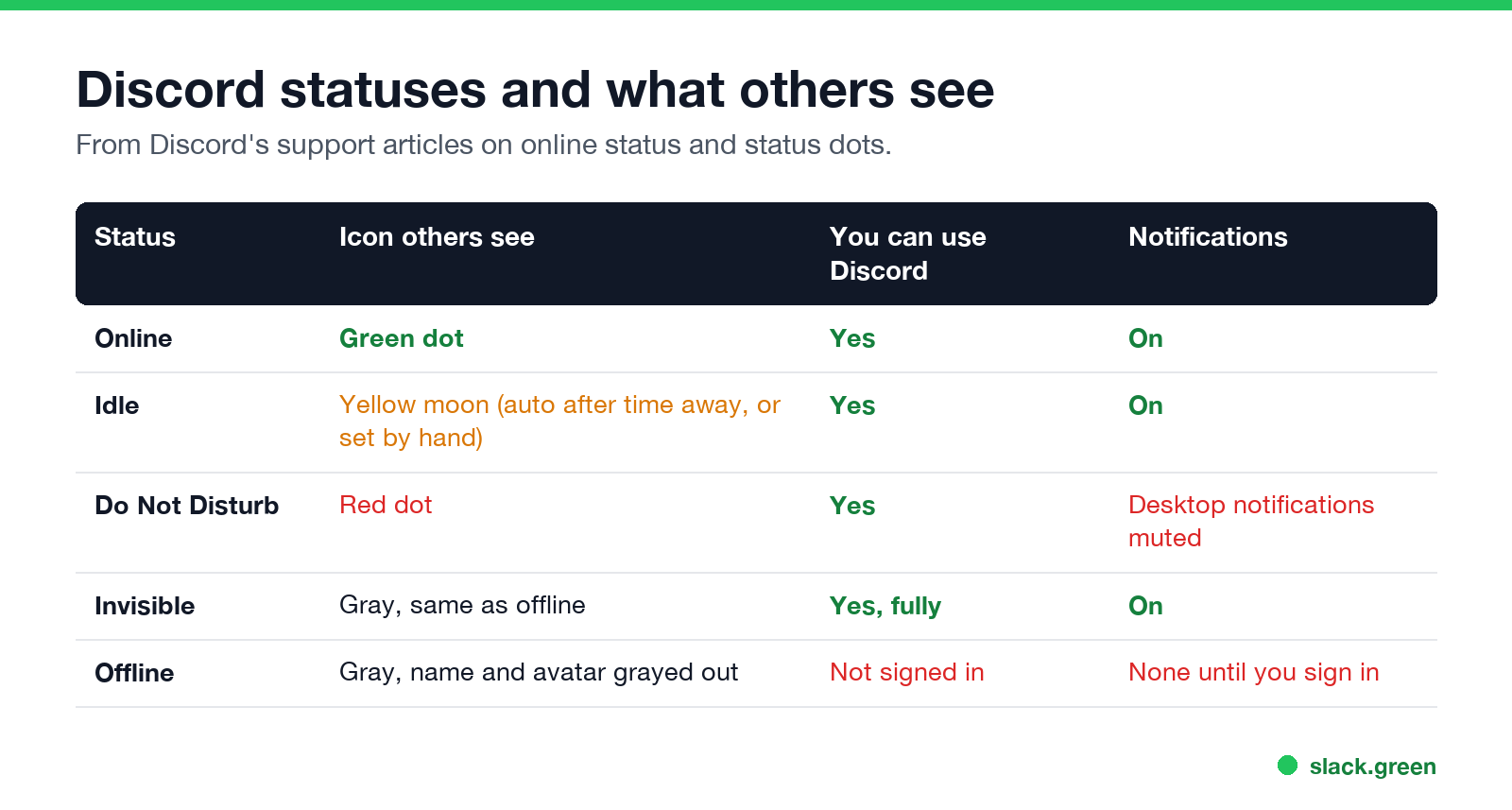
| Status | What others see | Can you use Discord? | Notifications |
|---|---|---|---|
| Online | Green dot | Yes | On |
| Idle | Yellow moon; set automatically after time away, or by hand | Yes | On |
| Do Not Disturb | Red dot | Yes | Desktop notifications muted |
| Invisible | Gray, the same as offline | Yes, fully | On |
| Offline | Gray, name and avatar grayed out | No, not signed in | None until you sign in |
Discord's support article on status dots lists gray as "Invisible/Offline", one color for both. A manual Idle stays until you change it; the automatic Idle ends when you come back. What the moon means and how long it takes is in what does idle mean on Discord.
How to go invisible on Discord
Desktop and web: click your avatar in the lower-left corner and choose Invisible.
Mobile: open your profile (your avatar or the You tab), tap your status, and choose Invisible.
To come back, pick Online the same way. The status applies to every device you are signed in on.
Can people tell if you are invisible on Discord?
Never appear "away" on Slack again
Cloud-based. No downloads. Works 24/7 even when your laptop is off.
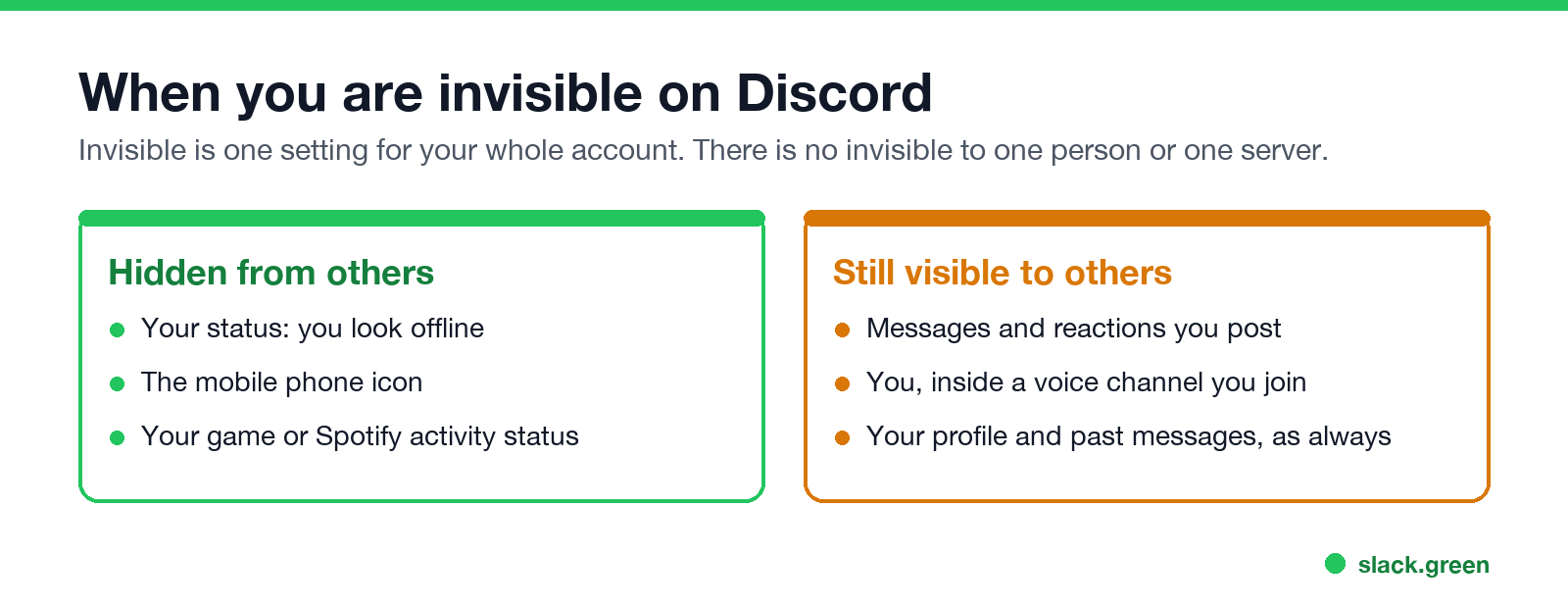
Not from your status. They can work it out from your activity:
- • You send a message or react. A person who looks offline but replies right away is almost certainly invisible.
- • You join a voice channel. Other members see you in the channel, whatever your status.
- • Your profile and past messages stay visible, as always.
- • Turn off activity sharing for that server, so members do not see what you are playing.
- • Mute the server, so you are not pulled back in by notifications.
- • Leave the server, if you do not want its members to see you at all.
- • Invisible hides you and keeps notifications on. Use it to read and reply without looking available.
- • Do Not Disturb shows a red dot and mutes desktop notifications. Use it when you want to look busy.
- • Idle shows a yellow moon. Discord sets it after you are away from your device for a while, or you can set it by hand and it stays.
Invisible does hide more than the dot. Discord's Mobile Presence article says Invisible removes the phone icon that shows when you are on mobile only (when that icon turns into the idle moon is in does Discord show idle on mobile), and your activity status, such as the game you are playing, stops showing next to your name. If you want to control activity sharing separately, Discord has global and per-server settings for it under Activity Privacy.
Does Discord show when you were last online? No. Discord shows no "last seen" time for anyone, invisible or not. That is one way it differs from WhatsApp.
Can you be invisible to one server or one person?
No. Your status is one setting for your whole account, so Invisible hides you from every server and every friend at once. Discord users have asked for invisible to select users or servers on Discord's feedback forum, and it has not shipped.
What you can do per server:
For one person, the only full options are to remove them as a friend or block them.
Invisible vs Do Not Disturb vs Idle
Work apps have the same idea under other names. For status meanings on Slack, see Slack status icons meaning. For Microsoft Teams, see Teams status icons meaning.
FAQ
Never appear "away" on Slack again
Cloud-based. No downloads. Works 24/7 even when your laptop is off.
Is invisible the same as offline on Discord?
To other people, yes: both show gray. For you, no: invisible means you are signed in and can use Discord.
Can people see my messages when I am invisible?
Yes. Anything you post is visible as normal, which is the most common way people notice.
Does invisible hide my game activity?
Yes, your activity stops showing next to your name while you are invisible.
Can I appear offline to one server on Discord?
No. Invisible applies to your whole account. You can turn off activity sharing or mute a single server.
Does Discord show last seen?
No. Discord has no last seen time.
Stop Jiggling Your Mouse.
Join hundreds of remote workers who never worry about their Slack status. Set it up once, stay green forever.
Related Articles
How to Keep Skype Status Active: Skype for Business Idle Timers
To keep your Skype for Business status active, open Options, Status, and raise both idle timers, Inactive and then Away, from 5 minutes to as much as 360 minutes each. Consumer Skype shut down on May 5, 2025 and Skype for Business Online in 2021, so for most people the real question is now Teams. What still works, status icons, Outlook, and status not updating.
Is It Legal for My Employer to Monitor Me? US, EU and UK Rules
In the US it is mostly legal for an employer to monitor company devices, accounts and premises, often without asking. The limits are state notice laws in New York, Connecticut and Delaware, consent rules for audio recording and biometrics, bans on cameras in restrooms, and your personal devices. The EU, UK and parts of Canada and Australia add notice and proportionality rules.
Can My Employer See My Personal Email on My Work Computer?
Your employer cannot sign in to your Gmail, and doing so without permission can break the Stored Communications Act. But on a work computer, screenshot and keystroke monitoring, browser history, HTTPS inspection and Outlook's local cache can all expose personal email. Work email is fully visible, deleted messages included. Case by case, with what to do.