
What Does AFK Mean in Slack? Away From Keyboard, Explained
AFK in Slack means "away from keyboard": the person is stepping away for a while. It is something people type in a message or a custom status, separate from Slack's automatic away dot. How AFK compares with away, and how to set an AFK status that clears itself.
AFK in Slack means "away from keyboard". When someone writes "AFK 10 min" in a channel or sets an AFK status, they are telling you they have stepped away and will answer later. It is not a Slack feature; it is text people type. Slack's own away state is different: it is the hollow grey dot Slack shows automatically 10 minutes after your last input in the Slack window, or when you choose Set yourself as away.
The two work well together. The dot says you are gone; an AFK status says why and until when. If you want the opposite, a green dot during your working hours even when you step away briefly, Slack Green keeps your presence active on the schedule you set, from the cloud.
AFK vs away in Slack
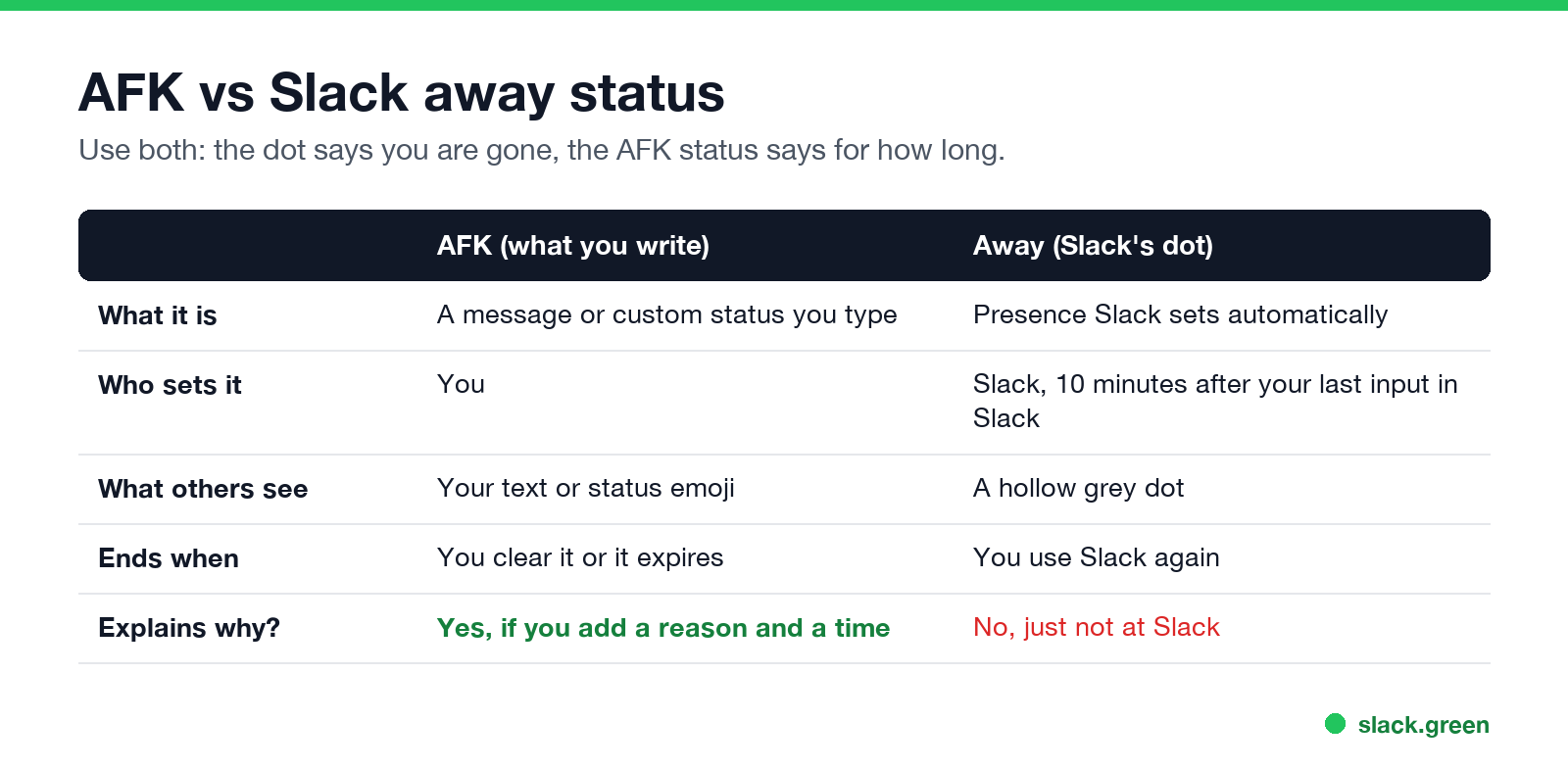
| AFK | Away | |
|---|---|---|
| What it is | A message or custom status you type | Presence Slack sets |
| Who sets it | You | Slack, or you with Set yourself as away |
| What others see | Your text and status emoji | A hollow grey dot |
| Ends when | You clear it, or it expires | You use Slack again |
What the grey dot means to others is in Slack away status meaning, and when Slack sets it in how long does Slack stay active.
How to set an AFK status in Slack
- Click your profile picture, then Update your status (or press Cmd+Shift+Y / Ctrl+Shift+Y).
- Type the status, for example "AFK, back at 2:30", and pick an emoji.
- Under Remove status after..., choose when it clears, so it does not stay after you are back.
- Optional: check Pause notifications.
- Click Save.
To show the grey dot as well, click your profile picture and choose Set yourself as away. Remember to switch back; manual away stays on even while you type.
AFK statuses you can copy
Never appear "away" on Slack again
Cloud-based. No downloads. Works 24/7 even when your laptop is off.
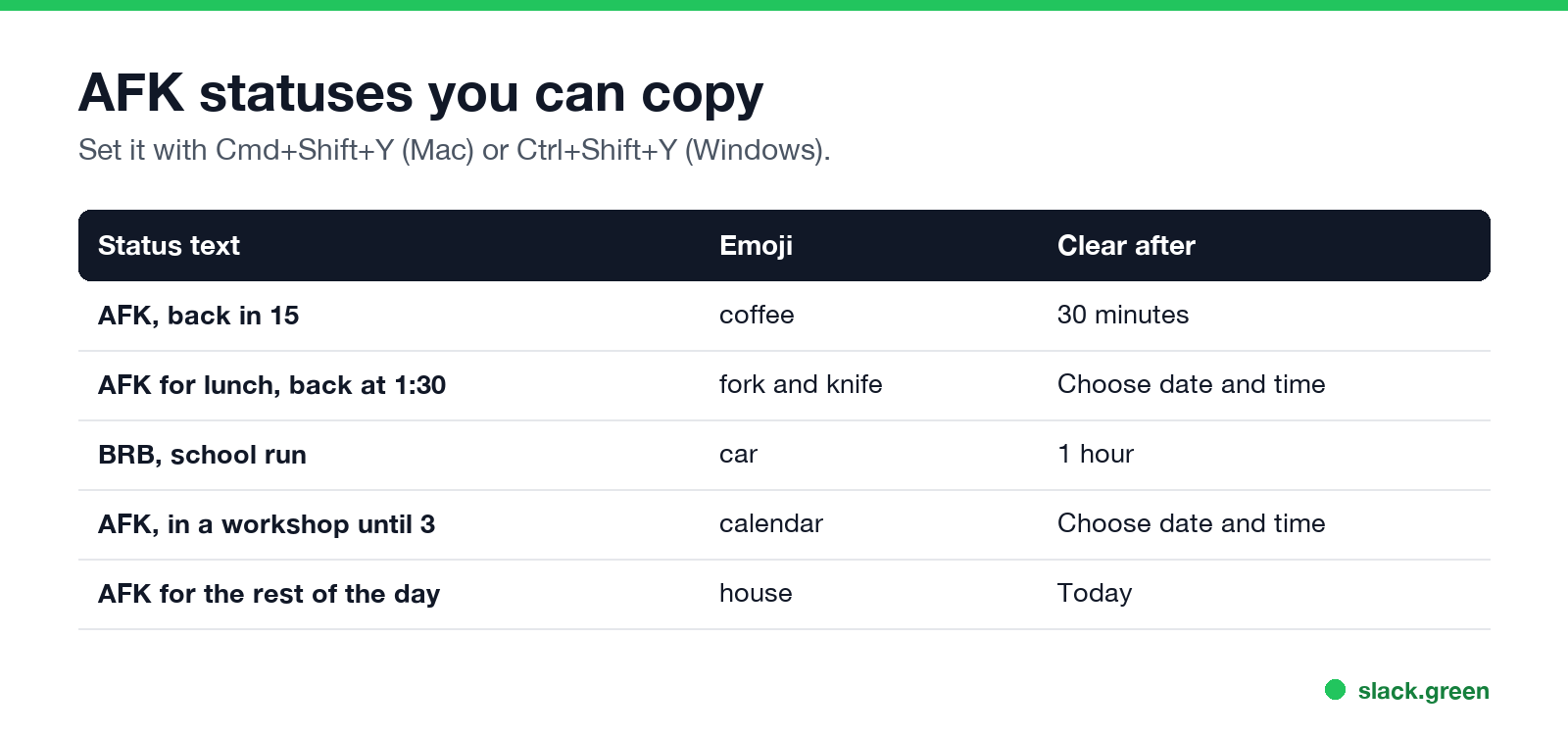
More lines are in Slack status examples and the Slack status ideas tool. For lunch specifically, see Slack lunch status.
Slack AFK emoji
There is no official AFK emoji. People use ☕, 🚶, 🍴 or 💤, or add a custom :afk: emoji; see how to add custom emoji to Slack. 💤 can be confused with the small z Slack shows for paused notifications, explained in Slack status icons meaning.
Slack AFK bots
Some teams install bots that post "@name is AFK" when someone mentions an absent person. They are third-party apps from the Slack Marketplace. On Enterprise plans, Slack's own out of office status does something similar: it sends your message to people who mention you. See Slack out of office.
FAQ
Never appear "away" on Slack again
Cloud-based. No downloads. Works 24/7 even when your laptop is off.
What does AFK mean in Slack?
Away from keyboard. The person stepped away and will reply later.
Is AFK the same as away in Slack?
No. AFK is text you type. Away is the grey dot Slack sets after 10 minutes without input in Slack, or when you set yourself away.
How do I set AFK on Slack?
Set a custom status such as "AFK, back at 2" with a clear time, and optionally choose Set yourself as away.
What does BRB mean in Slack?
Be right back, a shorter AFK.
Is AFK still used?
Yes, mostly in chat tools like Slack, Discord and games, for short breaks.
Stop Jiggling Your Mouse.
Join hundreds of remote workers who never worry about their Slack status. Set it up once, stay green forever.
Related Articles
How to Keep Your Outlook Status Green (It Comes From Teams)
Your Outlook status shows your Microsoft Teams presence, so to keep Outlook green you keep Teams Available: Teams signed in and running, input on the computer, no lock or sleep, and no leftover status. What sets you Away, and what you can change.
Slack Multiple Workspaces: Use, Switch and Stay Active in Each
You can sign in to several Slack workspaces in one app and switch with Ctrl+Tab or Cmd/Ctrl plus a number. Each workspace has its own account, status, presence and Do Not Disturb, so you can be active in one and away in another. How to add, switch and manage them.
Slack Lunch Status: Set It, Automate It, and Lines to Copy
To set a Slack lunch status, click your profile picture, Update your status, pick an emoji such as the fork and knife, type "Lunch, back at 1:30", and set Remove status after to when you are back. How to schedule it, the ways to automate a daily lunch status, and what happens to your green dot.