
What Does AFK Mean in Slack? Away From Keyboard, Explained
AFK means "away from keyboard". It is text people type, not Slack's away dot. Download free AFK, away and BRB emoji we tested in a real Slack status.
Free tool, runs in this tab
Keep your screen awake and see when Slack sets you away
Press Start. This tab keeps the screen on while it stays open, and shows the minute Slack, Teams and Zoom would set you away if nothing touches the keyboard or mouse.
This tab cannot move your pointer or press keys, so on its own it cannot keep Slack or Teams active. It reads the same idle time the Slack desktop app, Teams and Zoom read. To test a jiggler, start, then take your hands off for 6 minutes: if Your computer stays green, the jiggler keeps them active.
- Your computerNot measured yetPress Start and allow idle detection.
- Slack desktop app-Away after 10 min, any input.
- Microsoft Teams-Away after about 5 min, any input.
- Zoom-Away after 15 min by default, any input.
AFK in Slack means "away from keyboard". When someone writes "AFK 10 min" in a channel or sets an AFK status, they are telling you they have stepped away and will answer later. It is not a Slack feature; it is text people type. Slack's own away state is different: it is the hollow grey dot Slack shows automatically 10 minutes after your last keyboard or mouse input, or when you choose Set yourself as away. For the opposite, a green dot through your working hours, Slack Green keeps your presence active from a server on a schedule, even with the laptop closed, free for 7 days with no card.
The two work well together. The dot says you are gone; an AFK status says why and until when. Slack has no built-in AFK or BRB emoji, so below are six you can download and add, made with our free Slack emoji maker and tested in a real workspace.
AFK vs away in Slack
| AFK | Away | |
|---|---|---|
| What it is | A message or custom status you type | Presence Slack sets |
| Who sets it | You | Slack, or you with Set yourself as away |
| What others see | Your text and status emoji | A hollow grey dot |
| Ends when | You clear it, or it expires | You use Slack again |
What the grey dot means to others is in Slack away status meaning, and when Slack sets it in how long does Slack stay active.
Download AFK, away and BRB emoji for Slack
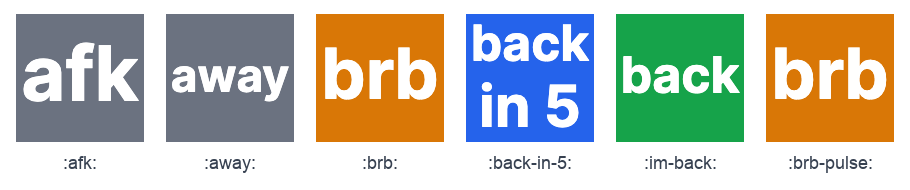
Each file is 128 x 128 pixels and between 2.5 KB and 21 KB, well under Slack's 128 KB limit. Grey is for away, orange for a short break and green for back, so the colour says it before anyone reads the word.
| Emoji | Name to use | File |
|---|---|---|
| afk | :afk: | afk.png |
| away | :away: | away.png |
| brb | :brb: | brb.png |
| back in 5 | :back-in-5: | back-in-5.png |
| back | :im-back: | back.png |
| brb, pulsing | :brb-pulse: | brb-pulse.gif, 16 frames |






Save a file, then in Slack open the emoji picker, click Add Emoji at the bottom, upload it and type the name. Use :im-back: rather than :back:, because :back: is already Slack's 🔙 emoji. The upload steps and who may add emoji are in how to add custom emoji to Slack. To change a word or a colour, open the emoji maker, pick Text to emoji, type your own word and download a new file.
Typing AFK is optional, but Slack shows the grey dot anyway, 10 minutes after your last keyboard or mouse input. A server-side tool keeps your Slack dot green with no input, even with the laptop closed or the phone locked.
How the AFK emoji look in a real Slack status
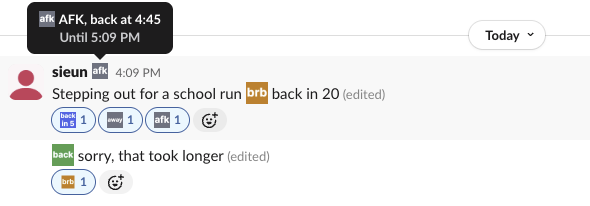
We added all six to a test workspace on 29 September 2026, set the status "AFK, back at 4:45" with :afk: and a one-hour clear time, and posted two messages. What we saw:
- • The status emoji appears next to your name on every message you post. Hovering it shows the status text and the time it clears ("Until 5:09 PM").
- • Three-letter words read best. "afk" and "brb" stay clear at reaction size. "away" and "back in 5" are readable inline but small as reactions.
- • The status did not change the presence dot. Our dot stayed green the whole time, because an AFK status is only text. Choose Set yourself as away if you also want the grey dot.
- Click your profile picture, then Update your status (or press Cmd+Shift+Y / Ctrl+Shift+Y).
- Type the status, for example "AFK, back at 2:30", and pick an emoji, such as the
:afk:one above. - Under Duration, choose when it clears, so it does not stay after you are back. The web app picks Today by default.
- Optional: tick Pause notifications until status is cleared.
- Click Save.
- • ☕ AFK, back in 15
- • 🍴 AFK for lunch, back at 1:30
- • 🚗 BRB, school run
- • 📆 AFK, in a workshop until 3
- • 🏡 AFK for the rest of the day
We removed the emoji, the status and the messages after the test.
How to set an AFK status in Slack
To show the grey dot as well, click your profile picture and choose Set yourself as away. Remember to switch back; manual away stays on even while you type. If you want the opposite, a green dot while you work, a server-side tool keeps your presence active on a schedule.
AFK statuses you can copy
More lines are in Slack status examples, and a status that clears itself after a short break is in Slack be right back status.
Slack AFK bots
Some teams install bots that post "@name is AFK" when someone mentions an absent person. They are third-party apps from the Slack Marketplace. On Enterprise plans, Slack's own out of office status does something similar: it sends your message to people who mention you. See Slack out of office.
FAQ
Is there an AFK emoji in Slack?
Not a built-in one. Download :afk: or :brb: from the table above and add it with Add Emoji. Without a custom emoji, people use ☕, 🚶 or 🍴. Avoid 💤, which looks like the small z Slack shows for paused notifications.
Does an AFK status make me show as away?
No. In our test the dot stayed green while the AFK status was set. Away is the grey dot Slack sets after 10 minutes without keyboard or mouse input, or when you choose Set yourself as away.
Is AFK still used?
Yes, mostly in chat tools like Slack, Discord and games, for short breaks.
Related Articles
Can You See Slack Status History? No, Here Is What Exists
No. Slack shows your active or away dot and your custom status only as they are right now, and keeps no history of either that coworkers or admins can open. Admins on paid plans see a last active date and sign-in logs. How to keep your own status log with the Slack API, from today on.
Slack: Get Notified When Someone Comes Online (No Built-In Alert)
Slack has no alert for when a coworker becomes active. No preference, Workflow Builder trigger or profile button does it. You can watch their green dot, send a message they will see when they return, or run a short script that checks users.getPresence every minute and DMs you.
Slack Active on Multiple Devices: Which One Sets Your Status?
When you use Slack on a phone and a computer at once, one active device keeps you green, and a manual away set on any device makes you away on all of them. We measured connection_count per browser tab and a manual away across four connections.