
How to Delete Your Slack Account (Deactivate It)
To delete your Slack account, deactivate it in each workspace: go to my.slack.com/account, scroll to Deactivate account, confirm your password, and click Yes, deactivate my account. Your messages stay. What else to know, and how to delete a whole workspace.
To delete your Slack account, deactivate it. Open my.slack.com/account in a browser while signed in to the workspace, scroll to Deactivate account, click Deactivate your account, enter your password, and click Yes, deactivate my account. It takes effect at once. A Slack account belongs to one workspace, so repeat this in every workspace you want to leave. Your messages and files are not deleted; if your workspace allows it, delete them first. To remove your name and photo, ask the workspace's Primary Owner after you deactivate.
If you are leaving Slack because of how it treats your presence, for example the dot turning grey while you work, there is a smaller fix: Slack Green keeps your dot green during the working hours you set, from the cloud.
How to deactivate your Slack account
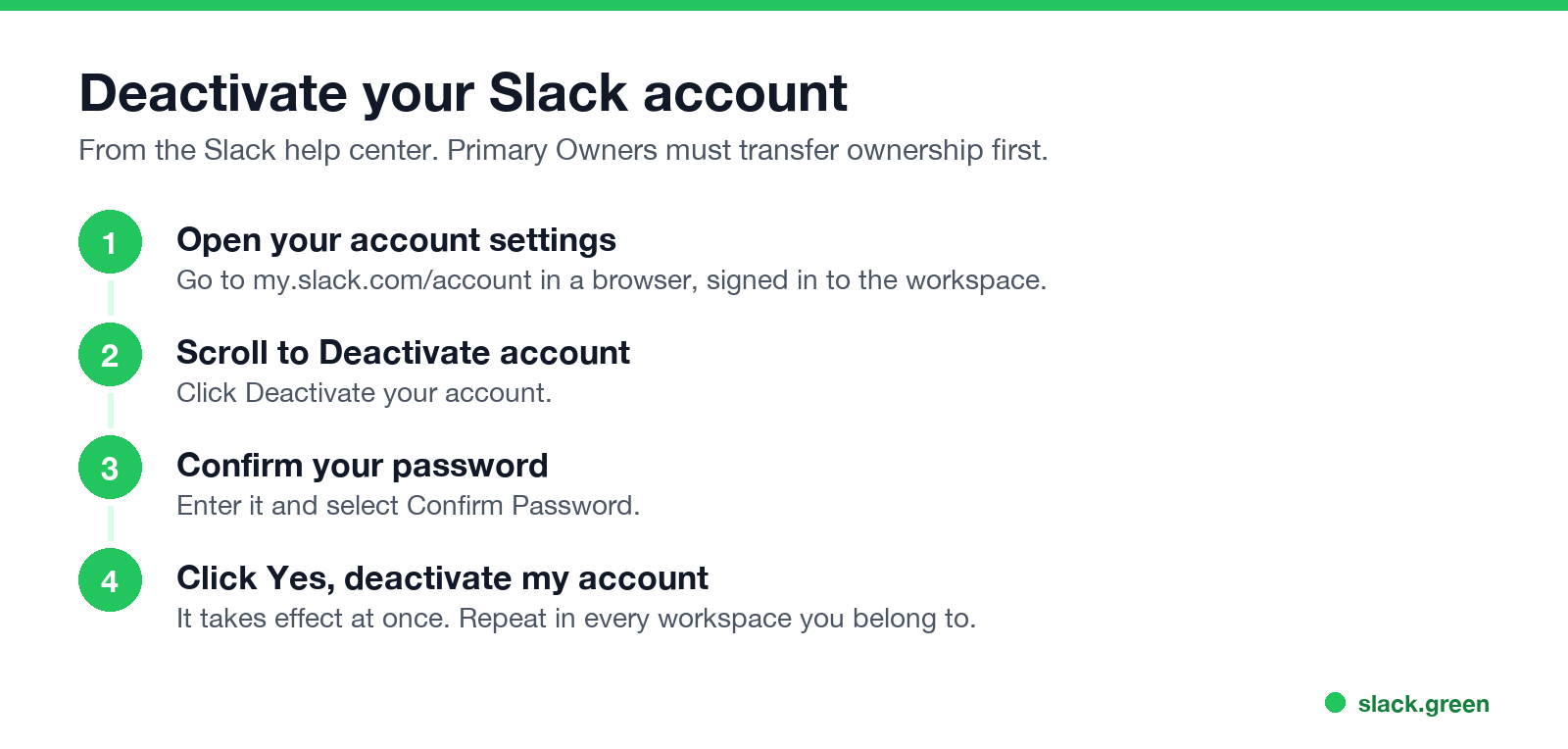
From Slack's help center:
- On a computer, go to my.slack.com/account.
- Scroll down to Deactivate account and click Deactivate your account.
- Enter your password and select Confirm Password.
- Click Yes, deactivate my account.
If you sign in through your company's single sign-on, IT may handle deactivation for you; see the limits below.
How to delete your Slack account on your phone
The Slack mobile app has no deactivate button. Open a mobile browser, sign in at your workspace's Slack address, then go to my.slack.com/account and follow the same steps. Deleting the app from your phone does not delete your account.
What happens when you deactivate
Nunca más aparezcas como "ausente" en Slack
Basado en la nube. Sin descargas. Funciona 24/7 incluso con tu laptop apagada.
When you cannot deactivate your account
Sign out, leave, deactivate or delete
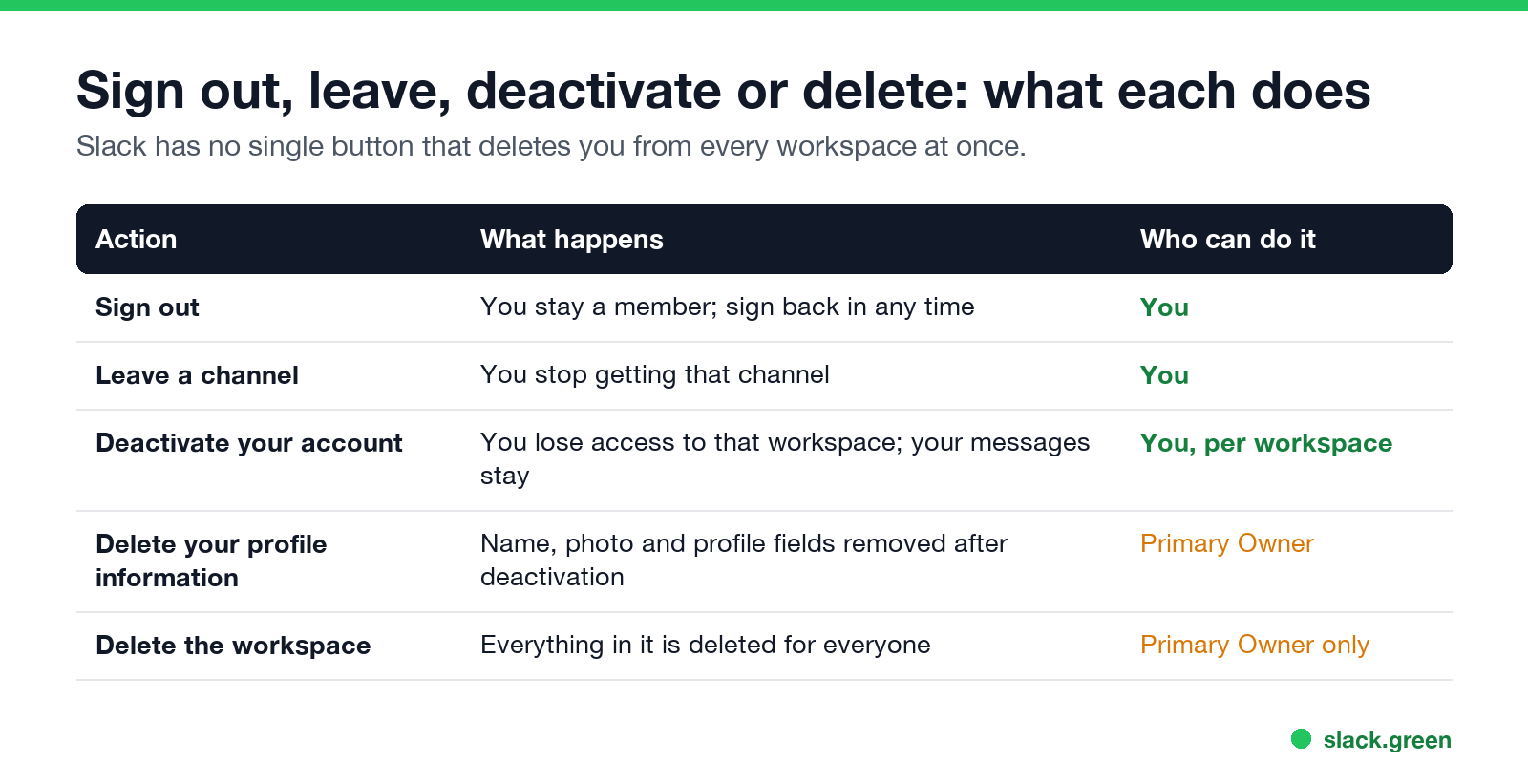
| Action | What happens | Who can do it |
|---|---|---|
| Sign out | You stay a member | You |
| Leave a channel | You stop getting that channel | You |
| Deactivate your account | No more access to that workspace; messages stay | You |
| Delete profile information | Name, photo and fields removed | Primary Owner |
| Delete the workspace | Everything deleted for everyone | Primary Owner only |
How to leave a Slack workspace: deactivate your account in it, as above. Signing out only removes it from that device. If you only want fewer channels, leave those instead, or tidy the sidebar; see Slack channels disappeared from the sidebar for how the sidebar filters work.
How to delete a whole Slack workspace
Nunca más aparezcas como "ausente" en Slack
Basado en la nube. Sin descargas. Funciona 24/7 incluso con tu laptop apagada.
Only the workspace's Primary Owner can delete it, and it removes all messages and files for everyone. Export anything you need first. The setting is in the workspace admin settings; if you are not the Primary Owner, ask them.
Before you leave
FAQ
Can I permanently delete my Slack account?
You can deactivate it in each workspace. Removing your profile information needs the workspace's Primary Owner, who can also ask Slack for deletion help.
Does deactivating Slack delete my messages?
No. Messages and files you sent stay in the workspace unless you delete them first.
How do I delete my Slack account on iPhone or Android?
Use a mobile browser, not the app: sign in and open my.slack.com/account, then deactivate.
Can I reactivate my Slack account?
Yes, if a workspace owner or admin reactivates it.
Why can't I deactivate my Slack account?
You are the Primary Owner, a guest, or in an Enterprise organization where membership is required. Ask an owner or admin.
Deja de Mover el Ratón.
Cientos de trabajadores remotos ya no se preocupan por su estado de Slack. Configúralo una vez, mantente verde para siempre.
Related Articles
Slack Workflow Builder Examples: 12 Workflows to Copy, With Triggers and Steps
Twelve Slack Workflow Builder examples with the exact trigger and steps for each: daily standups, channel welcomes, time-off approvals, help desk requests, emoji escalations, keyword routing, incidents, list updates and webhooks from other tools. Plus where Workflow Builder lives, what it costs and how branches work.
Slack Timer: How to Set a Countdown, Pomodoro or Focus Timer in Slack
Slack has no built-in timer, but four built-in tools act like one: /remind me to ... in 25 minutes, a status that clears itself, /dnd for a focus block, and Workflow Builder for dated countdowns. For a live countdown in a channel, use a Marketplace app or a 15-line bot script.
Slack Red Dot Won't Go Away? What It Counts and How to Clear It
A red dot on the Slack icon means unread activity somewhere; a red number means DMs, mentions, keywords or followed thread replies. Press Shift+Esc to mark all read, check Threads, Activity, Later and other workspaces, then clear the cache or reset the OS badge.