
Can Slack Admins See What You Search? And What Else They See
No. Slack gives admins no record of your search terms. On Enterprise they can see how many searches you ran each day. What admins see about edits, private channels, scheduled messages, analytics and read receipts.
No. Slack admins cannot see what you search for. No admin screen, analytics report or export in Slack contains your search terms. On Enterprise, admins can see a count: Slack's member analytics include a search_count field with the number of searches each person ran that day. So an Enterprise admin can learn that you searched 40 times on Tuesday, but not what you searched for.
The rest of this page answers the other "can Slack admins see" questions: edits, private channels, scheduled messages, read receipts and the activity analytics. DMs have their own page, can Slack admins see your DMs.
We build Slack Green, which keeps your Slack presence green during your working hours from a cloud server. It sets presence only and never reads messages or searches. Presence is one of the few things every coworker can see, which is why we track what admins can see too.
What Slack admins can and cannot see
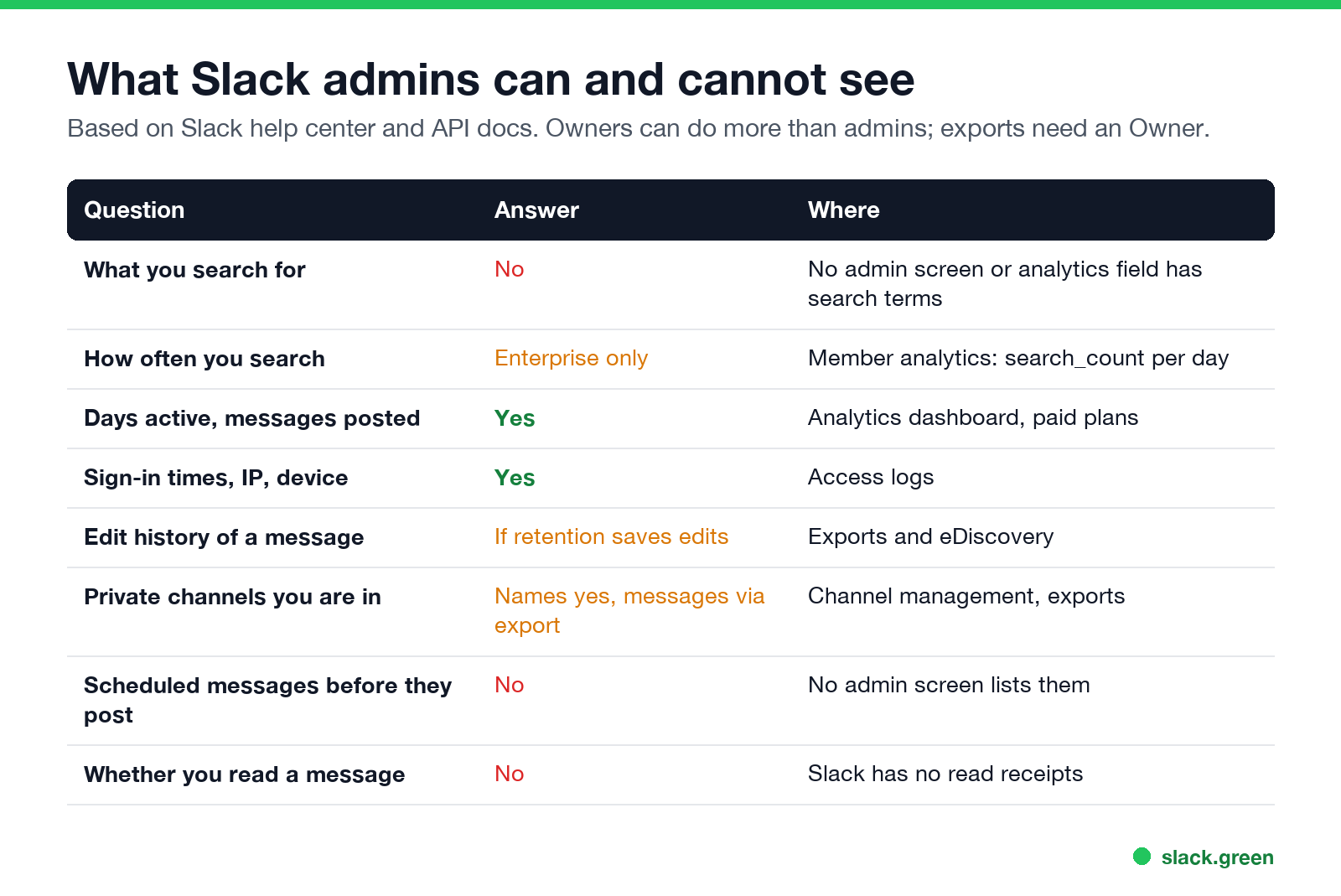
| Question | Answer | Where it shows |
|---|---|---|
| What you search for | No | No admin screen or analytics field has search terms |
| How often you search | Enterprise only | Member analytics, search_count per day |
| Days active and messages posted | Yes | Analytics dashboard, paid plans |
| Sign-in times, IP address, device | Yes | Access logs |
| The edit history of a message | Only if retention saves edits | Exports and eDiscovery tools |
| Private channels you are in | Names yes, messages only through an export | Channel management, exports |
| Scheduled messages before they post | No | No admin screen lists them |
| Whether you read a message | No | Slack has no read receipts |
Two roles matter. Admins manage members and channels. Owners can also run data exports and set retention. The full split is in Slack workspace Owner vs Admin. Most of what reads message content needs an Owner, the right plan, and sometimes Slack's approval.
Can Slack admins see your search history?
No. Search in Slack runs over the messages and files you can already see, and Slack keeps no search history that admins can open. The Enterprise analytics data is the only place search appears, and it is a number per person per day. This is the field as it appears in Slack's own API documentation for member analytics:
curl "https://slack.com/api/admin.analytics.getFile" \
  -H "Authorization: Bearer $ADMIN_USER_TOKEN" \
  -d "type=member&date=2026-09-01" | gunzip -c
Each line of the result is one member for one day. A shortened line from Slack's example:
{"user_id": "W1ZOSID3ZI2", "is_active": true, "is_active_desktop": true,
 "messages_posted_count": 123, "slack_huddles_count": 5, "search_count": 1001}
This call needs an Enterprise organization and a token with the admin.analytics:read scope. On Free, Pro and Business+, admins do not get a per-person search count at all.
Search is also private in the other direction: searching never shows you anything you do not already have access to. A search does not reveal private channels you are not in or other people's DMs.
Can Slack admins see edited messages?
Slack에서 다시는 '자리 비움'으로 표시되지 마세요
클라우드 기반. 다운로드 불필요. 노트북이 꺼져 있어도 24시간 작동.
Everyone sees the "(edited)" label on a changed message. The earlier version is a retention question. If the workspace Owner chose to keep messages and save edits, Slack keeps the edit history, and it can appear in a full export or an eDiscovery tool. If retention does not save edits, the earlier version is gone. The same rules decide what happens to deleted messages, explained in can Slack see deleted messages.
Can Slack admins see private channels?
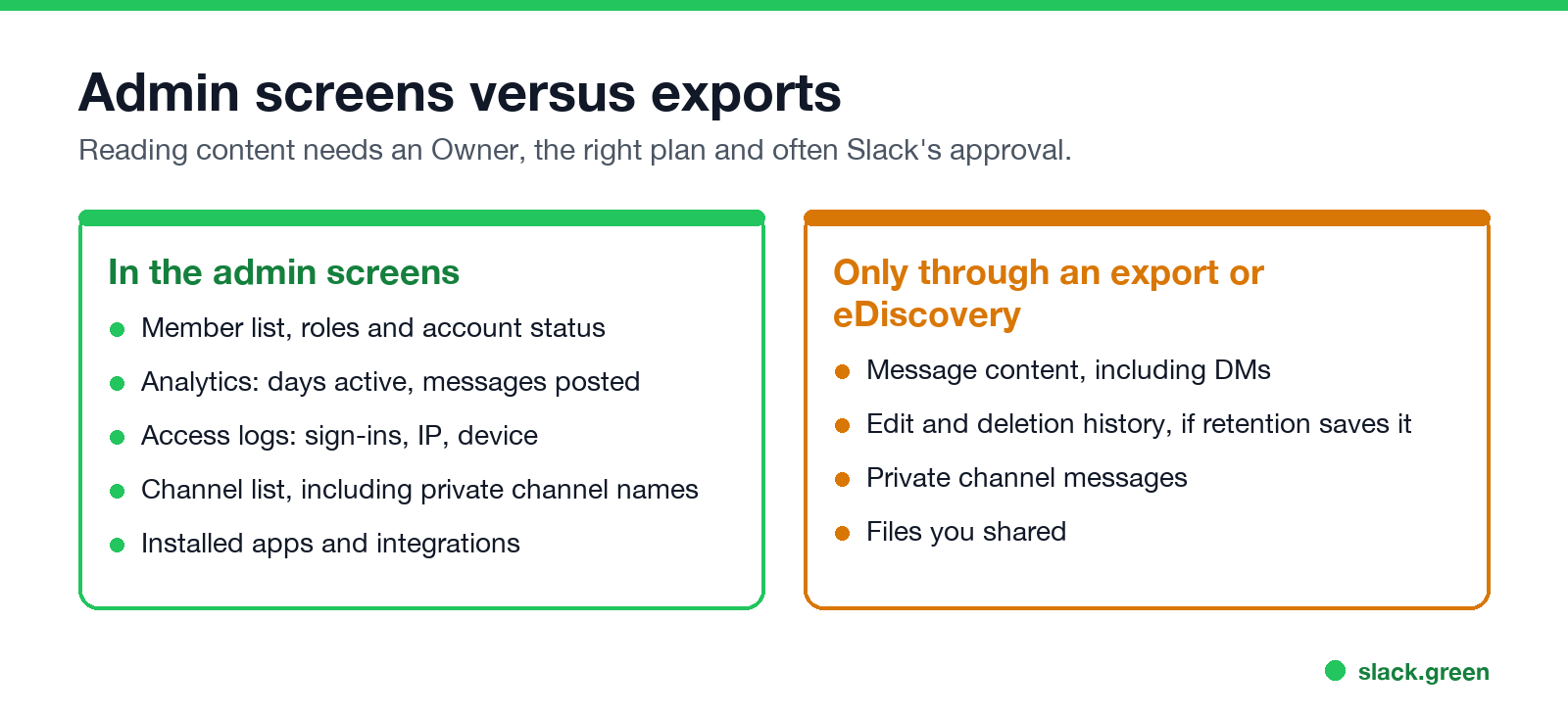
Admins and Owners can see that a private channel exists, its name and its members in the admin tools. They cannot open it and read it in the app unless they are a member. The messages can reach the company through an export: Owners on Business+ and Enterprise can export private channels once they have export access, and on Free and Pro an Owner must apply to Slack. The plan-by-plan table is in can Slack admins see your DMs, because DMs and private channels follow the same export rules.
Can Slack admins see scheduled messages?
No admin screen lists your scheduled messages. They sit in your own Scheduled list until they post. Once a scheduled message posts, it is an ordinary message, with the same visibility and export rules as any other. How scheduling works is in how to delay and schedule Slack messages.
Can Slack admins see read receipts?
Slack에서 다시는 '자리 비움'으로 표시되지 마세요
클라우드 기반. 다운로드 불필요. 노트북이 꺼져 있어도 24시간 작동.
No, because Slack has no read receipts. Nobody, admin or coworker, can see if you opened a message or a DM. What people can see instead, such as emoji reactions and replies, is in does Slack have read receipts.
Slack admin analytics: what member activity shows
The analytics dashboard on paid plans has a members view with each person's activity over a time range: days active, days active on desktop, Android and iOS, messages posted, messages posted in channels and reactions added. On Enterprise the same data, plus calls, huddles and the search count, is available per day through the API above.
This is how most managers read Slack activity. It shows days, not minutes. It does not show time spent in Slack or when your dot was green. A presence log exists only if someone runs an app that polls it. The longer version, with access logs and exports, is in can Slack be used to monitor employees, and the full picture across all work tools is in how do employers monitor remote workers.
Guests and people from other companies in Slack Connect channels see less than members do. The differences are in Slack Connect vs guest accounts.
What admins cannot see at all
- • Your search terms.
- • Whether you read a message.
- • Your screen, or screenshots you take.
- • Your mouse and keyboard outside Slack. Slack does not track mouse movement outside its window.
- • Your location, beyond the IP address in the access logs.
FAQ
Slack에서 다시는 '자리 비움'으로 표시되지 마세요
클라우드 기반. 다운로드 불필요. 노트북이 꺼져 있어도 24시간 작동.
Can Slack admins see what you search?
No. Admins cannot see search terms on any plan. On Enterprise, member analytics count how many searches you ran per day.
Can Slack admins see my activity?
Yes, in summary. They see days active, messages posted, reactions and sign-ins. Coworkers see your presence dot.
Can Slack admins see edited messages?
Everyone sees the edited label. The earlier version is kept only if the Owner's retention setting saves edits, and it is read through an export.
Can Slack admins see private channels?
They can see names and members. Messages reach them only through an Owner's export or eDiscovery.
Can Slack admins see scheduled messages?
No. A scheduled message is visible only to you until it posts.
Can Slack admins see when I read a message?
No. Slack has no read receipts.
Related Articles
Slack Lists Tutorial: Create, Organize and Share a List
Slack lists are tables of tasks inside Slack, with fields, assignees, due dates, a board view and a comment thread on every item. How to create a list from scratch or a template, set up fields, turn it into a kanban board, add messages to it, share it, and what the plan limits are.
Slack Jira Integration: Setup, /jira Commands and Notifications
Install the Jira Cloud for Slack app, type /jira connect in a channel to send a Jira space's updates there, /jira notify for personal notifications as DMs, and create work items from any message with More actions. Every /jira command, Jira automation to Slack, and fixes when previews or notifications stop.
How to Create a Slack Workspace, on Desktop or Phone
Go to slack.com/get-started, enter your email, type the confirmation code, and click Create a Workspace. It is free to start, you become the Primary Owner, and it takes about five minutes. Steps for desktop, iPhone and Android, and what to set up next.