
Can Slack See Deleted Messages? What Your Company Can Recover
Nobody can see a deleted Slack message in the app, including admins. Your company can still have it if the workspace retention setting saves edits and deletions, or if a legal hold is on, and read it through an export or eDiscovery tool. What each plan keeps, and whether you can recover a deleted message.
When you delete a Slack message, it disappears for everyone in the app, including admins. Whether your company can still read it depends on one setting. If the workspace Owner chose Never delete messages, save edits (Pro, Business+ and Enterprise plans), Slack keeps the message with its edit and deletion history, and it can appear in a full data export or an eDiscovery tool. On Enterprise, a legal hold also preserves deleted messages. With Never delete messages, don't save edits, or on the Free plan, the deleted version is gone. Members cannot undo a delete.
Deleted messages are one item on a longer list of what Slack keeps about you. For the part everyone sees, your green or grey dot, Slack Green keeps you active during the working hours you set, from the cloud.
Does Slack keep deleted messages?
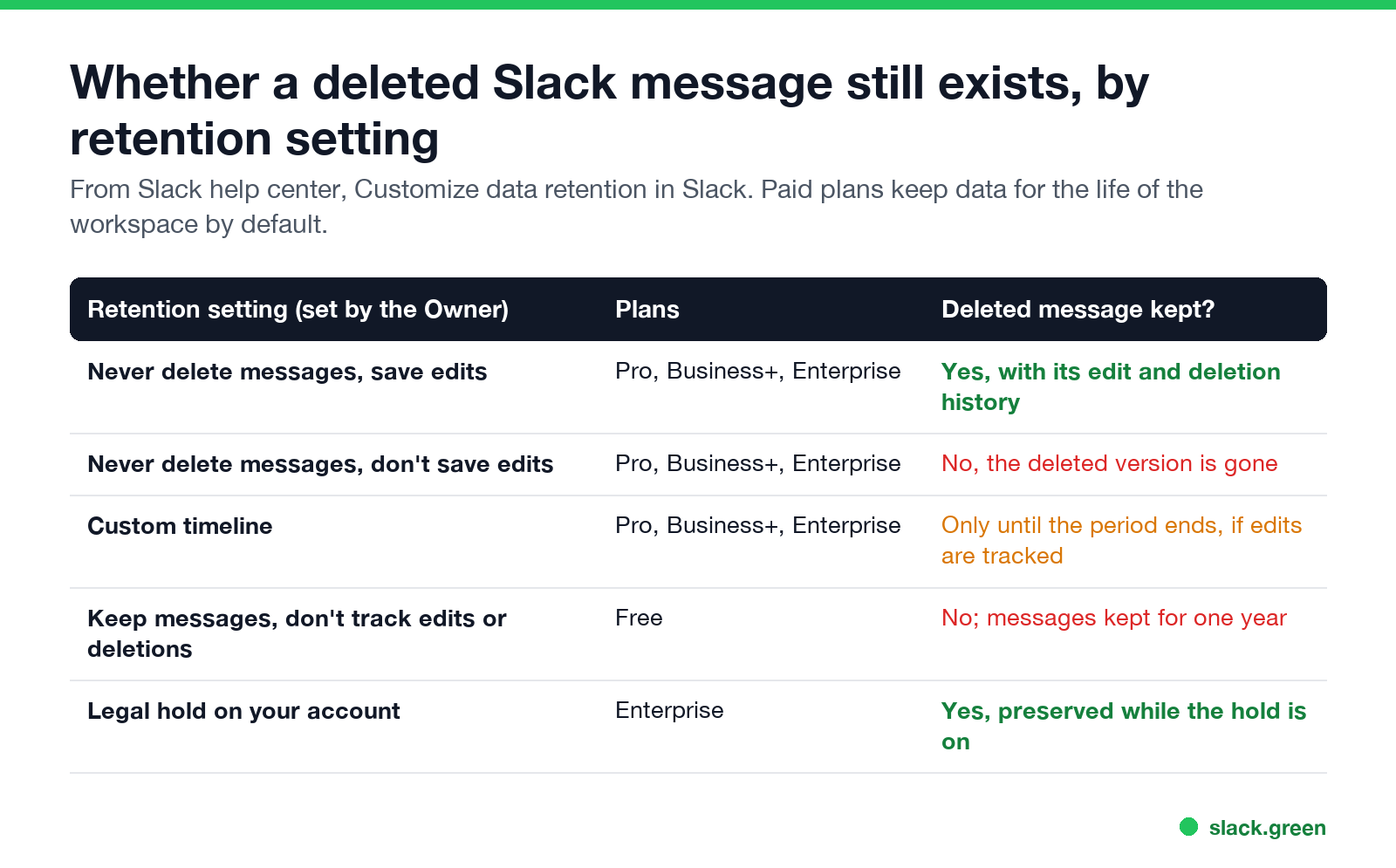
Slack's help center describes the retention options workspace Owners can choose:
| Retention setting | Plans | Deleted message kept? |
|---|---|---|
| Never delete messages, save edits | Pro, Business+, Enterprise | Yes, with edit and deletion history |
| Never delete messages, don't save edits | Pro, Business+, Enterprise | No |
| Custom timeline | Pro, Business+, Enterprise | Only while retention keeps it |
| Keep messages, don't track edits or deletions | Free | No |
| Legal hold on your account | Enterprise | Yes, while the hold is on |
On paid plans, Slack keeps data for the life of the workspace by default. On the Free plan, the Owner can keep a year of messages or delete them after 90 days, and Free plans do not track edits or deletions. Members usually cannot see which setting their workspace uses; ask your admin, or check the workspace's policy documents. The full retention rules, including files, are in Slack message retention.
Can my boss read deleted Slack messages?
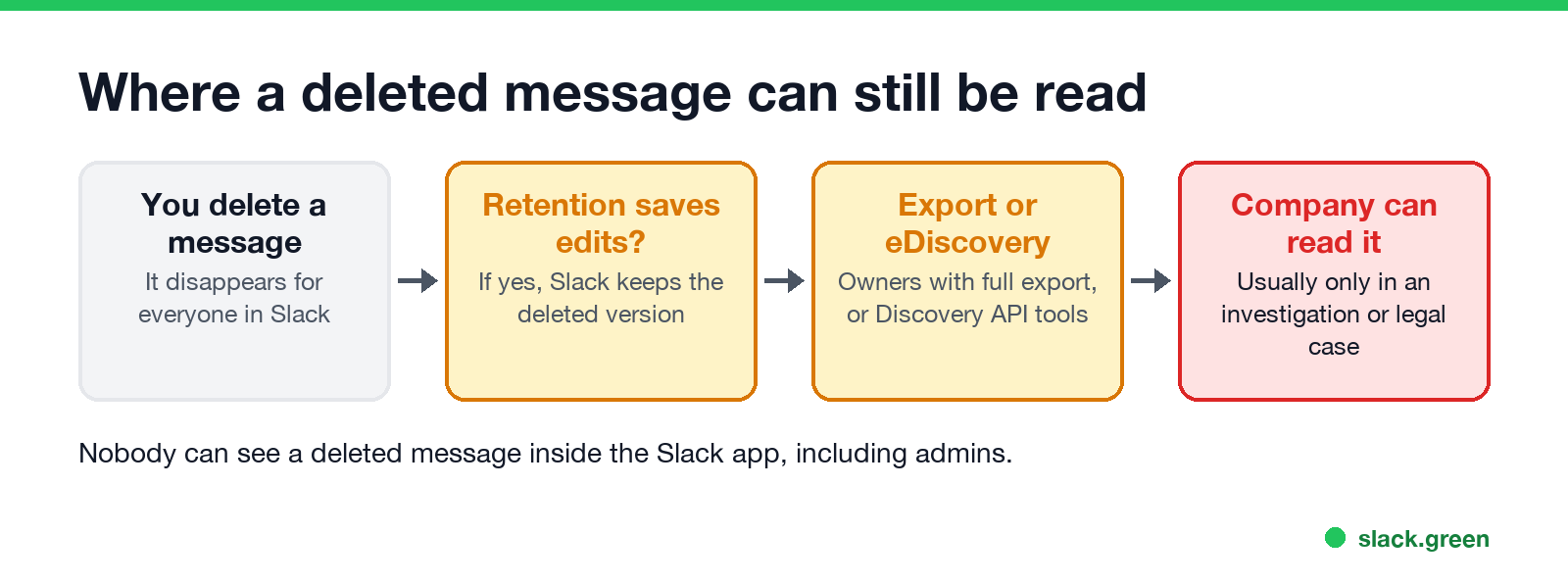
Not in the Slack app. Your boss, like everyone else, sees the message vanish. A deleted message can reach your company in two ways:
- A full export. Owners on Business+ and Enterprise can apply for exports of all channels and DMs. If retention saves edits, deleted versions can be in that data.
- Enterprise tools. On Enterprise, Slack says its Discovery API includes content that has been edited and deleted, if preserved by retention policies or legal holds. DLP and eDiscovery tools read it that way.
In practice companies pull this data for a reason, such as a legal case, an HR investigation or a security alert. Who can export what, plan by plan, is in can Slack admins see DMs and can Slack be used to monitor employees.
Does Slack show deleted messages?
Nunca mais apareça como "ausente" no Slack
Na nuvem. Sem downloads. Funciona 24/7 mesmo com seu notebook desligado.
A deleted message disappears from the conversation. If it had thread replies, Slack leaves a placeholder saying the message was deleted so the replies stay in context. Edited messages show "(edited)" next to them, but coworkers cannot see the earlier text in the app.
Slack does not notify anyone when you delete a message. People who were notified before you deleted it may still have seen it in a desktop or mobile notification.
How to recover deleted Slack messages
To keep something before you delete it, copy the text, or save the message to Later. Saving does not keep a copy after deletion.
Who can delete messages in Slack
By default members can delete their own messages. Owners and admins can change that in workspace settings, and can delete other people's messages. Deleting your account does not delete your messages; see how to delete your Slack account.
FAQ
Nunca mais apareça como "ausente" no Slack
Na nuvem. Sem downloads. Funciona 24/7 mesmo com seu notebook desligado.
Can Slack admins see deleted messages?
Not in the app. They can get them through a full export or eDiscovery tools if retention saves edits and deletions, or if a legal hold is on.
Does Slack keep deleted messages forever?
Only if the workspace uses Never delete messages, save edits, or a legal hold is on. Otherwise the deleted version is gone.
Can I see a message someone deleted in Slack?
No. Slack removes it for everyone.
Does deleting a Slack DM delete it for the other person?
Yes. It disappears for both of you.
Can my employer see my Slack messages?
Often, through exports on paid plans. See can Slack admins see DMs.
Pare de Mexer o Mouse.
Centenas de trabalhadores remotos não se preocupam mais com o status do Slack. Configure uma vez, fique verde para sempre.
Related Articles
How to Keep Your Outlook Status Green (It Comes From Teams)
Your Outlook status shows your Microsoft Teams presence, so to keep Outlook green you keep Teams Available: Teams signed in and running, input on the computer, no lock or sleep, and no leftover status. What sets you Away, and what you can change.
Does Microsoft Teams Track Your Activity? What Admins Can See
Teams admins can see activity counts per person: messages in channels and chats, meetings, 1:1 calls, audio, video and screen share time, and your last activity date. Your status follows keyboard and mouse activity on the whole computer. Teams does not log keystrokes, your screen, or other apps.
Slack Desktop App Blank or White Screen? Fix It in This Order
A blank, white or black Slack window is usually a failed load, a corrupt cache, a blocked connection or a graphics driver issue. Reload with Cmd or Ctrl+R, use Help, Troubleshooting, Clear Cache and Restart, test Slack in a browser, update, then reinstall cleanly. Steps for Windows and Mac.