
Are Slack Huddles Recorded? No, but AI Notes Can Keep a Transcript
No. Slack does not record huddle audio or video. It saves a transcript only when someone turns on AI notes, and everyone in the huddle is told. What else is kept, and who can listen.
No, Slack does not record huddles. Huddle audio and video are never saved, and there is no record button. Slack keeps a written transcript only when someone in the huddle turns on AI notes, and Slack tells everyone in the huddle when that happens.
So a huddle is close to a phone call: once it ends, the talk is gone. What Slack does keep is the huddle's thread, its notes canvas, and on paid plans any AI notes someone started. On Enterprise plans, audit logs also record who joined and who shared a screen. The details, and the answer to "can my boss listen in", are below.
Does Slack record huddles?
No. Slack's help page on huddles lists what you can do in one: video, screen sharing, a thread for notes, a notes canvas, reactions, music, and live captions. Recording is not on the list. The captions, Slack notes, "will not be saved once the huddle ends".
We checked this in our own Slack workspace on 3 October 2026. The huddle button in a channel header opens a menu with two items, Start Huddle and Copy huddle link, and nothing about recording:

The composer below it does have Record video clip and Record audio clip buttons. Those make clips, which are saved as files in the conversation. They are separate from huddles, and a clip only captures what the person recording it says or shows. To save every file a channel holds in one go, see download all files from a Slack channel.
The top r/Slack thread on this asks how to record huddle video. The top reply says: "No it's not supported on Huddles." That is still true. To keep a recording, people use a screen recorder on their own computer or a third-party meeting bot. Check the law where you and the other people are first, because some places require everyone's consent to record a call. Step-by-step setups for Windows and Mac, and how to turn on AI notes, are in how to record a Slack huddle. Which plans include AI huddle notes is in is Slack AI worth it. For recorded meetings, compare Slack huddles vs Zoom.
What Slack keeps after a huddle ends
| Part of the huddle | Saved? | Who can see it |
|---|---|---|
| Audio and video | Never | Nobody |
| Live captions | Not saved when the huddle ends | Nobody |
| Messages in the huddle thread | Yes, like any message | People in the channel or DM |
| Notes canvas | Yes | People in the channel or DM |
| AI notes and transcript | Only if someone turned AI notes on | People in the channel or DM |
| Who joined, left, or shared a screen | Enterprise audit log events | Org owners and admins |
Slack's Audit Logs API lists huddle events such as huddle_started, huddle_participant_joined, huddle_participant_left, and huddle_screenshare_on. These say who was in a huddle and when. They contain no audio and no words.
Apps cannot record huddles either. What the API does expose, huddle status and a change event, is in Slack huddle API.
Is there a Slack API for huddle recordings?
No. We listed every method and event in Slack's API reference on 26 October 2026 with this script, which reads the sitemap of docs.slack.dev:
import re, urllib.request
UA = {"User-Agent": "Mozilla/5.0"}
get = lambda u: urllib.request.urlopen(urllib.request.Request(u, headers=UA), timeout=60).read().decode()
xml = get("https://docs.slack.dev/sitemap.xml")
methods = sorted(set(re.findall(r"/reference/methods/([a-z]+(?:\.[a-zA-Z]+)+)", xml)))
events = sorted(set(re.findall(r"/reference/events/([a-z_]+)", xml)))
print(len(methods), "Web API methods,", len(events), "Events API events")
print("methods with huddle or record:", [m for m in methods if "huddle" in m.lower() or "record" in m.lower()])
print("events with huddle or record:", [e for e in events if "huddle" in e or "record" in e])
print("calls methods:", [m for m in methods if m.startswith("calls.")])
Output:
324 Web API methods, 115 Events API events
methods with huddle or record: []
events with huddle or record: ['user_huddle_changed']
calls methods: ['calls.add', 'calls.end', 'calls.info', 'calls.participants.add', 'calls.participants.remove', 'calls.update']
No Web API method has huddle or record in its name. The one huddle event, user_huddle_changed, tells an app that someone's huddle state changed, with no audio. The calls.* methods let a third-party call app, such as Zoom, show its own calls in Slack; they do not reach huddle audio. So a tool that records huddles works outside Slack's API, for example by recording the screen and sound of a computer that is in the huddle. The AI notes transcript, when someone starts one, lives in the huddle's notes canvas like any other canvas.
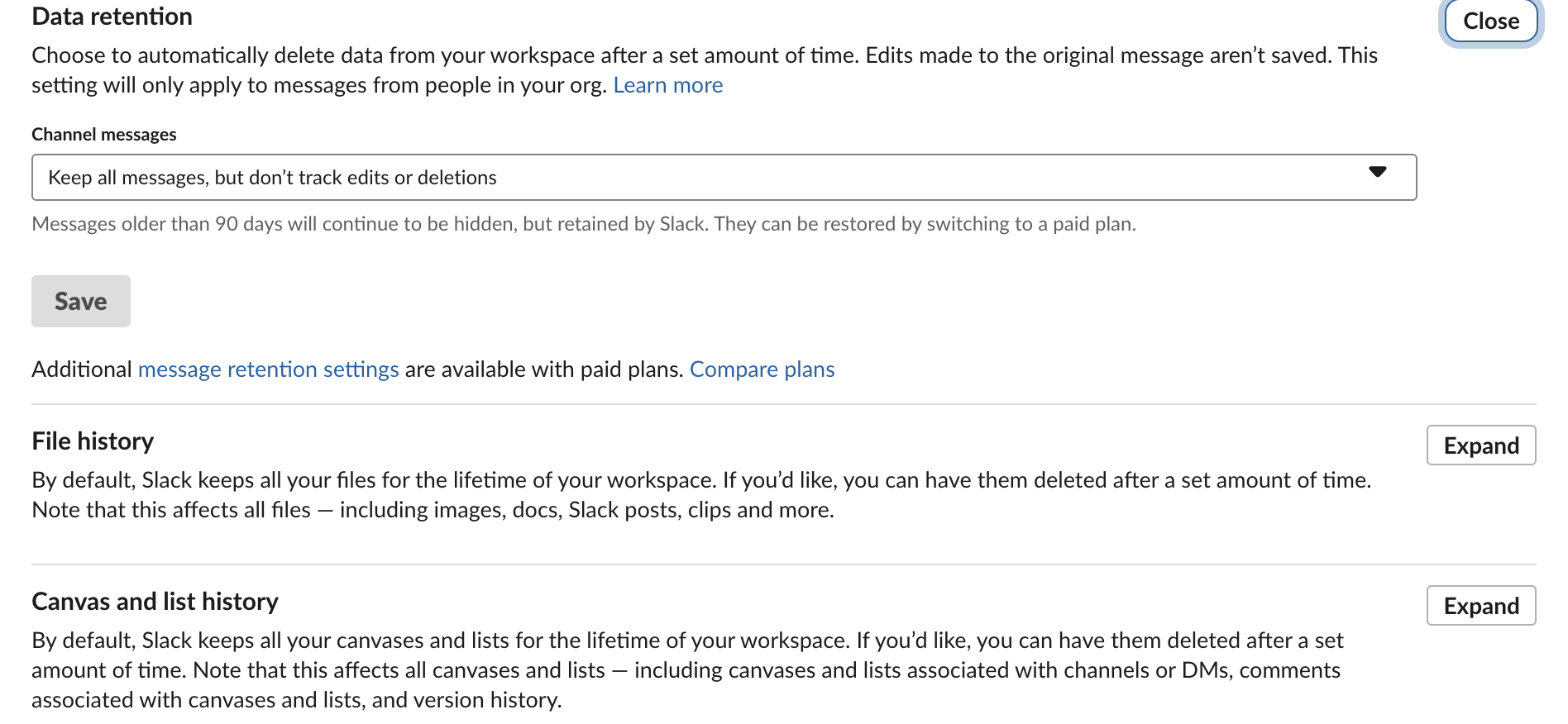
The admin side matches this. In our workspace's Admin settings, the retention controls cover channel messages, files ("images, docs, Slack posts, clips and more") and canvases and lists. There is no setting for huddle audio, video or recordings, because there is nothing of that kind to keep or delete:
Never appear "away" on Slack again
Cloud-based. No downloads. Works 24/7 even when your laptop is off.
Do Slack huddles have transcripts?
Only with AI notes. On paid plans, any member in a huddle can click AI notes: Off, then Start AI notes & transcription. From Slack's help page for this feature:
- • "Everyone in the huddle will be notified when notes are started, stopped, or canceled."
- • After the huddle, the notes go into a canvas in the huddle thread, with the list of people, topics, and action items.
- • "Transcripts are embedded in the notes canvas, but won't show up in search results."
- • Anyone in the channel or DM where the huddle took place can read the notes.
- • AI notes do not work in huddles with guests or people from other companies.
- • In a channel, any channel member can join your huddle. When they join, they appear in the huddle with everyone else.
- • In a DM or private channel, someone outside it can click a huddle link and Request Access. Someone inside has to approve.
- • Admins can see Enterprise audit events, such as who joined when, and can read AI notes only if they have access to that channel or DM. They cannot hear audio, because Slack does not keep it.
One setting can surprise you. Any channel member can set Start AI notes automatically for every huddle in that channel's settings. In that channel, a transcript starts without anyone clicking. You still get the notice when it starts, and anyone in the huddle can stop or delete it.
Can my boss hear my Slack huddles?
Not without joining. Slack has no feature that lets a manager or admin listen to a huddle silently.
What Slack cannot stop is a person in the huddle recording it with their own software. Slack sends no alert for that, the same way it sends no alert for screenshots. If a call matters, assume someone could be recording it.
Are Slack huddles private?
A huddle is as private as the place you start it. A huddle in a public channel is open to the whole channel. A huddle in a DM is open to the people in that DM, plus anyone they let in.
Joining a huddle also shows on your profile: while you are in one, Slack can set an automatic headphones status next to your name. Who sees you join, and how to join muted, is in can people see when you join a Slack huddle. That status is separate from your green dot, as covered in how Slack active status works. For the other things Slack records about you, see can Slack be used to monitor employees, and for message privacy, can Slack admins see your DMs.
FAQ
What if my huddle has no sound or will not connect?
Run the test in Preferences, Audio & video, then follow Slack huddle not working. In a browser, Slack also needs microphone permission for app.slack.com; with it blocked, clicking Start Huddle did nothing in our test.
Can I play a video with sound in a huddle?
Yes. Check Share system audio when you share your screen; see how to share audio in a Slack huddle.
Stop Jiggling Your Mouse.
Join hundreds of remote workers who never worry about their Slack status. Set it up once, stay green forever.
Related Articles
Why Slack Says LEGACY Next to Slackbot and Huddle Notices
The grey LEGACY tag marks messages from the old, automated Slackbot in your Slackbot DM. Slack shows it on Free and Pro workspaces to tell those notices apart from the new AI Slackbot. We read the code that draws it.
How to Turn Off Huddles in Slack: Channel, Notifications and Sounds
To stop huddles in one channel, open the channel's Settings and set Huddles to No. To stop huddle alerts for yourself, untick New huddles in Preferences > Notifications. We tested both in a Free workspace on October 28, 2026.
How to Translate Slack Messages (Free Plan Tested)
Slack's built-in Translate message is a Slack AI feature on Business+ and Enterprise+. On our Free workspace the message menu had no Translate item, but Slackbot translated a Spanish and a Japanese message when asked.