
Are Slack Huddles Recorded? No, but AI Notes Can Keep a Transcript
No. Slack does not record huddle audio or video. It saves a transcript only when someone turns on AI notes, and everyone in the huddle is told. What else is kept, and who can listen.
No, Slack does not record huddles. Huddle audio and video are never saved, and there is no record button. Slack keeps a written transcript only when someone in the huddle turns on AI notes, and Slack tells everyone in the huddle when that happens.
So a huddle is close to a phone call: once it ends, the talk is gone. What Slack does keep is the huddle's thread, its notes canvas, and on paid plans any AI notes someone started. On Enterprise plans, audit logs also record who joined and who shared a screen. The details, and the answer to "can my boss listen in", are below.
We build Slack Green, which keeps your Slack status green from our servers. The questions people ask us about what Slack sees come up often enough that we check each answer against Slack's help center and API docs, linked below.
Does Slack record huddles?
No. Slack's help page on huddles lists what you can do in one: video, screen sharing, a thread for notes, a notes canvas, reactions, music, and live captions. Recording is not on the list. The captions, Slack notes, "will not be saved once the huddle ends".
The top r/Slack thread on this asks how to record huddle video. The top reply says: "No it's not supported on Huddles." That is still true. To keep a recording, people use a screen recorder on their own computer or a third-party meeting bot. Step-by-step setups for Windows and Mac, and how to turn on AI notes, are in how to record a Slack huddle. Which plans include AI huddle notes is in is Slack AI worth it. For recorded meetings, compare Slack huddles vs Zoom.
What Slack keeps after a huddle ends
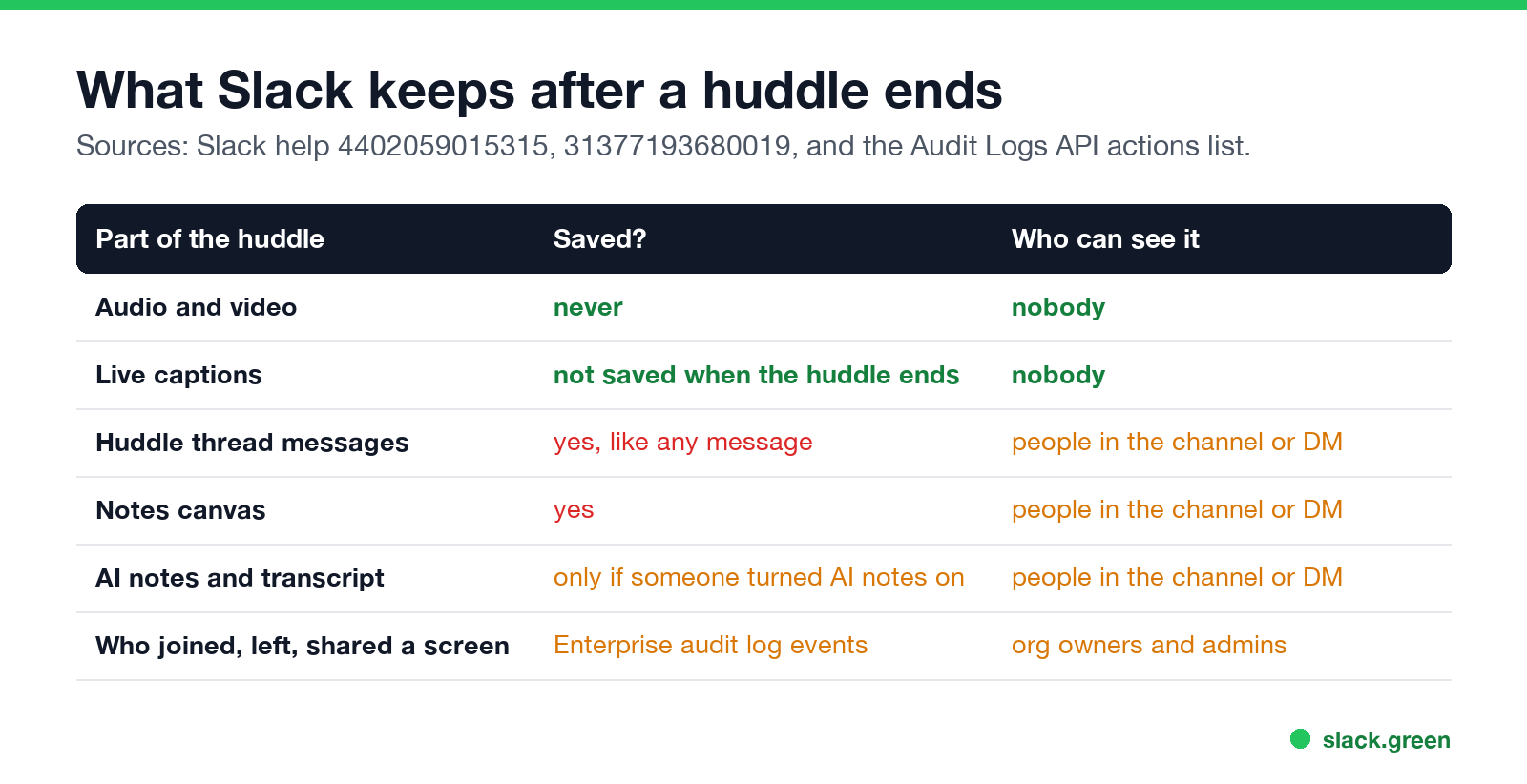
| Part of the huddle | Saved? | Who can see it |
|---|---|---|
| Audio and video | Never | Nobody |
| Live captions | Not saved when the huddle ends | Nobody |
| Messages in the huddle thread | Yes, like any message | People in the channel or DM |
| Notes canvas | Yes | People in the channel or DM |
| AI notes and transcript | Only if someone turned AI notes on | People in the channel or DM |
| Who joined, left, or shared a screen | Enterprise audit log events | Org owners and admins |
Slack's Audit Logs API lists huddle events such as huddle_started, huddle_participant_joined, huddle_participant_left, and huddle_screenshare_on. These say who was in a huddle and when. They contain no audio and no words.
Do Slack huddles have transcripts?
Only with AI notes. On paid plans, any member in a huddle can click AI notes: Off, then Start AI notes & transcription. From Slack's help page for this feature:
- • "Everyone in the huddle will be notified when notes are started, stopped, or canceled."
- • After the huddle, the notes go into a canvas in the huddle thread, with the list of people, topics, and action items.
- • "Transcripts are embedded in the notes canvas, but won't show up in search results."
- • Anyone in the channel or DM where the huddle took place can read the notes.
- • AI notes do not work in huddles with guests or people from other companies.
- • In a channel, any channel member can join your huddle. When they join, they appear in the huddle with everyone else.
- • In a DM or private channel, someone outside it can click a huddle link and Request Access. Someone inside has to approve.
- • Admins can see Enterprise audit events, such as who joined when, and can read AI notes only if they have access to that channel or DM. They cannot hear audio, because Slack does not keep it.
One setting can surprise you. Any channel member can set Start AI notes automatically for every huddle in that channel's settings. In that channel, a transcript starts without anyone clicking. You still get the notice when it starts, and anyone in the huddle can stop or delete it.
Can my boss hear my Slack huddles?
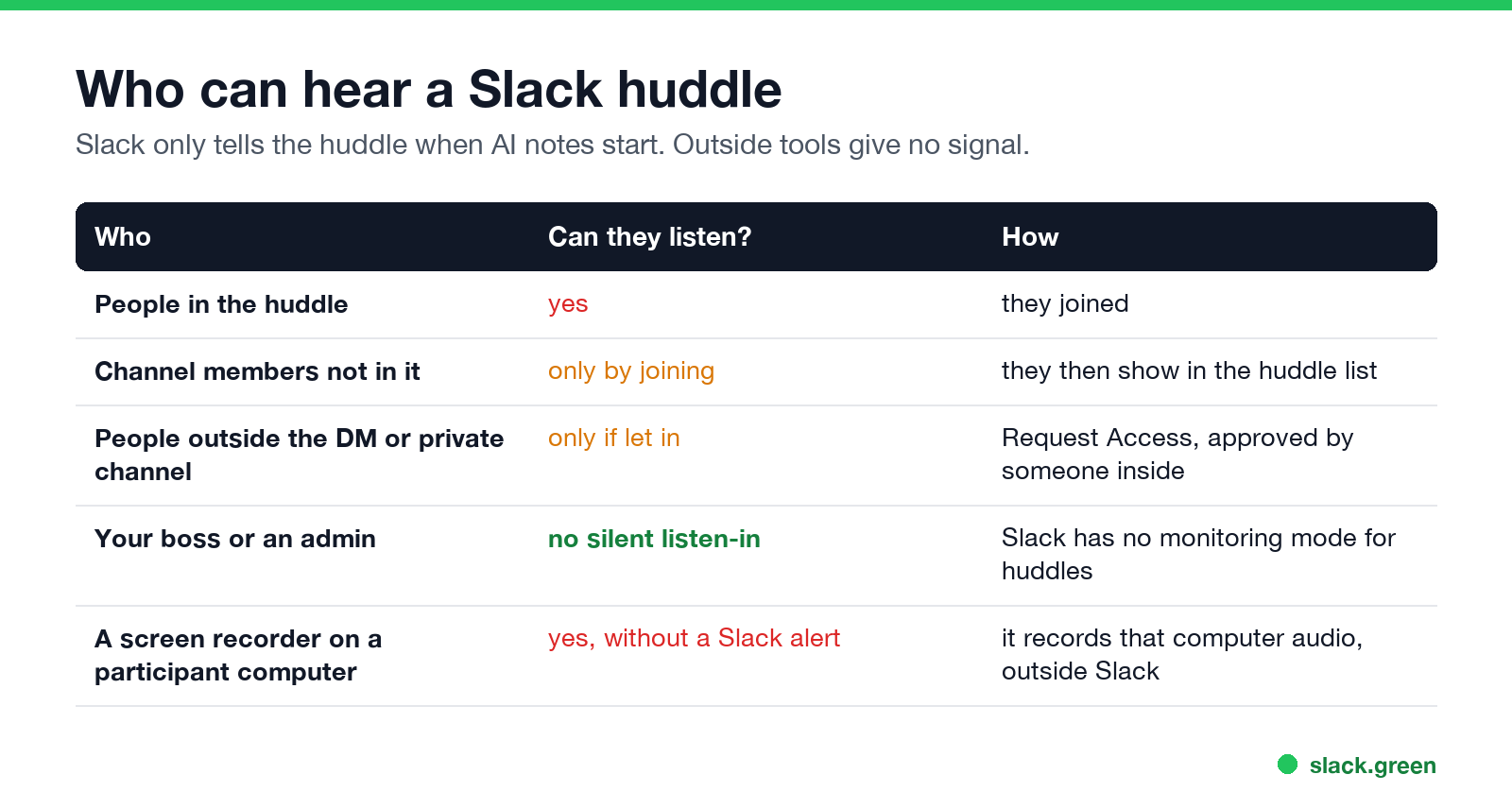
Not without joining. Slack has no feature that lets a manager or admin listen to a huddle silently.
What Slack cannot stop is a person in the huddle recording it with their own software. Slack sends no alert for that, the same way it sends no alert for screenshots. If a call matters, assume someone could be recording it.
Are Slack huddles private?
A huddle is as private as the place you start it. A huddle in a public channel is open to the whole channel. A huddle in a DM is open to the people in that DM, plus anyone they let in.
Joining a huddle also shows on your profile: while you are in one, Slack can set an automatic headphones status next to your name. That status is separate from your green dot, as covered in how Slack active status works. For the other things Slack records about you, see can Slack be used to monitor employees, and for message privacy, can Slack admins see your DMs.
If your dot keeps turning grey during long calls or focus blocks away from Slack, Slack Green keeps your presence active on a schedule you set. How to keep Slack active compares the options.
FAQ
Can you record a Slack huddle?
Not in Slack. You need a screen recorder on your computer or a third-party meeting bot. Check the law where you and the other people are, because some places require everyone's consent to record a call.
Do Slack huddles save a transcript?
Only if someone turns on AI notes, on a paid plan. Everyone in the huddle is notified, and the transcript goes into the notes canvas.
Can Slack admins listen to huddles?
No. Slack keeps no huddle audio, and admins have no live listen-in mode. On Enterprise plans, audit logs show who joined and when.
Can someone see who I am in a huddle with?
Yes, if they can see the channel or DM where the huddle is running. The huddle shows the people in it.
Are huddle messages saved?
Yes. Messages in the huddle thread and the notes canvas stay in the channel or DM like any other message.
What if my huddle has no sound or will not connect?
Run the test in Preferences, Audio & video, then follow Slack huddle not working.
Can I play a video with sound in a huddle?
Yes. Check Share system audio when you share your screen; see how to share audio in a Slack huddle.
Related Articles
Does Slack Notify When You Leave a Channel? Leave, Edit, Delete and More
Slack does not ping anyone when you leave a channel, but it posts a line saying you left, unless an admin turned join and leave messages off. Edits show (edited), deletes leave no alert, forwards do not tell the author, and removing someone does notify them. What each action shows, and how to leave quietly.
Slack Huddles vs Zoom: Which to Use for Team Calls
Slack huddles are quick calls inside Slack: 1:1 on the free plan, up to 50 people on paid plans, no recording. Zoom is built for scheduled, recorded and large meetings, with a free plan of 100 people for 40 minutes. Limits, cost, recording and privacy side by side.
Is Slack AI Worth It? What It Costs Now and What You Get
Slack no longer sells Slack AI as an add-on. Pro includes AI summaries and huddle notes; search answers, recaps, translations and Slackbot come with Business+, at $7.75 more per user a month. What each AI feature does, who it pays off for, and what it does with your data.