
Slack Zoom In and Out: Shortcuts, Limits and the Small Text Fix
Zoom in on Slack with Cmd and + (Ctrl and + on Windows), zoom out with Cmd and -, reset with Cmd and 0. Slack's code allows 5 steps in (249%) and 3 out (58%); we printed it from Slack 4.52.182 on 2 November 2026.
To zoom in on Slack and make the text bigger, press Cmd and + on a Mac or Ctrl and + on Windows and Linux. To zoom out, press Cmd and - or Ctrl and -, and Cmd and 0 or Ctrl and 0 puts Slack back at normal size. In the desktop app each press is one step of 20%: five steps in take you to 249%, three steps out to 58%, and then the keys stop working. We read those limits from the code of Slack 4.52.182 on 2 November 2026. If Slack text suddenly looks small, an accidental Cmd and - is the usual cause, and Cmd and 0 fixes it. On iPhone and Android, Slack has no text size setting of its own; it follows the font size you set on the phone. None of this changes what your coworkers see.
The free Markdown to Slack converter shows how bold, lists and code look in Slack before you post.
Make Slack text bigger or smaller, by device
| Where | Bigger or smaller | Kept as a setting? |
|---|---|---|
| Mac desktop app | Cmd and + or Cmd and - | Yes, Preferences, Accessibility, Zoom |
| Windows or Linux app | Ctrl and + or Ctrl and - | Yes, same place |
| Slack in a browser | Cmd or Ctrl and + or -, which is the browser's zoom | The browser remembers it for app.slack.com |
| iPhone or iPad | Settings, Display & Brightness, Text Size | Slack follows the device |
| Android | Settings, Display, Font size | Slack follows the device |
On some keyboards the + key needs Shift, so Cmd+Shift+= does the same as Cmd and +. Cmd+0 or Ctrl+0 puts the desktop app back at its normal size.
How far Slack zooms in and out
Slack's help center does not say how far the shortcuts go, so we searched the desktop app's own code, the app.asar file inside Slack.app, with this script:
import re, plistlib
data = open("/Applications/Slack.app/Contents/Resources/app.asar", "rb").read()
print("Slack", plistlib.load(open("/Applications/Slack.app/Contents/Info.plist", "rb"))["CFBundleShortVersionString"])
for m in sorted(set(re.findall(rb"case \w+\.yy\.(ZOOM_IN|ZOOM_OUT|RESET_ZOOM):return \w+\(\w,(\w\.zoomLevel[+-]1|0)\)", data))):
    print(m[0].decode(), "->", m[1].decode())
print("limits:", sorted(set(re.findall(rb"zoomLevel:\w+\(\w,(-?\d+),(-?\d+)\)", data))))
for level in range(-3, 6):
    print(f"level {level:>2}: {1.2 ** level:.0%}")
On our Mac on 2 November 2026 it printed:
Slack 4.52.182
RESET_ZOOM -> 0
ZOOM_IN -> e.zoomLevel+1
ZOOM_OUT -> e.zoomLevel-1
limits: [(b'-3', b'5')]
level -3: 58%
level -2: 69%
level -1: 83%
level  0: 100%
level  1: 120%
level  2: 144%
level  3: 173%
level  4: 207%
level  5: 249%
Each Cmd and + adds 1 to the zoom level, each Cmd and - takes 1 away, and Cmd and 0 sets it to 0. The settings code keeps the level between -3 and 5. Slack runs on Electron, which turns a zoom level into a size of 1.2 to the power of the level, so the last lines are the sizes you get:
| Presses from normal | Size |
|---|---|
| Cmd and + five times (the most) | 249% |
| Cmd and + twice | 144% |
| Cmd and + once | 120% |
| None, or Cmd and 0 | 100% |
| Cmd and - once | 83% |
| Cmd and - three times (the least) | 58% |
If 249% is still too small, raise the size for the whole computer instead: Displays in macOS System Settings, or Display, Scale in Windows Settings. Slack follows both.
Set a zoom level in Slack preferences
Slack's help center gives these steps for the desktop app:
- Click your profile picture in the sidebar.
- Select Preferences.
- Click Accessibility.
- Under Zoom, select your zoom level.
The zoom setting scales everything in Slack: messages, the sidebar, names and buttons. It is only in the desktop app. We opened Preferences, Accessibility in Slack's web app on 3 October 2026, and it has display, alt text, keyboard and screen reader options but no Zoom:
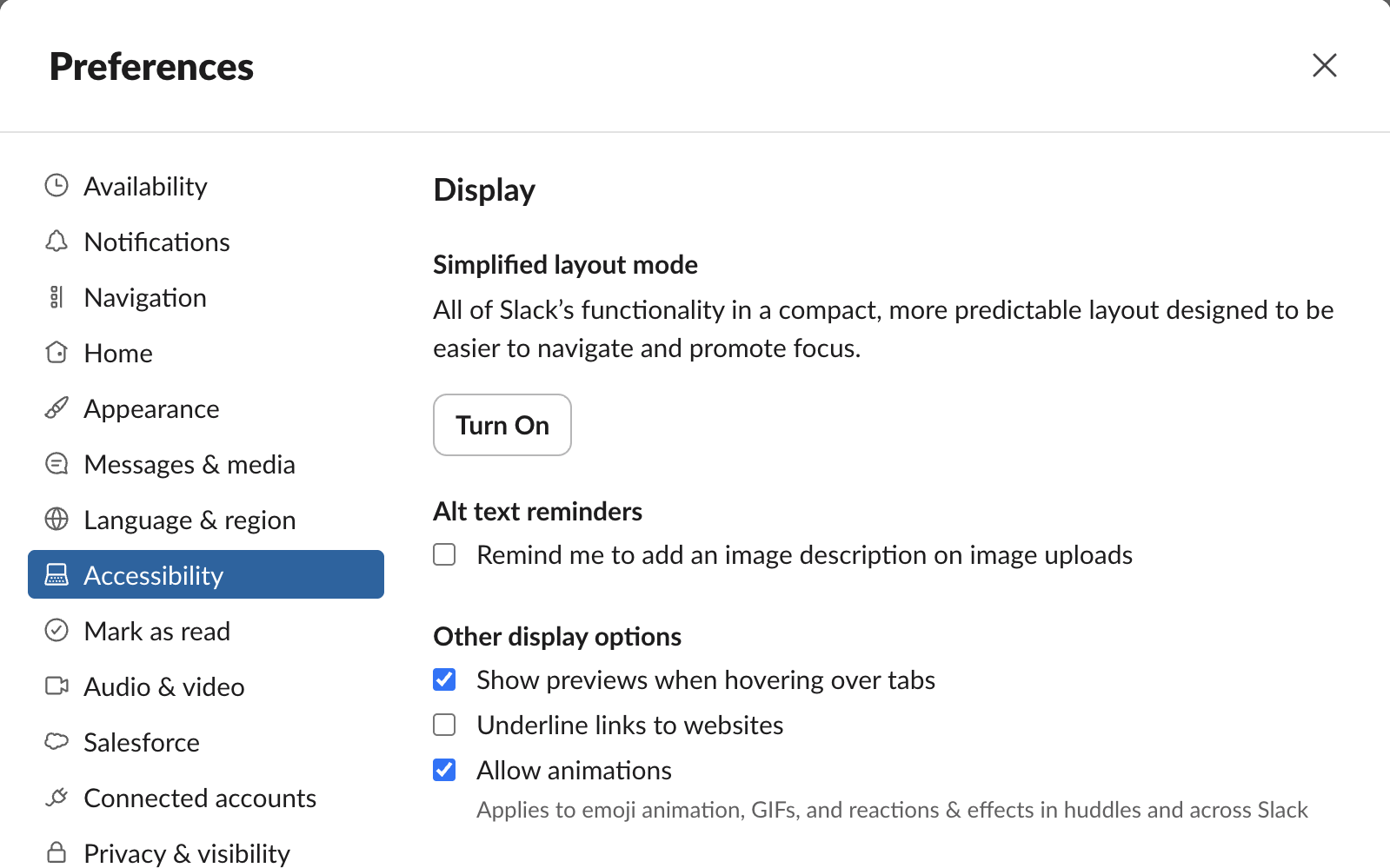
In a browser, use the keyboard shortcut instead. It changes the browser's own zoom for that site.
The desktop app keeps one zoom level for the whole app, not one per workspace. On our Mac it is stored in Slack's own settings file (we read it with Slack 4.52.171 on 3 October and again with 4.52.182 on 2 November 2026):
$ python3 -c "import json,os; print(json.load(open(os.path.expanduser('~/Library/Application Support/Slack/storage/root-state.json')))['settings']['zoomLevel'])"
0
0 is the normal size. If Slack looks too big or too small in every workspace at once, this is the value that changed, and Cmd+0 or Ctrl+0 sets it back.
If the text is fine but the layout feels cramped or too spread out, try the message theme under Preferences, Messages & media. Compact fits more messages on the screen and hides profile photos; Clean is the default.
Change the font in Slack
Slack also lets you pick a different font. On desktop, click your profile picture, choose Preferences, then Appearance, and choose an option under Font. Slack says this works on desktop and in the browser, for Latin-based languages, and you set it for each workspace you are in. It changes the typeface, not the size; for size, use zoom. The same Appearance page holds Color Mode (Light, Dark or System); our Slack dark mode test shows which custom emoji vanish in each. The 10 fonts in that menu, and which font Slack uses by default, are in what font Slack uses.
Never appear "away" on Slack again
Cloud-based. No downloads. Works 24/7 even when your laptop is off.
Slack font size on iPhone and Android
The Slack mobile apps do not have a zoom setting. Slack's help center says the app matches the font size in your device settings:
Close and reopen Slack if the text does not change right away. This changes the text size in every app on the phone, not only Slack.
Can you change the font size of a Slack message?
No. There is no font size button in the Slack message field, and markdown headings with a # do not work in messages. Everyone reads your message at the size they chose. To make a line stand out anyway:
header block shows a heavier title line:{
"blocks": [
{ "type": "header", "text": { "type": "plain_text", "text": "Release 2.4 is live" } },
{ "type": "section", "text": { "type": "mrkdwn", "text": "Dark mode, faster search, and 12 bug fixes." } }
]
}We posted that message to ourselves on 3 October 2026, together with a normal message that starts with #, then deleted both:
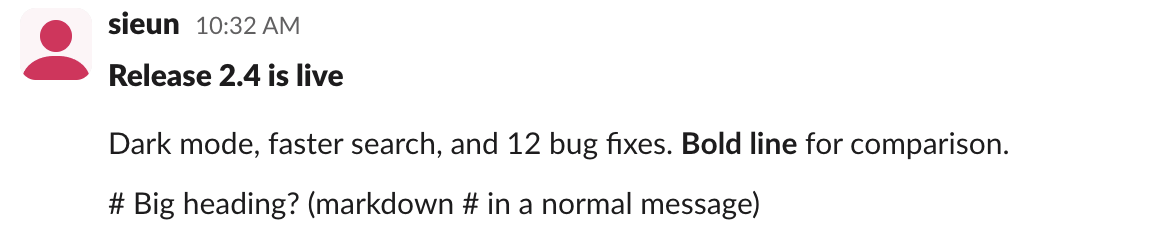
In Slack's web app the header did not come out bigger. Its capital letters measured the same 21 pixels tall in our screenshot as the bold phrase below it, and the page styles both at 15px, the header at weight 900 and bold text at 700. The # line stayed plain text. So a header block makes a title heavier, not larger. The header text must be plain_text, so no bold or links inside it. To convert a markdown document with # headings into something Slack shows well, use our Markdown to Slack converter; it turns headings into bold lines.
Emoji follow a different rule: an emoji sent with no text shows large. See how to make Slack emoji bigger.
Slack text too small or too big after an update
More shortcuts, including the formatting keys, are in our Slack keyboard shortcuts guide.
FAQ
How do I make Slack text bigger? Press Cmd and + on a Mac or Ctrl and + on Windows and Linux, or set Zoom in Preferences, Accessibility in the desktop app.
How do I zoom out in Slack? Press Cmd and - or Ctrl and -. Three presses is the smallest Slack goes, 58%. Cmd+0 or Ctrl+0 resets the size.
Why can't I find the Zoom setting in Slack? It is only in the desktop app. Slack in a browser has no Zoom option under Accessibility, so use the keyboard shortcut.
How do I change the font size in the Slack app on my phone? Change the text size in your phone's settings. Slack follows it.
Stop Jiggling Your Mouse.
Join hundreds of remote workers who never worry about their Slack status. Set it up once, stay green forever.
Related Articles
Slack Formatting Toolbar Missing? How to Get It Back
The Slack formatting toolbar hides when you click Aa, and Slack remembers it. With Format messages with markup on, the toolbar and the Aa button both vanish. Tested fixes, the 10 buttons and their shortcuts.
Slack Message Character Limit: 40,000 Max, 4,000 Advised
Slack keeps up to 40,000 characters in a message's text and truncates anything longer, and its developer docs advise staying under 4,000 characters. Block Kit sections stop at 3,000 characters and headers at 150. What happens with long messages, other Slack text limits, and how to split a long post.
How to Add a Hyperlink in Slack: Paste, Shortcut or Markup
To add a hyperlink in Slack, copy the URL, select the words in your message, and paste with Cmd+V or Ctrl+V. Or select the words and press Cmd+Shift+U (Ctrl+Shift+U) to add the link. Markup mode, bot and webhook syntax, mobile, and how to change or remove link text.