
How to Make a Table in Slack: Paste, Canvas or Block Kit
Copy cells from Excel or Google Sheets, or a markdown table with pipes, and paste them into a Slack message: Slack turns the paste into a real table, up to 20 columns, 100 rows and 10,000 characters (tested 6 and 28 October 2026). Plus code blocks, canvas tables and the Block Kit table block, with the errors we hit.
To make a table in a Slack message, copy the cells from Excel or Google Sheets, or a markdown table with | pipes such as one ChatGPT writes, and paste it into the message box. Slack turns the paste into a real table: a Table chip appears in the box, and the sent message shows a grid with the first row in bold. We tested cells from Sheets in Slack for web on 6 October 2026 and a pasted pipe table on 28 October 2026, both on a Free workspace. Typing the pipes yourself still gives plain text, and the formatting toolbar has no table button. For CSV or JSON, our Slack table maker turns the data into text Slack accepts. For a table people keep editing, use a canvas. Bots send the Block Kit table block.
The paste tests, their limits and the Block Kit answers below come from our own workspace, on 6 and 28 October 2026. The canvas limit is from Slack's developer docs.
Which table method to use
| Method | Where it works | What you get | Use it for |
|---|---|---|---|
| Paste cells or a markdown pipe table | Any message, any plan | A real table, up to 100 rows and 20 columns | Rows from a sheet, a report or a ChatGPT answer |
| Code block | Any message, any plan | Text that lines up like a table | Apps with no tables, or more than 20 columns |
| Canvas table | Canvases (paid plans) | Real, editable cells | Tables people update and keep |
| Slack list | Lists (paid plans) | Rows with owners, dates and status | Tracking tasks |
| Block Kit table block | Messages sent by an app | Real rows and columns, up to 100 x 20 | Bot reports and alerts |
If the table is a to-do list with owners and due dates, a Slack list fits better than either; see Slack canvas vs lists. Canvases and lists you add to a channel sit in the tabs under its name; on the Free plan the add-tab menu offered Canvas but put List behind Pro, as our Slack channel tabs test shows.
How to paste a real table into a Slack message
- Select the cells in Excel or Google Sheets and copy them (Cmd+C or Ctrl+C). A markdown table with pipes, from ChatGPT or a README, can be copied as it is. For CSV or JSON, paste it into the Slack table maker first and click Copy table for Slack.
- Click in the Slack message box and paste. A Table chip appears. On 6 October it sat under the text field with the note "Table added as an attachment"; on 28 October it sat inside the box, above the cursor.
- Type a line above it if you want, then send.
- Type or paste your rows, with spaces between the columns so each column starts at the same position.
- Select the text and click Code block in the formatting toolbar, or press Cmd+Option+Shift+C on a Mac (Ctrl+Alt+Shift+C on Windows). You can also type three backticks before and after the text.
- Check the preview in the message box, then send.
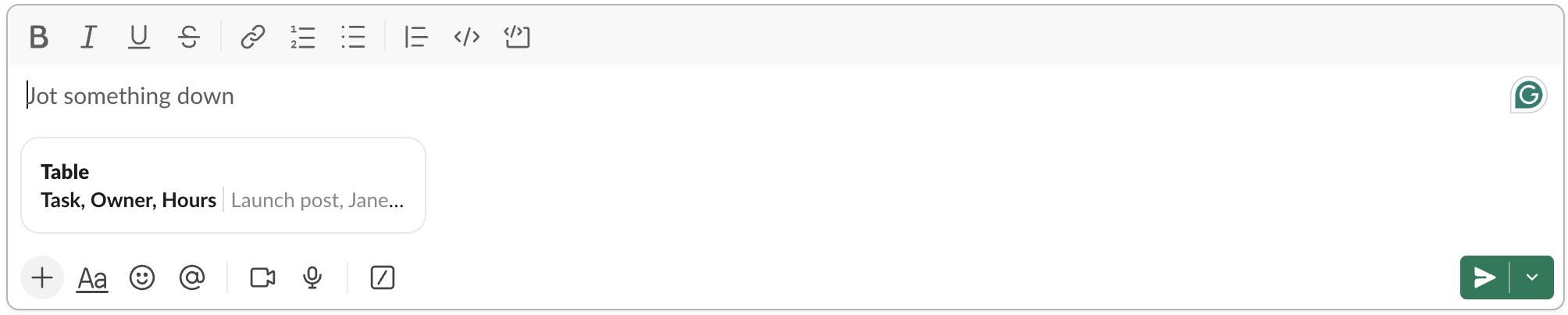
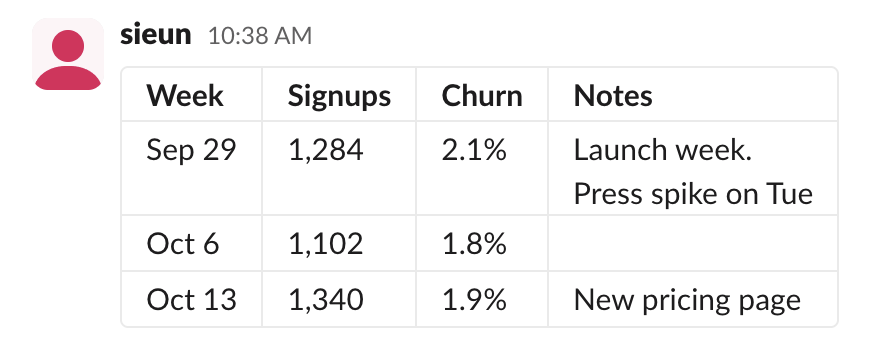
The chip opens a read-only Table preview, so fix cells before you copy. This is the Google Sheets sample from the table maker after sending, with a line break inside one cell:
What we measured on 6 October, pasting into the message box of a Free workspace and reading each message back through the API:
| Pasted | What Slack did |
|---|---|
| Tab-separated rows, 2 or more rows and columns | Real table, first row bold |
| 20 columns, 100 rows, 10,000 characters | Real table |
| 21 columns, 101 rows or 10,001 characters | "This table is too big to send as an attachment. Send a snippet instead?" |
| Rows with different numbers of cells | Plain text |
| One row, or one column | Plain text |
| Markdown table with pipes (retested 28 October) | Real table, first row bold |
| CSV with commas | Plain text |
| A second table in the same message | "Only 1 table can be attached to each message. Paste as text instead?" |
Slack counts the 10,000 characters in UTF-16 units, so an emoji or a symbol like 𝐀 counts 2. In a pasted table, <@user>, @channel, links, *bold* and ` code stay as plain text; only :emoji:` codes turn into emoji. When the clipboard held an HTML table with bold text and a link next to the tab-separated copy, as Google Sheets puts it there, Slack built the table from the plain text and dropped the bold and the link.
Make a text table with a code block
Slack shows code blocks in a fixed-width font, so every character takes the same space and the columns stay in line:
Name  Task         Status
----  -----------  ---------
Jane  Launch post  Done
Sam   QA           In review
Mira  Design       Waiting
Keep the table narrow, about 60 characters at most, or it will not fit a phone screen. Bold, links and mentions do not work inside a code block.
To skip the spacing work, the As a code block tab of the Slack table maker pads the columns for you, and the markdown to Slack converter does the same for a markdown table inside a longer message.
Paste a markdown table into a Slack message
Slack's message box now reads a pasted markdown table. On 28 October 2026 we copied this plain text, with no HTML on the clipboard, and pasted it with Cmd+V into a channel in Slack for web:
| Task | Owner | Hours |
| --- | --- | --- |
| Launch post | Jane | 6 |
| QA pass | Sam | 12 |
The box replaced the text with a Table chip named after the header cells:
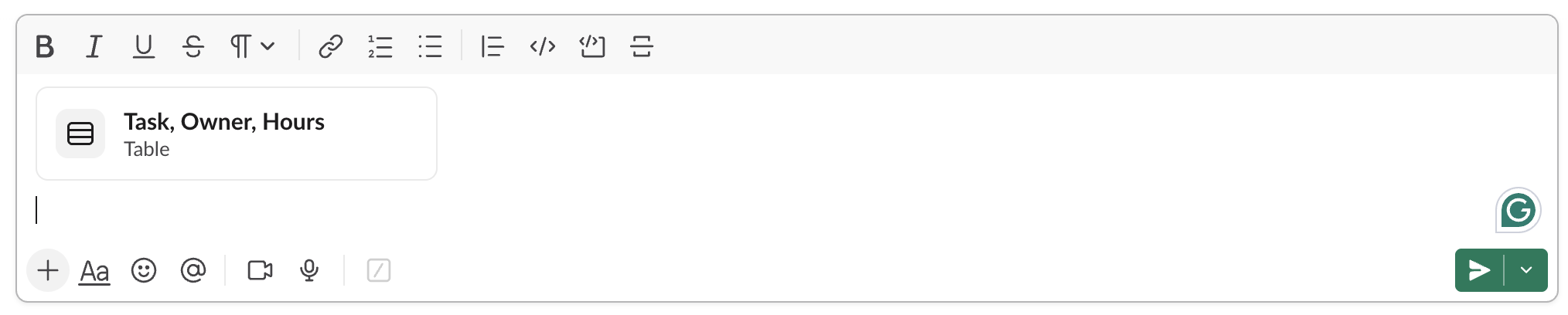
After Enter, the message showed a grid with the header row in bold, and the | --- | line was gone:

Read back with conversations.history, the message held one table block with raw_text cells. Its text field, the fallback Slack keeps for places that cannot draw blocks, was "This message contains interactive elements." The paste is the only way in. Typed pipes stay as the characters you typed (our 27 October test stored | Plan | Price | as plain text), because Slack's own markup, mrkdwn, has no table syntax. To align a table by hand instead, use the code block method above.
Never appear "away" on Slack again
Cloud-based. No downloads. Works 24/7 even when your laptop is off.
How to make a real table in a Slack canvas
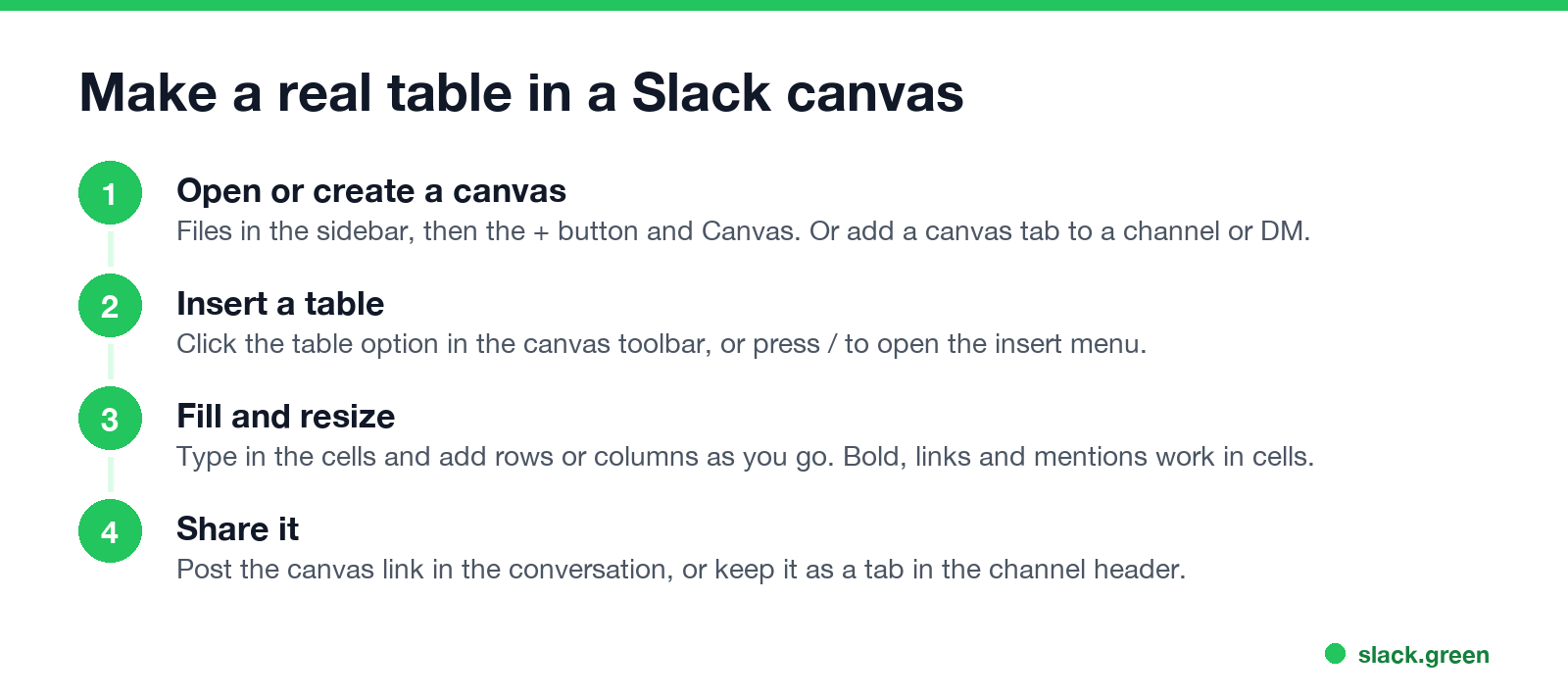
A canvas is Slack's document inside a channel or DM, and its toolbar has a table option.
Slack's developer docs set a limit of 300 cells per canvas table, in any mix of rows and columns. Standalone canvases are a paid-plan feature; Slack marks Create new > Canvas as Pro, and existing canvases become read-only when a workspace drops to the free plan. A free workspace can still add a canvas tab to a channel, which is where we tested the Slack canvas formatting shortcuts. Canvas tables are the one place in Slack where a markdown table works: an app that creates a canvas with the canvases.create API can send the table as markdown and Slack builds the grid. Pasting works too: on 29 October 2026 a pipe table pasted into a channel canvas on the Free plan became an editable canvas table, as the weekly update in our Slack canvas examples shows.
Turn a CSV file into a Slack table
For a spreadsheet you export often, a short script does the padding. Save this as csv_to_slack.py and run python3 csv_to_slack.py team.csv. It prints a code block you can paste into any Slack message:
import csv
import sys

FENCE = "`" * 3

with open(sys.argv[1], newline="") as f:
    rows = list(csv.reader(f))

ncols = max(len(r) for r in rows)
rows = [r + [""] * (ncols - len(r)) for r in rows]
widths = [max(len(r[i]) for r in rows) for i in range(ncols)]

lines = ["  ".join(c.ljust(w) for c, w in zip(r, widths)).rstrip() for r in rows]
lines.insert(1, "  ".join("-" * w for w in widths))
print("\n".join([FENCE, *lines, FENCE]))
For the team.csv file behind the example above, the output is the table shown in the code block section, with a dashed line under the header. For a CSV with more than five or six columns, a canvas table is easier to read.
Send a table from a Slack app with the Block Kit table block
Apps can post a real table in a message. Slack's Block Kit has a table block, and we hit the same limits as a paste: at 101 rows chat.postMessage answered no more than 100 items allowed, at 21 cells in a row no more than 20 items allowed, and at 10,001 characters table_character_count_must_not_exceed_10000. Cells are raw_text, raw_number or rich_text (for bold, links and mentions), and column_settings sets wrapping and alignment per column. Two traps from the same test: a null entry in column_settings fails with must provide an object, so use {} for a column with no setting, and an empty raw_text cell fails with must be more than 0 characters, so send an empty cell as null. The From a bot tab of the Slack table maker builds this JSON from a pasted table.
Save the message as table.json:
{
  "channel": "C0123456789",
  "text": "Launch status: 3 tasks",
  "blocks": [
    {
      "type": "table",
      "column_settings": [{"is_wrapped": true}, {}, {"align": "right"}],
      "rows": [
        [{"type": "raw_text", "text": "Task"}, {"type": "raw_text", "text": "Owner"}, {"type": "raw_text", "text": "Hours"}],
        [{"type": "raw_text", "text": "Launch post"}, {"type": "raw_text", "text": "Jane"}, {"type": "raw_text", "text": "6"}],
        [{"type": "raw_text", "text": "QA pass"}, {"type": "raw_text", "text": "Sam"}, {"type": "raw_text", "text": "12"}]
      ]
    }
  ]
}
Then post it with chat.postMessage and your bot token:
curl -X POST https://slack.com/api/chat.postMessage \
  -H "Authorization: Bearer $SLACK_BOT_TOKEN" \
  -H "Content-type: application/json; charset=utf-8" \
  --data @table.json
The text field is the fallback that shows in notifications. For longer tables, Slack's docs say to split them across messages. For a sortable table with paging, or a chart next to it, apps can use the newer data_table and data_visualization blocks; we tested both, with the errors each returns, in Slack Block Kit charts.
A shorter route for apps that already produce markdown, such as an LLM answer: Slack's Block Kit markdown block ("type": "markdown") takes standard markdown. We sent the pipe table below on 6 October, and Slack stored it as a table block; unlike a paste, the header row was not bold. All markdown blocks in one message share a 12,000-character limit.
{
  "channel": "C0123456789",
  "text": "Launch status",
  "blocks": [
    {"type": "markdown", "text": "| Task | Owner |\n| --- | --- |\n| Launch post | Jane |\n| QA pass | Sam |"}
  ]
}
For text a bot posts outside a table, the Slack to Markdown side of the Markdown to Slack converter previews the mrkdwn before you send it.
Tables on Slack mobile
On the Slack app for iPhone and Android, a wide code block does not fit the screen. If most readers are on phones, keep code-block tables to two or three short columns, or use a bulleted list or a canvas instead. The Slack keyboard shortcuts for code blocks and lists only apply on desktop.
FAQ
Does Slack markdown support tables?
Only when you paste. A pasted markdown table with | pipes becomes a real table in the message box (tested 28 October 2026), and so do cells copied from Excel or Sheets. Pipes you type show as typed. Markdown tables also work in canvases created through the Slack API and in the Block Kit markdown block that apps send.
How do I paste a table from Excel into Slack?
Copy the cells and paste them into the message box. Slack makes a real table from up to 100 rows, 20 columns and 10,000 characters; past that it offers to send a snippet instead.
Is there a table button in Slack messages?
No. The message toolbar has bold, italics, underline, strikethrough, code, block quote, code block and lists. Pasting cells or a markdown table is the way in; the table button is in canvases.
Stop Jiggling Your Mouse.
Join hundreds of remote workers who never worry about their Slack status. Set it up once, stay green forever.
Related Articles
Export a Slack Canvas to PDF or Markdown: What Works, Tested
Slack has no download or export button for canvases. We checked every menu on a test canvas, used Print canvas for PDF, and turned the API's HTML download into clean Markdown with a script we ran.
Slack Markdown File Preview: What a .md File Shows in Slack
Slack now renders an uploaded .md file: our 28 October 2026 test showed headings, bold text, checkboxes and a table in the file viewer. Mermaid blocks and HTML tags still show as text. Screenshots, the API output, and when a canvas is still the better choice.
Slack Formatting Toolbar Missing? How to Get It Back
The Slack formatting toolbar hides when you click Aa, and Slack remembers it. With Format messages with markup on, the toolbar and the Aa button both vanish. Tested fixes, the 10 buttons and their shortcuts.