
Slack Keeps Logging Me Out: Why It Happens and How to Stop It
Slack keeps logging you out when your workspace admin set a session duration, when your browser deletes Slack's cookies, or after a password change or sign out of all sessions. How to tell which one it is, and what you can change yourself.
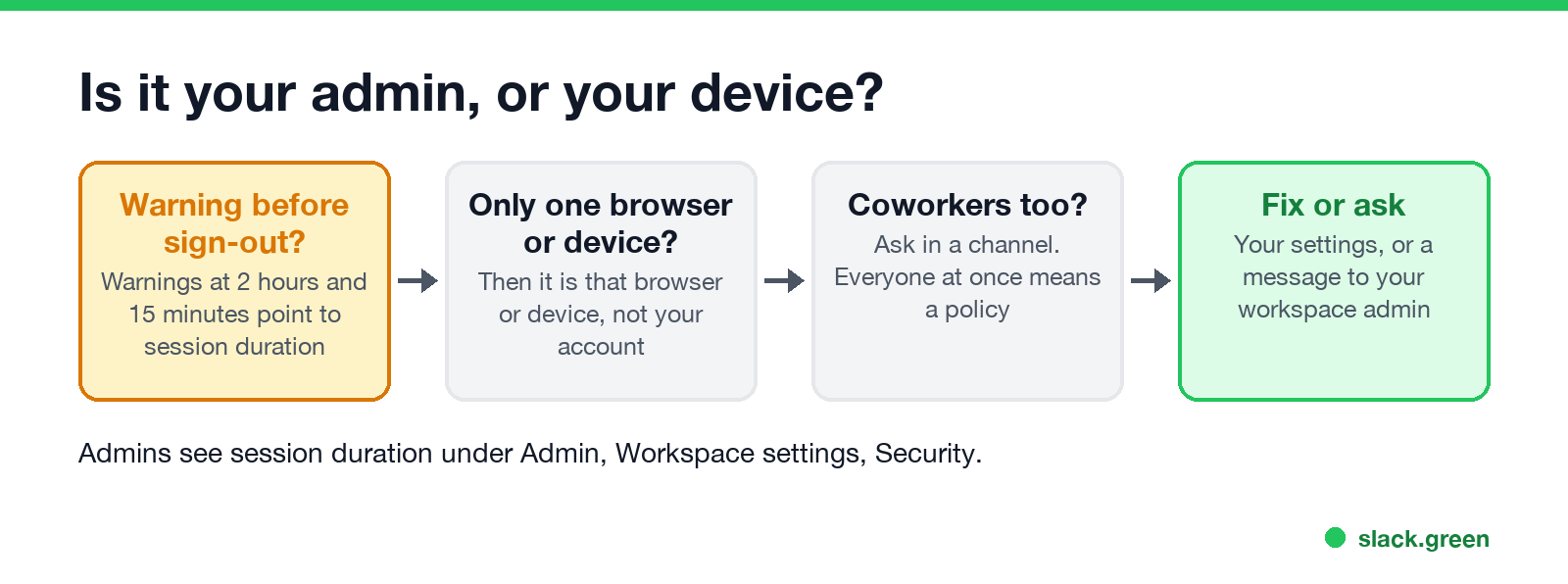
Slack keeps logging you out for one of four reasons. Your workspace admin set a session duration, which signs members out when they close Slack or after a set time. Your browser deletes Slack's cookies when it closes, or you use a private window. You changed your password or someone chose sign out of all sessions. Or your company's single sign-on session expired. If Slack warns you two hours and again 15 minutes before it signs you out, it is the admin setting, and only an admin can change it. If it only happens in one browser or on one device, the cause is on that device, and you can fix it.
Each sign-out also ends your presence on that device, so you show as away until you sign back in. If your team reads the dot, Slack Green keeps your presence active from the cloud during the working hours you set, independent of your laptop.
Why Slack keeps signing you out
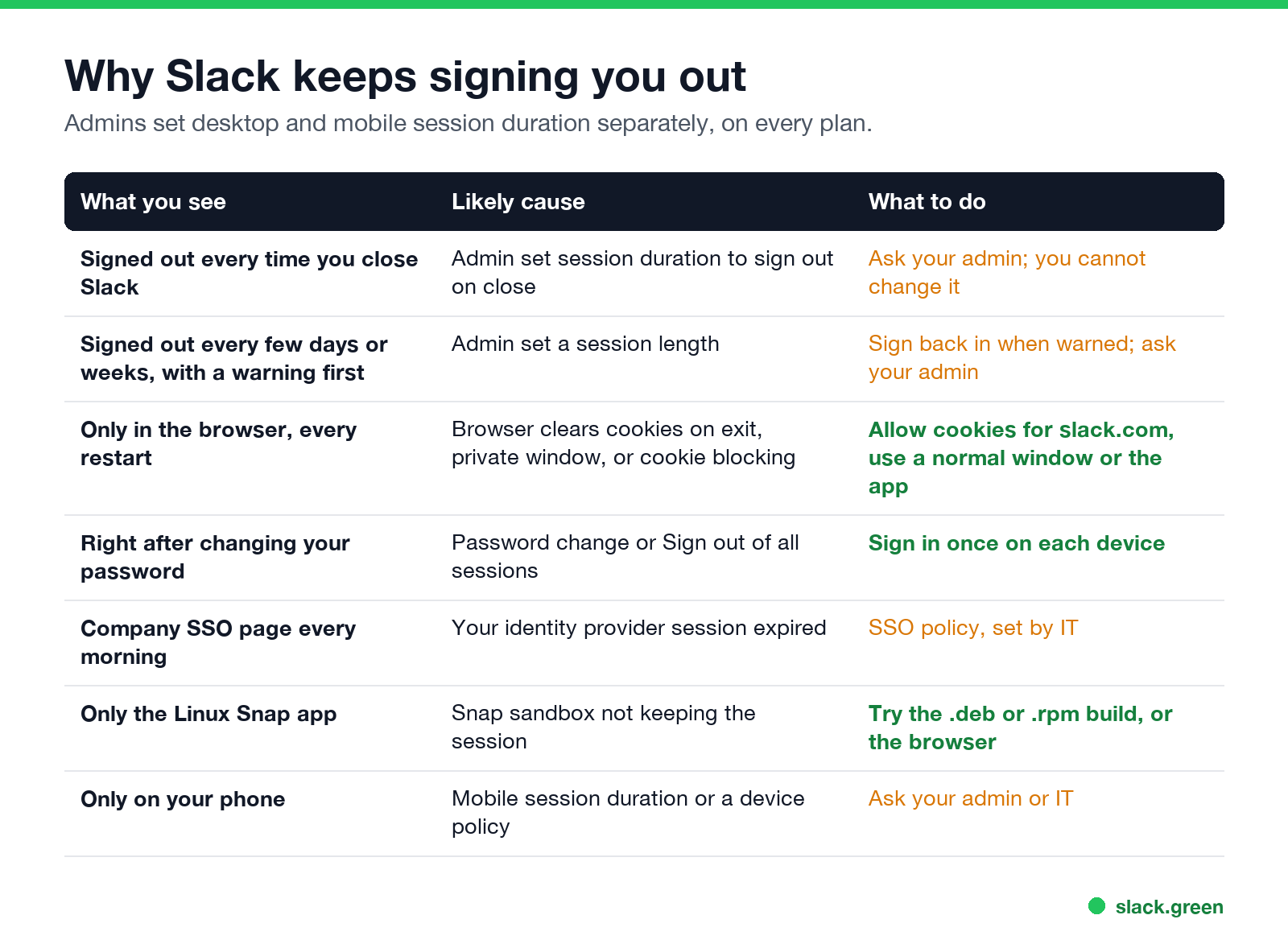
| What you see | Likely cause | What to do |
|---|---|---|
| Signed out every time you close Slack | Admin session duration: sign out on close | Ask your admin |
| Signed out every few days, with a warning first | Admin session duration: a time limit | Sign back in when warned, or ask your admin |
| Only in the browser, after each restart | Cookies cleared on exit, private window, or cookie blocking | Allow cookies for slack.com, or use the app |
| Right after a password change | Other sessions ended | Sign in once on each device |
| Company SSO page every morning | Identity provider session expired | IT sets this |
| Only in the Linux Snap app | Snap package not keeping the session | Try the .deb or .rpm build |
| Only on your phone | Mobile session duration or a device policy | See the mobile section |
Your admin set a session duration
Workspace owners and admins can limit how long members stay signed in, on every Slack plan. They set desktop and mobile separately, under Admin, Workspace settings, Security, then Desktop session duration or Mobile session duration. The options are to sign members out whenever they close Slack, or after a set period.
Slack's help center adds two details that help you recognise it:
- • Members get a warning two hours before the session expires and a final reminder 15 minutes before, with an option to sign in again.
- • When an admin changes the duration, sign-outs start that day and spread out over the chosen period, so coworkers get signed out at different times.
You cannot override this from your own preferences. If the limit gets in the way of your work, ask your admin whether the desktop limit can be longer than the mobile one.
Slack logs you out of the browser
Nie wieder "abwesend" auf Slack erscheinen
Cloud-basiert. Keine Downloads. Funktioniert 24/7 auch wenn Ihr Laptop aus ist.
Slack in a browser keeps you signed in with a cookie called d. Anything that deletes it signs you out:
slack.com and app.slack.com as sites that can always use cookies.The desktop app keeps its own session, so switching to it often stops the problem. If Slack links keep opening in the browser instead of the app, see Slack keeps opening in the browser. How the d cookie works is covered in Slack xoxc and xoxd tokens.
You changed your password or signed out everywhere
Slack ends your other sessions when you choose to sign out of all sessions, and your admin can also sign members out of all devices. After a password change or a security reset, sign in once on each device and it stays signed in again. To see which sessions you have, open my.slack.com/account and select Access Logs. To leave a workspace for good rather than sign out, see how to delete your Slack account.
Single sign-on sends you back to the login page
If your company signs you in through Okta, Google Workspace, Microsoft Entra ID or another identity provider, that provider has its own session length. When it expires, Slack asks you to sign in through it again. The fix is an IT policy, not a Slack setting.
Slack keeps logging me out on iPhone or Android
Nie wieder "abwesend" auf Slack erscheinen
Cloud-basiert. Keine Downloads. Funktioniert 24/7 auch wenn Ihr Laptop aus ist.
Slack keeps logging you out on Linux
Reports on the Ubuntu forum describe the Snap version of Slack not keeping its session between restarts. Install the .deb or .rpm package from Slack's download page instead, or use Slack in a browser that keeps cookies. Keeping Slack running on Linux has its own guide: keep Slack active on Linux.
Signed in, but shown as away
Staying signed in is not the same as showing as active. A signed-in Slack still turns your dot grey 10 minutes after your last input in the Slack window; see why Slack keeps showing you as away. And if Slack says it is trying to connect rather than asking you to sign in, that is a connection problem, covered in Slack showing everyone offline.
FAQ
Nie wieder "abwesend" auf Slack erscheinen
Cloud-basiert. Keine Downloads. Funktioniert 24/7 auch wenn Ihr Laptop aus ist.
Why does Slack keep logging me out?
Most often an admin session duration or a browser that clears cookies. A warning two hours before sign-out means it is the admin setting.
How do I stay logged in on Slack?
Use the desktop app or a normal browser window that keeps cookies for slack.com. If your admin set a session duration, you will still need to sign in again when it ends.
Can I change Slack's session duration myself?
No. Only workspace or org owners and admins can change it.
Why does Slack ask me to sign in every time I open it?
Your admin chose to sign members out whenever they close Slack, or your browser deletes cookies when it closes.
Does being logged out make me show as away?
Yes. With no signed-in session reporting activity, your dot shows away.
Hör auf, die Maus zu Bewegen.
Hunderte Remote-Arbeiter sorgen sich nicht mehr um ihren Slack-Status. Einmal einrichten, für immer grün bleiben.
Related Articles
How to Create a Slack Workspace, on Desktop or Phone
Go to slack.com/get-started, enter your email, type the confirmation code, and click Create a Workspace. It is free to start, you become the Primary Owner, and it takes about five minutes. Steps for desktop, iPhone and Android, and what to set up next.
Slack User Groups: How to Create, Mention and Manage Them
A Slack user group is a named list of people with one @handle, like @designers, that notifies all of them and can add them to up to 100 default channels. How to create one, who can, how to mention it, and how it differs from a channel.
How to Make a Private Slack Channel Public, and Who Can
Open the channel, click its name, go to Settings, and choose Change to a public channel. By default only Workspace Owners, Org Owners and Org Admins can do it. The whole history and every file become visible to the workspace.