
Can My Employer See My Claude Chats? On a Work Account, Yes
On a Claude Team or Enterprise account, yes. The organization's Primary Owner can export every member's chats, incognito chats included, and Enterprise companies can stream chats to security tools through the Compliance API. On a personal Claude account your employer has no access. What each plan exposes, and what stays private.
Yes, if you use Claude through your company's Team or Enterprise plan. Anthropic's help center says the organization's Primary Owner "manages your Work account and all associated data", and that includes a data export with your conversations, uploaded files and usage. Enterprise companies can also turn on the Compliance API, which feeds chats and files into their security tools. On your own Claude Free, Pro or Max account, your employer has no access to your chats at all. The work laptop you use is a separate question: monitoring software on it can record what you type into any website.
No admin, owner or manager can open your chats inside the Claude app. The access is an export or an API feed, taken on purpose by the one or two people who hold the top role.
This is the Claude part of our guide to whether your employer can see your ChatGPT history. If what you want is less visibility in Slack, Slack Green keeps your Slack status green from a server during the hours you set. It installs nothing on the work laptop and does not read your messages.
Who can read your Claude chats, by plan
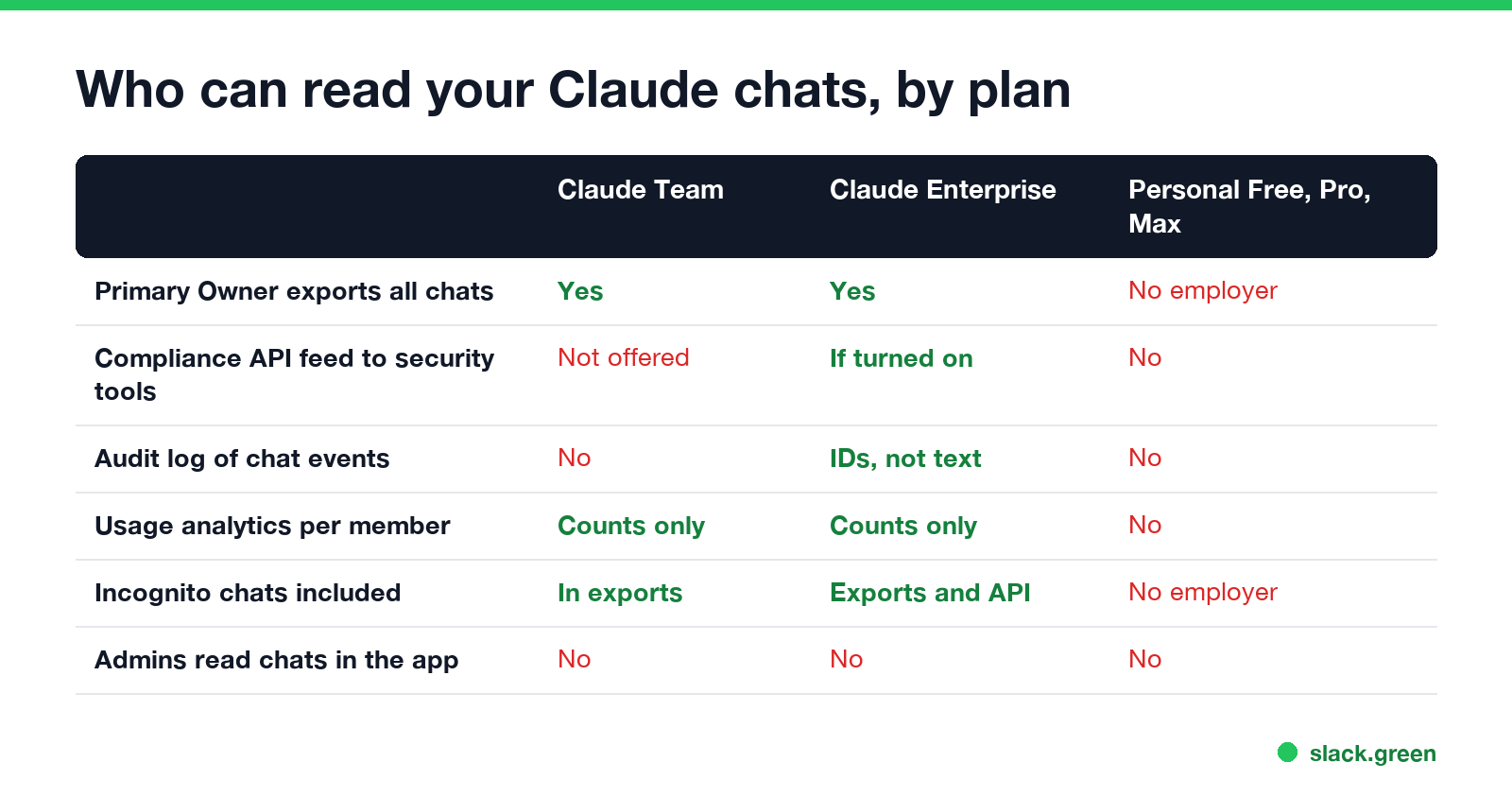
| Plan | Can the company read your chats? | How |
|---|---|---|
| Claude Team | Yes, the Primary Owner | Organization data export, which includes conversations |
| Claude Enterprise | Yes | Data export, plus the Compliance API if the Primary Owner turns it on |
| Personal Free, Pro or Max | No | Your employer is not part of the account |
| Claude through the API, Bedrock or Vertex AI | Depends on the app your company built | Logs are whatever that app stores |
Sources are Anthropic's own help pages, read on 27 September: "Who owns and manages the data of my team?", "Export your organization's data", "Roles and permissions", "Access the Compliance API", "Access audit logs" and "Use incognito chats" and "Claim and migrate accounts on your domain".
Claude Team: the Primary Owner can export every chat
Each Team or Enterprise organization has exactly one Primary Owner. In Anthropic's roles table, "Request data exports" is ticked for the Primary Owner only. Owners, Admins and Users cannot request one.
The export works like this:
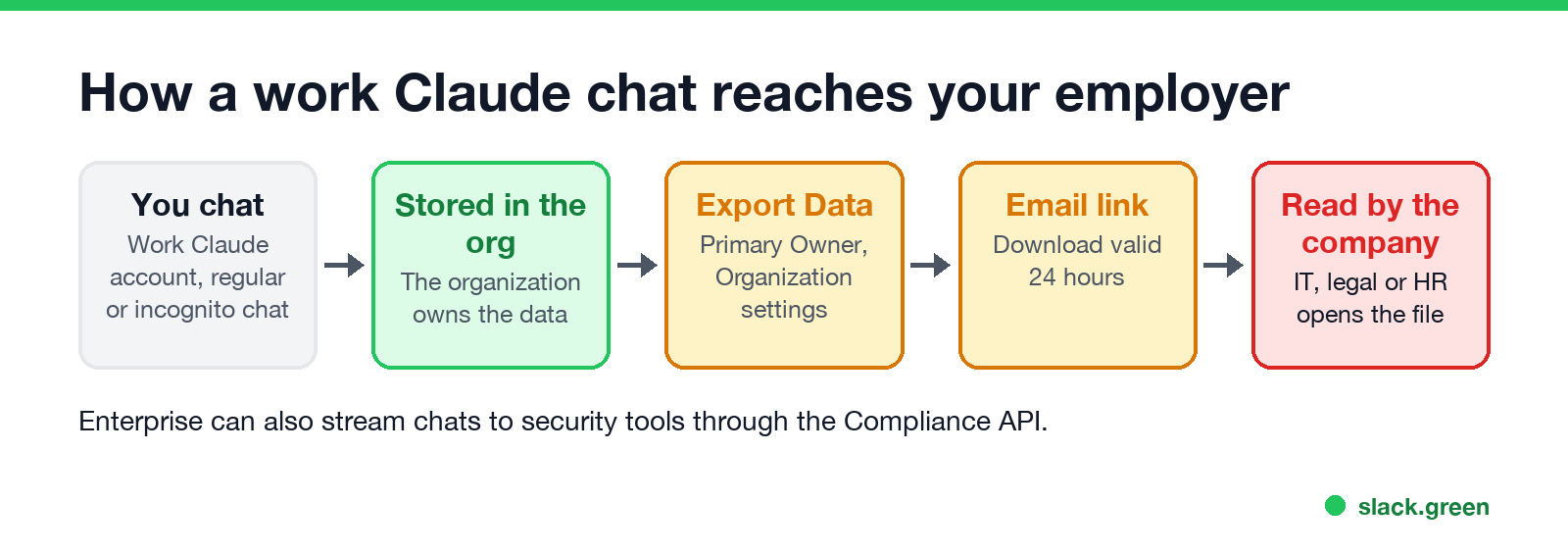
- The Primary Owner opens Organization settings > Data and privacy and clicks Export Data.
- Anthropic emails a download link to the Primary Owner. It expires after 24 hours.
- The file holds the organization's conversations, files and projects.
Anthropic says members of a Team or Enterprise plan cannot export their own data. Only the Primary Owner can.
Owners on a Team plan also see usage analytics: chats per day, the share of members with at least one chat, and "top members by chats". These are counts. They show that you use Claude and how much, not what you asked.
Claude Enterprise: exports, the Compliance API and audit logs
Never appear "away" on Slack again
Cloud-based. No downloads. Works 24/7 even when your laptop is off.
Enterprise adds three things on top of the export.
The Compliance API. Anthropic describes it as a way to "programmatically pull activity feed events, chat data, and file content" across Claude, Claude Desktop, Claude Mobile, Cowork and Claude Code. Only the Primary Owner can turn it on, in Organization settings > API. Once it is on, security and compliance products can read your chats continuously, without anyone clicking Export.
Audit logs. Owners and the Primary Owner can export 180 days of audit events. The log records who did what, such as creating a chat or a project, with an IP address and device. Anthropic says the titles and content of chats are not in the audit log, only their IDs.
Retention settings. Owners can set how long chats are kept, with a minimum of 30 days. By default Enterprise keeps chats indefinitely.
Enterprise Admins and Owners also see usage analytics, and on usage-based plans a spend report with one row per person, per model, listing request counts and tokens. Again, those are numbers and not the text of your prompts.
Incognito chats and deleted chats
Incognito mode keeps a chat out of your history and out of Claude's memory. It does not hide it from your employer. Anthropic's incognito article says that on Team and Enterprise plans:
Deleting a chat helps with exports. Anthropic says messages, files and projects deleted by a user or by the retention setting are not included in exports started after the deletion. But a company that streams chats through the Compliance API may already hold its own copy from before you deleted it.
Personal Claude on a work computer
Your personal Claude account belongs to you. Your employer cannot request an export of it, and Anthropic's consumer terms do not give employers any role. On a Team or Enterprise account the situation is reversed: Anthropic acts as a data processor for your company, and your company's agreement decides the rules.
The device is the weak point. If you open claude.ai on a company laptop, the company can still see:
A personal Claude account on your work email
Never appear "away" on Slack again
Cloud-based. No downloads. Works 24/7 even when your laptop is off.
This is the case most people miss. If you signed up for Claude Free, Pro or Max with your work address, your company can find that account once it buys Claude Enterprise.
Anthropic calls it domain claiming. After the company verifies its email domain, an Enterprise admin sees every personal account on that domain with its email address, plan type, creation date and last active date, and can export that list. The admin cannot read the chats at that stage. The admin can then claim the accounts, and you get an email with a deadline of at least 30 days and two choices:
If you do nothing, you get a fresh account and lose access to the personal one. A Pro or Max subscription is canceled with a prorated refund. Team plans can block new personal accounts on the company domain but cannot claim existing ones. The safe setup is a personal Claude account on a personal email address.
How to check what your company can see
Claude vs ChatGPT vs Copilot at work
| Claude (Team, Enterprise) | ChatGPT (Business, Enterprise) | Microsoft 365 Copilot | |
|---|---|---|---|
| Who can export your chats | The Primary Owner | Enterprise: owner-granted Compliance API key | Admins with Microsoft Purview |
| Live feed to security tools | Enterprise Compliance API | Enterprise and Edu Compliance API | Purview, DLP and Teams export APIs |
| Admins read chats in the app | No | No | No |
The ChatGPT side is in can my employer see my ChatGPT history, and the Copilot side in can my employer see my Copilot chats. Chat tools work the same way: see can Slack admins see your DMs and can my employer read my Teams chats.
FAQ
Never appear "away" on Slack again
Cloud-based. No downloads. Works 24/7 even when your laptop is off.
Can a Claude Team admin see my chat history? Not in the app. An Admin has no export rights. The Primary Owner can export all chats, including yours.
Can Claude Enterprise see my chat history? Your company can, through the Primary Owner's export and, if it is turned on, the Compliance API.
Does Anthropic share my chats with my employer? Anthropic does not send your personal account's chats to anyone. On a work account the chats already belong to your company's organization, and Anthropic provides the export tools.
Can my employer see my Claude chats if I use my own phone? Yes, if you sign in to the work account. The chats live in the company organization, not on the phone.
Stop Jiggling Your Mouse.
Join hundreds of remote workers who never worry about their Slack status. Set it up once, stay green forever.
Related Articles
Can My Employer See What I Watch on YouTube at Work?
On a work laptop or the office network, your employer can see that you used YouTube, when, and for how long. With HTTPS inspection or monitoring software, they can see which videos, because the video address and the browser tab title both name it. On your own phone on mobile data, they see nothing.
Can My Employer See My iMessages on a Work Mac?
Not through device management or the network: Jamf or Intune cannot read Messages, and iMessage is end-to-end encrypted. But if you sign in to Messages on a work Mac, your texts are stored on that Mac, where monitoring screenshots, backups and admin access can reach them. How to check, and how to take iMessage off the Mac without deleting it from your iPhone.
Can My Boss See My Private Outlook Calendar Events?
Usually not the details. When you mark an Outlook event Private, someone who can read your calendar sees only Private appointment, the time and a lock. The exceptions are delegates you gave Can view private items, the people invited to the event, anyone with full access to your mailbox in new Outlook or the web, and compliance admins. How to check who has which access, and what Private does not hide.