
Slack vs Teams: Prices, Limits, Calls and Which to Pick
Teams is cheaper if your company already pays for Microsoft 365. Slack is better when most work happens in chat, threads and apps. Prices, free plan limits, calls, apps and how each app decides you are away, side by side.
Microsoft Teams is the cheaper choice if your company already pays for Microsoft 365, because Teams comes with it; Teams Essentials alone costs $4 a user a month. Slack costs more (Pro is $7.25 a user a month, paid yearly) but is the better tool when most of your work happens in chat, threads and connected apps. Teams is stronger for large scheduled meetings (300 people, up to 30 hours). Slack is stronger for quick calls, search, external channels and its 2,600+ app marketplace. For communities and free group voice, see Slack vs Discord. Tools that are free with full history are in free Slack alternatives.
One difference most comparisons skip: how each app decides you are away. Slack turns your dot grey after 10 minutes without input inside the Slack window. Teams shows Away after a few minutes with no input anywhere on the computer. Slack Green keeps your Slack dot green during the working hours you set, from the cloud.
Slack vs Teams pricing
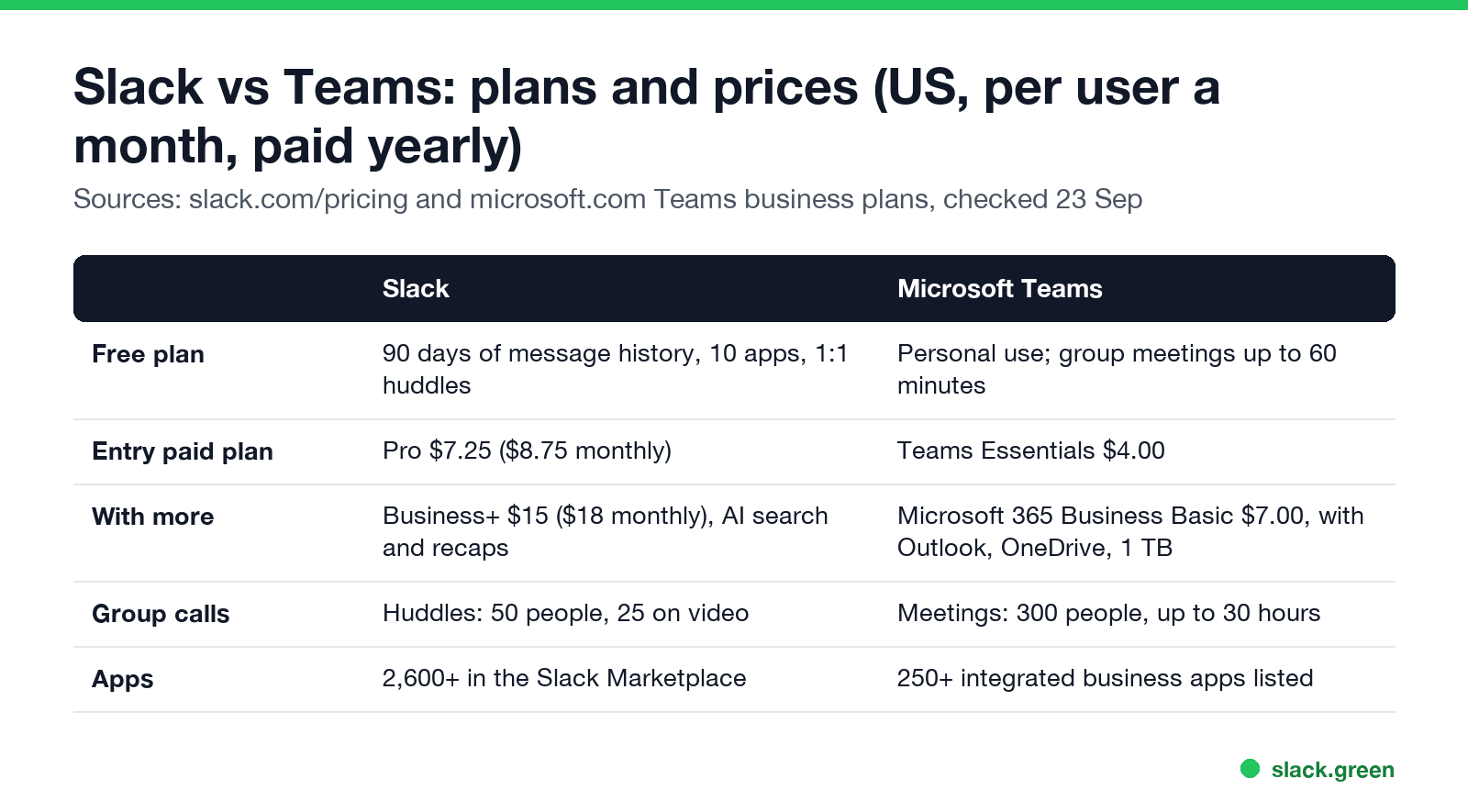
| Slack | Microsoft Teams | |
|---|---|---|
| Free | $0: 90 days of history, 10 apps, 1:1 huddles | Free Teams for personal use; group meetings up to 60 minutes |
| Entry paid plan | Pro: $7.25 paid yearly, $8.75 monthly | Teams Essentials: $4.00 paid yearly |
| Next tier | Business+: $15 paid yearly, $18 monthly | Microsoft 365 Business Basic: $7.00 paid yearly |
| Top tier | Enterprise+: contact sales | Microsoft 365 Business Standard and Enterprise plans |
Prices are US list prices from slack.com/pricing and Microsoft's Teams business plans page, checked on 23 September. Slack bills only active members: someone who does nothing in Slack for 28 days stops counting, and you get a prorated credit. Whether Pro pays off for your team is in is Slack Pro worth it.
The real cost question is what else you pay for. Microsoft 365 Business Basic ($7) includes Teams, Outlook, OneDrive with 1 TB a user and web versions of Word, Excel and PowerPoint. If your company buys that anyway, Teams costs nothing extra, and Slack Pro adds $7.25 a user on top. That is the most common reason companies standardize on Teams, and the most common complaint in Reddit threads from people who prefer Slack.
Free plans compared
Slack free: you can see and search only the last 90 days of messages and files. Data older than one year is deleted. You get 10 apps, 1:1 huddles only, and Slack Connect DMs with one outside person at a time. Workflows and canvases need a paid plan. The details are in Slack free plan limits.
Teams free: the free version of Teams is aimed at personal use and communities. Meetings with a link are free up to 60 minutes. A company that wants Teams with admin controls pays for Teams Essentials or a Microsoft 365 business plan.
For a small team that talks all day and rarely needs old messages, Slack free works. The 90-day limit is the thing that pushes most teams to pay.
Calls: Slack huddles vs Teams meetings
Nunca más aparezcas como "ausente" en Slack
Basado en la nube. Sin descargas. Funciona 24/7 incluso con tu laptop apagada.
Slack huddles are quick audio or video calls you start from any channel or DM with one click. On paid plans a huddle holds up to 50 people, 25 of them on video, and up to two people can share their screen at once. On the free plan, huddles are 1:1. Pro and above also get AI huddle notes.
Teams meetings are built for scheduled calls: up to 300 people, up to 30 hours, recordings with transcripts, breakout rooms and webinars on business plans. If your day is booked calls with calendar invites, Teams is the better meeting tool. If your day is "got a minute?", huddles are faster. More on that in Slack huddles vs Zoom, and on privacy in are Slack huddles recorded.
Chat, search and apps
Slack's strength is chat. Threads keep side discussions out of the main channel, search supports operators like from: and in: (see Slack search operators), and the Slack Marketplace lists more than 2,600 apps. On Pro and above, Slack Connect shares channels with up to 250 outside organizations, which is why agencies and startups that work with clients tend to pick Slack.
Teams organizes chat into teams and channels, with posts and replies. It opens Word, Excel and PowerPoint files inside the app and stores them in SharePoint and OneDrive. Microsoft lists over 250 integrated business apps on its plans page. For companies that live in Office documents, that tight fit is worth more than Slack's app count.
AI: Slack Pro includes conversation summaries and huddle notes. Business+ adds AI search answers, daily recaps, translations and file summaries; the separate Slack AI add-on is no longer sold. Microsoft sells Copilot for Microsoft 365 as a paid add-on or in "with Copilot" plan bundles. See is Slack AI worth it.
How Slack and Teams decide you are away
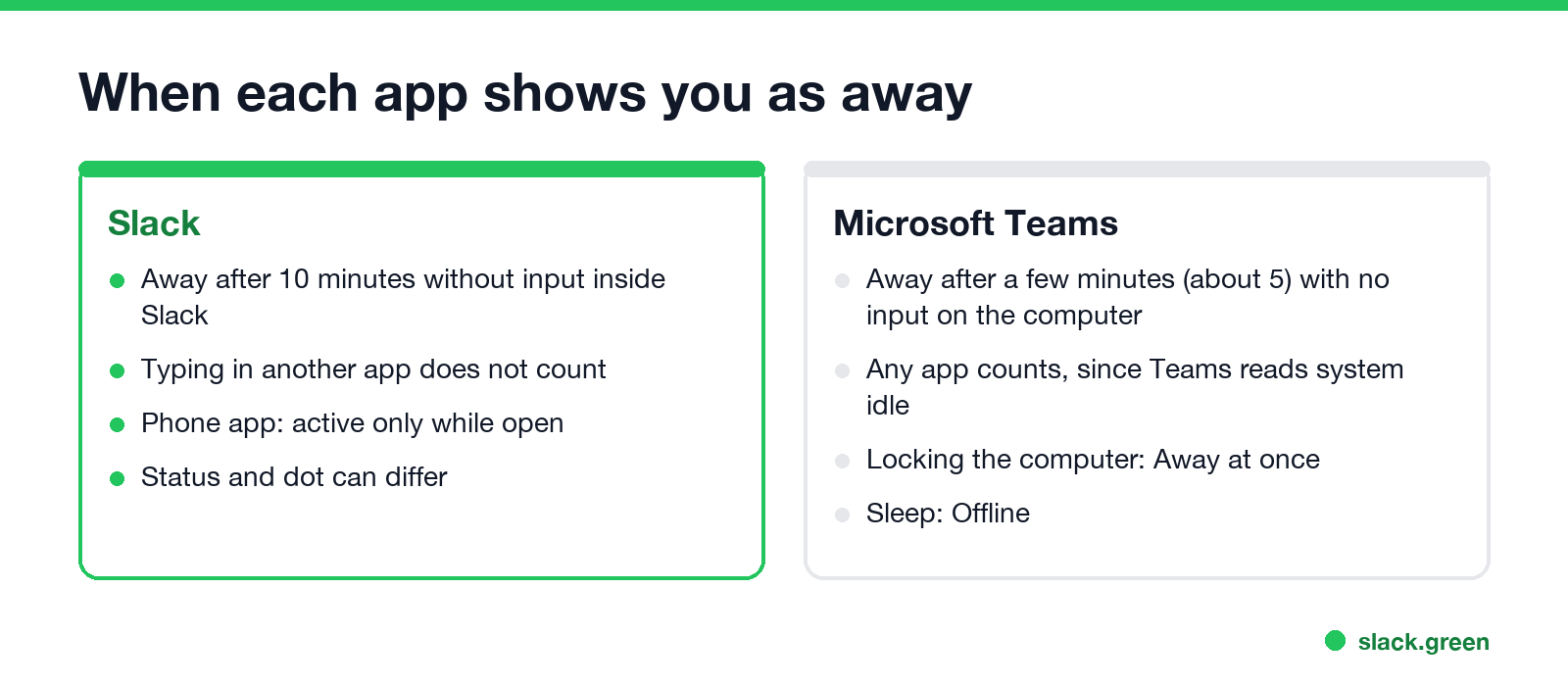
| Slack | Microsoft Teams | |
|---|---|---|
| Goes away after | 10 minutes without input in Slack | A few minutes (about 5) without input on the computer |
| What counts as activity | Only input inside the Slack window | Any keyboard or mouse input on the computer |
| Computer locked | Away after the 10 minutes | Away at once |
| Phone | Active only while the app is open | Away when the app is in the background |
This matters if you use both. Working in a spreadsheet keeps Teams green but lets Slack go grey, which is why people see "Available" in Teams and "Away" in Slack at the same moment. The full Slack rules are in how long does Slack stay active, and the Teams rules in how long before Teams shows Away. To keep both honest during your working hours, see keep Teams and Slack active.
Slack vs Teams pros and cons
Nunca más aparezcas como "ausente" en Slack
Basado en la nube. Sin descargas. Funciona 24/7 incluso con tu laptop apagada.
Slack pros: faster chat and threads, better search, 2,600+ apps, Slack Connect for client channels, quick huddles. Slack cons: costs more, free plan hides history after 90 days, group calls cap at 50 people.
Teams pros: included with Microsoft 365, cheaper on its own, large meetings and webinars, Office files built in. Teams cons: chat and notifications are harder to follow, fewer third-party apps, slower to move around for chat-heavy work.
Which one should you pick?
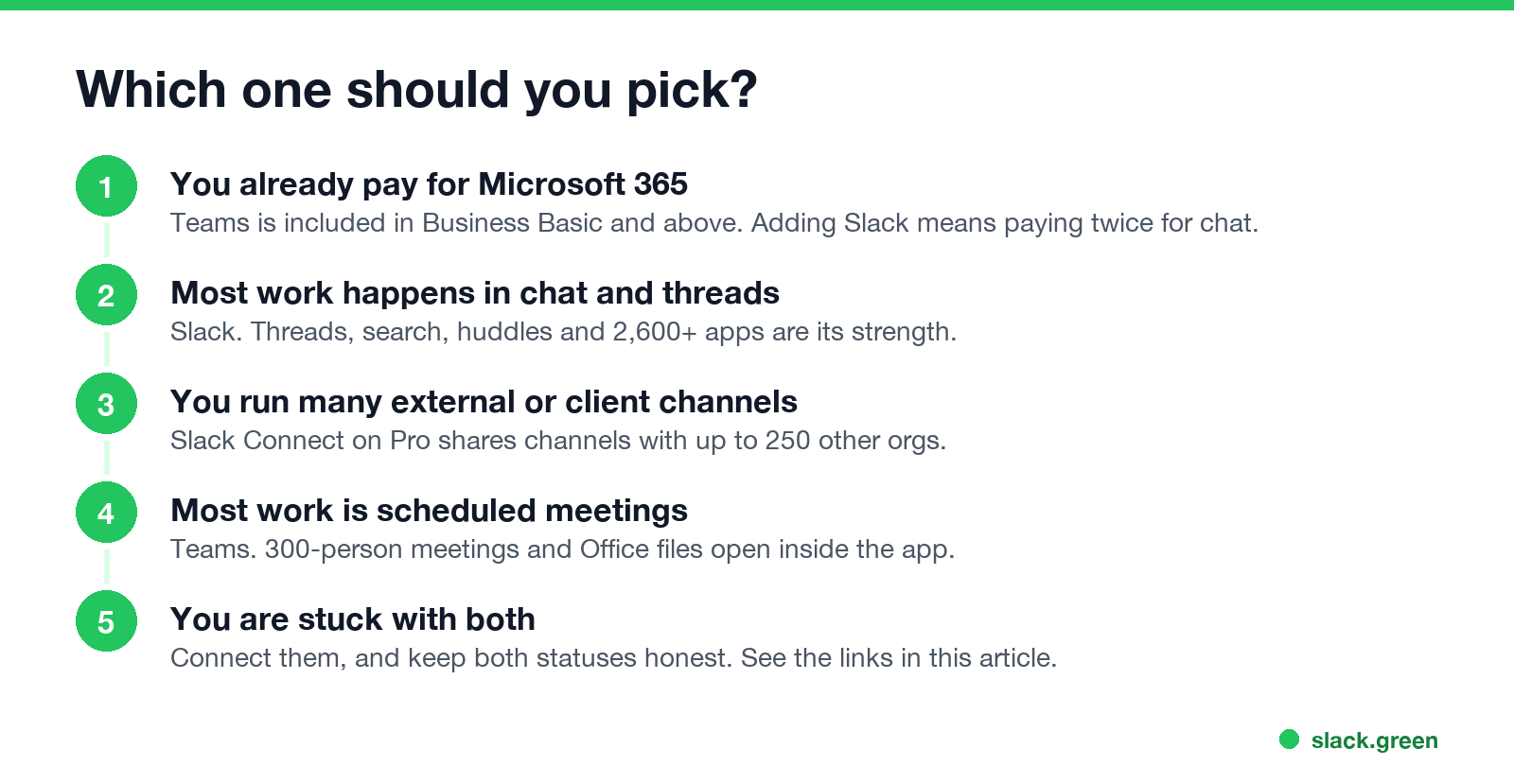
- • Your company already pays for Microsoft 365: start with Teams. It is already paid for.
- • Most work is chat, threads and tools like Jira, GitHub or Salesforce: Slack.
- • You run many client or partner channels: Slack, for Slack Connect.
- • Most work is scheduled meetings with large groups: Teams.
- • You are stuck with both: connect them. See how to connect Slack and Teams.
FAQ
Is Slack better than Teams?
For chat-heavy teams and companies that use many third-party apps, usually yes. For companies already on Microsoft 365 and heavy on scheduled meetings, Teams is the better fit and costs nothing extra.
Which is cheaper, Slack or Teams?
Teams. Teams Essentials is $4 a user a month and Teams comes with Microsoft 365 Business Basic at $7. Slack Pro is $7.25 a user a month, paid yearly.
Is a Slack huddle the same as a Teams call?
Close. Both are audio and video calls with screen sharing. Huddles start in one click from a channel and hold up to 50 people. Teams meetings are scheduled, hold up to 300 people and can be recorded.
Why do people prefer Slack over Teams?
Threads, search, speed and apps. Reddit threads on the topic mostly say the same: Slack is nicer for chat, Teams wins on price when Microsoft 365 is already paid for.
Does Teams or Slack track more activity?
Both show presence. Teams reads activity anywhere on the computer; Slack reads only input in its own window. See does Teams track activity and can Slack be used to monitor employees.
Deja de Mover el Ratón.
Cientos de trabajadores remotos ya no se preocupan por su estado de Slack. Configúralo una vez, mantente verde para siempre.
Related Articles
How to Look Busy on Teams: Busy Status, Calendar Blocks and Focus Time
To look busy on Microsoft Teams, set your status to Busy with a duration, or block time in your Outlook calendar so Teams shows In a meeting. Focus time shows Focusing, and a status message says what you are on. How long each lasts, what Teams does when you go idle, and what not to do.
Free Slack Alternatives That Keep Your Full Message History
Slack's free plan hides messages after 90 days. Pumble, Discord and Chanty keep unlimited history for free; Mattermost, Element and Rocket.Chat are free if you host them; Google Chat and Teams free cost nothing if you already use Google or Microsoft. What each free plan limits, from each vendor's pricing page.
Slack vs Discord: Which One for Work, Teams and Communities
Slack is built for companies: business apps, admin controls and shared channels with other firms, for $7.25 a user a month on Pro. Discord is free for everyone with unlimited history and group voice, but has no SSO, retention or compliance tools. Prices, limits, calls and status compared.