
Slack Green vs Idle Pilot: Price, Platforms and Setup
Idle Pilot and Slack Green both keep you available from the cloud with the laptop closed. Idle Pilot covers Slack or Teams for $9 a month. Slack Green covers Slack only for $3.99. The full comparison.
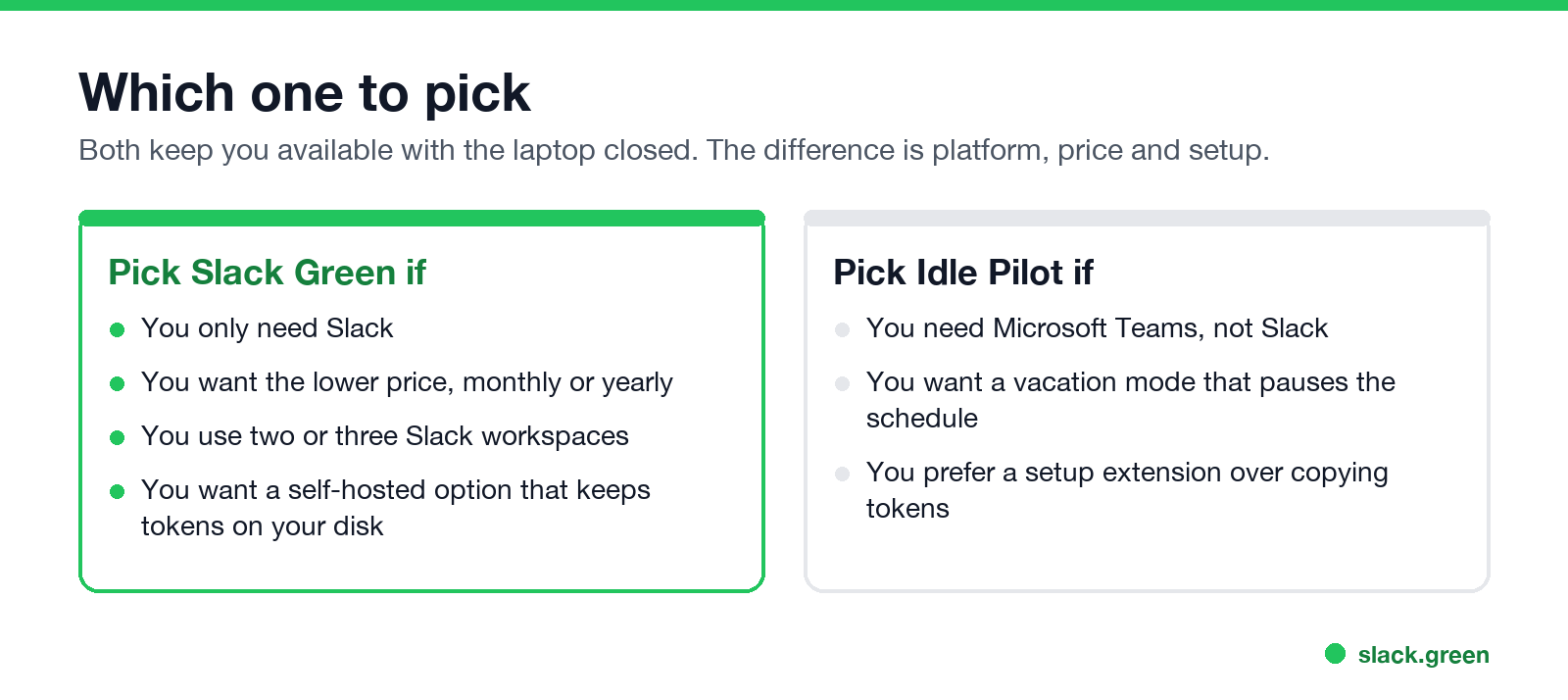
Idle Pilot is a cloud service that keeps you available on Slack or Microsoft Teams during the work hours you set, even with your laptop closed, asleep or off. It costs $9 a month, or $60 a year, after a 7-day free trial. Slack Green, which we build, works the same way for Slack: a server keeps your session active on your schedule. It costs $3.99 a month or $23.99 a year. The main difference is the platform. Pick Idle Pilot if you need Teams. For Slack, Slack Green does the same job for less than half the price and adds a self-hosted option.
Everything about Idle Pilot below comes from its own website, idlepilot.com, at the time of writing. Where its design has an advantage, we say so.
What Idle Pilot is
Idle Pilot describes itself as "Close your laptop. Stay available on Slack or Microsoft Teams." You connect one platform once from desktop Chrome with its setup extension, set your work hours, and close the laptop. Its site says the extension is needed only for setup and can be removed after you link your account. The one plan, Freedom Pass, includes:
- • availability on Slack or Microsoft Teams during your work hours, one connected platform at a time
- • per-day schedules and a lunch break
- • vacation mode, which pauses the schedule when your status says you are away
- • an instant off switch
How the two compare
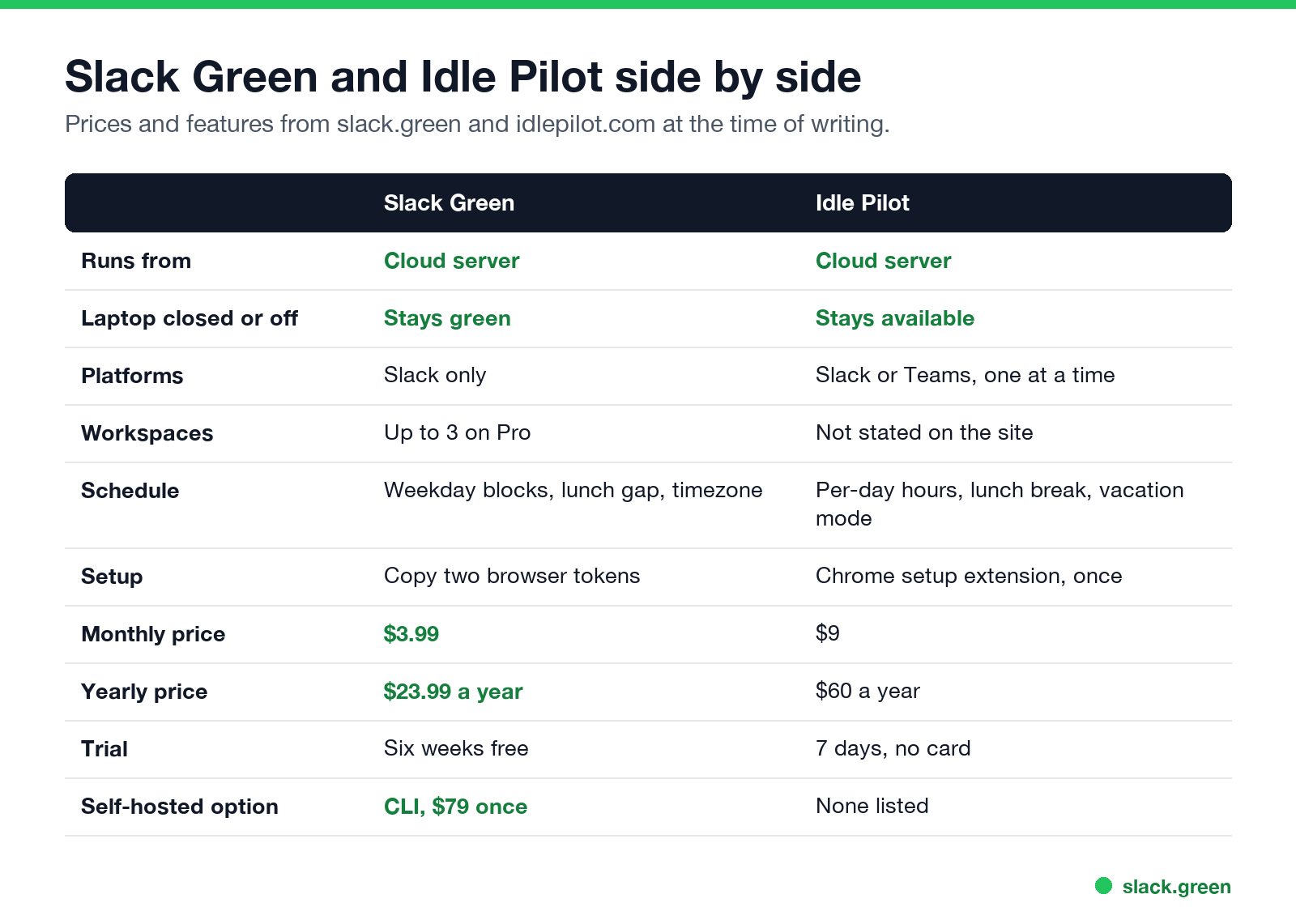
| Slack Green | Idle Pilot | |
|---|---|---|
| Runs from | Cloud server | Cloud server |
| Works with laptop closed or off | Yes | Yes |
| Platforms | Slack | Slack or Microsoft Teams, one at a time |
| Workspaces | Up to 3 on Pro | Not stated on the site |
| Schedule | Blocks per weekday, lunch gap, your timezone | Per-day hours, lunch break, vacation mode |
| Setup | Copy two browser tokens, about two minutes | Chrome setup extension, once |
| Monthly price | $3.99 | $9 |
| Yearly price | $23.99 ($1.99 a month) | $60 ($5 a month) |
| Free trial | Six weeks at the time of writing | 7 days, no credit card |
| Self-hosted option | CLI, $79 once | None listed |
Both tools solve the same problem the same way. Slack sets you away 10 minutes after your last input in its window, and at once when the laptop sleeps. A tool on the laptop cannot help once the lid is closed. A server can, because Slack combines your devices and shows you active if any session is active. The full rule is in how long does Slack stay active.
Where Idle Pilot is ahead
Where Slack Green is ahead
Is Idle Pilot safe?
Idle Pilot says it stores your account basics and your schedule settings: work hours, lunch break, timezone and vacation mode. To keep you available it also has to act as your Slack or Teams session from its servers, like every cloud tool in this category, Slack Green included. Treat that as the real trade-off. You give a third party a way to act as your account, so read the vendor's security page and check your employer's policy. What an admin can and cannot see when you use a tool like this is in will I get caught using Slack Green, and it applies to any cloud presence tool.
Neither tool installs anything that runs on your laptop during the day. That is the main safety difference from a jiggler, which shows up as an app or a USB device on a managed laptop. See can a mouse jiggler be detected.
Which one to pick
Other tools in this market are compared in Slack Green vs Presence Scheduler, Slack Green vs StayGreenOnSlack and top tools to keep your Slack status green. Every method, free ones included, is in how to keep Slack active.
FAQ
What is Idle Pilot?
A paid cloud service that keeps you available on Slack or Microsoft Teams during your work hours, even when your laptop is closed or off.
How much does Idle Pilot cost?
$9 a month, or $60 a year, after a 7-day free trial with no credit card, per its pricing page at the time of writing.
Does Idle Pilot work with Slack?
Yes. It works with Slack or Microsoft Teams, one connected platform at a time.
What is a cheaper Idle Pilot alternative for Slack?
Slack Green does the same thing for Slack from the cloud for $3.99 a month or $23.99 a year, and has a self-hosted CLI for a one-time $79.
Do I need to keep Chrome open with Idle Pilot?
Its site says no. The Chrome extension is used only to link your account, and you can remove it afterwards.
Does Slack Green work with Microsoft Teams?
No. Slack Green is for Slack. For Teams, see how to keep Teams status available.
Related Articles
How to Create a Slack Workspace, on Desktop or Phone
Go to slack.com/get-started, enter your email, type the confirmation code, and click Create a Workspace. It is free to start, you become the Primary Owner, and it takes about five minutes. Steps for desktop, iPhone and Android, and what to set up next.
Slack User Groups: How to Create, Mention and Manage Them
A Slack user group is a named list of people with one @handle, like @designers, that notifies all of them and can add them to up to 100 default channels. How to create one, who can, how to mention it, and how it differs from a channel.
How to Make a Private Slack Channel Public, and Who Can
Open the channel, click its name, go to Settings, and choose Change to a public channel. By default only Workspace Owners, Org Owners and Org Admins can do it. The whole history and every file become visible to the workspace.